Introducció
This manual provides comprehensive instructions for the HXSJ J900 USB Wired Gaming Mouse. Designed for desktop and laptop use, this ergonomic gaming mouse features adjustable DPI settings and vibrant RGB lighting, enhancing your gaming and computing experience.
Característiques principals:
- Super Lightweight Design: Weighing approximately 96g, the honeycomb hollow shell ensures comfortable extended use.
- Botons programables: Six customizable buttons allow for enhanced functionality and personalized control.
- Dynamic RGB Rainbow Backlit: Features 6 distinct light modes, adjustable via a dedicated button.
- High-Performance Gaming Chip: Provides fast and stable performance with a maximum DPI of 6400.
- Àmplia compatibilitat: Supports Windows 2000 / XP / win7 / win8 / win10, Vista 32bit, and later operating systems.
Producte acabatview
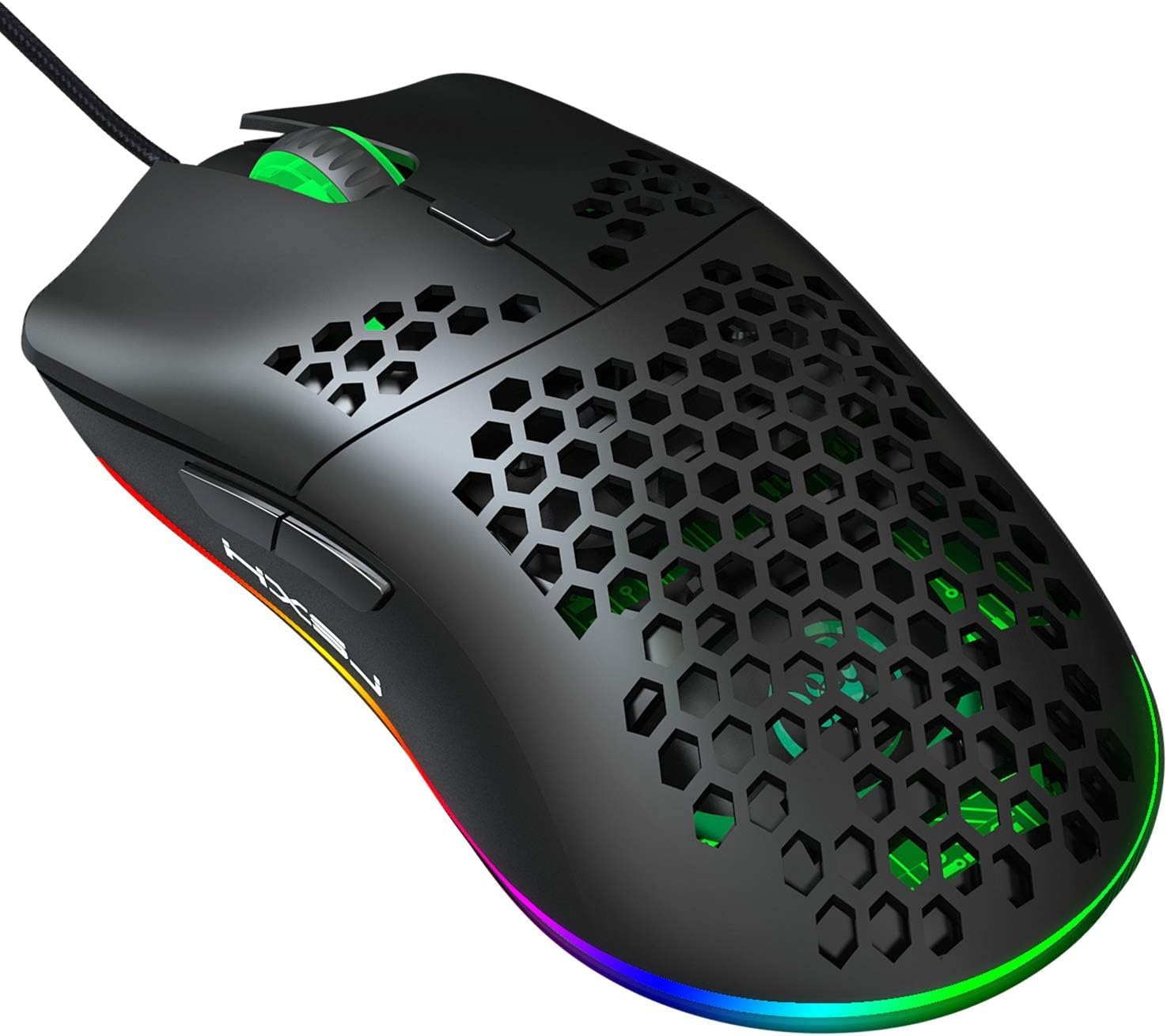
Figura 1: De dalt a baix view of the HXSJ J900 Gaming Mouse, highlighting its lightweight honeycomb shell and vibrant RGB lighting along the base.

Figura 2: lateral view of the HXSJ J900 Gaming Mouse, illustrating key features such as comfortable grip, 6400 DPI, RGB marquee lighting, 5G laser sensor, and 1000Hz polling rate.

Figura 3: Exploded diagram of the J900 mouse, detailing internal components including the left button, hollow hole hand board, Gundam 6400DPI sensor, midframe, transparent roller, ten-million-life microswitch, tail LOGO, PCP circuit board, RGB marquee, glow ring, hollow base, and UPE foot sticker.

Figura 4: Diagram showing the button layout of the HXSJ J900 Gaming Mouse, identifying the left button, right button, DPI key, forward key, back button, and light mode key.

Figura 5: Dimensions of the HXSJ J900 Gaming Mouse: Length 130mm, Width 67mm, Height 38mm.
Guia de configuració
- Desempaqueta el ratolí: Carefully remove the HXSJ J900 Gaming Mouse from its packaging.
- Connexió a l'ordinador: Locate an available USB port on your desktop or laptop. Insert the USB connector of the mouse firmly into the USB port.
- Instal·lació del controlador (automàtica): The operating system (Windows 2000 / XP / win7 / win8 / win10, Vista 32bit, or later) will automatically detect and install the necessary drivers. This process usually takes a few seconds.
- Verificació de la funcionalitat: Once the drivers are installed, move the mouse to confirm cursor movement on your screen. The RGB lighting should also illuminate.
No additional software installation is typically required for basic functionality. For advanced customization of programmable buttons, refer to the manufacturer's website for any dedicated software.
Instruccions de funcionament
Ajust de DPI:
The HXSJ J900 mouse features six adjustable DPI (Dots Per Inch) levels, allowing you to customize cursor sensitivity to your preference. To change the DPI, press the Clau DPI (refer to Figure 4 for location) located behind the scroll wheel. Each press cycles through the following DPI settings:
- 800 DPI
- 1600 DPI
- 2400 DPI
- 3200 DPI
- 4800 DPI
- 6400 DPI (Maximum)
The RGB lighting may change color to indicate the current DPI level, as shown in Figure 6.

Figura 6: Illustration of light modes and DPI value settings, showing how different DPI levels can be associated with distinct lighting colors.
Modes d'il·luminació RGB:
The mouse features 6 different RGB lighting modes. To cycle through these modes, press the Tecla de mode de llum (refer to Figure 4 for location), typically located on the underside of the mouse or near the DPI button.
- Mode arc de Sant Martí
- DPI Color Breath Mode
- Random Leisure Mode
- Random Sleep Mode
- Random Sport Mode
- Keep Light On Mode
- Close Light Mode
Botons programables:
The HXSJ J900 mouse is equipped with 6 programmable buttons (Left, Right, Scroll Wheel Click, Forward, Back, DPI). While basic functionality is plug-and-play, advanced customization of these buttons may require specific software from the manufacturer. Please visit the official HXSJ website for information on any available software for button remapping and macro creation.
Manteniment
- Neteja: Feu servir un drap suau i sec per netejar la superfície del ratolí. Per a la brutícia persistent, netegeu lleugerament.amp cloth can be used, but ensure no liquid enters the mouse. Avoid using harsh chemicals or abrasive cleaners.
- Cura del sensor: Mantingueu el sensor òptic de la part inferior del ratolí net i lliure de pols o restes per garantir un seguiment precís.
- Gestió de cables: Eviteu doblegar bruscament o estirar excessivament el cable USB per evitar danys. Guardeu el cable amb cura quan no l'utilitzeu.
- Emmagatzematge: Quan no l'utilitzeu durant períodes prolongats, guardeu el ratolí en un entorn net i sec, allunyat de temperatures extremes.
Resolució de problemes
- El ratolí no respon:
- Assegureu-vos que el cable USB estigui ben connectat a un port USB que funcioni de l'ordinador.
- Prova de connectar el ratolí a un port USB diferent.
- Reinicieu l'ordinador.
- Test the mouse on another computer to determine if the issue is with the mouse or your system.
- DPI setting is not changing:
- Ensure you are pressing the correct DPI key (refer to Figure 4).
- Press the DPI key firmly.
- RGB lighting is not working or stuck:
- Press the Light mode key to cycle through different lighting modes.
- Ensure the mouse is properly connected to your computer.
- Reinicieu l'ordinador.
- Mouse movement is erratic or inaccurate:
- Netegeu el sensor òptic de la part inferior del ratolí.
- Assegureu-vos que feu servir el ratolí sobre una superfície neta, no reflectant i uniforme.
- Ajusteu la configuració de DPI a un valor més baix si el cursor és massa sensible.
Especificacions
| Característica | Detall |
|---|---|
| Marca | HXSJ |
| Model | J900 |
| Color | Negre |
| Nivells de DPI | 800-1600-2400-3200-4800-6400 |
| Interfície | USB |
| Canvia la vida | 20 milions de cicles |
| Mida de l'article (L*W*H) | 13 x 6.7 x 3.8 cm |
| Pes de l'article | Aprox. 95.4 g |
| Dimensions del producte (paquet) | 15 x 10 x 5 cm |
| Pes del paquet | 146 g |
| Compatibilitat de sistemes operatius | Windows 2000 / XP / win7 / win8 / win10, Vista 32bit, IOS or latest |
| Plataforma de maquinari | PC |
| Dispositius compatibles | Ordinador portàtil, ordinador personal |
| Característiques especials | Ergonomic Design, RGB Backlit, Honeycomb Hollow Shell |
| Font d'alimentació | Elèctric amb cable |
| Tecnologia de detecció de moviment | Òptic |
| Material | Plàstic |
| Orientació de la mà | D'acord |
| País d'origen | USA (as per specifications, though manufacturer is China) |
Informació de la garantia
HXSJ products are manufactured to high quality standards. For detailed warranty terms and conditions, including coverage period and claim procedures, please refer to the warranty card included with your product packaging or visit the official HXSJ weblloc web. Si us plau, conserveu el comprovant de compra per a reclamacions de garantia.
Suport
For technical support, troubleshooting assistance, or any inquiries regarding your HXSJ J900 Gaming Mouse, please contact HXSJ customer support through their official website. You may find FAQs, driver downloads, and contact information on their support page.
Recursos en línia:
- Official HXSJ Weblloc: www.hx-sj.com (Nota: Això és un marcador de posició) URL sense suport oficial URL was provided in the data. Users should verify the correct URL.)
- Product Support Page: Check the official website for a dedicated support section for the J900 model.