
1. Introducció
This manual provides essential information for the safe and efficient use of your Westinghouse 27-inch Full HD Monitor (Model: Wes-Wh27fx9222-B). Please read this manual thoroughly before operating the monitor and retain it for future reference.
The Westinghouse Wes-Wh27fx9222-B monitor features a 27-inch Full HD (1920x1080) display with a 75Hz refresh rate and 3ms response time, designed for clear visuals and smooth performance. It includes Adaptive Sync technology to reduce screen tearing and stuttering, and EyeRest Technology for enhanced viewing comfort by minimizing eye strain.
2. Informació de seguretat
Observeu les següents precaucions de seguretat per evitar danys al monitor i garantir la seguretat personal:
- No exposeu el monitor a la pluja, la humitat ni a temperatures extremes.
- Assegureu-vos que el monitor estigui col·locat sobre una superfície estable i plana per evitar que caigui.
- Feu servir només l'adaptador de corrent que s'inclou amb el monitor.
- No bloquejar les obertures de ventilació.
- Eviteu col·locar objectes pesats al cable d'alimentació.
- Desconnecteu l'endoll de la presa de corrent si no heu d'utilitzar el monitor durant un període prolongat.
- No intenteu fer la reparació del monitor vosaltres mateixos. Encarregueu-vos de totes les tasques de manteniment a personal qualificat.
3. Contingut del paquet
Verifiqueu que tots els elements siguin presents al vostre paquet:
- Westinghouse 27-inch Full HD Monitor
- Suport de monitor (base i coll)
- Adaptador d'alimentació
- Cable HDMI
- Manual d'usuari
4. Configuració
4.1 Muntatge del suport del monitor
- Traieu amb cura el monitor del seu embalatge, mantenint la pantalla protegida.
- Fixeu el coll del suport al panell del monitor.
- Fixeu la base del suport al coll del suport.
- Col·loqueu el monitor muntat sobre una superfície plana i estable.
The monitor offers a flexible tilt screen, allowing adjustment from -5° to +15° for optimal viewcomoditat.

Image: The monitor can be tilted from -5 degrees to +15 degrees for ergonomic viewing. It also features a wide 178-degree viewangle de ing.
4.2 Connexió del monitor
The monitor supports HDMI and VGA connections. Ensure your computer's output matches one of these inputs.
- Connexió d'alimentació: Connect the power adapter to the monitor's DC input port, then plug the adapter into a power outlet (110 Volts).
- Connexió de vídeo (HDMI): Connecteu un extrem del cable HDMI al port HDMI de la targeta gràfica de l'ordinador i l'altre extrem al port d'entrada HDMI del monitor.
- Connexió de vídeo (VGA): Connecteu un extrem del cable VGA al port VGA de la targeta gràfica de l'ordinador i l'altre extrem al port d'entrada VGA del monitor.
- Connexió d'àudio (opcional): If desired, connect headphones or external speakers to the headphone output port on the monitor.

Imatge: Part posterior view of the monitor showing the available input ports: HDMI, VGA, Audio Out, and DC power input. The monitor also supports VESA wall mounting.
5. Funcionament del monitor
5.1 Encès/Apagat
Premeu el botó d'engegada que es troba al monitor per engegar-lo o apagar-lo. L'indicador lluminós d'engegada s'il·luminarà quan el monitor estigui actiu.
5.2 Menú de visualització en pantalla (OSD)
Use the control buttons on the monitor to navigate and adjust settings within the OSD menu. Common settings include:
- Brillantor/Contrast: Ajusta els nivells de luminància i contrast de la pantalla.
- Configuració de color: Modify color temperature, hue, and saturation. The monitor features a wider color gamut, covering 98% sRGB and 83% NTSC, displaying over 16.7 million colors for accurate image reproduction.
- Selecció d'entrada: Canvia manualment entre les fonts d'entrada HDMI i VGA.
- Mode d'imatge: Select from various preset display modes (e.g., Standard, Game, Movie).
- EyeRest Technology: Access settings for flicker-free operation, anti-glare, low blue light modes, and warm/cool viewing options to reduce eye strain.
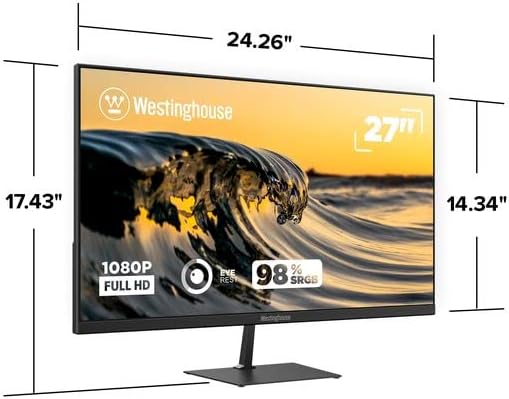
Image: Illustration of the monitor's wider color gamut, indicating 98% sRGB and 83% NTSC coverage for outstanding color accuracy and 16.7 million colors.

Image: Depiction of Innovative EyeRest Technology, which reduces digital eye strain and fatigue through flicker-free, anti-glare, low blue light settings, and warm & cool mode viewing.
5.3 Sincronització adaptativa
The monitor supports Adaptive Sync technology, which synchronizes the monitor's refresh rate with your graphics card's frame rate. This feature helps eliminate motion blur, screen tearing, and stuttering during fast-paced video playback or gaming. Ensure Adaptive Sync is enabled in your graphics card settings and on the monitor's OSD menu for optimal performance.

Image: Visual representation of Adaptive-Sync technology and 75Hz refresh rate, which work together to eliminate motion blur, tearing, or stuttering during video playback or competitive gameplay.
6. Manteniment
6.1 Neteja del monitor
- Desendolleu sempre el monitor de la presa de corrent abans de netejar-lo.
- Utilitzeu un drap suau i sense pelusa dampesbandida amb aigua o un netejador de pantalles suau i no abrasiu.
- No ruixeu el netejador directament sobre la pantalla.
- Eviteu utilitzar productes químics agressius, dissolvents o materials abrasius, ja que poden danyar la pantalla o el dispositiu.asing.
7. Solució De Problemes
| Problema | Causa possible | Solució |
|---|---|---|
| No hi ha imatge a la pantalla |
|
|
| La imatge és borrosa o distorsionada |
|
|
| Parpelleig o esquinçament de la pantalla |
|
|
| No audio from headphone jack |
|
|
8. Especificacions

Imatge: Frontal view of the Westinghouse 27-inch Full HD Monitor, showing its physical dimensions: approximately 24.26 inches wide, 17.43 inches high (with stand), and 2.48 inches deep.
| Número de model | Wes-Wh27fx9222-B |
| Mida de la pantalla | 27 polzades |
| Resolució | Full HD (1920 x 1080 píxels) |
| Relació d'aspecte | 16:9 |
| Freqüència d'actualització | 75 Hz |
| Temps de resposta | 3 mil·lisegons |
| Tipus de panell | LCD with LED Technology |
| Viewangle ing | 178 graus |
| Gamma de colors | 98% sRGB, 83% NTSC, 16.7 Million Colors |
| Connectivitat | HDMI, VGA |
| Sortida d'àudio | 1x Headphone Jack |
| Tipus de muntatge | Wall Mount (VESA Compatible) |
| Ajust d'inclinació | -5° a +15° |
| Entrada de potència | 110 Volts |
| Dimensions (A x A x P) | Aprox. 24.26" x 17.43" x 2.48" (amb suport) |
| Pes | 3.8 quilos |
| Color | Negre |
9. Garantia i Suport
9.1 Informació de la garantia
This Westinghouse monitor comes with a 3-month limited warranty from the date of purchase. This warranty covers manufacturing defects and malfunctions under normal use. It does not cover damage caused by misuse, accidents, unauthorized modifications, or external factors.
Conserveu el vostre comprovant de compra per a reclamacions de garantia.
9.2 Atenció al client
For technical assistance, troubleshooting, or warranty inquiries, please contact Westinghouse customer support. Refer to the contact information provided on the Westinghouse official weblloc web o la targeta de registre del producte.