
1. Introducció
The Tilta Lightweight Dual Handle Gimbal Support System (GSS-T04-DHB2) is designed to provide enhanced comfort and stability for operators using handheld gimbals, particularly during extended shooting sessions. This system helps distribute the weight of the gimbal and camera setup across the operator's body, reducing arm fatigue and allowing for more precise control. It is compatible with DJI Ronin RS2, RSC2, RS3, RS3 Pro, RS4, and RS4 Pro gimbals.

This image shows a user wearing the Tilta Lightweight Dual Handle Gimbal Support System, demonstrating how the vest and handles distribute the weight of a camera gimbal for comfortable operation.
2. Què hi ha a la caixa
Verifiqueu que tots els components siguin presents abans de continuar amb el muntatge.
- 1x Lightweight Gimbal Support Vest (GSS-T04)
- 1x Dual Handle Bracket for DJI Ronin (TGA-DHB2)

The packing list illustrates the main components included: the Lightweight Gimbal Support Vest (GSS-T04) and the Dual Handle Bracket for DJI Ronin (TGA-DHB2).
3. Muntatge i muntatge
Follow these steps to assemble and prepare your Tilta Lightweight Dual Handle Gimbal Support System.
3.1. Dual Handle Bracket Assembly
- Unpack the Dual Handle Bracket (TGA-DHB2).
- Ensure the safety latches are disengaged before attaching to your gimbal.
- Utilize the 1/4-inch screw holes and cold shoe mounts for attaching additional accessories as needed.

A close-up of the dual handle bracket highlights key features such as the cold shoe mount for accessories, a safety latch, toggle switches, and 1/4-inch screw holes for additional attachments.
3.2. Gimbal Support Vest Preparation
- Unpack the Lightweight Gimbal Support Vest (GSS-T04).
- Adjust the quick-release buckle and straps to fit your waistline (range 85-130cm). Ensure a snug but comfortable fit to properly distribute weight.
- Familiarize yourself with the NATO rail for vertical adjustment and the NATO to 1/4-20 mounting bracket for gimbal attachment.
- The expansion strap and D-rings can be used for attaching small tools or additional accessories.

This image details the various parts of the gimbal support vest, including the safety button, expansion strap, NATO rail for vertical adjustment, quick release buckle, D-ring, and the NATO to 1/4-20 mounting bracket for the gimbal.
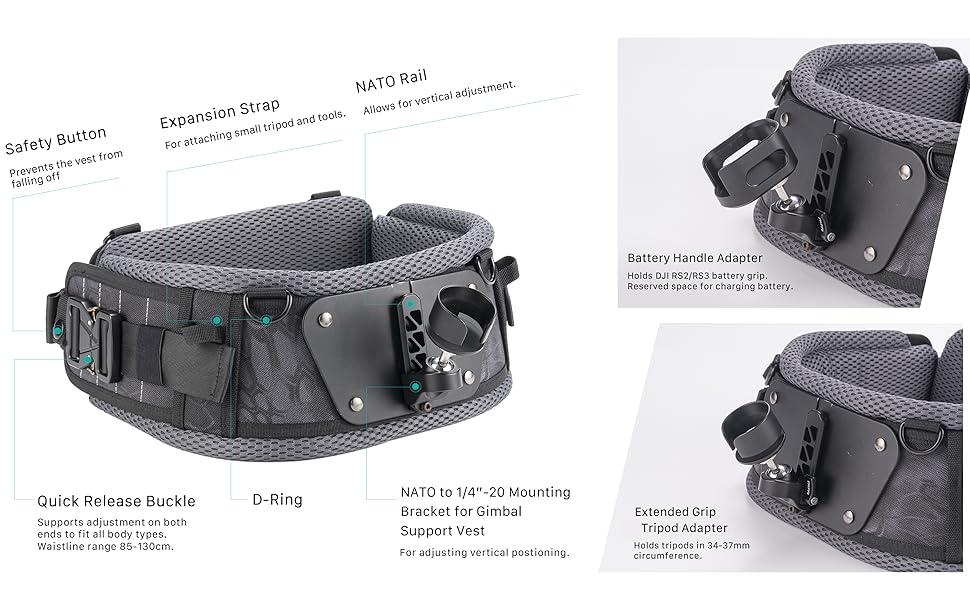
Un detallat view of the waist belt, showing the quick-release buckle and D-rings, which allow for waistline adjustments from 85-130cm to fit various body types.
4. Instruccions de funcionament
Proper operation of the support system ensures maximum comfort and stability.
4.1. Wearing the Support System
- Put on the Lightweight Gimbal Support Vest, ensuring the shoulder straps are comfortable and the waist belt is securely fastened around your waist.
- Adjust the straps to achieve an ergonomic fit that distributes the gimbal's weight evenly across your shoulders and hips.
4.2. Attaching the Gimbal
- Attach your compatible DJI Ronin gimbal (RS2, RSC2, RS3, RS3 Pro, RS4, RS4 Pro) to the NATO to 1/4-20 mounting bracket on the vest.
- Secure the Dual Handle Bracket to your gimbal, ensuring all connections are tight and secure.
- Adjust the vertical positioning of the gimbal using the NATO rail on the vest for optimal balance and operating height.
4.3. Enhancing Control and Comfort
- Confort millorat: The system is designed to allow for longer shooting periods by reducing strain on your arms.
- Improved Gimbal Operation: Expanded points of contact provide better control and stability.
- Rotació flexible: The handles offer flexible rotation, allowing you to fine-tune your operating position for various shots.
- Support Straps: Utilize the support straps for additional security and to go hands-free when necessary.

A user demonstrates the system's expandability, with the vest and handles providing stable support while showcasing the multiple 1/4-20 screw holes and cold shoe mounts available for attaching monitors, phone brackets, and other accessories.

Aquesta imatge ofereix una visió general view of the Tilta Lightweight Dual Handle Gimbal Support System in use, highlighting its ergonomic design and how it supports a camera and gimbal setup for extended shooting periods.

Aquest costat professionalfile shows the ergonomic design and slim fit of the Tilta Lightweight Dual Handle Gimbal Support System, ensuring comfort and freedom of movement during operation.
5. Manteniment
Regular maintenance helps prolong the life and performance of your support system.
- Neteja: Wipe down the vest and handles with a damp cloth after use. Avoid harsh chemicals.
- Emmagatzematge: Store the system in a dry, cool place away from direct sunlight.
- Inspecció: Periodically check all buckles, straps, and mounting points for wear and tear. Ensure all screws and latches are secure.
6. Solució De Problemes
If you encounter issues with your Tilta Lightweight Dual Handle Gimbal Support System, consider the following:
- Discomfort or Uneven Weight Distribution: Re-adjust all straps and the waist belt. Ensure the gimbal is balanced correctly on the mounting bracket and that the vertical position is optimized.
- Inestabilitat: Verify that all connections, including the gimbal to the mounting bracket and the handles to the gimbal, are securely tightened. Check for any loose components.
- Problemes d'ajust dels accessoris: Ensure that any attached accessories are compatible with 1/4-inch screw holes or cold shoe mounts and are not obstructing movement or balance.
- Danys als components: If any part appears damaged or broken, discontinue use and contact Tilta customer support for assistance.
7. Especificacions
| Característica | Detall |
|---|---|
| Número de model | GSS-T04-DHB2 |
| Marca | Tilta |
| Color | Negre |
| Dispositius compatibles | DJI Ronin RS2, RSC2, RS3, RS3 Pro, RS4, RS4 Pro |
| Pes de l'article | 1.7 kg (System Total) |
| Mida plegada | 16.5 x 9.5 x 6.5 polzades |
| Materials | Aluminum-alloy, Stainless Steel, Nylon, Plastic, 1000D Cordura+Mesh |
| Waistline Range | 85-130 cm |
| Recomanació de pes màxim | 10 kg |
| Mitjans integrats | Lightweight Gimbal Support Vest (GSS-T04), Dual Handle Bracket for DJI Ronin (TGA-DHB2) |
| UPC | 810076270388 |
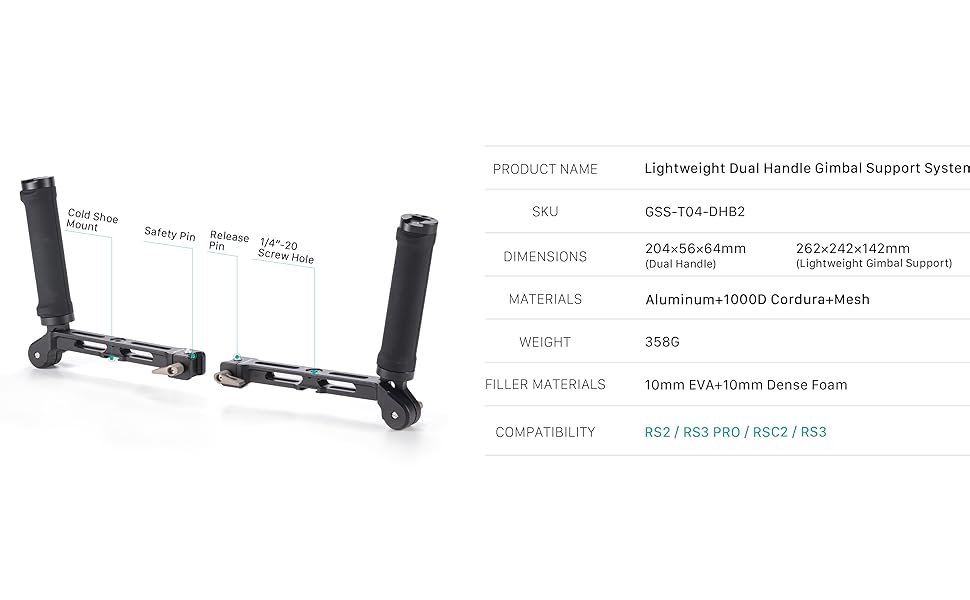
This diagram provides key specifications including product name, SKU (GSS-T04-DHB2), dimensions for both dual handle and lightweight gimbal support, materials (Aluminum-alloy, 1000D Cordura+Mesh), weight (358g for dual handle), filler materials (10mm EVA+10mm Dense Foam), and compatibility (RS2 / RS3 PRO / RSC2 / RS3).
8. Producte acabatview Vídeo
Oficial acabatview video demonstrating the features, assembly, and usage of the Tilta Lightweight Dual Handle Gimbal Support System.
9. Garantia i Suport
For warranty information, technical support, or service inquiries, please contact Tilta directly through their official channels. Keep your purchase receipt as proof of purchase.
You can visit the official Tilta store for more information and contact details: Tilta Official Store