
Introducció
This manual provides detailed instructions for the proper use, setup, and maintenance of your Gearlab G4555 Bluetooth Office Headset. Please read this manual thoroughly before using the device to ensure optimal performance and longevity. The G4555 headset is designed for clear communication and comfort in office environments, utilizing Bluetooth wireless technology for seamless connectivity.
Què hi ha a la caixa
Desembaleu amb cura tots els articles i assegureu-vos que hi hagi els components següents:
- Gearlab G4555 Bluetooth Office Headset
- Cable de càrrega USB
- Manual d'usuari (aquest document)
Producte acabatview
Familiarize yourself with the various parts of your Gearlab G4555 headset:
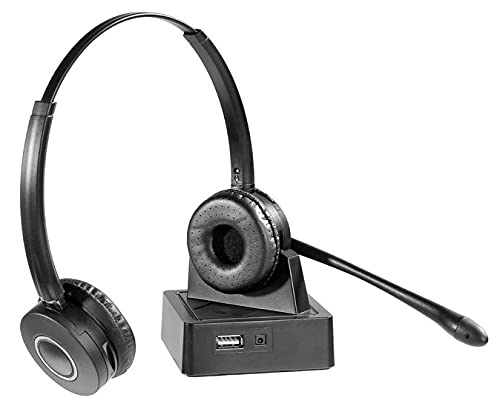
Image: The Gearlab G4555 Bluetooth Office Headset, featuring its adjustable headband, cushioned earcups, and flexible microphone boom. This image illustrates the general design and key components of the headset.
- Diadema ajustable: Per a un ajustament còmode i segur.
- Cushioned Earcups: Dissenyat per a una comoditat d'ús prolongada.
- Boom del micròfon: Flexible arm for optimal voice pickup.
- Botó d'encesa: To turn the headset on/off and initiate pairing.
- Controls de volum: Buttons to adjust audio output level.
- Botó multifunció (MFB): For call management and media playback.
- Port de càrrega: Port USB per connectar el cable de càrrega.
- Indicador LED: Displays status such as power, pairing, and charging.
Configuració
1. Càrrega dels auriculars
- Connecteu l'extrem petit del cable de càrrega USB al port de càrrega dels auriculars.
- Connecteu l'extrem més gran del cable de càrrega USB a una font d'alimentació USB (per exemple, un port USB de l'ordinador, un adaptador de paret USB).
- The LED indicator will typically show a solid red light during charging and turn off or change to blue/green when fully charged.
- Espereu aproximadament 2-3 hores per a una càrrega completa abans del primer ús.
2. Vinculació amb un dispositiu Bluetooth
- Assegureu-vos que els auriculars estiguin completament carregats i apagats.
- Press and hold the Power Button for approximately 5-7 seconds until the LED indicator flashes red and blue alternately. This indicates the headset is in pairing mode.
- On your Bluetooth-enabled device (smartphone, computer, tablet), go to the Bluetooth settings.
- Cerca available devices. You should see "G4555" or "Gearlab G4555" in the list.
- Select "G4555" to connect. If prompted for a password, enter "0000" (four zeros).
- Once successfully paired, the LED indicator will typically flash blue slowly or turn solid blue, and you may hear an audible confirmation.
- The headset will automatically attempt to reconnect to the last paired device when powered on.
Instruccions de funcionament
Encès/Apagat
- Encès: Press and hold the Power Button for 3 seconds. The LED will flash blue.
- Apagar: Press and hold the Power Button for 3 seconds. The LED will flash red and then turn off.
Gestió de trucades
- Respon a la trucada: Premeu el botó multifunció (MFB) una vegada.
- Finalitzar la trucada: Premeu el botó multifunció una vegada durant una trucada.
- Rebutja la trucada: Manteniu premut el MFB durant 2 segons.
- Torna a marcar l'últim número: Premeu dues vegades el botó multifunció quan no estigueu en una trucada.
Reproducció d'àudio
- Reproduir/pausa: Premeu el MFB una vegada.
- Pista següent: Premeu i manteniu premut el botó de pujar el volum.
- Pista anterior: Manteniu premut el botó de baixar el volum.
Ajust de volum
- Pujar el volum: Premeu el botó Pujar volum.
- Baixar el volum: Premeu el botó per baixar el volum.
Manteniment
Neteja
- Netegeu els auriculars amb un drap suau, sec i sense borrissol.
- No utilitzeu netejadors abrasius, dissolvents ni aerosols.
- Eviteu que entri humitat a cap obertura.
Emmagatzematge
- Guardeu els auriculars en un lloc fresc i sec, allunyat de la llum solar directa i de temperatures extremes.
- When storing for extended periods, charge the headset at least once every three months to maintain battery health.
Resolució de problemes
- Els auriculars no s'encenen: Assegureu-vos que els auriculars estiguin completament carregats. Connecteu-los a una font d'alimentació i torneu-ho a provar al cap d'uns minuts.
- No es pot emparellar amb el dispositiu:
- Assegureu-vos que els auriculars estiguin en mode d'emparellament (el LED parpelleja en vermell i blau).
- Assegureu-vos que el Bluetooth estigui habilitat al vostre dispositiu.
- Move the headset closer to your device (within 10 meters).
- Turn off and on both the headset and your device's Bluetooth.
- Clear previous Bluetooth connections on your device if too many are stored.
- No hi ha so o hi ha mala qualitat de so:
- Comproveu els nivells de volum tant dels auriculars com del dispositiu connectat.
- Ensure the headset is properly connected to your device. Re-pair if necessary.
- Allunyeu-vos de fonts de fortes interferències electromagnètiques.
- El micròfon no funciona:
- Assegureu-vos que el braç del micròfon estigui col·locat correctament a prop de la boca.
- Check microphone settings on your connected device to ensure the G4555 is selected as the input device.
Especificacions
| Nom del model | G4555 |
| Número de model | GLB245550 |
| Marca | Gearlab |
| Tecnologia de connectivitat | Sense fil (Bluetooth) |
| Material | Pell sintètica |
| Pes | 2.15 quilos |
| Dimensions | 2.79 x 24.64 x 16.51 cm |
| Característiques addicionals | Lleuger |
Garantia i Suport
Gearlab products are designed for reliability and performance. For specific warranty information, please refer to the warranty card included with your purchase or visit the official Gearlab website. For technical support, troubleshooting assistance, or service inquiries, please contact Gearlab customer support through their official channels. Keep your purchase receipt as proof of purchase for warranty claims.