
1. Introducció
This manual provides essential information for the proper use and maintenance of your DOMO Slate SLP9 10.1-inch Tablet PC. Please read this guide thoroughly before operating the device to ensure optimal performance and longevity. The DOMO Slate SLP9 is an Octa Core tablet featuring a 10.1-inch IPS LCD display, Dual SIM 4G LTE connectivity, and a 5020 mAh battery.

Davant view of the DOMO Slate SLP9 tablet displaying a colorful screen.
2. Producte acabatview
Familiarize yourself with the physical components of your DOMO Slate SLP9 tablet.
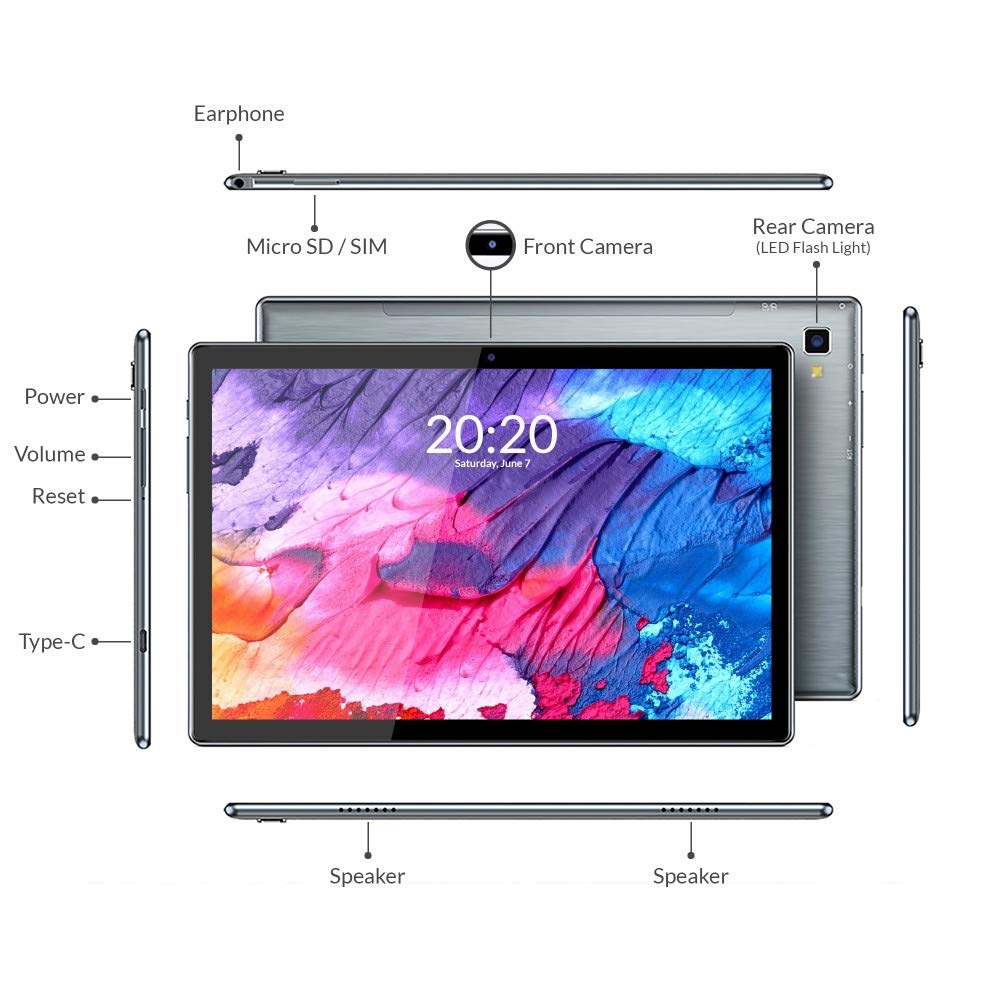
Diagram of DOMO Slate SLP9 tablet showing earphone jack, Micro SD/SIM slot, front camera, rear camera with LED flash, power button, volume buttons, reset button, Type-C port, and dual speakers.
- Presa per a auriculars: Connecteu auriculars de 3.5 mm.
- Micro SD / SIM Slot: Insert Micro SD card for expandable storage (up to 512GB) and Dual 4G LTE SIM cards for cellular connectivity and calling.
- Càmera frontal: Càmera de 5MP per a videotrucades i selfies.
- Rear Camera (with LED Flash): 13MP camera for photos and videos.
- Botó d'encesa: Press and hold to power on/off or restart. Press briefly to turn the screen on/off.
- Botons de volum: Adjust media volume and notification sounds.
- Botó de restabliment: Use a pin to press for a hard reset if the device becomes unresponsive.
- Port de tipus C: Connect for charging and data transfer.
- Ponents: Dual box speakers for audio output.
3. Configuració
3.1 Càrrega de la tauleta
Before first use, fully charge your tablet. Connect the provided Type-C cable to the tablet's Type-C port and the other end to the included power adapter. Plug the adapter into a wall outlet. The battery indicator on the screen will show charging status.

The DOMO Slate SLP9 is equipped with a 5020 mAh rechargeable battery.
3.2 Inserting SIM and Micro SD Cards
- Localitza la safata de la targeta SIM/Micro SD al lateral de la tauleta.
- Use the provided SIM card tray eject pin to open the tray.
- Carefully place your 4G LTE SIM cards and/or Micro SD card into the designated slots on the tray. Ensure correct orientation.
- Empenyeu suaument la safata cap a dins de la tauleta fins que encaixi al seu lloc.
3.3 Engegada/apagada
- Per encendre: Press and hold the Power button until the DOMO logo appears on the screen.
- Per apagar: Press and hold the Power button until the power options menu appears. Select "Power Off".
- Per reiniciar: Mantingueu premut el botó d'engegada fins que aparegui el menú d'opcions d'energia. Seleccioneu "Reiniciar".
4. Instruccions de funcionament
4.1 Pantalla i navegació
The tablet features a 10.1-inch IPS HD LCD display with a resolution of 1920x1200 pixels. Navigate the interface using touch gestures: tap to select, swipe to scroll, pinch to zoom.

The DOMO Slate SLP9 features a 10.1-inch IPS HD LCD display.
4.2 Fer trucades
With Dual SIM 4G LTE and VoLTE support, you can make and receive calls directly from your tablet. Use the pre-installed Phone application. Ensure a SIM card is properly inserted and activated.
4.3 Ús de la càmera
The tablet is equipped with a 5MP front camera and a 13MP rear camera with LED flash. Open the Camera application to capture photos and videos. Tap the screen to focus and press the shutter button to take a picture.
4.4 Connectivitat
- Wi-Fi: Go to Settings > Network & internet > Wi-Fi to connect to available wireless networks.
- Bluetooth: Go to Settings > Connected devices > Bluetooth to pair with Bluetooth-enabled devices like headphones or speakers.
- GPS: The tablet includes built-in GPS for location services and navigation.
4.5 Àudio
The DOMO Slate SLP9 features dual box speakers for clear audio output. Adjust volume using the physical volume buttons or through the system settings.

The DOMO Slate SLP9 is equipped with dual box speakers.
5. Manteniment
5.1 Cura de la bateria
- Eviteu exposar la tauleta a temperatures extremes.
- No permeteu que la bateria es descarregui completament amb freqüència.
- Feu servir només el carregador i el cable originals que s'inclouen amb el dispositiu.
5.2 Neteja
Wipe the screen and body of the tablet with a soft, lint-free cloth. Avoid using harsh chemicals or abrasive materials, which can damage the screen or finish.
6. Solució De Problemes
- Tablet does not power on: Ensure the battery is charged. Connect the charger and try again. If unresponsive, press the reset button with a pin.
- La pantalla no respon: Try restarting the tablet. If the issue persists, perform a hard reset using the reset button.
- No es pot connectar a Wi-Fi: Check if Wi-Fi is enabled in settings. Restart your router and the tablet. Ensure you have the correct password.
- No s'ha detectat la targeta SIM: Ensure the SIM card is correctly inserted and activated by your service provider. Restart the tablet.
- Rendiment lent: Tanca les aplicacions en segon pla innecessàries. Esborra la memòria cau i les aplicacions temporals files. Consider performing a factory reset if performance issues continue (back up data first).
7. Especificacions
Key technical specifications for the DOMO Slate SLP9 Tablet PC.

The DOMO Slate SLP9 is powered by an Octa-core ARM Cortex processor.
| Característica | Detall |
|---|---|
| Nom del model | Slate SLP9 |
| Mostra | 10.1 Inches IPS LCD, 1920 x 1200 Pixels |
| Processador | MTK 6762 (Helio P22) 64-bit Octa-core @ 2GHz ARM Cortex-A53 |
| RAM | 4 GB |
| Emmagatzematge intern | 64 GB |
| Emmagatzematge ampliable | Up to 512 GB (Micro SD) |
| Tecnologia cel·lular | Dual SIM 4G LTE, VoLTE Calling |
| Càmera posterior | 13 MP amb flaix LED |
| Càmera frontal | 5 MP |
| Capacitat de la bateria | 5020 mAh |
| Sistema operatiu | Android 11 |
| Connectivitat | Wi-Fi (802.11n), Bluetooth, GPS |
| Dimensions (L x A x A) | 24.4L x 1W x 16.2Th Centimeters |
| Pes | 505 grams |
8. Contingut de la caixa
The DOMO Slate SLP9 package includes the following items:
- DOMO Slate SLP9 Tablet
- Adaptador d'alimentació
- Cable tipus C
- Cable OTG
- SIM Card Tray Eject Pin
- Manual d'usuari (aquest document)
9. Garantia i Suport
9.1 Informació de la garantia
The DOMO Slate SLP9 device comes with a 6-month warranty. Accessories have a 3-month warranty. The warranty type is Onsite, including free pickups and deliveries for covered issues. The warranty does not cover physical damages, water damages, moisture damages, seal tampering, or burnout cases.
9.2 Atenció al client
For support inquiries, please contact DOMO Support:
- Telèfon: +91 8080 98 3666
- Horaris: 11:00 AM to 06:00 PM, Monday to Friday (except bank holidays)
- Assistència en línia: Online Knowledge Base, Support Tickets
Post-warranty services are available Onsite as paid services.