
1. Introducció
This manual provides detailed instructions for the installation, operation, and maintenance of your SOGTICPS BL912-40A-WIFI MPPT Solar Charge Controller. This advanced charge controller is designed for off-grid solar applications, compatible with 12V/24V battery systems, including Gel, Flooded, and Lithium types. It features efficient MPPT tracking, an LCD display, dual USB outputs, and WiFi connectivity for remote monitoring.
Característiques principals:
- Innovative MPPT (Maximum Power Point Tracking) technology for up to 99% tracking efficiency.
- Automatic 12V/24V system voltage detecció.
- Integrated LCD display for real-time monitoring of temperature, charge current, discharge current, and power generation.
- Comprehensive system protection: over-temperature, over-current, short-circuit, open-circuit, and reverse polarity.
- Compatibility with Gel, Flooded, and Lithium battery types.
- Dual 5V 2A USB outputs for charging mobile devices.
- WiFi communication for remote parameter adjustment and monitoring via a dedicated application.
- Industrial-grade main control chip with 16AD sampprecisió de ling.
- Two-way MOS tube anti-reverse circuit for high-power charging and low heat generation.
2. Instruccions de seguretat
Si us plau, llegiu atentament totes les instruccions abans de la instal·lació i el funcionament. Si no seguiu aquestes instruccions, podeu patir danys a la unitat, lesions personals o danys materials.
- Ensure all connections are tight and correct to avoid excessive voltage drop and potential hazards.
- Install the controller indoors, away from direct sunlight, high temperatures, and moisture.
- The controller generates heat during operation; ensure adequate ventilation.
- Connect the battery first, then the solar panel, and finally the load. Disconnect in the reverse order: load, solar panel, then battery.
- Do not connect any inverter directly to the load terminals of the controller.
- Ensure the solar panel's open-circuit voltage (Voc) does not exceed the controller's maximum input voltage.
- Use appropriate circuit breakers or fuses for the battery and solar panel circuits.
- Keep children away from the solar power system.
- No intenteu desmuntar ni reparar el controlador vosaltres mateixos. Poseu-vos en contacte amb personal qualificat per al servei tècnic.
3. Producte acabatview
The SOGTICPS BL912-40A-WIFI solar charge controller features a robust design with an intuitive LCD display and multiple connection points.

Imatge: Davant view of the SOGTICPS BL912-40A-WIFI Solar Charge Controller, highlighting its security protection features such as short-circuit, overload, overcharge, under-voltage, i sobre-voltagprotecció.
Components:
- Pantalla LCD: Shows real-time system status and parameters.
- Botons de control: For navigating menus and setting parameters.
- Solar Panel Input Terminals: Connect to solar panels.
- Terminals de bateria: Connect to the battery bank.
- Terminals de sortida de càrrega: Connect to DC loads.
- Dual USB Ports (5V 2A): Per carregar dispositius externs.
- Antena WiFi: Per a la comunicació sense fil.
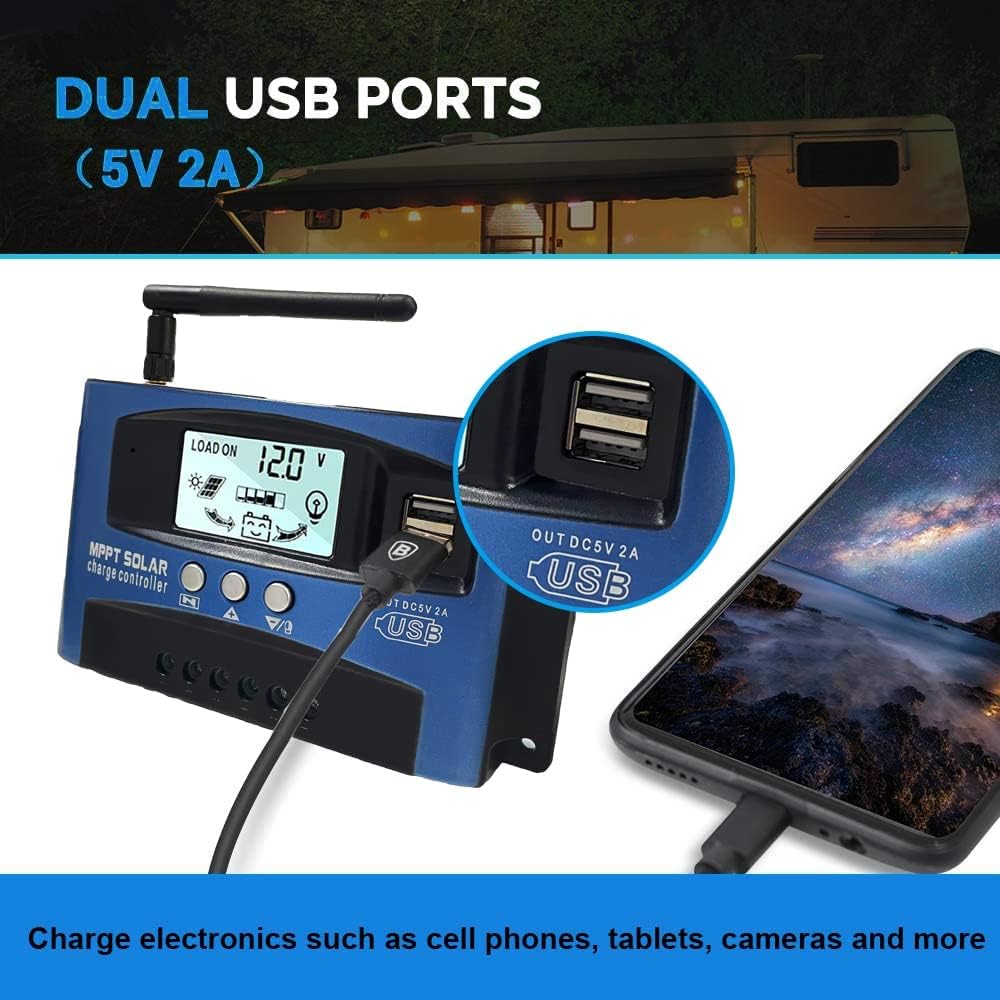
Imatge: Primer pla view of the SOGTICPS BL912-40A-WIFI Solar Charge Controller, showing the dual 5V 2A USB ports in use, charging a smartphone.
4. Configuració i instal·lació
Proper installation is critical for the safe and efficient operation of your solar charge controller. Follow the connection order precisely.
Ordre de connexió:
- Connect the Battery First: Connect the battery to the charge controller's battery terminals. Ensure correct polarity (+ to + and - to -). The controller will automatically detect 12V or 24V system voltage.
- Connecteu els panells solars: Connect the solar panels to the charge controller's solar input terminals. Again, observe correct polarity.
- Connect DC Load (Optional): Connect your DC loads to the load output terminals.
Important: When disconnecting, reverse the order: first disconnect the load, then the solar panels, and finally the battery. Failure to follow this order may damage the controller or other components.
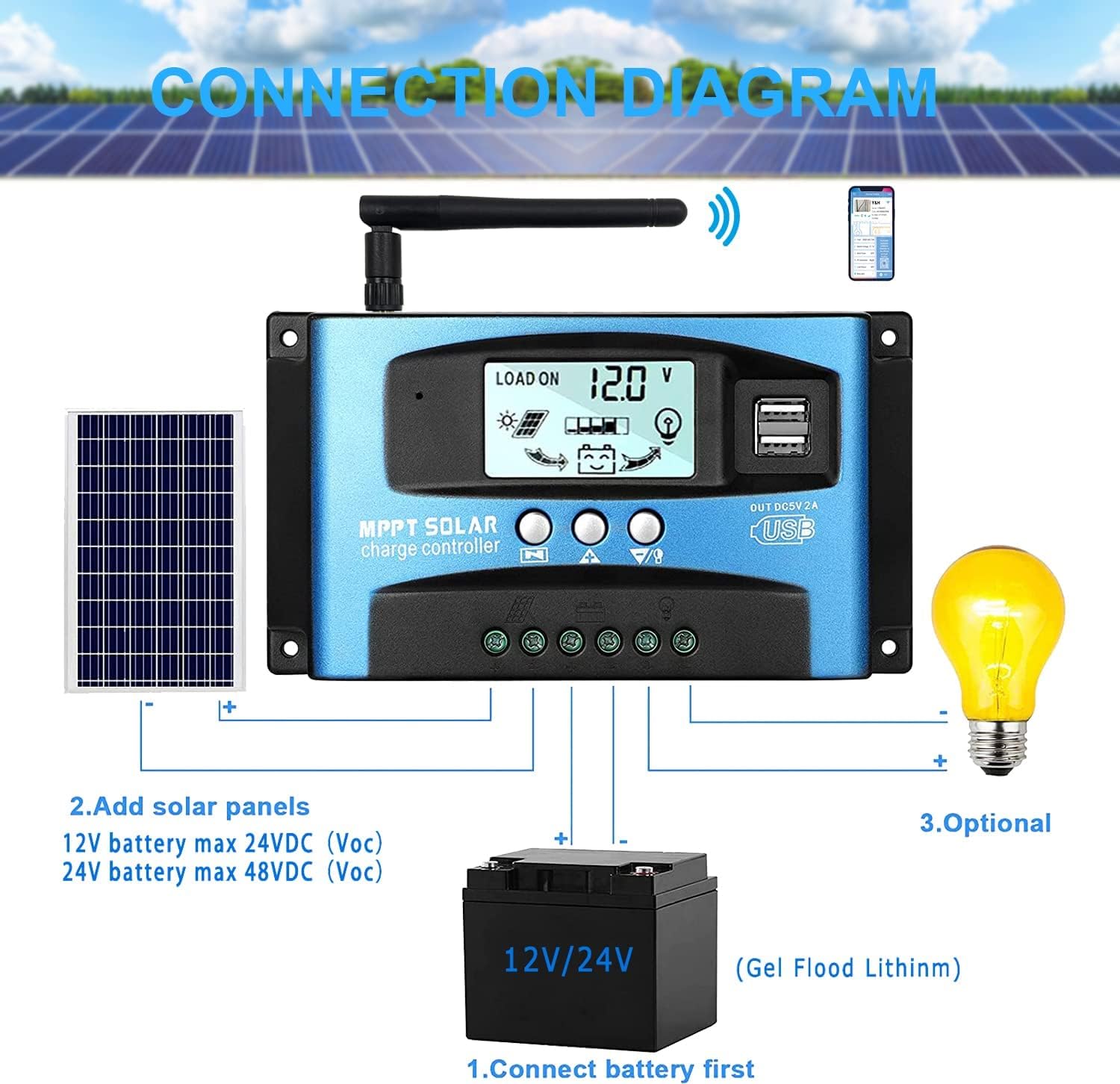
Imatge: A clear connection diagram illustrating the proper wiring sequence for the solar charge controller, connecting to a battery, solar panels, and an optional DC load. It emphasizes connecting the battery first.
Compatibilitat de la bateria:
The controller is compatible with various battery types, including Gel, Flooded (Lead-Acid), and Lithium batteries. Ensure the correct battery type is selected in the controller settings for optimal charging.

Imatge: Visual representation showing the SOGTICPS BL912-40A-WIFI Solar Charge Controller's compatibility with Gel, Flooded, and Lithium battery types, indicated by arrows pointing between battery icons and the controller.
5. Instruccions de funcionament
LCD Display and Navigation:
The LCD provides real-time information about your solar system. Use the control buttons to navigate through the display interfaces and adjust parameters.

Imatge: A series of LCD screen captures demonstrating the browsing interface and parameter setting process for the SOGTICPS BL912-40A-WIFI Solar Charge Controller. It shows main display, float voltage, discharge reconnect, discharge stop, load work mode, battery type, and work parameter display.
- Browsing Interface: Premeu el botó MENÚ button to cycle through different display interfaces, showing information such as main display, float voltage, discharge reconnect voltage, discharge stop voltage, load work mode, battery type, and other work parameters.
- Paràmetres de configuració: In interfaces 2-8, press the MENÚ button to enter the setting mode. Use the UP i ABAIX buttons to adjust the values. Press MENÚ de nou per confirmar i sortir del mode de configuració.
Monitorització de WiFi:
The controller supports WiFi connectivity, allowing you to monitor and control your solar system remotely via a smartphone application.

Imatge: The SOGTICPS BL912-40A-WIFI Solar Charge Controller shown alongside a smartphone displaying its monitoring application interface. This illustrates the wireless monitoring capability of the PV system.
- Instal·lació de l'aplicació: Download the dedicated application for your smartphone (Android). Refer to the QR code or instructions provided with the product for app download.
- Connexió: Follow the in-app instructions to connect your controller to your local WiFi network.
- Monitorització remota: Un cop connectat, pots view real-time data such as temperature, charge current, discharge current, accumulated power generation, battery voltage, and adjust charging modes from anywhere.
6. Manteniment
Un manteniment regular garanteix la longevitat i el rendiment òptim del vostre controlador de càrrega solar.
- Comproveu les connexions: Inspeccioneu periòdicament totes les connexions del cablejat per assegurar-vos que estiguin ben ajustades i sense corrosió.
- Controlador net: Mantingueu el controlador net i lliure de pols i brutícia. Feu servir un drap sec per netejar-lo.
- Ventilació: Ensure the installation area has adequate ventilation to prevent overheating.
- Inspecció de la bateria: Regularly check battery terminals for corrosion and ensure battery fluid levels (for flooded batteries) are correct.
- Monitorització del sistema: Use the LCD display or the WiFi app to monitor system performance and identify any anomalies early.
7. Solució De Problemes
Si teniu problemes amb el controlador de càrrega solar, consulteu els següents problemes i solucions habituals:
| Problema | Causa possible | Solució |
|---|---|---|
| Sense pantalla a la pantalla LCD | Bateria no connectada o de baix volumtage; polaritat inversa. | Comproveu les connexions de la bateria i el voltage. Assegureu-vos de la polaritat correcta. |
| La bateria no es carrega | Solar panels not connected; insufficient sunlight; faulty solar panel; incorrect battery type setting. | Check solar panel connections and ensure adequate sunlight. Verify solar panel functionality. Confirm battery type setting. |
| La càrrega no funciona | Load disconnected; battery low voltage protection; overload protection. | Check load connections. Charge battery. Reduce load or check for short circuits. |
| WiFi app issues (connection/language) | Incorrect WiFi setup; app region/language settings; firmware issues. | Ensure correct WiFi network and password. Check app settings for language. Contact support if issues persist. |
8. Especificacions
| Paràmetre | Valor |
|---|---|
| Model | BL912-40A-WIFI |
| Corrent de càrrega nominal | 40 A |
| Volum del sistematage | 12V/24V Auto-detection |
| Max PV Input Power (12V) | 480 W |
| Max PV Input Power (24V) | 960 W |
| Panell solar recomanat Voltage | 18V for 12V battery; 36V for 24V battery |
| Autoconsum | <10 mA |
| Temperatura de funcionament | -14 °F a 140 °F (-10 °C a 60 °C) |
| Tipus de visualització | LCD |
| Sortida USB | Dual 5V 2A |
| Comunicació | WiFi |
| Dimensions (paquet) | 18 x 11 x 5 cm |
| Pes (paquet) | 330 grams |
| Referència del fabricant | 2-BL912-40A-WIFI-DE |
| UPC | 732246237116 |
9. Garantia i Suport
For warranty information and technical support, please refer to the documentation included with your purchase or contact SOGTICPS customer service. Keep your purchase receipt as proof of purchase.