
1. Introducció
Gràcies per la compraasing the ODK 120cm Computer Desk. This desk is designed to provide a practical and organized workspace for various uses, including home office, gaming, and study. Its simple yet functional design ensures it fits seamlessly into any room while offering ample storage and a spacious desktop for enhanced productivity.
2. Informació de seguretat
- Llegiu atentament totes les instruccions abans de muntar i utilitzar.
- Assegureu-vos que totes les peces estiguin presents i que no estiguin danyades abans de començar el muntatge.
- Munta l'escriptori sobre una superfície suau i neta per evitar ratllades.
- No estrenyeu massa els cargols durant el muntatge per evitar danys al material.
- No us poseu drets ni asseguts a l'escriptori.
- Distribute weight evenly on the desktop and shelves. Do not overload.
- Mantingueu les peces petites i els materials d'embalatge fora de l'abast dels nens.
- Regularly check all connections and tighten if necessary to maintain stability.
3. Contingut del paquet
Si us plau, verifiqueu que tots els components que s'enumeren a continuació estiguin inclosos al paquet. Si falta alguna peça o hi ha alguna peça danyada, poseu-vos en contacte amb el servei d'atenció al client.
- Desktop Panels (3 pieces)
- Steel Frame Components (Legs, Crossbars)
- Left Storage Shelves (2 pieces)
- CPU Shelf (1 piece)
- Peus ajustables (4 peces)
- Maquinari de muntatge (cargols, perns, etc.)
- Wrench (1 piece)
- Assembly Instruction Manual (Japanese)
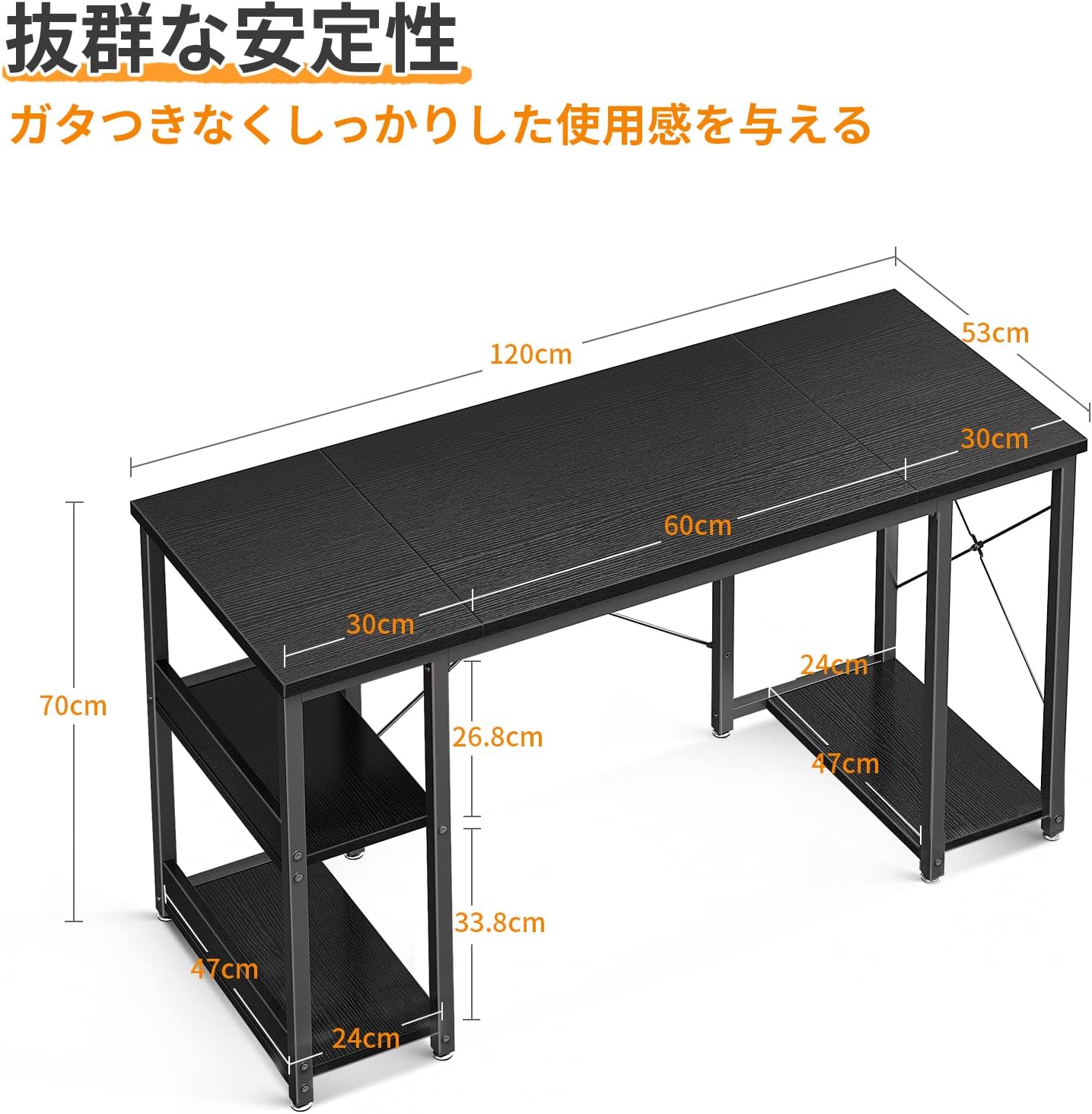
4. Instruccions de muntatge
Follow these steps to assemble your ODK Computer Desk. An assembly wrench is included, so no additional tools are required.
- Desempaquetar i identificar les peces: Carefully unpack all components and lay them out on a soft, clean surface. Refer to the "Package Contents" section to ensure all parts are present.
- Muntar el marc: Attach the steel frame components together using the provided hardware. Ensure the crossbars are securely fastened to prevent wobbling.
- Instal·leu prestatgeries: Attach the two storage shelves to the left side of the desk frame. The upper shelf can be removed later if needed for taller items.
- Install CPU Shelf: Secure the CPU shelf to the right side of the desk frame.
- Adjunta els panells d'escriptori: Carefully place the three desktop panels onto the assembled frame. Align them properly and secure them with the remaining hardware. Note that the desktop is formed by connecting three panels.
- Fixeu els peus ajustables: Screw the adjustable feet into the bottom of each leg. Adjust them as needed to ensure the desk is level and stable on uneven floors.
- Comprovació final: Once assembled, gently shake the desk to ensure all connections are tight and the desk is stable.


5. Ús
The ODK Computer Desk is designed for versatile use, offering features that enhance your work or gaming experience.
- Escriptori espaiós: The 120cm wide desktop provides ample space for multiple monitors, a keyboard, and other peripherals, ensuring a comfortable and efficient workspace.
- Emmagatzematge integrat: Utilize the two shelves on the left for books, documents, or office supplies. The upper shelf can be removed to accommodate taller items.
- CPU Shelf: The dedicated CPU shelf on the right side keeps your PC tower off the floor, protecting it from dust and freeing up desktop space.
- Ample Legroom: The desk's design ensures sufficient legroom (70cm width), allowing you to comfortably use chairs with armrests.


6. Manteniment
To keep your ODK Computer Desk in excellent condition, follow these simple maintenance guidelines:
- Neteja: The desktop is made of melamine material, which is easy to clean. Simply wipe any dirt or spills with a damp drap. Eviteu utilitzar productes químics agressius o netejadors abrasius que puguin danyar la superfície.
- Comprovacions periòdiques: Periodically check all screws and bolts to ensure they remain tight. Retighten if necessary to maintain the desk's stability.
- Eviteu l'excés d'humitat: While the surface is easy to clean, avoid prolonged exposure to excessive moisture.
- Protegir de la calor: Do not place hot items directly on the desktop without a protective coaster.
7. Solució De Problemes
If you encounter any issues with your ODK Computer Desk, please refer to the following common solutions:
- L'escriptori és tambaleant:
- Assegureu-vos que tots els cargols i cargols estiguin ben ajustats.
- Adjust the leveling feet at the bottom of each leg to compensate for uneven floor surfaces.
- Missing Parts or Initial Defects:
- If you find any parts missing or discover initial defects upon unpacking, please contact our customer support immediately for assistance.
- Dificultat de muntatge:
- Review Llegiu atentament les instruccions de muntatge. Assegureu-vos que feu servir els accessoris correctes per a cada pas.
- Do not force parts together. If a part does not fit, re-check the instructions and part orientation.
8. Especificacions
| Característica | Detall |
|---|---|
| Marca | ODK |
| Número de model | B01XS011333JP |
| Dimensions del producte (P x A x A) | 53 cm x 120 cm x 70 cm |
| Pes de l'article | 15.3 KG |
| Color | Negre |
| Estil | Desk with Rack |
| Tipus d'acabat | Recobert de pols |
| Material del marc | Metall |
| Característica especial | Estalvi d'espai |
| Tipus d'habitació | Oficina |
| Usos recomanats per al producte | Jocs |
| Muntatge obligatori | Sí |
9. Garantia i assistència
For any issues regarding initial defects, missing parts, or general inquiries about your ODK Computer Desk, please do not hesitate to contact our customer support team. We are committed to providing prompt assistance to ensure your satisfaction.
Si us plau, consulteu la documentació de la vostra compra o la del venedor. weblloc web per obtenir detalls específics de la garantia i informació de contacte.