
iZEEKER iG600
iZEEKER Dual-Lens Trail Camera
User Manual - Model iG600
1. Introducció
This manual provides detailed instructions for the setup, operation, maintenance, and troubleshooting of your iZEEKER Dual-Lens Trail Camera. Designed for wildlife monitoring, this camera features 4K 48MP resolution, WiFi and Bluetooth connectivity, and advanced Starlight Night Vision capabilities. Please read this manual thoroughly before using the camera to ensure optimal performance and longevity.

Image 1.1: iZEEKER Dual-Lens Trail Camera, including the camera unit, SD card, and AA batteries.
Característiques principals:
- Innovative Dual-Lens Design: Features two advanced optical lenses for superior image capture in varying light conditions.
- Superb Starlight Night Vision: Automatically adjusts for low light, providing full-color images in dim conditions and clear black-and-white images in total darkness.
- Imatges d'alta resolució: Captures crisp 48MP photos and smooth 4K Ultra HD videos.
- Fast Trigger Time: Achieves a rapid 0.1-second trigger time with a 120° detection angle.
- Connectivitat Wi-Fi i Bluetooth: Allows for easy settings adjustment, live view, and direct content download via a smartphone app.
- Construcció duradora: IP66 waterproof material ensures reliable operation in various weather conditions.
2. Què hi ha a la caixa
Upon unboxing your iZEEKER Trail Camera, please verify that all the following components are included:
- iG600 Trail Camera x 1
- SD Card (32GB) x 1
- AA Alkaline Batteries x 4
- Cable USB x 1
- Tripod Mount x 1

Image 2.1: All components included in the iZEEKER Trail Camera package.
3. Configuració
3.1 Instal·lació de la bateria
The iG600 Trail Camera requires 4 or 8 AA alkaline batteries for operation. For extended battery life, 8 batteries are recommended.
- Open the camera's main latch and then the battery compartment cover.
- Insert the AA batteries according to the polarity indicators (+/-) inside the compartment.
- Close the battery compartment cover securely, followed by the main latch to ensure a waterproof seal.
3.2 Instal·lació de la targeta SD
A 32GB SD card is included. The camera supports up to 256GB memory storage.
- Locate the SD card slot, typically near the battery compartment.
- Introduïu la targeta SD amb els contactes metàl·lics cap avall fins que encaixi al seu lloc.
- Per treure-la, premeu suaument la targeta fins que surti.
3.3 Muntatge de la càmera
The camera can be mounted using the included strap for trees or the tripod mount for other surfaces.
- Muntatge a l'arbre: Thread the provided strap through the camera's mounting slots and secure it around a tree or pole. Adjust the strap for a snug fit.
- Tripod/Wall Mount: Attach the tripod mount to the camera's bottom screw hole. Use screws to secure the mount to a wall or other flat surface, or attach it to a standard tripod.

Image 3.1: Camera mounted on a tree, demonstrating its outdoor placement.
3.4 Engegada inicial i configuració bàsica
After installing batteries and the SD card, power on the camera and configure initial settings.
- Locate the mode switch inside the camera. Slide it to the "SETUP" position.
- The internal display will turn on, allowing you to navigate the menu using the control buttons.
- Set the date, time, and preferred language.
- Format the SD card through the camera's menu to ensure compatibility and optimal performance.
- Once basic settings are configured, slide the switch to the "ON" position to activate monitoring mode.
4. Funcionament de la càmera
4.1 Dual-Lens Technology and Night Vision
The iG600 features two distinct lenses: one optimized for daylight and another for low-light and night conditions, ensuring superior image quality around the clock.

Image 4.1: The camera's dual-lens system, featuring dedicated lenses for daytime and low-light conditions.
The camera automatically switches between lenses based on ambient light. In low-light conditions, the dedicated low-light lens captures up to 2x more light, while in total darkness, the 850nm low glow LEDs provide clear black-and-white images.

Imatge 4.2: Ex.amples of image capture in full light, low light, and no light conditions.
4.2 Modes de foto i vídeo
The iG600 captures high-quality still images and video footage.
- Fotos: Up to 48MP resolution, providing vivid details.
- Vídeos: Records 4K 30fps Ultra HD videos with clear sound, utilizing H.264 encoding for efficient storage.

Imatge 4.3: Ex.ample of 4K resolution detail captured by the camera.
Video 4.1: Demonstrates the camera's ability to capture stunning wildlife moments with high clarity.
4.3 PIR Sensor and Trigger Speed
The camera's Passive Infrared (PIR) sensors detect motion and trigger recording rapidly.
- Angle de detecció: A 120° detection angle is achieved with one 60° central PIR sensor and two 30° side PIR sensors. Side sensors can be enabled or disabled in the menu.
- Temps de desencadenament: An ultra-fast 0.1-second trigger time ensures minimal delay between detection and capture.
- Trigger Distance: The longest trigger distance is 65ft (20m).

Image 4.4: Illustrates the camera's rapid 0.1-second trigger speed.
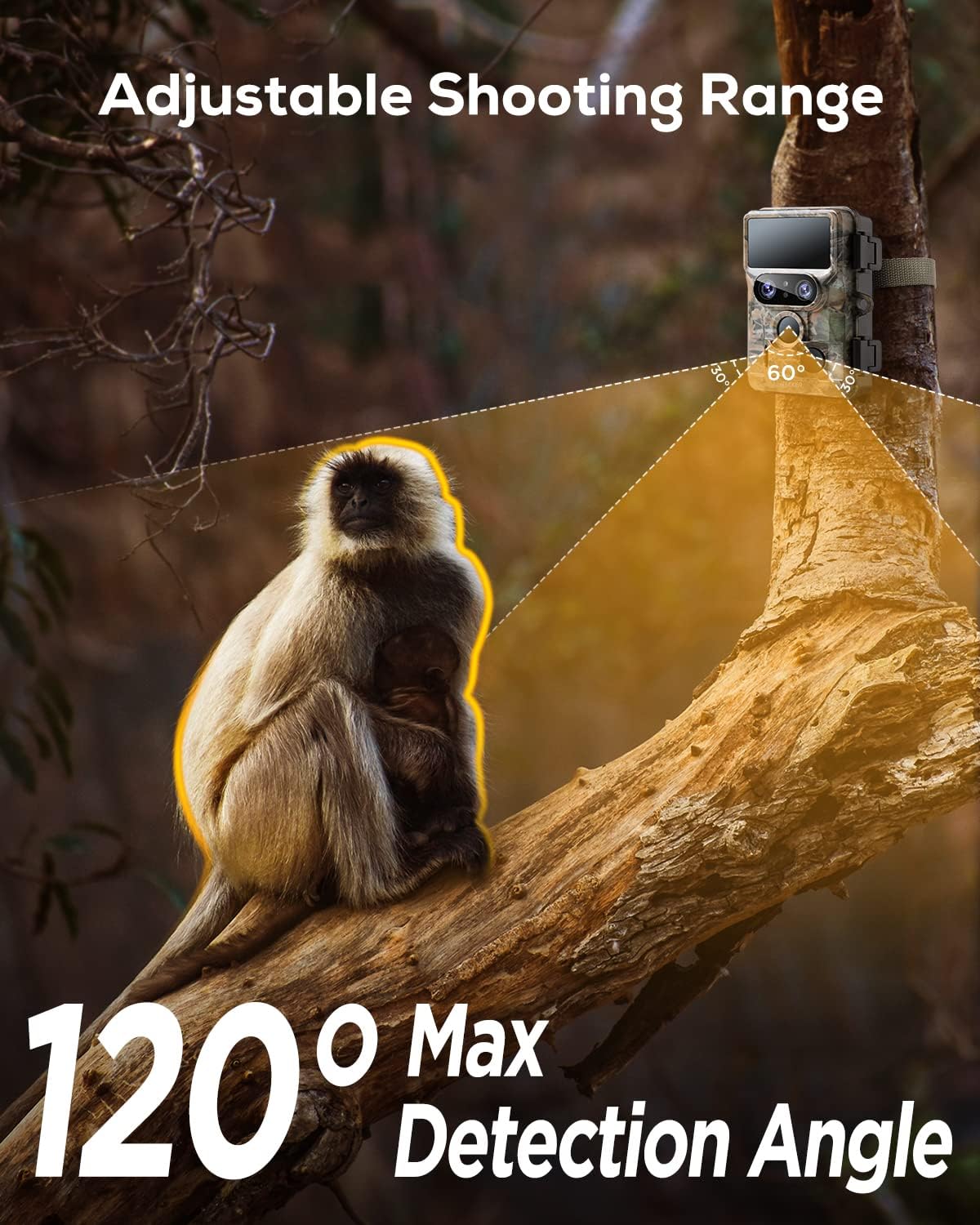
Image 4.5: Depicts the 120° maximum detection angle of the camera.
Video 4.2: Shows the camera's effectiveness in capturing motion, ensuring no interesting shots are missed.
4.4 Control per Wi-Fi i aplicacions
Connect your camera to your smartphone via WiFi for convenient control and content management.
- Descarrega't el
Ask a question about this manual
Ask about setup, troubleshooting, compatibility, parts, safety, or missing instructions. Manuals+ will review the question and use this page’s manual context to help answer it.