
1. Introducció
This manual provides essential instructions for the safe and effective use of your Otech DIV004 Li-ion battery, designed for compatibility with Doro DFC-0130 portable telephones. Please read this manual thoroughly before installation and use to ensure optimal performance and safety.

Imatge 1: Frontal view of the Otech DIV004 Li-ion Battery Pack, showing brand, model, voltage, capacitat i avisos de seguretat.
2. Informació de seguretat
La vostra seguretat és primordial. Si us plau, observeu les següents precaucions:
- Eliminació: Do not dispose of the battery in fire. This may cause an explosion.
- Càrrega: Use only the specified charger for your Doro DFC-0130 telephone. Using an incompatible charger may damage the battery or device and poses a fire risk.
- Curtcircuit: Do not short circuit the battery terminals. This can lead to overheating, fire, or explosion.
- Temperatura: Eviteu exposar la bateria a temperatures extremes (calor o fred).
- Danys: No feu servir la bateria si sembla danyada, inflada o amb fuites.
- Nens: Mantingueu les piles fora de l'abast dels nens.
3. Configuració i instal·lació
Follow these steps to install the Otech DIV004 battery into your Doro DFC-0130 telephone:
- Apagar: Ensure your Doro DFC-0130 telephone is completely powered off before beginning installation.
- Traieu la coberta de la bateria: Locate and carefully remove the battery compartment cover on the back of your telephone. Refer to your phone's original manual if you need assistance.
- Treure la bateria antiga (si escau): If replacing an existing battery, gently lift it out of the compartment.
- Inseriu una bateria nova: Align the Otech DIV004 battery with the contacts in the battery compartment. Ensure the battery is inserted with the correct polarity, matching the markings inside the compartment. Do not force the battery into place.
- Cobertura segura: Torneu a col·locar la tapa del compartiment de la bateria, assegurant-vos que encaixi correctament al seu lloc amb un clic.
- Càrrec inicial: It is recommended to fully charge the new battery before its first use.
4. Operating Instructions (Charging)
To ensure the longevity and performance of your Otech DIV004 battery, follow these charging guidelines:
- Primer ús: For optimal performance, fully charge the battery before its initial use.
- Compatibilitat amb el carregador: Always use the original or a certified compatible charger designed for your Doro DFC-0130 telephone.
- Procés de càrrega: Connect your telephone to its charger. The phone's display or indicator light will typically show that it is charging.
- Càrrega completa: Disconnect the charger once the battery is fully charged to prevent overcharging, although modern batteries and chargers have built-in protection.
- Eviteu la descàrrega profunda: While Li-ion batteries do not suffer from 'memory effect', it is generally best to recharge them before they are completely depleted.
5. Manteniment
Proper maintenance will help extend the life of your Otech DIV004 battery:
- Emmagatzematge: If storing the battery for an extended period, keep it in a cool, dry place, ideally at about 50% charge. Avoid extreme temperatures.
- Neteja: Periodically clean the battery contacts and the phone's battery terminals with a clean, dry cloth to ensure good connection.
- Eviteu danys físics: No deixeu caure, punxeu ni desmunteu la bateria.
- Reciclatge: When the battery reaches the end of its life, dispose of it responsibly at an authorized recycling facility. Do not discard with household waste.
6. Solució De Problemes
If you encounter issues with your Otech DIV004 battery, consider the following:
- La bateria no es carrega:
- Ensure the charger is properly connected to both the phone and a working power outlet.
- Verify that the battery is correctly seated in the phone's compartment.
- Try using a different compatible charger or power outlet to rule out charger or outlet issues.
- Clean the battery and phone contacts.
- Durada de la bateria curta:
- Assegureu-vos que la bateria s'hagi carregat completament.
- Reduce background applications or features on your phone that consume significant power.
- Battery life naturally diminishes over time and with usage cycles. If the battery is old, replacement may be necessary.
- Battery Swelling or Overheating:
- Deixar d'utilitzar immediatament of the battery and phone.
- Carefully remove the battery if safe to do so and dispose of it properly at a recycling facility.
- Do not attempt to charge or use a swollen or excessively hot battery.
If problems persist, contact Otech customer support or your retailer for further assistance.
7. Especificacions
| Característica | Especificació |
|---|---|
| Marca | Otech |
| Model | DIV004 |
| Compatibilitat | Doro DFC-0130 |
| Tipus de bateria | Li-ió |
| Voltage | 3.7 V |
| Capacitat | 850 mAh |
| Energia | 3.14 Wh |
| Fabricant | Otech |
| ASIN | B0BBTKB9DJ |
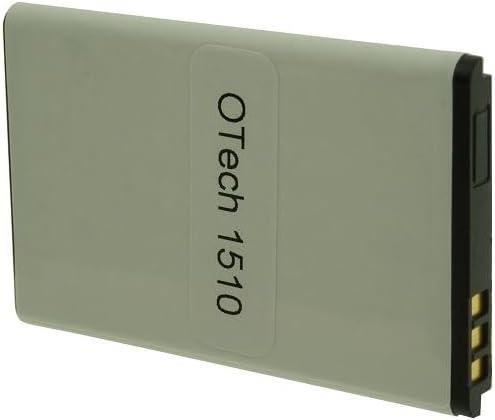
Imatge 2: Darrere view of the Otech DIV004 Li-ion Battery Pack, showing the 'Otech 1510' label.
8. Garantia i Suport
The Otech DIV004 battery comes with a 1 any de garantia des de la data de compra. Aquesta garantia cobreix els defectes de fabricació en condicions d'ús normal.
For warranty claims, technical support, or any questions regarding your Otech battery, please contact your retailer or Otech customer service directly. Please have your purchase receipt and product information available when contacting support.
Per a més informació, podeu visitar el Otech brand page.