
1. Introducció
The Walfront SG 003A is a versatile and portable signal source generator designed for debugging, testing, and calibration in various industrial and scientific applications. It offers multiple signal output modes including current, voltage, and pulse, with high precision and automatic output functions. This manual provides detailed instructions for the proper use, maintenance, and troubleshooting of your device.
2. Producte acabatview
2.1 Característiques clau
- Multiple Signal Modes: Supports current (0-24mA, 0.01mA precision), voltage (0-24V, 0.01V precision), passive current (0-24mA, 0.01mA precision), and pulse (0-9999Hz, 5-bit precision) outputs.
- Preset Design: Stores 4 groups of commonly used signal values for quick and easy output adjustment.
- Automatic Display Curve Adjustment: Automatically adjusts the display curve within maximum and minimum value ranges over a set period.
- Llarga vida útil de la bateria: Operates up to 26 hours on a full charge.
- Automatic Output Function: Continuously changes output based on set parameters with monotonic increase, monotonic decrease, and cyclic modes.
- Esborra la pantalla: 2.4-inch TFT backlit screen shows signal trends and allows setting curve samptemps de ling.
- Alta precisió: Achieves 0.2% high accuracy for precise measurements.
- Disseny durador: Features a drop-proof process and anti-slip silicone for enhanced durability.
2.2 Components i controls

Figure 1: SG 003A Signal Source Generator and Accessories
The SG 003A package includes the signal generator unit, a set of test leads (yellow, blue, black, red), a USB Type-C charging cable, and a power adapter.

Figure 2: SG 003A Labeled Parts and Controls
This diagram illustrates the key components and controls of the SG 003A, including the 2.4-inch backlit screen, input/output ports, function buttons (IN, OUT, FN, AUTO, ON/OFF, CONVERT, PRESET, CURVE, navigation arrows), and indicator light.
- Pantalla de visualització: 2.4-inch TFT backlit screen for displaying readings and settings.
- Botons d'entrada/sortida: Used to switch between input and output modes.
- Botó FN: Function button for accessing additional settings or menus.
- Botó AUTO: Activates automatic output functions.
- Botó ON/OFF: Toggles output on or off.
- CONVERT Button: Used for signal conversion.
- Botó PRESET: Accesses and saves preset signal values.
- CURVE Button: Displays real-time signal curves.
- Fletxes de navegació: Used for adjusting values and navigating menus (Up, Down, Left, Right).
- Botó de confirmació: Confirma les seleccions.
- Ports d'entrada/sortida: Connect test leads for signal input and output.
- Interfície tipus C: Per carregar el dispositiu.
3. Configuració
3.1 Càrrega inicial
Before first use, fully charge the SG 003A using the provided USB Type-C cable and power adapter. Connect the Type-C cable to the device's charging port and the adapter to a standard power outlet. The battery level is displayed on the screen.

Figure 3: Internal Features (Battery, Power Display, Type-C Port)
The SG 003A features an internal lithium battery, a power level display in the top right corner of the screen, and a Type-C interface for convenient charging.
3.2 Connexió dels cables de prova
Connect the appropriate test leads to the IN (Input) and OUT (Output) ports on the device based on your testing requirements. Ensure a secure connection for accurate readings and stable output.
4. Instruccions de funcionament
4.1 Funcionament bàsic
- Encès/apagat: Press and hold the power button (usually integrated with ON/OFF or a dedicated button) to turn the device on or off.
- Selecció del mode: Use the IN or OUT buttons to switch between input measurement and output generation modes.
- Value Adjustment: Use the navigation arrows (Up/Down/Left/Right) to adjust signal values or navigate through menu options.
- Confirmeu: Press the central confirm button to apply changes or enter sub-menus.
4.2 Signal Output Modes
The SG 003A supports various signal output types:
- Current Output (mA):
The device can generate current signals from 0 to 24 mA with a precision of 0.01 mA. This is ideal for testing current loops in industrial control systems.
Video 1: Current Output Demonstration
This video segment demonstrates the current output function of the SG 003A, showing how to adjust the mA output and observe the reading on an external multimeter.
- Voltage Output (V):
Generar voltage signals from 0 to 24 V with a precision of 0.01 V. Useful for calibrating voltage sensors and inputs.
Video 2: Voltage Output Test
This video segment illustrates the voltage output capability of the SG 003A, showing real-time voltage adjustments and readings on a connected multimeter.
- Pulse Signal Output:
Output pulse signals with frequencies ranging from 0 to 9999 Hz. This mode is suitable for testing frequency inputs or PWM controlled devices.
Video 3: PWM Signal Output Demonstration
This video segment demonstrates the pulse width modulation (PWM) signal output, showing how the SG 003A can generate various pulse frequencies and duty cycles, displayed on an oscilloscope.
4.3 Funcions avançades
- Preset Values: Press the PRESET button to cycle through or select from the 4 stored signal value groups. To save a current output as a preset, adjust the value and then press and hold the PRESET button until confirmation appears.
- Automatic Output Function: Press the AUTO button to activate continuous output changes. You can select between monotonic increase, monotonic decrease, or cyclic modes to automate testing sequences.
- Display Curve Adjustment: The device automatically adjusts the displayed signal curve based on the input/output range and sampling time. Use the CURVE button to view the real-time trend of signal variations.
- Output Calibration: For precise measurements, the SG 003A allows for output calibration. Follow the on-screen prompts or refer to the video demonstration to calibrate the output against a known reference meter.
Video 4: Output Calibration Process
This video segment demonstrates the output calibration process for current signals, ensuring accurate readings and adjustments on the SG 003A compared to a reference multimeter.
5. Aplicacions
The Walfront SG 003A is a versatile tool suitable for a variety of industrial and scientific applications:
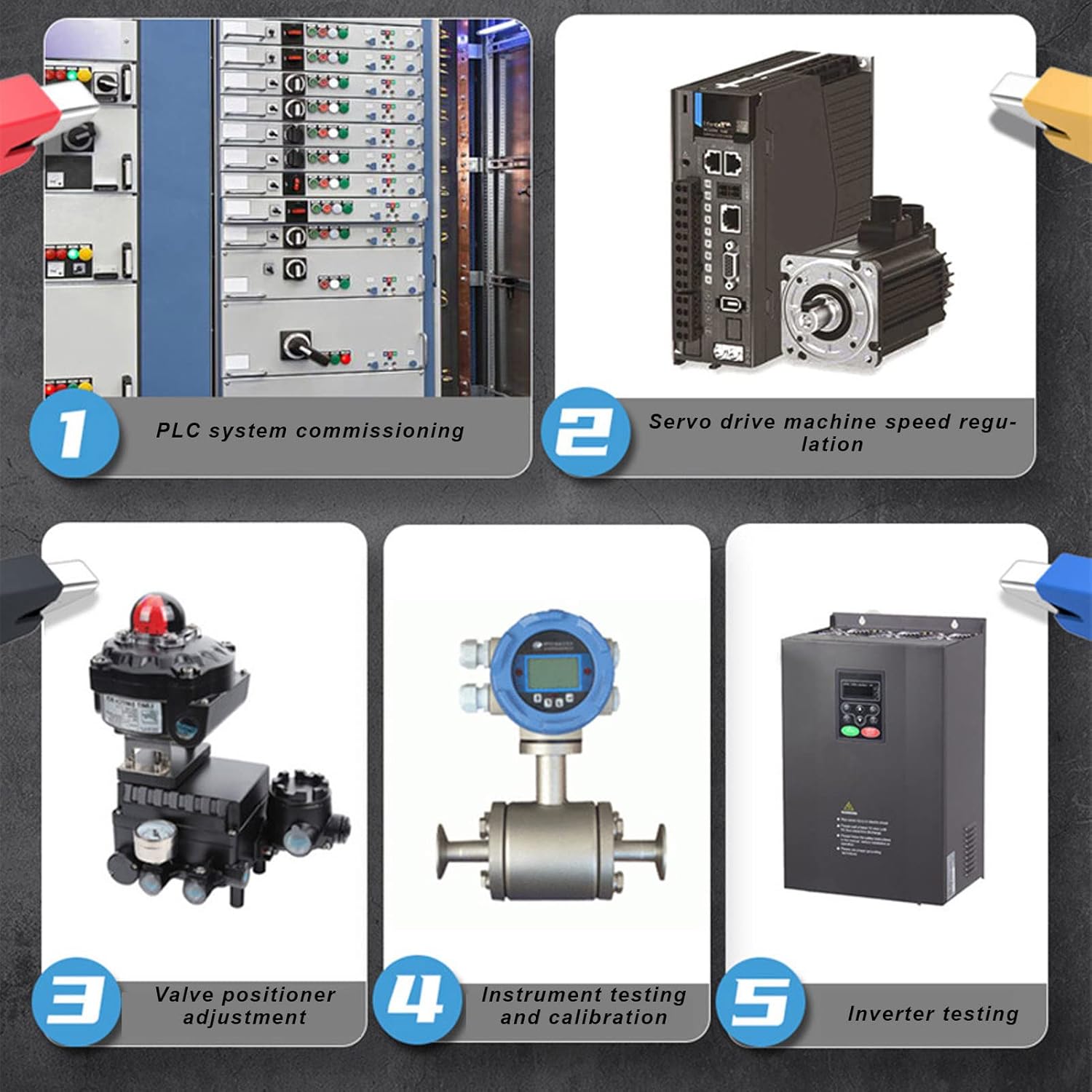
Figure 4: Typical Applications
The SG 003A is suitable for a wide range of applications, including PLC system commissioning, servo drive machine speed regulation, valve positioner adjustment, instrument testing and calibration, and inverter testing.
- PLC System Commissioning: Debugging and testing Programmable Logic Controllers.
- Servo Drive Machine Speed Regulation: Calibrating and testing servo motor control systems.
- Valve Positioner Adjustment: Setting and verifying the position of control valves.
- Instrument Testing and Calibration: Verifying the accuracy of various industrial instruments.
- Inverter Testing: Checking the functionality and output of frequency inverters.
6. Manteniment
6.1 Cura i emmagatzematge
- Mantingueu el dispositiu net i sec. Netegeu-lo amb un drap suau i sec.amp tela. No utilitzeu netejadors abrasius ni dissolvents.
- Eviteu exposar el dispositiu a temperatures extremes, humitat o llum solar directa.
- Guardeu el dispositiu en un lloc fresc i sec quan no l'utilitzeu.
- Charge the battery periodically (e.g., every 3-6 months) if stored for long periods to maintain battery health.
7. Solució De Problemes
7.1 Problemes comuns i solucions
| Problema | Causa possible | Solució |
|---|---|---|
| El dispositiu no s'encén. | Bateria baixa; botó d'engegada no premut correctament. | Carregueu el dispositiu completament; manteniu premut el botó d'engegada durant uns segons. |
| Inaccurate readings/output. | Loose test lead connections; Device needs calibration; External interference. | Check and secure all connections; Perform output calibration (refer to Section 4.3); Move away from strong electromagnetic fields. |
| No signal output. | Output is turned off; Incorrect mode selected; Faulty test leads. | Press the ON/OFF button to enable output; Ensure you are in output mode; Test with different leads. |
| La pantalla està tènue o no respon. | Low battery; Software glitch. | Charge the device; Restart the device. |
8. Especificacions
8.1 Especificacions tècniques
| Característica | Especificació |
|---|---|
| Model | SG 003A |
| Mostra | 2.4-inch TFT Backlit Color Screen |
| Interval de sortida actual | 0-24 mA (0.01 mA precision) |
| Voltage Interval de sortida | 0-24 V (0.01 V precision) |
| Passive Current Output Range | 0-24 mA (0.01 mA precision) |
| Pulse Output Frequency | 0-9999 Hz (5-bit precision) |
| Precisió | 0.2% |
| Durada de la bateria | Fins a 26 hores (amb càrrega completa) |
| Interfície de càrrega | USB tipus C |
| Dimensions | 15.8 x 14.7 x 9.3 cm |
| Pes | 460 grams |
| Fabricant | Walfront |
| País d'origen | Xina |
9. Garantia i Suport
9.1 Informació de la garantia
The Walfront SG 003A Signal Source Generator comes with a standard manufacturer's warranty. Please refer to the product packaging or the seller's terms and conditions for specific warranty duration and coverage details.
9.2 Atenció al client
For any technical assistance, troubleshooting beyond this manual, or warranty claims, please contact Walfront customer support through their official website or the platform where you purchased the product. Provide your product model (SG 003A) and purchase details for efficient service.