
1. Introducció
Gràcies per la compraasing the Mediacom MCI SK22 Bluetooth Karaoke Speaker. This portable and rechargeable speaker system is designed to provide high-quality audio for music playback and karaoke performances. It comes equipped with two professional wireless microphones, offering a versatile entertainment experience for various occasions.
2. Informació de seguretat
- Llegiu atentament totes les instruccions abans d'utilitzar el producte.
- Mantingueu l'altaveu allunyat de l'aigua, la humitat i les temperatures extremes.
- No intenteu desmuntar ni reparar la unitat vosaltres mateixos. Encarregueu tot el manteniment a personal qualificat.
- Feu servir només l'adaptador de corrent proporcionat per carregar.
- Eviteu col·locar objectes pesats sobre l'altaveu.
- Assegureu-vos que hi hagi una ventilació adequada al voltant de l'altaveu durant l'ús.
3. Contingut del paquet
Marqueu la casella per als elements següents:
- Mediacom MCI SK22 Bluetooth Karaoke Speaker
- 2 x micròfons sense fil
- Control remot
- Adaptador d'alimentació
- Manual d'usuari
4. Producte acabatview
Familiarize yourself with the various parts and controls of your MCI SK22 speaker.
4.1 Davant View with Microphones

Imatge: Frontal view of the Mediacom MCI SK22 speaker, showcasing the main unit and the two accompanying wireless microphones.
4.2 lateral View

Imatge: Lateral view of the Mediacom MCI SK22 speaker, highlighting its compact and portable design.
4.3 Darrera View amb ports

Imatge: Part posterior view of the Mediacom MCI SK22 speaker, displaying the various input and output ports for connectivity.
4.4 Speaker Dimensions
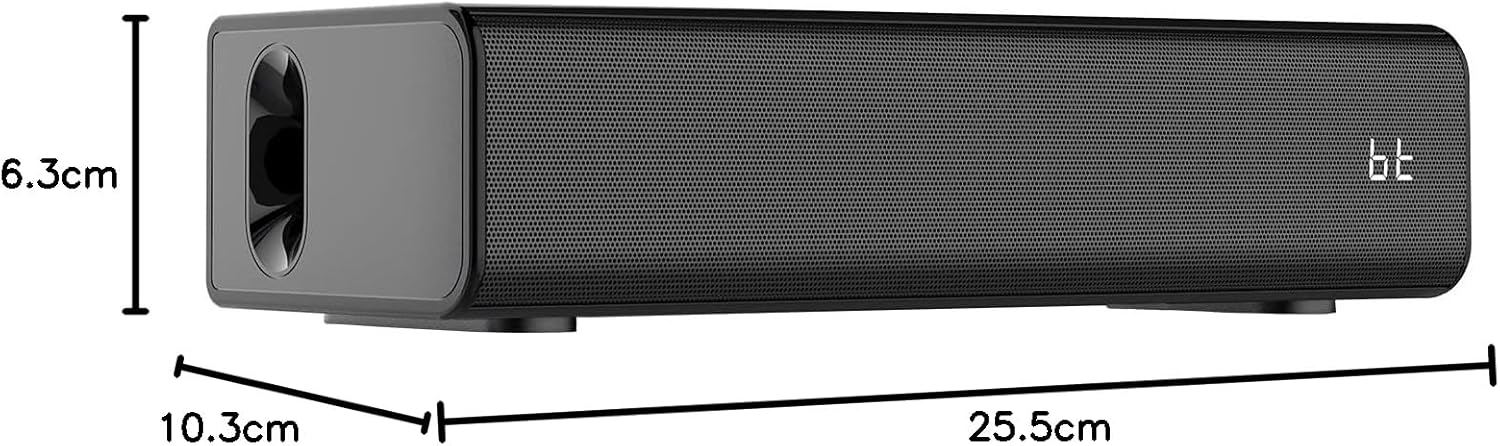
Image: A diagram illustrating the length, width, and height of the Mediacom MCI SK22 speaker.
5. Configuració
5.1 Càrrega de l'altaveu
- Connect the provided power adapter to the speaker's charging port.
- Connecteu l'adaptador de corrent a una presa de corrent adequada.
- The charging indicator light will illuminate. Allow the speaker to fully charge before first use (approximately X hours, refer to LED indicator for full charge).
5.2 Engegada/apagada
- To power on, press and hold the Power button on the speaker or remote control until the display illuminates.
- Per apagar l'aparell, premeu i manteniu premut el botó d'engegada de nou.
5.3 Configuració del micròfon
- Ensure the wireless microphones have fresh batteries installed.
- Turn on the microphones using their respective power switches. They should automatically connect to the speaker.
6. Instruccions de funcionament
6.1 Vinculació Bluetooth
- Turn on the speaker. The Bluetooth indicator will flash, indicating it is in pairing mode.
- Al dispositiu (telèfon intel·ligent, tauleta, etc.), activeu el Bluetooth i cerqueu els dispositius disponibles.
- Select "MCI SK22" from the list. Once paired, the Bluetooth indicator will stop flashing and remain solid.
Reproducció USB 6.2
- Inseriu una unitat flash USB que contingui àudio MP3 files al port USB de l'altaveu.
- The speaker will automatically switch to USB mode and begin playing music. Use the speaker's or remote's controls to navigate tracks.
6.3 Entrada AUX
- Connect an external audio device (e.g., TV, computer, music player) to the speaker's AUX input port using a 3.5mm audio cable (not included).
- The speaker will automatically switch to AUX mode. Adjust volume from both the speaker and the connected device.
6.4 Microphone Usage and Echo Effects
- Once connected, speak or sing into the wireless microphones.
- Use the dedicated controls on the speaker or remote to adjust microphone volume and apply echo effects for an enhanced karaoke experience.
6.5 Control de volum
- Adjust the main speaker volume using the volume controls on the speaker or the remote control.
- Individual microphone volume can be adjusted separately.
7. Manteniment
- Neteja: Feu servir un drap suau i sec per netejar la superfície de l'altaveu. No utilitzeu productes de neteja abrasius ni dissolvents.
- Emmagatzematge: Quan no l'utilitzeu durant períodes prolongats, guardeu l'altaveu en un lloc fresc i sec, allunyat de la llum solar directa i de temperatures extremes.
- Cura de la bateria: To prolong battery life, fully charge the speaker before storing it for long periods and recharge it every few months.
8. Solució De Problemes
| Problema | Causa possible | Solució |
|---|---|---|
| Sense poder | Battery is low or depleted. Power adapter not connected. | Charge the speaker using the provided power adapter. Ensure the power adapter is securely connected to both the speaker and the power outlet. |
| Sense so | Volume is too low. Incorrect input mode selected. Device not properly connected. | Increase the volume on the speaker and the connected device. Ensure the correct input mode (Bluetooth, USB, AUX) is selected. Check all cable connections. |
| Bluetooth no emparellat | Speaker is not in pairing mode. Device's Bluetooth is off. Interference. | Ensure the speaker's Bluetooth indicator is flashing. Turn off and on your device's Bluetooth. Move closer to the speaker and away from other wireless devices. |
| Els micròfons no funcionen | Microphone batteries are low. Microphones are not turned on. | Canvieu les piles del micròfon. Assegureu-vos que els micròfons estiguin encesos. |
9. Especificacions
| Característica | Detall |
|---|---|
| Marca | Mediacom |
| Número de model | MCI SK22 |
| Tecnologia de connectivitat | Bluetooth, AUX, USB |
| Entrada d'àudio | Bluetooth, AUX, USB |
| Característiques especials | Bass boost, USB port, Built-in microphone, Hi-Res Audio, Echo effects |
| Dispositius compatibles | Mobile Phone, iPhone, Laptop, Smartphone, TV, Computer, Tablet, Music Player, DVD Player |
| Font d'alimentació | Funciona amb bateria |
| Material | Plàstic |
| Color | Negre |
| Dimensions de l'article (L x A x A) | 10.3 x 25.5 x 6.3 cm |
| Pes de l'article | 1.68 quilos |
| Fabricant | Xina |
10. Garantia i Suport
Mediacom products are designed for reliability and performance. For warranty information and technical support, please refer to the warranty card included in your package or visit the official Mediacom weblloc web. Conserveu el rebut de compra com a comprovant de compra per a qualsevol reclamació de garantia.