
Introducció
This manual provides detailed instructions for the installation, operation, and maintenance of your Aigostar Smart LED Strip Light. This smart lighting solution is designed for indoor use, offering versatile color options, music synchronization, and multiple control methods including voice, app, and remote control. Please read this manual thoroughly before use to ensure proper functionality and safety.
Què s'inclou
Verifiqueu que tots els components siguin presents al paquet:
- Smart LED RGB Strip Light (32.8 FT)
- Manual d'instruccions (aquest document)
- Manual d'usuari de l'aplicació
- Cinta de doble cara
- Fixed Clips
- Remote Control with battery
- 3-Key Control Box
- Endoll

Image: The product packaging displaying the Aigostar Smart Low Voltage Strip Light, along with the coiled LED strip, remote control, and smart home devices like Google Assistant and Alexa speakers, indicating compatibility.
Instruccions de configuració
1. Preparació
- Assegureu-vos que la superfície d'instal·lació estigui neta, seca i llisa.
- Unroll the LED strip light completely before powering on to prevent overheating.
- Identify the desired path for the strip light.
2. Instal·lació física
- Connect the LED strip to the 3-Key Control Box.
- Connect the Power Plug to the Control Box.
- Traieu el suport adhesiu de la tira LED.
- Carefully press the strip onto the prepared surface, ensuring firm contact. For added security, use the provided fixed clips.
- Mount the control box in a convenient location, ensuring the remote sensor has a clear line of sight if using the IR remote.
- Connecteu l'adaptador d'alimentació a una presa de corrent estàndard.
3. App Connection (Aigosmart APP)
- Download the "Aigosmart" APP from your device's app store (iOS or Android).
- Register or log in to your Aigosmart account.
- Assegureu-vos que el vostre dispositiu mòbil estigui connectat a una xarxa Wi-Fi de 2.4 GHz.
- Follow the in-app instructions to add your Smart LED Strip Light. This typically involves putting the device into pairing mode (refer to the App User Manual for specific steps).
- Once connected, you can rename the device for easier control.
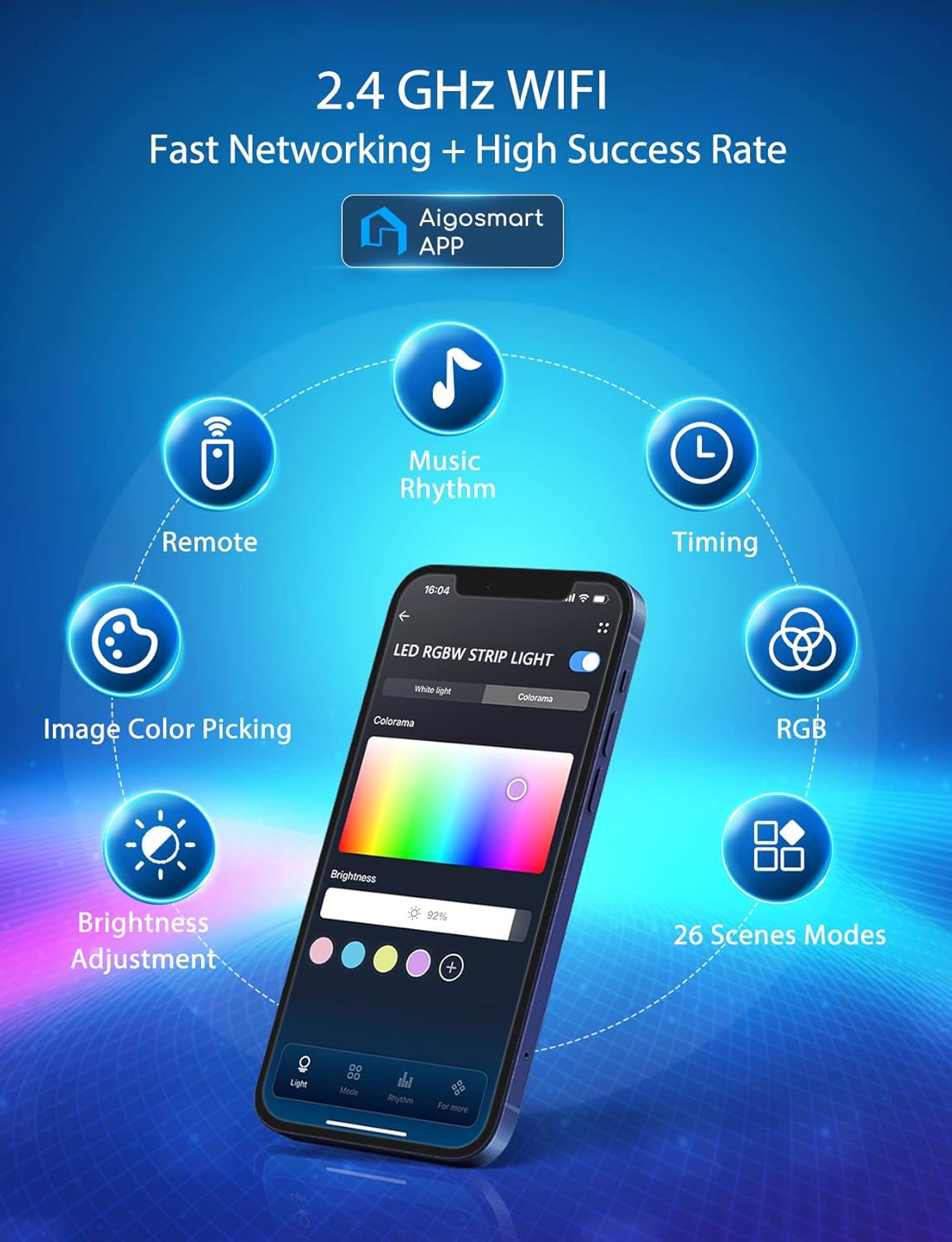
Image: A smartphone screen displaying the Aigosmart app interface, highlighting features like remote control, music rhythm, timing, RGB color selection, image color picking, brightness adjustment, and 26 scene modes, all operating over 2.4 GHz Wi-Fi.
Instruccions de funcionament
1. Mètodes de control
Your Aigostar Smart LED Strip Light offers multiple ways to control its functions:
- Aigosmart APP Control: Access 16 million colors, 26 mood modes, 64 scene selections, brightness adjustment, and custom lighting effects directly from your smartphone.
- Control de veu: Link with Amazon Alexa or Google Assistant for hands-free control using voice commands.
- Comandament a distància: Use the included IR remote for basic functions like power, color selection, and brightness.
- 3-Key Control Box: Provides basic on/off, color change, and mode selection directly on the strip.

Image: An illustration demonstrating the four control methods for the Aigostar Smart LED Strip Light: Voice Control (Alexa/Google Assistant), App Control (Aigosmart APP), Remote Control (Physical Remote), and Control Box (3-Way Control Box), shown with children interacting with smart speakers and lights.

Image: A visual summary of the light strip's capabilities, including Remote Control, Voice Control, App Control, Group Control, Music Sync, Timer Function, Multiple Scenes, Color Recognition, Cuttable design, and 16 Million RGB Color options.
2. Music Synchronization
The strip lights can change color and rhythm in sync with music. Activate this feature through the Aigosmart APP and adjust sensitivity settings to match your audio environment.
Video: An official product video titled "Aigostar Smart LED Strip Lights - Let Color Dance" demonstrating the dynamic color changes and music synchronization features of the LED strip lights in various settings, including a living room, gym, and gaming room.

Image: Two individuals enjoying music, with the Aigostar Smart LED Strip Lights illuminating the background in vibrant colors, demonstrating the music sync feature.
3. Customization and Scenes
Utilize the Aigosmart APP to explore 1600 colors, 26 modes, and 64 pre-set scenes. You can also create custom lighting effects and save them for quick access. The strip is cuttable at designated marks to fit specific lengths, allowing for tailored installations.

Image: A television screen displaying vibrant colors from the LED backlight, with a smartphone showing the "Creative Customization" interface of the Aigosmart app, allowing users to design their own light effects.
4. Timer and Schedule Functions
Set schedules for your lights to turn on or off automatically using the Aigosmart APP. This includes modes like Sunrise/Sunset to align with your daily routine.
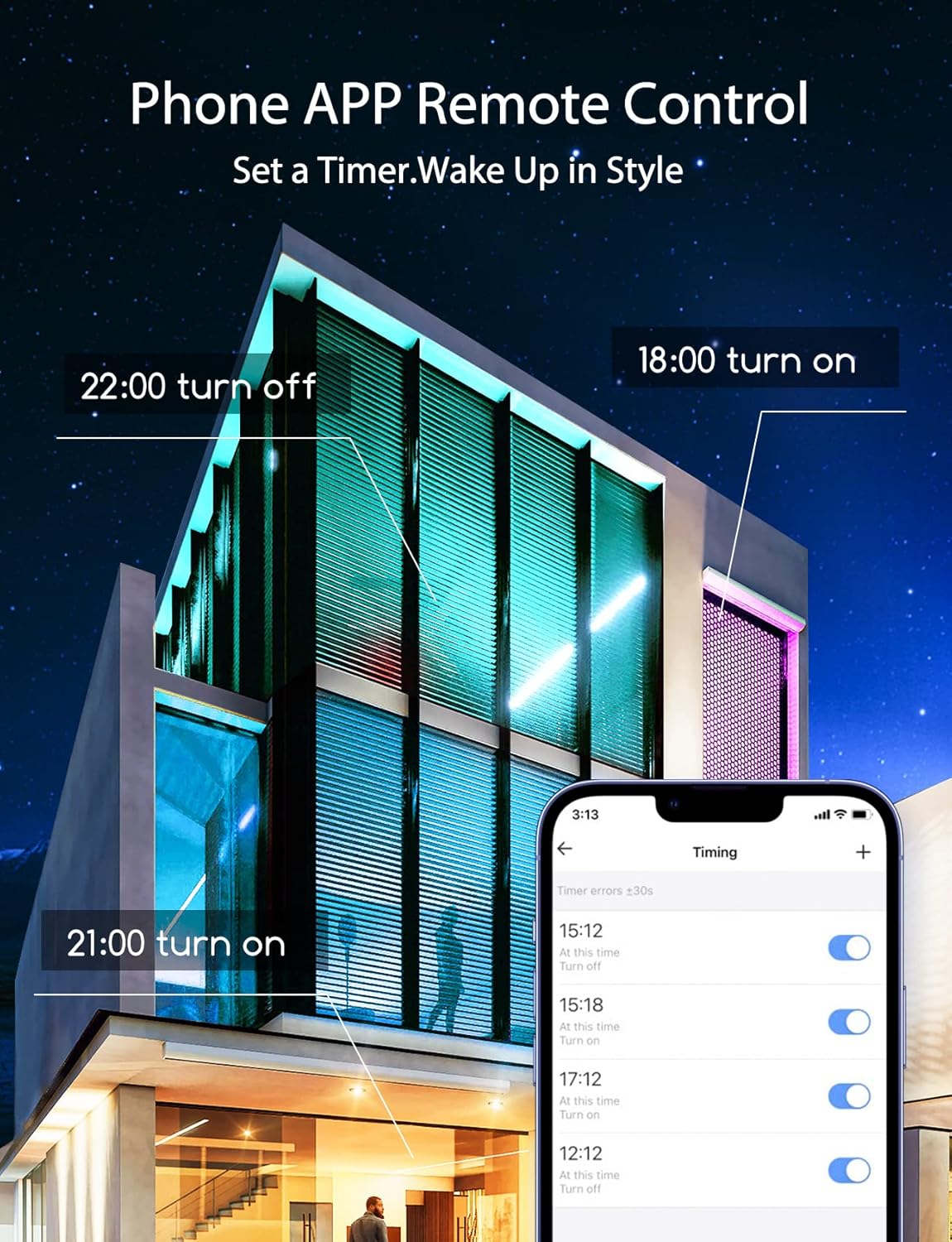
Image: A modern building illuminated by smart LED strip lights, with a smartphone displaying the Aigosmart app's timer and schedule settings, showing options to set specific turn-on and turn-off times.
Manteniment
- Neteja: Disconnect power before cleaning. Use a soft, dry cloth to wipe the LED strip and control box. Do not use liquid cleaners or abrasive materials.
- Adhesió: If the adhesive weakens over time, use the provided fixed clips or additional double-sided tape to secure the strip.
- Emmagatzematge: When not in use for extended periods, store the strip light in a cool, dry place, away from direct sunlight and extreme temperatures.
Resolució de problemes
| Problema | Causa possible | Solució |
|---|---|---|
| La tira de llums no s'encén. | No power connection; loose connection; faulty power adapter. | Check if the power plug is securely connected to the outlet and the control box. Ensure the power outlet is functional. Try a different outlet. |
| Lights are dim or inconsistent. | Insufficient power; strip is not fully unrolled; damaged section. | Ensure the strip is fully unrolled. Check for any physical damage. Verify power supply is adequate. |
| No es pot connectar a la Wi-Fi/aplicació. | Incorrect Wi-Fi band (not 2.4GHz); incorrect password; device not in pairing mode; Wi-Fi signal too weak. | Ensure your router is broadcasting a 2.4GHz Wi-Fi signal. Re-enter Wi-Fi password carefully. Put the device into pairing mode as per the App User Manual. Move closer to the router. |
| El comandament a distància no funciona. | Battery depleted; obstruction to IR sensor; remote out of range. | Replace the remote control battery. Ensure there is no obstruction between the remote and the control box's IR sensor. Operate within the specified range. |
| La sincronització musical no respon. | Microphone sensitivity too low; ambient noise interference. | Adjust the microphone sensitivity in the Aigosmart APP. Reduce background noise for better performance. |
Especificacions del producte
| Característica | Detall |
|---|---|
| Marca | Aigostar |
| Número de model | AG-DD |
| Tipus de font de llum | LED |
| Color clar | Multicolor (RGB) |
| Nombre de fonts de llum | 300 |
| Longitud | 32.8 FT |
| Font d'alimentació | Elèctric amb cable |
| Ús interior/exterior | Interior |
| Característiques especials | Dimmable, Linkable, Adjustable, Music Sync, Timer, App Control, Voice Control |
| Mètode de control | Aplicació, comandament a distància, veu (Alexa, Assistent de Google) |
| Tecnologia de connectivitat | Wi-Fi (2.4 GHz) |
| Material | Metall |
| Pes de l'article | 12.6 unces |
| Dimensions del paquet | 7.56 x 6.38 x 2.68 polzades |
| Nivell de resistència a l'aigua | No resistent a l'aigua |
Garantia i Suport
For warranty information or technical support, please refer to the contact details provided in the original product packaging or visit the official Aigostar weblloc web. Conserveu el rebut de compra com a comprovant de compra per a qualsevol reclamació de garantia.
Aigostar is dedicated to providing quality products and customer satisfaction. For further assistance, please contact Aigostar customer service.