
Introducció
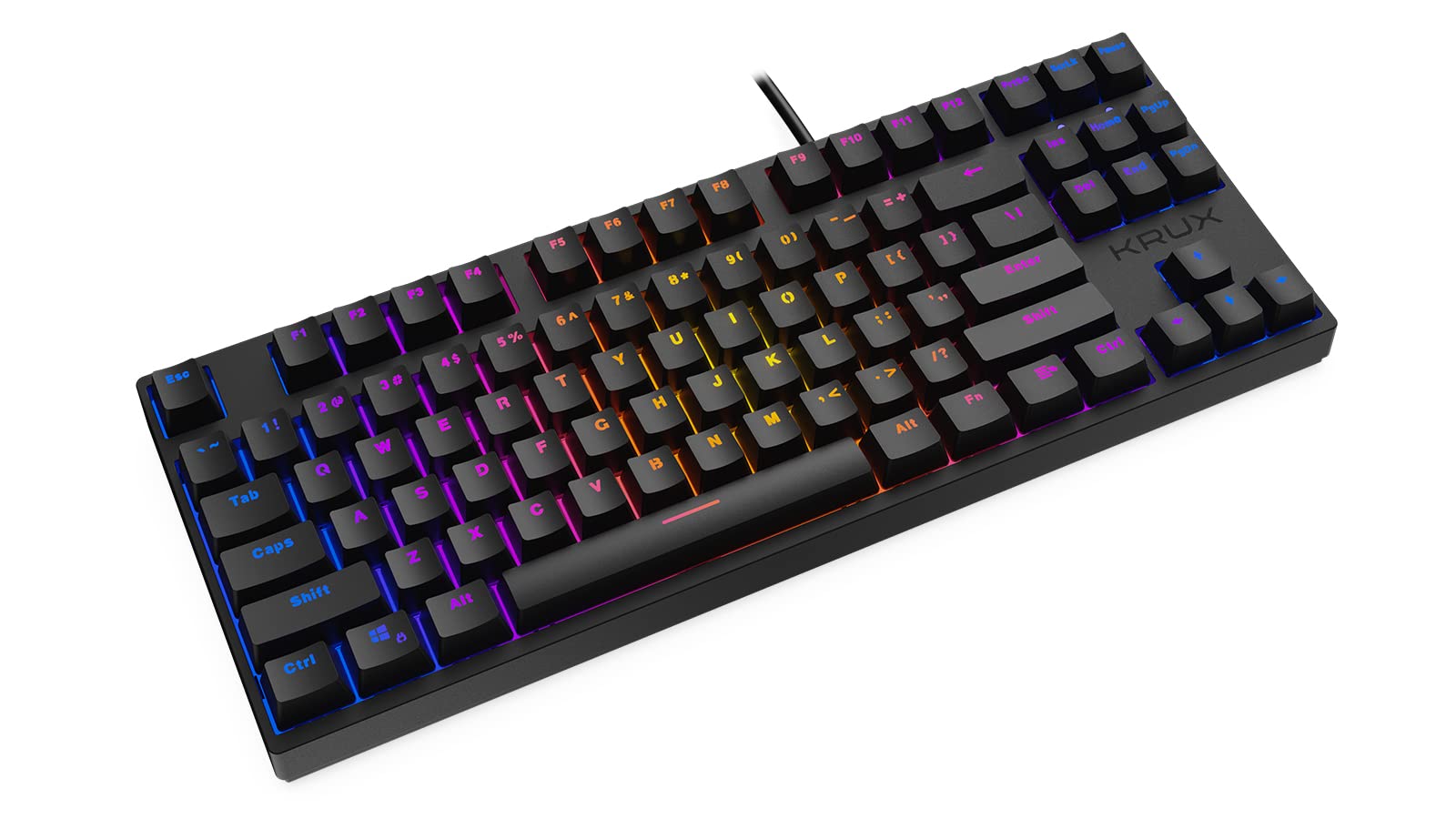
Thank you for choosing the KRUX Atax Pro RGB Outemu Brown KRX0039 Wired Gaming Keyboard. This manual provides essential information for setting up, operating, maintaining, and troubleshooting your new mechanical gaming keyboard. Please read this manual thoroughly before use to ensure optimal performance and longevity of your device.
Configuració
Follow these steps to set up your KRUX Atax Pro RGB keyboard:
- Descomprimir el teclat: Traieu amb cura el teclat del seu embalatge. Assegureu-vos que hi hagi tots els components.
- Connexió a l'ordinador: Plug the USB-A connector of the keyboard cable into an available USB-A port on your computer or laptop.
- Instal·lació del controlador: El teclat és plug-and-play. El vostre sistema operatiu (Windows, macOS, Linux) hauria de detectar i instal·lar automàticament els controladors necessaris. Normalment no cal instal·lar cap programari addicional per a la funcionalitat bàsica.
- Posicionament: Place the keyboard on a stable, flat surface. Adjust the rear feet for your preferred typing angle.
Instruccions de funcionament
The KRUX Atax Pro RGB keyboard offers various functions beyond standard typing:
Funcions bàsiques de la clau
- Claus estàndard: All standard alphanumeric and symbol keys function as expected.
- Tecles de funció (F1-F12): These keys perform their standard functions.
- Clúster de navegació: Includes Insert, Home, Page Up, Delete, End, Page Down for document navigation.
- Tecles de fletxa: Standard directional control.
Control de retroil·luminació RGB
The keyboard features customizable RGB backlighting. Use the following key combinations with the Fn key (located near the right Alt key) to control lighting effects:
- Fn + F1-F12: Specific multimedia or system functions (refer to keycap legends for exact functions).
- Fn + Impr Pant: Cycle through various RGB lighting modes.
- Fn + Scrlk: Ajusteu la brillantor de la llum de fons.
- Fn + Pausa: Change backlight color or direction in certain modes.

Característiques de joc
- Canvi de clau N: The keyboard supports N-key rollover, allowing multiple simultaneous key presses to be registered accurately, which is beneficial for gaming.
- Anti-fantasma: Prevents unintended key presses from registering when multiple keys are pressed at once.
Manteniment
Un manteniment adequat garanteix la longevitat i el rendiment del teclat:
- Neteja de les tecles: Utilitzeu un suau, damp cloth with mild soap and water to gently wipe the keycaps. Avoid excessive moisture.
- Neteja sota les tecles: For deeper cleaning, you may carefully remove keycaps using a keycap puller (not included) and use compressed air to remove dust and debris from the switches.
- Neteja del xassís: Wipe the keyboard chassis with a dry or slightly damp tela.
- Eviteu líquids: Do not spill liquids on the keyboard. If a spill occurs, immediately unplug the keyboard and allow it to dry completely before reconnecting.
- Emmagatzematge: Guardeu el teclat en un lloc fresc i sec, allunyat de la llum solar directa i de temperatures extremes.

Resolució de problemes
If you encounter issues with your KRUX Atax Pro RGB keyboard, try the following solutions:
- El teclat no respon:
- Assegureu-vos que el cable USB estigui ben connectat tant al teclat com a l'ordinador.
- Prova de connectar el teclat a un port USB diferent.
- Reinicieu l'ordinador.
- Prova el teclat en un altre ordinador per descartar un problema específic del sistema.
- RGB Backlighting Not Working:
- Check if the backlight brightness is turned down (Fn + Scrlk).
- Cycle through lighting modes (Fn + PrtSc) to see if it reactivates.
- Assegureu-vos que el teclat rebi prou energia del port USB.
- Claus específiques que no es registren:
- Remove the keycap and check for any debris or obstruction around the switch. Use compressed air to clean.
- If the issue persists, it may indicate a faulty switch.
- Ghosting or Input Lag:
- Assegureu-vos que els controladors USB de l'ordinador estiguin actualitzats.
- Avoid connecting the keyboard through unpowered USB hubs.
Especificacions
| Característica | Detall |
|---|---|
| Marca | Krux |
| Nom del model | Atax PRO RGB Outemu Brown TKL |
| Número de model | KRX0039 |
| Tecnologia de connectivitat | USB-A (amb cable) |
| Descripció del teclat | Mecànica |
| Tipus de canvi | Outemu Brown (Tactile) |
| Nombre de claus | 87 |
| Llum de fons | RGB |
| Color | Negre |
| Usos recomanats | Jocs |
| Pes de l'article | 940 grams |
| Dispositius compatibles | Portàtil, PC |

Garantia i Suport
Garantia: Aquest producte ve amb un Garantia del fabricant de 2 anys from the date of purchase. This warranty covers defects in materials and workmanship under normal use. It does not cover damage caused by misuse, accident, modification, or unauthorized repair.
Suport tècnic: For technical assistance, warranty claims, or further inquiries, please contact KRUX customer support through their official website or the retailer where the product was purchased. Please have your product model number (KRX0039) and proof of purchase ready when contacting support.