
GRAUGEAR G-M2DK-AC-10G
GRAUGEAR M.2 NVMe/SATA SSD Docking Station User Manual
Model: G-M2DK-AC-10G
Marca: GRAUGEAR
Introducció
Gràcies per la compraasing the GRAUGEAR M.2 NVMe/SATA SSD Docking Station. This device is designed to provide a high-speed, tool-free solution for accessing M.2 NVMe and SATA SSDs. Featuring a built-in cooling fan and USB 3.2 Gen 2 (10Gbps) connectivity, it ensures stable and efficient data transfer while maintaining optimal operating temperatures for your SSDs. This manual provides detailed instructions for setup, operation, maintenance, and troubleshooting.

Figure 1: GRAUGEAR M.2 NVMe/SATA SSD Docking Station and accessories.
Informació de seguretat
- Mantingueu el dispositiu allunyat de l'aigua, el foc i les altes temperatures.
- No intenteu desmuntar o modificar el dispositiu.
- Assegureu-vos que hi hagi una ventilació adequada al voltant del dispositiu durant el funcionament.
- Feu servir només els cables i accessoris proporcionats.
- Eviteu deixar caure o sotmetre el dispositiu a forts impactes.
- Unplug the device from the power source when not in use or during cleaning.
Contingut del paquet
Si us plau, comproveu el contingut del paquet per assegurar-vos que hi hagi tots els elements:
- GRAUGEAR M.2 SSD Docking Station
- USB Type-A to Type-C Cable (x1)
- USB Type-C to Type-C Cable (x1)
- Thermal Pad (x1)
- Aluminum Heatsink (x1)
- SSD Fixing Rubber Pins (x2)
- Manual d'usuari
- Targeta de garantia
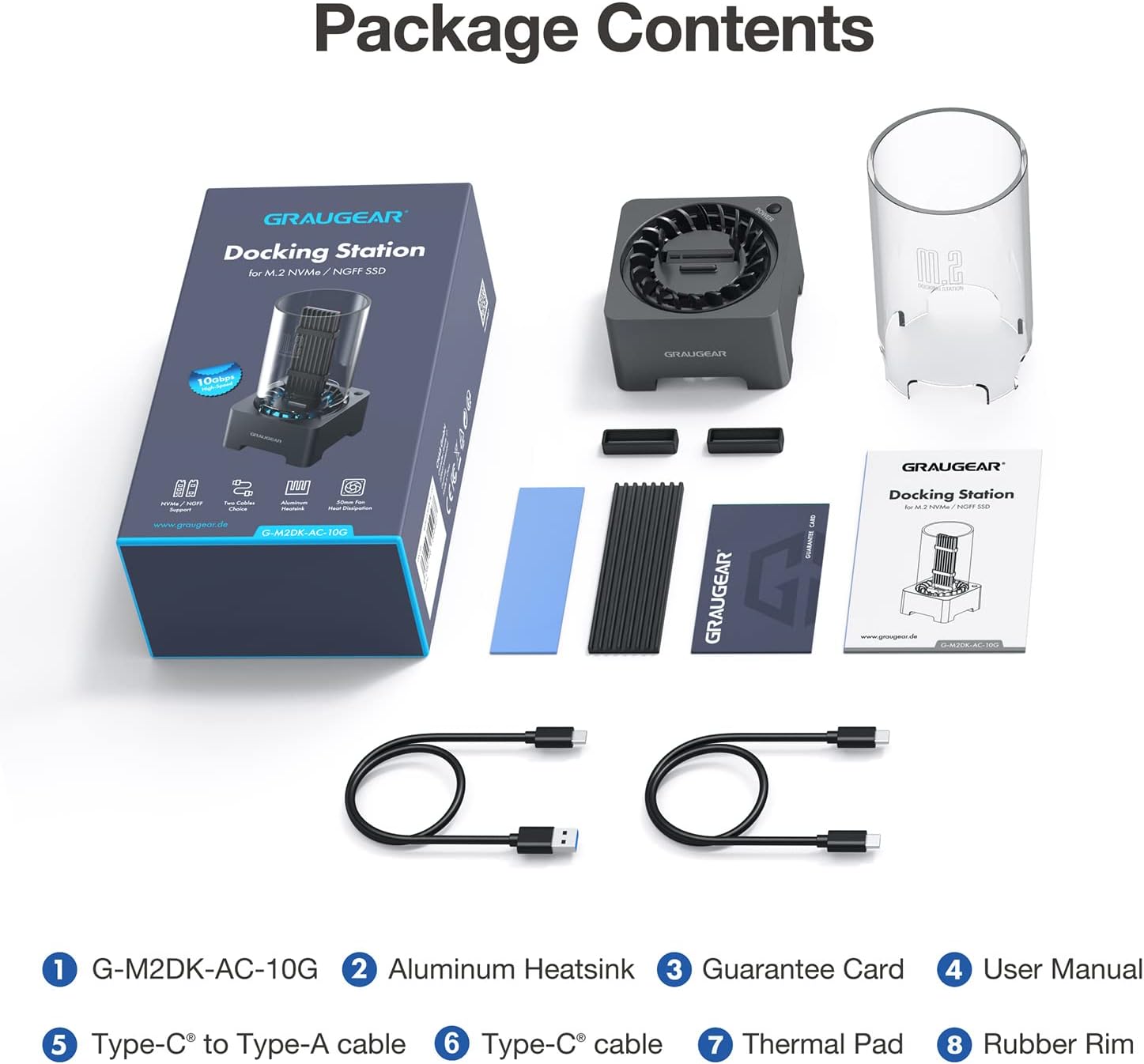
Figura 2: Tots els elements inclosos al paquet del producte.
Configuració
1. Compatibilitat amb SSD
This docking station supports both M.2 NVMe and M.2 SATA SSDs. It is compatible with various M.2 SSD sizes: 2230, 2242, 2260, 2280, and 22110. It also accommodates M.2 SSDs with pre-installed heatsinks.
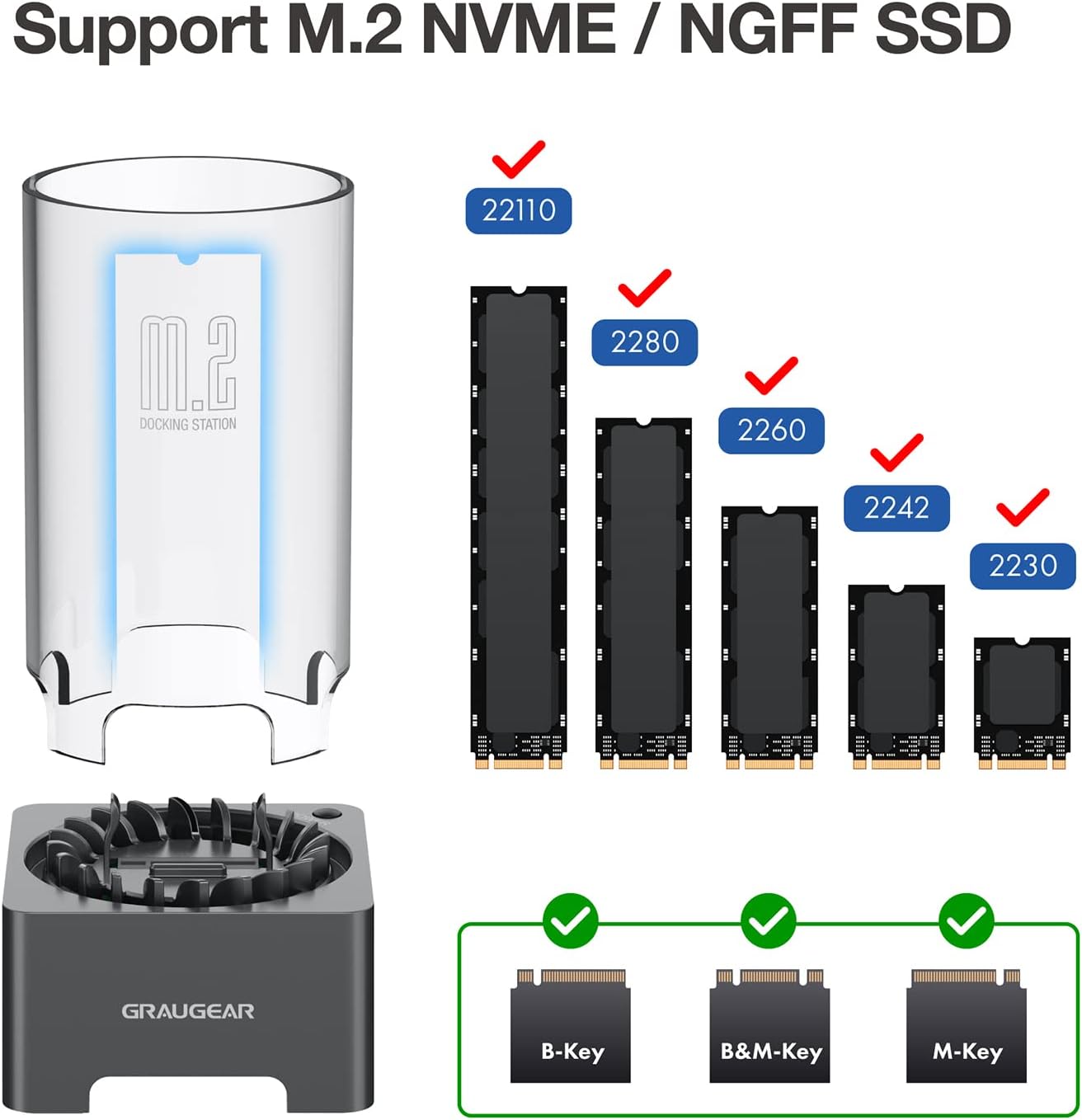
Figure 3: Supported M.2 SSD form factors and key types.

Figure 4: The docking station is designed to accommodate M.2 SSDs with various integrated heatsinks.
2. SSD Installation (Tool-Free)
The GRAUGEAR docking station features a tool-free design for easy SSD installation.
- If your M.2 SSD does not have a heatsink, you may install the provided thermal pad and aluminum heatsink onto your M.2 SSD.
- Insert the M.2 SSD into the slot on the docking station. Ensure the SSD is fully seated and secured by the internal fixing bracket. The SSD fixing rubber pins help stabilize the SSD.
- Place the transparent protective tube over the SSD and onto the docking station base.
- Connect the docking station to your computer using one of the provided USB cables (Type-A to Type-C or Type-C to Type-C).
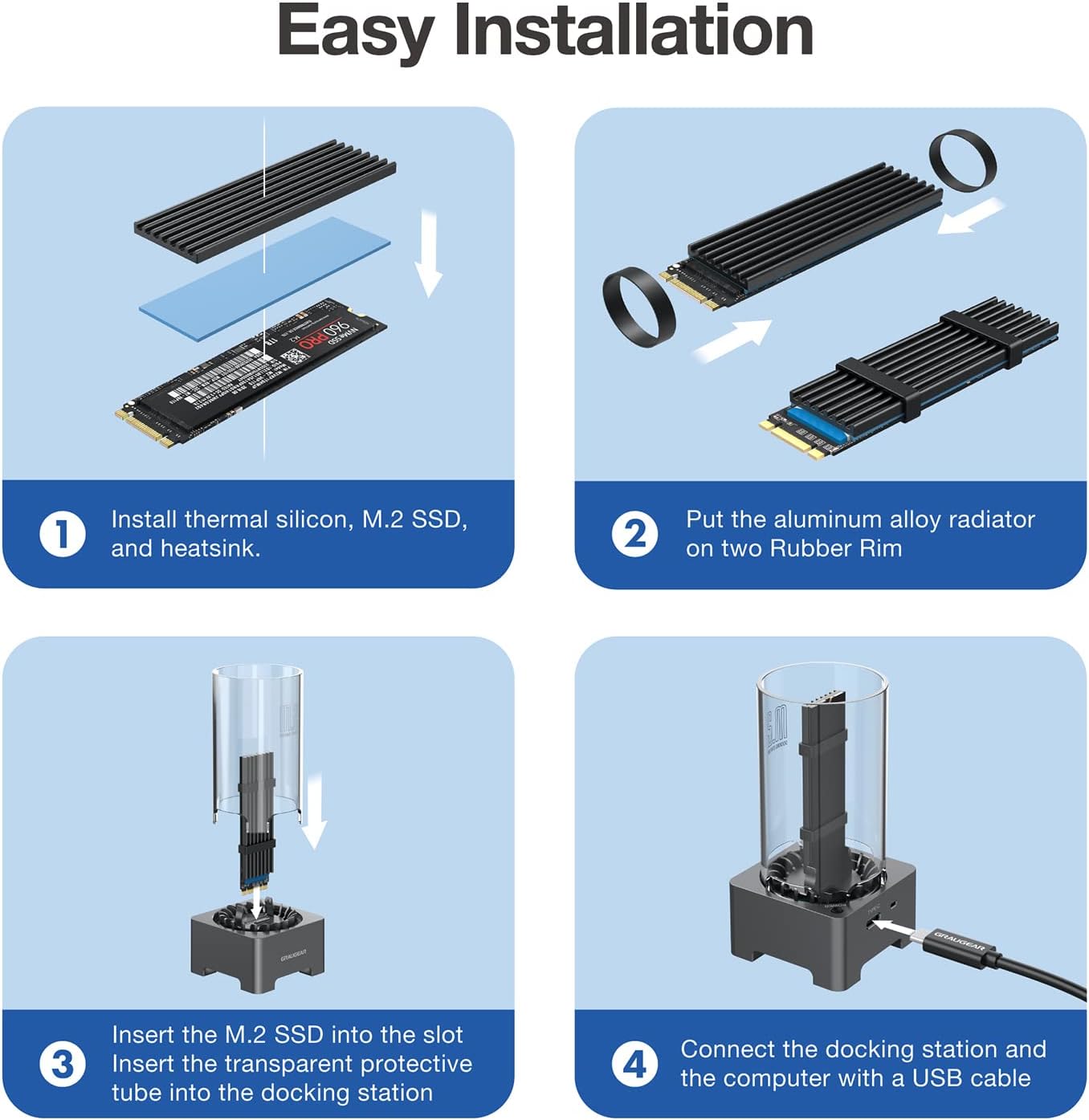
Figure 5: Easy installation steps for the M.2 SSD.
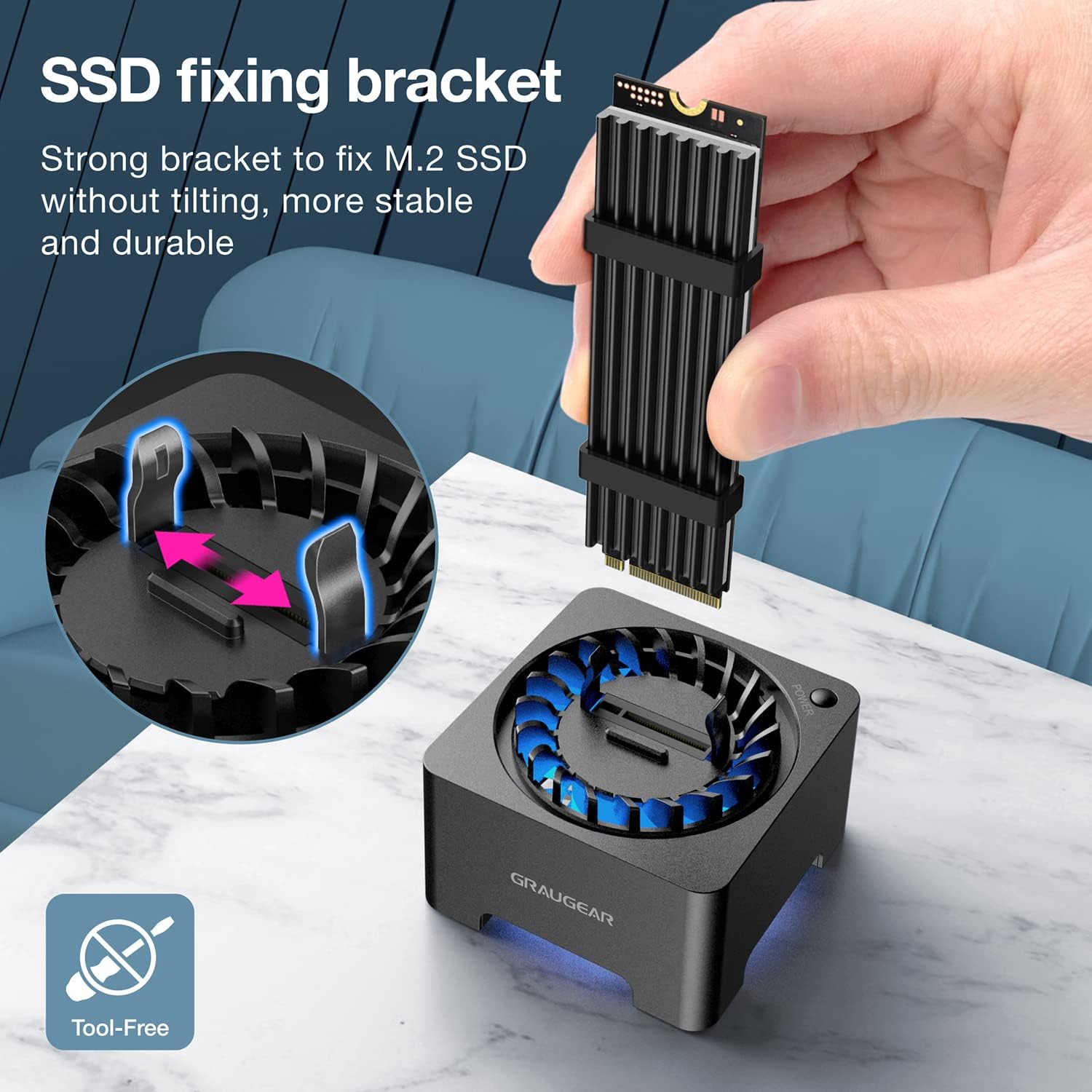
Figure 6: The internal SSD fixing bracket ensures stability.
Nota: If you are using a brand new SSD, it may need to be initialized and partitioned before it can be recognized by your operating system. Please refer to your operating system's documentation for instructions on disk management.
Instruccions de funcionament
1. Encendre/apagar
The docking station features a manual power switch. Press the power button located on the side of the unit to turn it on. The blue LED indicator will illuminate, and the cooling fan will activate. To turn off the device, press the power button again.
2. Transferència de dades
The docking station supports USB 3.2 Gen 2, offering data transfer speeds of up to 10Gbps. For optimal performance, connect the device to a USB 3.2 Gen 2 compatible port on your computer. When using a SATA protocol SSD, the maximum theoretical transfer speed is 6Gbps.

Figure 7: High-speed data transfer capabilities.
3. Cooling Fan Operation
The built-in 50mm cooling fan automatically adjusts its speed to optimize cooling performance and minimize noise. This active cooling system helps reduce SSD temperatures by up to 60%, preventing thermal throttling and extending the lifespan of your M.2 SSD.

Figure 8: The integrated cooling fan actively dissipates heat from the SSD.
Manteniment
- To clean the device, gently wipe the exterior with a soft, dry cloth.
- Eviteu utilitzar netejadors líquids o materials abrasius.
- Periodically check the fan area for dust accumulation and clean it carefully with compressed air if necessary to maintain optimal cooling performance.
- Ensure the transparent protective tube is free of dust to allow for proper airflow and visibility.
Resolució de problemes
| Problema | Causa possible | Solució |
|---|---|---|
| SSD not recognized by computer. |
|
|
| Velocitats de transferència de dades lentes. |
|
|
| Cooling fan not spinning or making unusual noise. |
|
|
| "USB surge" or power error messages. |
|
|
Especificacions
| Característica | Descripció |
|---|---|
| Número de model | G-M2DK-AC-10G |
| Marca | GRAUGEAR |
| Dispositius compatibles | M.2 NVMe/SATA SSD (B-Key, B+M Key, M-Key) |
| Mides SSD compatibles | 2230, 2242, 2260, 2280, 22110 |
| Capacitat màxima d'emmagatzematge | Fins a 8 TB |
| Velocitat de transferència de dades | Fins a 10 Gbps (USB 3.2 Gen 2) |
| Chipset | Realtek RTL9210B |
| Sistema de refrigeració | Built-in 50mm automatic speed control fan |
| Interfície | USB tipus C |
| Material | Plàstic |
| Dimensions del producte | 5.7 x 5.7 x 11.3 cm (2.2 x 2.2 x 4.5 polzades) |
| Pes del producte | 10 grams (0.35 unces) |
| Sistema operatiu compatible | Windows, macOS, Linux, Android |
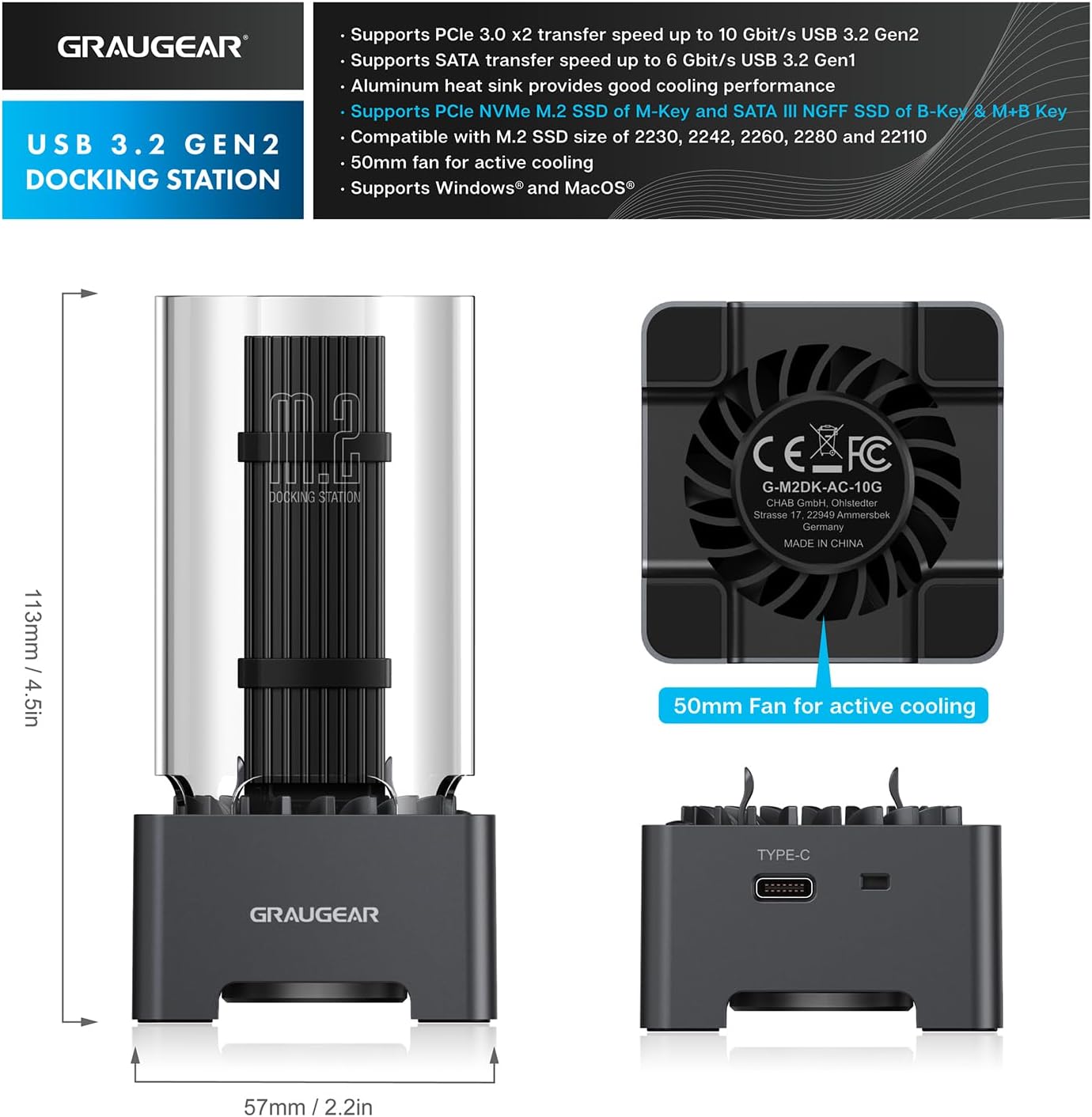
Figura 9: Dimensions del producte i característiques principals.
Garantia i Suport
GRAUGEAR products come with a standard warranty. Please refer to the included Guarantee Card for specific warranty terms and conditions.
Atenció al client
If you encounter any issues or have questions regarding your GRAUGEAR M.2 SSD Docking Station, please contact our customer support team.
- For the fastest support, please visit the official GRAUGEAR weblloc web amb preguntes freqüents i informació de contacte.
- When contacting support, please have your product model number (G-M2DK-AC-10G) and purchase details ready.
Ask a question about this manual
Ask about setup, troubleshooting, compatibility, parts, safety, or missing instructions. Manuals+ will review the question and use this page’s manual context to help answer it.