
1. Introducció
This manual provides detailed instructions for the operation and maintenance of your LFF DAB+/FM Digital Radio, Model YT81107. Please read this manual thoroughly before using the device to ensure proper function and to maximize your listening experience.

Imatge 1: Frontal view of the LFF DAB+/FM Digital Radio, Model YT81107, featuring its speaker grille, color LCD display, and telescopic antenna.
2. Contingut del paquet
Si us plau, comproveu el paquet per veure si hi ha els elements següents:
- 1 x LFF DAB Digital Radio (Model YT81107)
- 1 x adaptador de corrent altern
- 1 x Guia d'inici ràpid (aquest manual)
Si falta algun article o està danyat, poseu-vos en contacte amb el servei d'atenció al client immediatament.
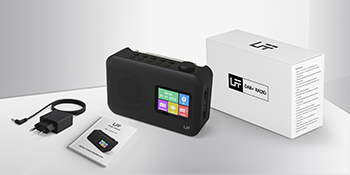
Image 2: The LFF DAB+/FM Digital Radio, AC power adapter, and quick start guide as included in the package.
3. Característiques del producte
The LFF DAB+/FM Digital Radio YT81107 offers a range of features designed for versatile listening:
- DAB+ and FM Digital Radio: Supports ultra-wide signals in DAB+ (174.928 - 239.2 MHz) and FM (87.5 - 108 MHz) bands.
- Presets d'estació: Store up to 30 FM and 30 DAB+ stations for quick access.
- Pantalla LCD clara: Large color LCD screen displays station information and time.
- Opcions d'alimentació flexibles: Operates with the included AC adapter or 4 x 1.5V (LR6, AA) batteries (not included).
- Enhanced Reception: Features a 39 cm extendable antenna for improved signal strength.
- Temporitzador de son: Programmable sleep timer (15/30/45/60/90/120 minutes).
- Rellotge despertador dual: Establiu dues alarmes independents.
- Connectivitat Bluetooth: Functions as a Bluetooth speaker for streaming audio from compatible devices.
- Auriculars Jack: Jack de 3.5 mm per a escolta privada.

Imatge 3: acabatview of the radio's functions, including DAB+ radio, 60 presets, FM radio, sleep timer, headphone jack, Bluetooth, full-color screen, and dual alarm.

Image 4: Close-up of the radio's full-color LCD display, showing time and date.
4. Configuració
4.1 Alimentació del dispositiu
Your radio can be powered by either the AC adapter or batteries.
- Alimentació CA: Connect the included AC adapter to the DC 5V input port on the radio and plug the other end into a standard wall outlet.
- Potència de la bateria: Open the battery compartment on the back of the radio. Insert 4 x 1.5V AA (LR6) batteries, ensuring correct polarity. Close the compartment securely. (Les piles no estan incloses.)
4.2 Ajust de l'antena
Extend the telescopic antenna fully and adjust its angle for optimal reception. For DAB+ and FM radio, a fully extended antenna generally provides the best signal.

Image 5: Illustration of the radio's dimensions (16.1 x 10.9 x 5.6 cm), battery requirements (4 x 1.5V AA), AC adapter (5V/1000mA), and the 360° adjustable antenna.
4.3 Initial Scan for Stations
Upon first power-on, the radio will typically perform an automatic scan for available DAB+ and FM stations. This process may take a few minutes. Once complete, the radio will store the found stations.
5. Instruccions de funcionament
5.1 Encesa/apagada
Premeu el botó Poder button (usually located on the top or front panel) to turn the radio on or off.
5.2 Selecció del mode
Premeu el botó Mode button to cycle through available modes: DAB+ Radio, FM Radio, and Bluetooth.
5.3 Tuning Radio Stations (DAB+/FM)
There are three primary ways to find and select radio stations:
- Escaneig automàtic: In DAB+ or FM mode, initiate an auto-scan. The radio will search for and list all available stations.
- Cerca manual: Use the tuning knob or navigation buttons to manually adjust the frequency.
- Presets: Store your favorite stations to preset numbers (1-30 for FM, 1-30 for DAB+). To save a station, tune to it, then press and hold a preset number button until the display confirms storage. To recall a station, simply press the corresponding preset number button.

Image 6: Visual representation of the three methods for selecting radio stations: Automatic Scan, Manual Search, and using Presets.
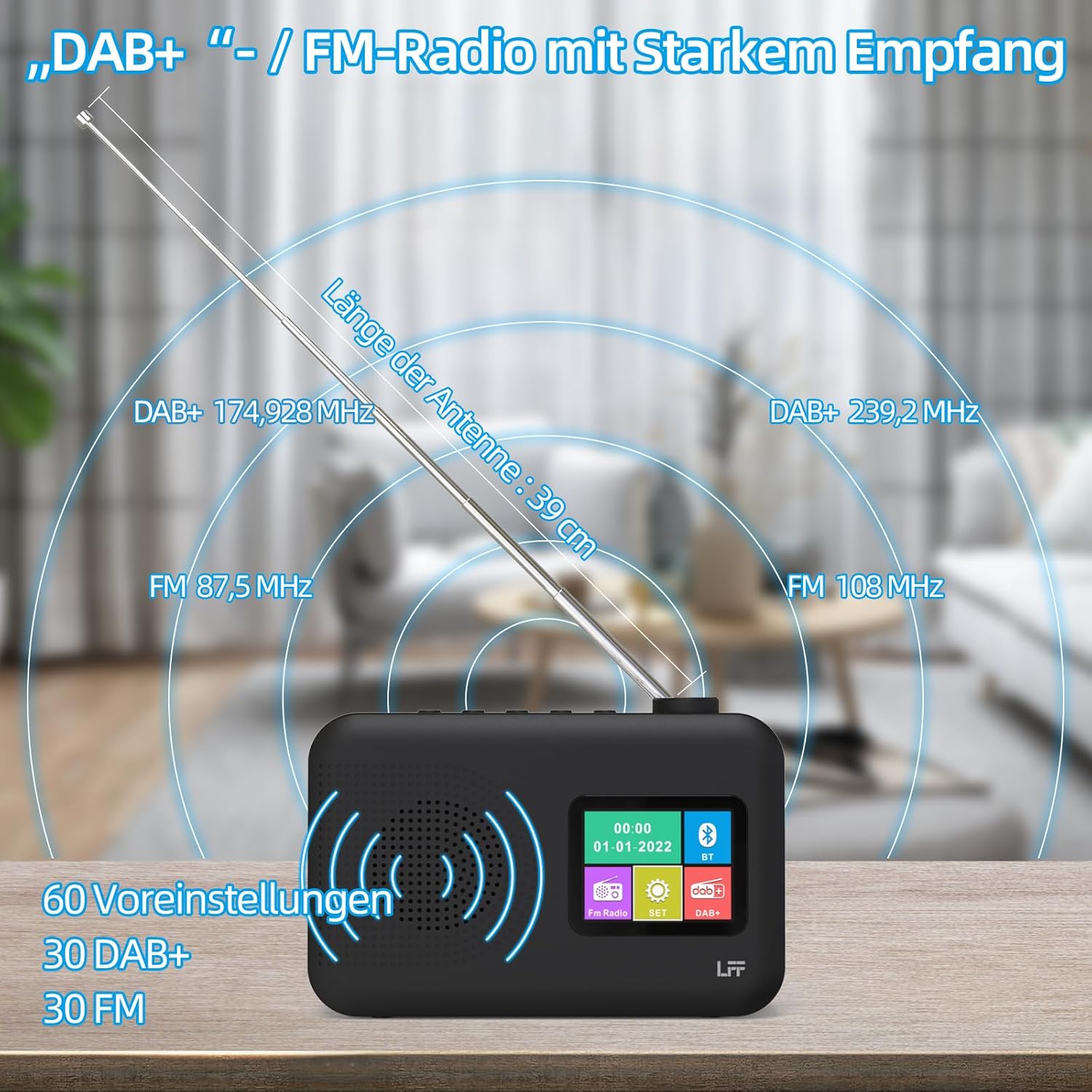
Image 7: Diagram showing the radio's reception capabilities for DAB+ (174.928 - 239.2 MHz) and FM (87.5 - 108 MHz) bands, highlighting the 39 cm antenna and 60 total presets.
5.4 Control de volum
Adjust the volume using the dedicated volume knob or buttons, typically located on the top or side of the radio. The radio features 16 adjustable volume levels.
5.5 Temporitzador de repòs
To activate the sleep timer:
- Premeu el botó Temporitzador de dormir botó.
- Cycle through the available durations: 15, 30, 45, 60, 90, or 120 minutes.
- La ràdio s'apagarà automàticament després del temps seleccionat.

Image 8: Visual guide to setting the sleep timer, showing options for 15, 30, 45, 60, 90, and 120 minutes.
5.6 Rellotge despertador dual
Per configurar les alarmes:
- Premeu el botó Alarma button to access alarm settings.
- Seleccioneu Alarma 1 o Alarma 2.
- Set the desired alarm time, alarm source (e.g., buzzer, DAB+, FM), and volume.
- Confirmeu la vostra configuració.

Image 9: Depiction of the dual alarm clock feature, allowing for two separate alarm settings (Alarm 1 and Alarm 2).
5.7 Connectivitat Bluetooth
Per vincular el dispositiu mitjançant Bluetooth:
- Switch the radio to Bluetooth mode. The display will indicate it is searching for devices.
- Al telèfon intel·ligent o a un altre dispositiu amb Bluetooth, cerqueu els dispositius Bluetooth disponibles.
- Select "LFF YT81107" (or similar name) from the list to pair.
- Once connected, you can stream audio from your device to the radio.
Note: This radio acts as a Bluetooth receiver. It cannot connect to Bluetooth headphones.

Image 10: The radio's display showing a successful Bluetooth connection, indicating the paired device name.
5.8 Ús d'auriculars
Plug standard 3.5mm wired headphones into the headphone jack on the side of the radio for private listening. The internal speaker will automatically mute when headphones are connected.

Image 11: Close-up of the 3.5mm headphone jack located on the side of the radio.
6. Manteniment
To ensure the longevity and optimal performance of your radio, follow these maintenance guidelines:
- Neteja: Feu servir un drap suau i sec per netejar l'exterior de la ràdio. No utilitzeu productes de neteja abrasius, ceres ni dissolvents.
- Emmagatzematge: When not in use for extended periods, remove batteries and store the radio in a cool, dry place.
- Medi ambient: Eviteu exposar la ràdio a temperatures extremes, llum solar directa, humitat elevada o ambients polsosos.
- Exposició a l'aigua: Aquesta ràdio no és impermeable. Mantingueu-la allunyada de l'aigua i dels líquids.
7. Solució De Problemes
Si teniu problemes amb la ràdio, consulteu els següents problemes i solucions habituals:
| Problema | Causa possible | Solució |
|---|---|---|
| Sense poder | AC adapter not connected, batteries depleted or incorrectly inserted. | Assegureu-vos que l'adaptador de CA estigui ben connectat. Canvieu les piles o comproveu la polaritat. |
| Mala recepció de ràdio | Antena no estesa, zona de senyal feble, interferències. | Fully extend and adjust the antenna. Move the radio to a different location. Avoid placing near other electronic devices. |
| Bluetooth no connectat | Radio not in Bluetooth mode, device not discoverable, already paired with another device. | Ensure radio is in Bluetooth mode. Make sure your device's Bluetooth is on and discoverable. Disconnect from other Bluetooth devices. |
| L'alarma no sona | Alarm not activated, volume too low, incorrect time setting. | Verify alarm is set and enabled. Increase alarm volume. Check alarm time. |
| No hi ha so de l'altaveu | Volum massa baix, auriculars connectats. | Augmenta el volum. Desconnecta els auriculars. |
If the problem persists after trying these solutions, please contact LFF customer support.
8. Especificacions
| Característica | Detall |
|---|---|
| Marca | Extensió LFF |
| Número de model | YT81107 |
| Color | Negre |
| Dimensions (L x A x A) | 16.1 x 5.9 x 10.9 cm |
| Tecnologia d'afinació | DAB+ |
| Bandes de ràdio compatibles | DAB+ (174.928 - 239.2 MHz), FM (87.5 - 108 MHz) |
| Connectivitat | Bluetooth, 3.5mm Headphone Jack |
| Font d'alimentació | AC Adapter (5V/1000mA), 4 x 1.5V AA (LR6) Batteries |
| Característiques especials | Color LCD Display, Sleep Timer, Dual Alarm Clock, 60 Presets (30 DAB+, 30 FM) |
| Dispositius compatibles | Smartphones (for Bluetooth audio), Wired Headphones |
9. Garantia i Suport
LFF is committed to providing quality products. If you experience any quality issues or require assistance with your LFF DAB+/FM Digital Radio, please contact our customer support directly. Refer to the contact information provided in your purchase documentation or on the official LFF weblloc.