
1. Introducció
This manual provides detailed instructions for the installation, operation, and maintenance of your EMANER EMR-8040R Remote Control Motion Sensor Outdoor Flood Light. Please read this manual thoroughly before installation and use to ensure proper function and safety. This 28W LED flood light offers remote control functionality, tunable white color temperature, dimmable brightness, and two optional lighting modes (Always On or Motion Sensor Activated).
2. Característiques del producte
- Operació de control remot: Easily adjust brightness, color temperature, and lighting modes without needing to physically access the light fixture.
- Tunable White & Dimmable: Select color temperatures from Warm White (3000K), Daylight White (4500K), to Cool White (6000K). Brightness is adjustable from 10% to 100%. Features a memory function to retain settings.
- Dos modes d'il·luminació:
- Stay On Mode (PC button): Functions as a normal light, staying on continuously. Brightness and color temperature are adjustable.
- Motion Sensor Mode (PIR button): Activates the motion sensor. Brightness and color temperature are adjustable.
- Super Bright & Energy Saving: Generates a maximum of 2800 lumens at 28W, equivalent to a 150W halogen light, reducing electricity consumption.
- Easy Installation & Weatherproof: Designed for simple wall, eave, or soffit mounting. IP65 waterproof rating ensures durability in various weather conditions.
- Ultrasonic Welding Waterproof Technology: Enhanced protection against rain, sleet, and snow.
- Disseny durador: Constructed for long-lasting outdoor performance.
3. Components inclosos
Els components següents s'inclouen al paquet:
- EMANER EMR-8040R Flood Light Fixture
- Control remot
- Barra transversal
- Screws (A, B, C)
- Tapa de cargol
- Junta
- Tot el maquinari de muntatge necessari
4. Guia d'instal·lació
Before beginning installation, ensure the power supply is turned off at the circuit breaker to prevent electrical shock. It is recommended to have a qualified electrician perform the installation.
Passos d'instal·lació:
- Prepareu la caixa de connexions: Use Screw B to fix the cross bar to the junction box.
- Attach Gasket: Stick the gasket to the aluminum cross bar for a secure and weatherproof seal.
- Connecteu el cablejat: Connecteu els cables de la següent manera:
- Black wire (L) to Black wire
- White wire (N) to White wire
- Green wire to ground wire
- Muntar la Lamp Cos: Use Screw C to fix the lamp body to the cross bar Screw A through the middle hole. Secure with the screw cover.
- Instal·lació del segell: Apply silicone caulking compound completely around where the back plate meets the wall surface to ensure a waterproof seal.
Vídeo: EMANER Remote Control Security Light Installation Guide. This video demonstrates the step-by-step process for installing the EMANER flood light, including mounting the crossbar, wiring connections, and securing the fixture.

Imatge: Freely Adjustable Design. This image illustrates the dimensions of the flood light (11.96"L x 5"W x 6.7"H) and the 90-degree adjustable angles for the light heads and 180-degree rotation for the motion sensor, allowing for flexible light direction.
5. Instruccions de funcionament
Your EMANER flood light is controlled by a remote. Familiarize yourself with the remote control functions for optimal use.
Funcions del comandament a distància:
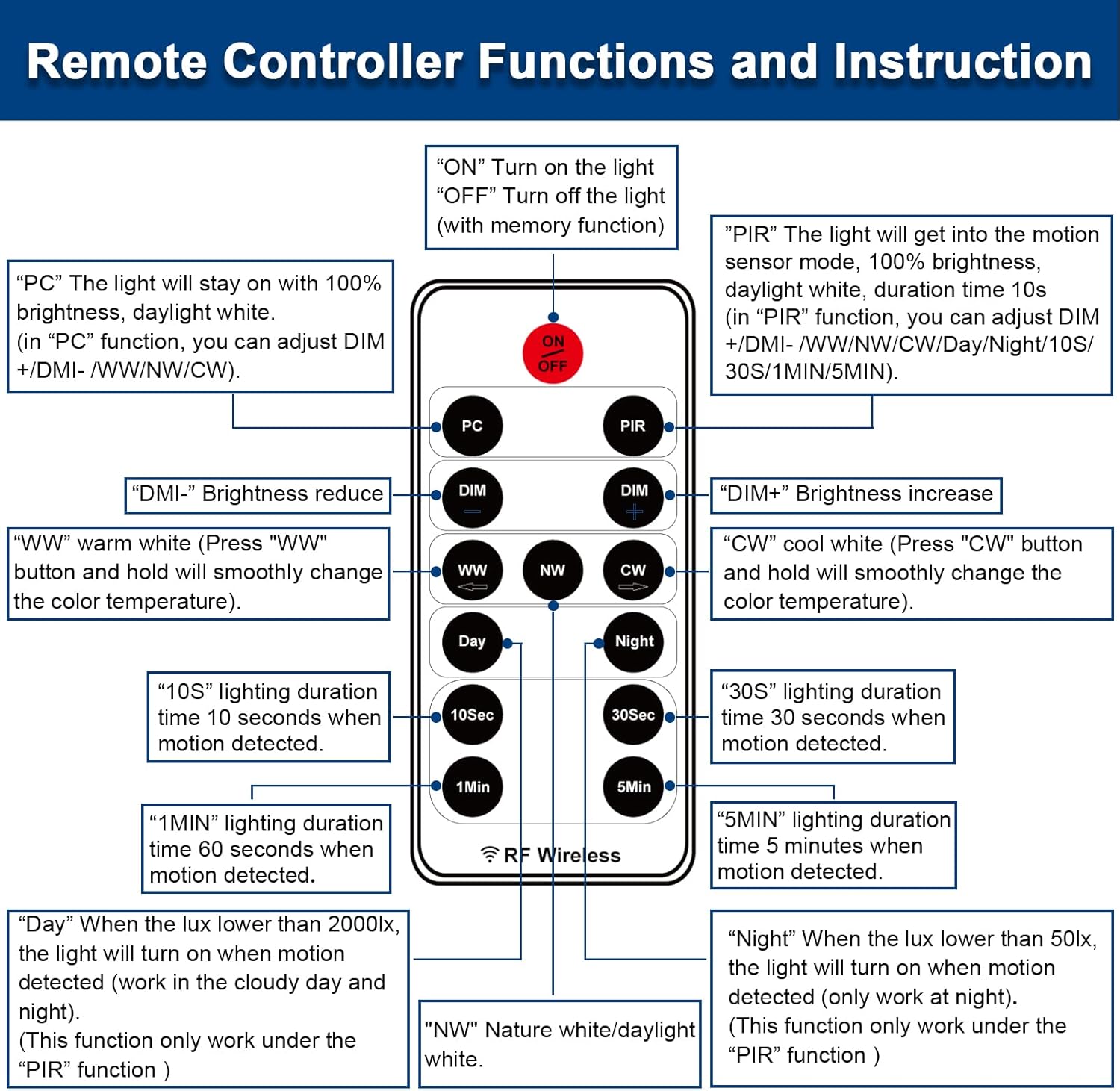
Imatge: Remote Controller Functions and Instruction. This diagram details each button on the remote control and its corresponding function for operating the flood light.
- ON/OFF: Turns the light on or off. The light has a memory function for previous settings.
- PC (Constant On Mode): Press to activate the 'Always On' mode. The light will stay on with 100% brightness in daylight white. You can adjust DIM+/DIM- and color temperature (WW/NW/CW) in this mode.
- PIR (Motion Sensor Mode): Press to activate the motion sensor mode. The light will turn on with 100% brightness in daylight white for 10 seconds when motion is detected. You can adjust DIM+/DIM-, color temperature (WW/NW/CW), and duration time (10S/30S/1MIN/5MIN) in this mode.
- DIM-/DIM+: Decreases or increases brightness (10% to 100%).
- WW (blanc càlid): Press and hold to smoothly change the color temperature to Warm White (3000K).
- NW (Nature White/Daylight White): Sets the color temperature to Nature White/Daylight White (4500K).
- CW (blanc fred): Press and hold to smoothly change the color temperature to Cool White (6000K).
- 10Sec/30Sec/1Min/5Min: Sets the lighting duration time (10 seconds, 30 seconds, 1 minute, or 5 minutes) when motion is detected in PIR mode.
- Dia: When the ambient light is lower than 2000 lux, the light will turn on when motion is detected (works in cloudy day and night). This function only works under the PIR mode.
- Nit: When the ambient light is lower than 50 lux, the light will turn on when motion is detected (only works at night). This function only works under the PIR mode.
Vídeo: Outdoor Security Lighting Motion Sensor Dusk to Dawn. This video demonstrates the EMANER flood light's motion sensing capabilities and its performance in outdoor settings, showcasing its brightness and coverage.

Imatge: Smooth Dimming from 0% to 100%. This image visually demonstrates the dimmable feature of the flood light, showing how the brightness can be adjusted from low to full intensity.
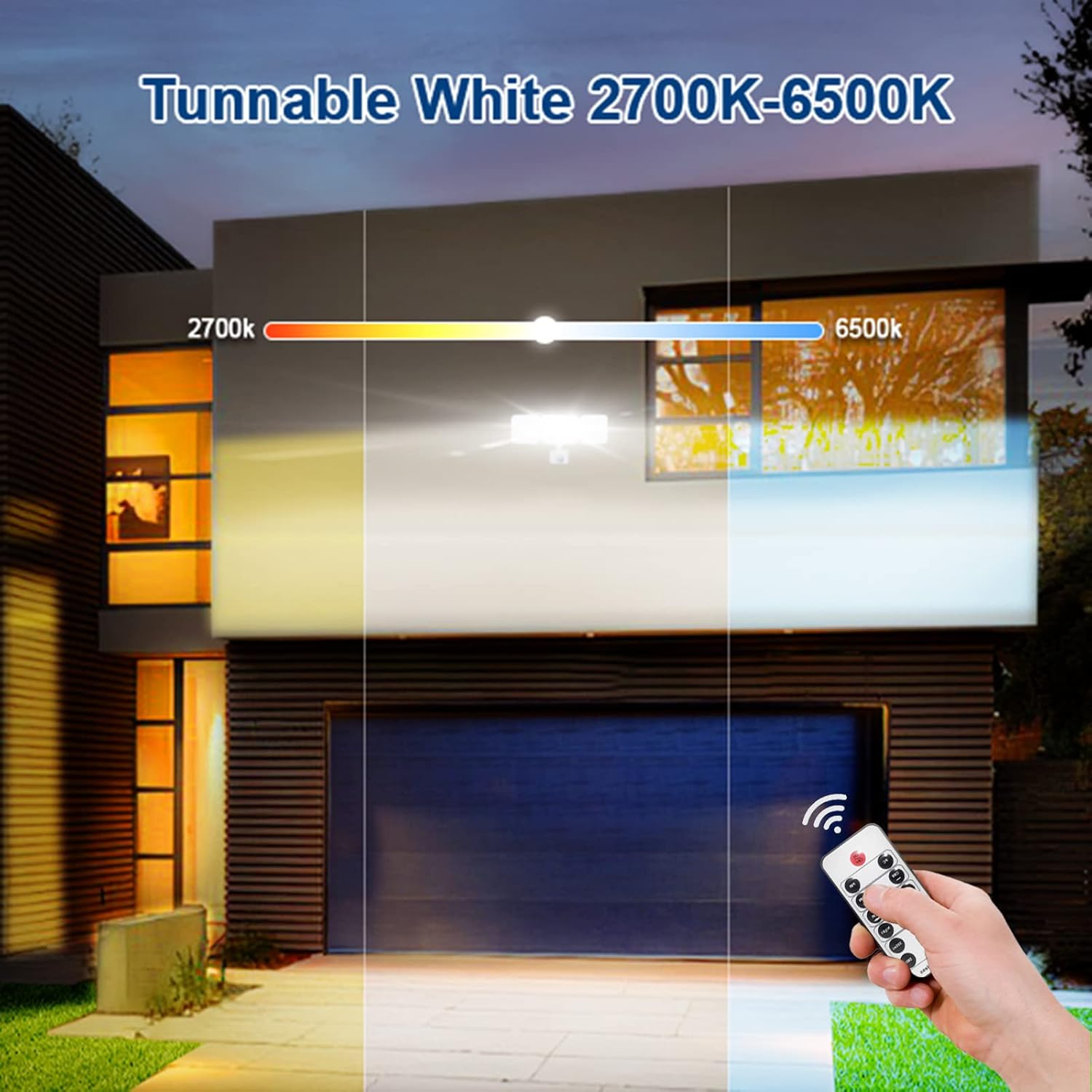
Imatge: Tunable White 2700K-6500K. This image illustrates the range of color temperatures available, from warm white to cool white, allowing users to select the desired ambiance.

Imatge: 2 Optional Lighting Modes. This image shows the difference between the 'Constant On Mode' (PC button) where the light stays on, and the 'Motion Sensor Mode' (PIR button) where the light activates upon motion detection.
6. Manteniment
To ensure optimal performance and longevity of your EMANER flood light, follow these maintenance guidelines:
- Neteja: Netegeu periòdicament la lluminària amb un drap suau iamp drap. No utilitzeu productes de neteja abrasius ni dissolvents, ja que poden danyar l'acabat o els components elèctrics.
- Inspecció: Regularly inspect the wiring and mounting hardware for any signs of wear, damage, or looseness. Tighten any loose screws and replace damaged components immediately.
- Àrea del sensor: Keep the motion sensor lens clear of obstructions (e.g., dirt, leaves, spiderwebs) per garantir una detecció precisa.
- Segellat: Check the silicone caulk around the base of the fixture annually and reapply if any cracks or gaps are present to maintain its waterproof integrity.
7. Solució De Problemes
If you encounter issues with your EMANER flood light, refer to the following common troubleshooting steps:
- La llum no s'encén:
- Comproveu si la font d'alimentació està connectada i si l'interruptor està activat.
- Ensure the remote control battery is functional and correctly inserted.
- Verify that the light is not in 'Night' mode during daylight hours, or 'Day' mode during dark hours if not intended.
- El sensor de moviment no detecta:
- Ensure the light is in 'PIR' (Motion Sensor) mode.
- Check for obstructions in front of the sensor lens.
- Confirm the sensor is aimed correctly and within the specified detection range (Max 26 feet, 180° sensing angle).
- Adjust the 'Day' or 'Night' settings on the remote to match ambient light conditions.
- El comandament a distància no respon:
- Substituïu la bateria del comandament a distància.
- Ensure there are no physical obstructions between the remote and the light fixture.
- La llum parpelleja o s'atenua inesperadament:
- Comproveu si hi ha connexions de cablejat soltes.
- Assegureu-vos que la font d'alimentació sigui estable.
If these steps do not resolve the issue, please contact EMANER customer support.
8. Especificacions
| Característica | Especificació |
|---|---|
| Marca | EMANER |
| Nom del model | EMR-8040R |
| Color | White Fixture |
| Material | Plàstic |
| Forma de llum | Reflector |
| Dimensions del producte | 11.96 cm de llargada x 5 cm d'amplada x 6.7 cm d'alçada |
| Ús interior/exterior | A l'aire lliure |
| Font d'alimentació | AC |
| Tipus d'instal·lació | Muntatge d'escorredor |
| Mètode de control | Remot |
| Tipus de font de llum | LED |
| Voltage | 120 Volts |
| Color clar | Cool White, Daylight White, Warm White (selectable CCT) |
| Wattage | 28 watts |
| Brillantor | 2800 lúmens (màx.) |
| Nivell de resistència a l'aigua | Impermeable (IP65) |
| Protocol de connectivitat | infrarojos |
| Temperatura de color | 3000K-6000K (Tunable) |
| Índex de reproducció del color (CRI) | 80.00 |
| Vida Mitjana | 50000 hores |
9. Garantia
The EMANER EMR-8040R Remote Control Motion Sensor Outdoor Flood Light comes with a Garantia de per vidaSi us plau, conserveu el comprovant de compra per a reclamacions de garantia.
10. Suport
For any questions, technical assistance, or warranty inquiries regarding your EMANER product, please contact EMANER customer support. You can typically find contact information on the product packaging or by visiting the official EMANER brand store online.
Visit the EMANER Store: EMANER Official Store