
Introducció
This manual provides instructions for the ROCCAT Vulcan II Max Optical-Mechanical Gaming Keyboard. This keyboard is designed for performance and functionality, featuring customizable RGB illumination and durable Titan II Optical Tactile switches. It offers a 100 million keystroke life cycle and compatibility with third-party keycaps.

Image: The ROCCAT Vulcan II Max keyboard shown in its retail packaging, highlighting its RGB features and optical-mechanical switches.
Configuració
- Connecteu el teclat: Plug the USB cable from the Vulcan II Max keyboard into an available USB port on your PC.
- Compatibilitat del sistema operatiu: The keyboard is compatible with Windows 10 and newer operating systems.
- Instal·lació de programari: For full functionality, including customization of RGB lighting, key reassignments, and firmware updates, download and install the ROCCAT Swarm software from the official ROCCAT weblloc.
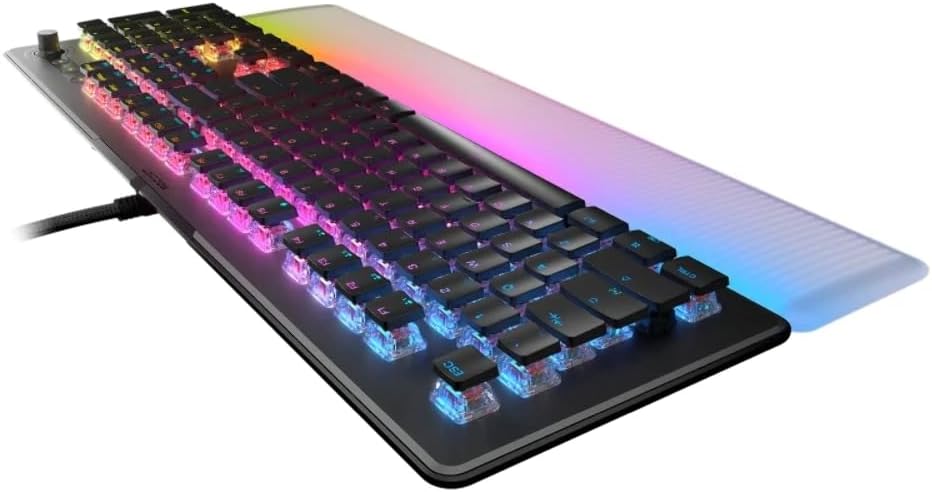
Imatge: Un costat view of the keyboard, illustrating its low-profile design and the integrated USB cable for connection to a PC.
Instruccions de funcionament
TITAN II Optical Switches
The Vulcan II Max features exclusive TITAN II Optical Tactile switches. These switches provide a smooth mechanical feel with hyper-fast actuation and a durability rating of 100 million clicks. They are designed with cross-shaped stems, allowing compatibility with many third-party keycaps for customization.
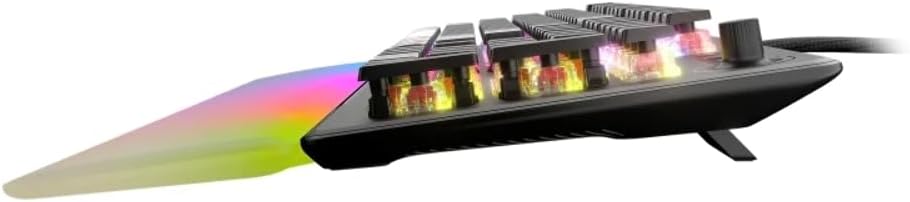
Imatge: Un costat detallat view of the keyboard, highlighting the transparent housing of the optical switches and their internal mechanism.
AIMO Illumination
The keyboard incorporates AIMO lighting technology, which produces vibrant and smooth RGB lighting effects. This system operates at double the refresh rate of standard gaming keyboards and can synchronize with other compatible AIMO-enabled products for an integrated lighting experience.
Reposamans desmuntable
A translucent, detachable palm rest is included to enhance comfort and extend the RGB lighting display. To attach, align the palm rest with the front edge of the keyboard and gently push until it clicks into place. To detach, pull the palm rest away from the keyboard.

Imatge: Vista de dalt a baix view del teclat, mostraasing the full layout with the detachable, translucent palm rest illuminated with RGB lighting.
Easy-Shift[+] Button Duplicator Technology
Activate 'game mode' to utilize Easy-Shift[+] technology. This feature allows you to assign a second function layer to various keys, providing near-limitless customization options for macros and key reassignments. This is typically accessed via a dedicated Easy-Shift[+] key or a combination within the Swarm software.
Tecles intel·ligents
The Vulcan II Max includes 24 multi-function smart keys. Each smart key features a dedicated LED indicator that illuminates when its secondary function is active, providing clear visual feedback during use.
Controls de mitjans dedicats
A full set of dedicated media keys and a push-to-mute volume knob are located on the keyboard. These controls allow for convenient adjustment of audio and media playback without interrupting your activity.
On-Board Profiles
The keyboard supports saving up to 4 user profiles directly onto its internal memory. These profiles can store custom lighting configurations, key reassignments, and other settings, allowing you to switch between personalized setups without software intervention.
Manteniment
Neteja
To maintain optimal performance and appearance, regularly clean your keyboard. Use a can of compressed air to remove dust and debris from between the keycaps. For surface cleaning, gently wipe the keycaps and chassis with a soft, damp tela. Eviteu utilitzar productes químics o materials abrasius.
Personalització de les tecles
The TITAN II switches are compatible with many third-party keycaps that feature a cross-shaped mount. This allows for personalization of the keyboard's aesthetic. Exercise caution when removing and installing keycaps to avoid damaging the switches.
Resolució de problemes
- El teclat no respon: Ensure the USB cable is securely connected to both the keyboard and the PC. Try a different USB port.
- Problemes d'il·luminació: Verify that the ROCCAT Swarm software is installed and updated. Check lighting settings within the software.
- Funcionalitat clau: If specific keys are not working, ensure no software conflicts are present. Reinstalling the Swarm software or updating keyboard firmware may resolve the issue.
- Problemes generals: Restart your computer. If problems persist, consult the ROCCAT support website for further assistance or contact customer support.
Especificacions
| Característica | Detall |
|---|---|
| Marca | ROCCAT |
| Model | Vulcan II Max Tactile (ROC-12-012) |
| Tipus de canvi | TITAN II Optical Mechanical Tactile Linear Switches |
| Durabilitat de les pulsacions de teclat | 100 milions de clics |
| Il·luminació | HD AIMO RGB Lighting |
| Repòs de palmes | Translucent Detachable |
| Característiques especials | Easy-Shift[+], Smart Keys with LED, Dedicated Media Controls |
| Emmagatzematge a bord | Up to 4 User Profiles |
| Material de la placa superior | Durable Aluminum |
| Connectivitat | USB |
| Dispositius compatibles | Portàtil, PC |
| Sistema operatiu | Windows 10 |
| Pes de l'article | 1.36 lliures |
| Dimensions del producte (LxWxH) | 4.88 x 12.8 x 1.3 polzades |
Garantia i Suport
The ROCCAT Vulcan II Max keyboard comes with a manufacturer's warranty. For specific warranty terms and conditions, please refer to the documentation included with your product or visit the official ROCCAT website. For technical support, driver downloads, and frequently asked questions, please visit the ROCCAT support page at www.roccat.com/support.