
1. Introducció i finalview
This manual provides essential information for the safe and efficient operation of your OOYCYOO MPPT 100A Solar Charge Controller. This device is designed to manage power flow from your solar panels to your battery bank, ensuring optimal charging and protecting your batteries from overcharge and over-discharge. It features Maximum Power Point Tracking (MPPT) technology for high efficiency and supports various battery types including sealed, gel, flooded, and lithium batteries. The controller automatically detects 12V or 24V DC system voltages.
2. Instruccions de seguretat
- Ensure all connections are tight and correct to prevent damage or injury.
- Always connect the battery to the charge controller first, then the solar panels, and finally the load. Disconnect in the reverse order.
- Do not short-circuit the solar panel or battery terminals.
- Instal·leu el controlador en una zona ben ventilada, allunyada de materials inflamables i de la llum solar directa.
- This device is for indoor use only. Protect it from water and moisture.
- Només personal qualificat ha de fer la instal·lació i el manteniment.
- Utilitzeu l'equip de protecció individual (EPI) adequat quan treballeu amb sistemes elèctrics.
3. Característiques del producte
- Tecnologia MPPT avançada: Minimum 99.99% tracking efficiency and maximum 99% conversion efficiency.
- Automatic System Voltage Detecció: Compatible with 12V and 24V DC systems.
- Alta capacitat de corrent: 100A maximum power current.
- Compatibilitat versàtil de bateries: Supports sealed, gel, flooded, and lithium battery types.
- Protecció integral: Includes protection against overcharge, over-discharge, overload, short circuit, reverse polarity, overheating, and battery undervoltage.
- Pantalla LCD: Provides clear data display and system status monitoring.
- Controls fàcils d'utilitzar: Adjustable load operating mode, one-key load control (open/close), and one-key factory reset function.
- Sensor de temperatura: External temperature sensor included for accurate battery charging compensation.
4. Contingut del paquet
- 1 x OOYCYOO MPPT Solar Charge Controller (Model: K 2500W 100A)
- 1 x Sensor de temperatura
- 1 manual d'usuari (anglès)
5. Configuració i instal·lació
5.1 Muntatge del controlador
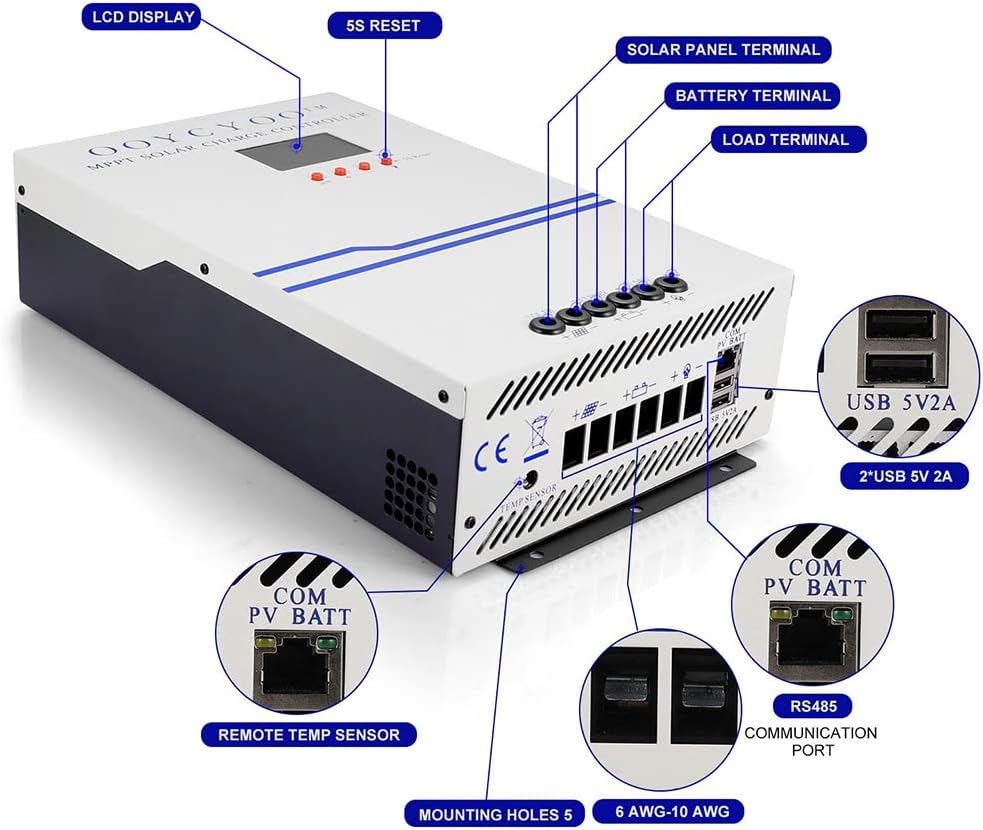
Mount the controller vertically on a wall or a stable surface in a dry, well-ventilated indoor environment. Ensure there is sufficient space around the controller for heat dissipation. The controller features 5 mounting holes for secure installation.
5.2 Connexions de cablejat
Follow the wiring order precisely to avoid damage to the controller or other components. Use appropriate wire gauges (recommended 20 mm² or 4# AWG for main power connections) and ensure all connections are secure.
- Connecteu la bateria: Connect the battery cables to the battery terminals on the controller (marked 'BATTERY'). Ensure correct polarity (+ to + and - to -). The controller will automatically detect the system voltage (12V o 24V).
- Connecteu els panells solars: Connect the solar panel cables to the solar input terminals (marked 'SOLAR'). Ensure correct polarity.
- Connect the Load: Connect your DC load to the load terminals (marked 'LOAD'). Ensure correct polarity.
- Connect the Temperature Sensor: Plug the external temperature sensor into its designated port (marked 'TEMP SENSOR'). Place the sensor near the battery for accurate temperature compensation during charging.
- Sortida USB: The controller includes USB 5V 2A output ports for charging small electronic devices.
- Port de comunicació: The RS485 communication port (marked 'COM PV BATT') allows for external monitoring or control (if applicable).
6. Instruccions de funcionament
6.1 Engegada inicial
Once the battery is connected, the controller will power on and automatically detect the system voltage. The LCD display will show real-time system information.
6.2 Control de càrrega
The controller allows for manual control of the DC load output. Use the designated button (often labeled 'A' or similar) to toggle the load on or off. Refer to the display section for button functions.
6.3 Selecció del tipus de bateria
The controller is compatible with multiple battery types. While some parameters are automatically detected, specific battery types (sealed, gel, flooded, lithium) may require selection or fine-tuning through the controller's interface to ensure optimal charging profiles. Consult the on-screen menu or the included English user manual for detailed instructions on setting battery parameters.

7. Display and Button Functions
The LCD screen provides real-time monitoring of your solar system's performance. It displays information such as battery voltage, charging current, load current, and system status. The controller typically features buttons for navigation and settings adjustment.
- Pantalla LCD: Shows all operational information at one time.
- '5S Reset' Button: Used for resetting certain parameters or functions by holding for 5 seconds.
- Load Control Button: A dedicated button (often indicated by an 'A' or similar icon) to open or close the load output.
- Botó de restabliment de fàbrica: A button to restore the controller to its default factory settings.

8. Manteniment
Un manteniment regular garanteix la longevitat i el rendiment òptim del vostre controlador de càrrega solar.
- Comproveu les connexions: Periodically inspect all wiring connections for tightness and corrosion.
- Netegeu el controlador: Keep the controller clean and free from dust and debris. Use a dry cloth for cleaning. Do not use liquids.
- Ventilació: Ensure that the ventilation openings are not blocked to allow for proper heat dissipation.
- Monitoritzar el rendiment: Regularly check the LCD display for normal operation and any error codes.
9. Solució De Problemes
If you encounter issues with your solar charge controller, refer to the following basic troubleshooting steps:
- Sense pantalla/Sense alimentació: Comproveu les connexions de la bateria i assegureu-vos que el volum de la bateriatage is within the operating range. Verify that the battery is charged.
- Sense càrrega: Check solar panel connections and ensure panels are receiving adequate sunlight. Verify solar panel voltage.
- La càrrega no funciona: Check load connections and ensure the load is not exceeding the controller's rated current. Verify that the load output is enabled via the controller's settings.
- Codis d'error: If an error code appears on the LCD, consult the detailed English user manual for specific meanings and solutions.
10. Especificacions
| Paràmetre | Valor |
|---|---|
| Model | K 2500W 100A |
| Corrent de potència màxima | 100 A |
| Volum del sistematage | 12V / 24V Auto Detection |
| Volum d'entrada PV màximtage (VOC) | 18V ~ 48V (12V System) 36V ~ 96V (24V System) |
| Potència d’entrada màxima PV | 1300W (12V System) 2600W (24V System) |
| Battery Capacity Configuration (Recommended) | 800 Ah |
| Vol. flotanttage | 13.8 V (sistema de 12 V) 27.6 V (sistema de 24 V) |
| Bateria sota voltage Protecció | 10.6 V (sistema de 12 V) 21.2 V (sistema de 24 V) |
| Bateria sota voltage Recuperació | 12.6 V (sistema de 12 V) 25.2 V (sistema de 24 V) |
| System Load Loss | <= 13 mA |
| Buck Loop | <= 100 mV |
| Temperatura de funcionament | -10 ℃ ~ 60 ℃ |
| Temperatura d'emmagatzematge | -30 ℃ ~ -70 ℃ |
| Humitat de funcionament | <= 90% (Non-condensing) |
| Compensació de temperatura | -4 mV/Cell/℃ |
| Installation Wire (mm²) | 20 mm² |
| Installation Wire (AWG) | 4 # AWG |
| Dimensions del producte (aprox.) | Alçada: 32 cm (12.60 polzades) Amplada: 20 cm (7.87 polzades) Profunditat: 8 cm (3.15 polzades) |
| Pes | 3.89 quilos |
| Material | Plàstic |
| Tipus de visualització | LCD |
| UPC | 768461886877 |
11. Garantia i Suport
Per obtenir informació sobre la garantia, assistència tècnica o consultes sobre el servei, poseu-vos en contacte directament amb el venedor o el fabricant. Conserveu el rebut de compra com a comprovant de compra.