
1. Introducció
Thank you for choosing the ABASK Q40S Dashcam. This device is designed to provide reliable video recording of your journeys, enhancing safety and providing evidence in case of incidents. It features Full HD 1080P recording, a wide-angle lens, night vision, G-sensor, loop recording, and parking monitoring capabilities. Please read this manual carefully before use to ensure proper installation and operation.
2. Contingut del paquet
Si us plau, comproveu el paquet per veure si hi ha els elements següents:
- ABASK Q40S Dashcam
- Càmera posterior
- Muntatge de la ventosa
- Car Charger (Cigarette Lighter Adapter)
- Mini USB Cable (0.6 m)
- Targeta SD de 32 GB
- Tape & Screws (for rear camera installation)
- Manual d'usuari

Figura 2.1: Contingut del paquet
3. Característiques del producte
- Full HD 1080P Dual Recording: The dashcam supports Full HD 1080P recording for both front and rear cameras, capturing clear video of the road ahead and behind. Equipped with a 6-layer HD lens and WDR technology, it provides crystal-clear video and image quality day or night, regardless of lighting conditions.

Figura 3.1: Dual Camera Recording (170° Front, 140° Rear)
- Supervisió nocturna: Utilizes multiple technologies to maximize night vision, ensuring clear recordings in low-light environments.

Figura 3.2: Super Visió Nocturna
- Parking Monitoring & Motion Detection: The dashcam automatically turns on and starts recording video when an impact is detected while your car is parked, providing evidence if your car is scratched or damaged. This feature requires an ACC hardwire kit (not included) to connect the camera to the car battery for 24-hour surveillance.

Figura 3.3: Monitorització d'aparcament les 24 hores
- Gravació en bucle i sensor G: The loop recording function automatically overwrites the oldest unlocked video files to free up memory on the SD card, ensuring continuous recording. The variable-sensitivity G-Sensor (Gravity Sensor) automatically detects sudden collisions or braking, recording and locking the corresponding video immediately. These locked videos cannot be overwritten, serving as crucial evidence.

Figura 3.4: Enregistrament en bucle
- Sistema d'assistència a l'aparcament: When reverse gear is engaged, the screen automatically displays the rear view with parking guidelines, assisting drivers in safe parking maneuvers. The red reverse line on the rear camera extension cable must be connected to the positive pole of the reverse light.

Figura 3.5: Parking Assistance System
- WDR (ampli rang dinàmic): Improves video quality in high-contrast lighting conditions, ensuring clear images in both bright and dark areas of the frame.
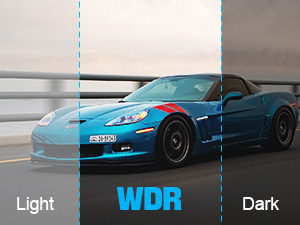
Figura 3.6: Tecnologia WDR
4. Configuració i instal·lació
Follow these steps to install your ABASK Q40S Dashcam:
- Neteja el parabrisa: Use a clean cloth to wipe the area on your windshield where the dashcam will be mounted. Ensure it is free of dust and grease for optimal suction.
Vídeo 4.1: Dashcam Installation and Operation Guide. This video demonstrates cleaning the windshield, attaching the suction cup, routing cables, installing the rear camera, plugging in the power adapter, and the camera automatically starting.
The video shows a hand cleaning the windshield with a wipe.
- Col·loqueu el suport de la ventosa: Secure the suction cup mount to the cleaned area of your windshield. Ensure it is firmly attached.
The video shows a hand attaching the dashcam with its suction cup mount to the windshield.
- Route and Hide Cables: Connect the power cable to the dashcam. Carefully route the cable along the edge of the windshield and down the A-pillar to conceal it. This provides a neat and safe installation.

Figura 4.1: Encaminament de cables
The video shows hands tucking the power cable into the car's trim along the windshield and A-pillar.
- Instal·leu la càmera posterior: Mount the rear camera on your rear windshield using the provided tape and screws. Connect its cable to the main dashcam unit. Ensure the red reverse line on the rear camera extension cable is connected to the positive pole of your car's reverse light for parking assistance functionality.
The video shows a hand installing the rear camera on the interior of the rear windshield.
- Plug in the Car Charger: Inseriu el carregador del cotxe a la presa de l'encenedor del vostre vehicle.
- Encès: The dashcam will automatically power on and begin recording when you start your car.
- Formateu la targeta Micro SD: Before first use, or if you encounter recording issues, format the Micro SD card through the dashcam's settings menu. Navigate to the settings, find the 'Format' option, and confirm. This ensures optimal performance and compatibility.
The video demonstrates navigating the menu to the 'Format' option and confirming the formatting of the Micro SD card.
5. Funcionament
Here are the basic operating instructions for your dashcam:
- Enregistrament automàtic: Once powered on, the dashcam automatically starts recording. The screen will display the live view de les càmeres frontals i/o posteriors.
- Viewmenjar gravattage: A view recorded videos, stop the current recording (if active), switch to playback mode, and then navigate through the files. You can select and play back specific video clips.
The video demonstrates stopping video recording, switching to camera mode, and then playing back recorded images/videos.
- Activació del sensor G: In the event of a sudden impact or collision, the built-in G-Sensor will automatically detect the event and lock the current video file, evitant que es sobreescrigui amb l'enregistrament en bucle.
- Monitor d'aparcament: If the optional hardwire kit is installed, the dashcam will automatically detect vibrations or impacts while parked and record a short video clip, providing surveillance for your vehicle.
- Enregistrament en bucle: The dashcam continuously records in short segments (e.g., 1, 3, or 5 minutes). When the memory card is full, the oldest unlocked fileLes s se sobreescriuen automàticament per fer espai per a noves gravacions.
6. Manteniment
- Neteja: Feu servir un drap suau i sec per netejar la lent i la pantalla de la càmera. Eviteu utilitzar productes de neteja abrasius o dissolvents.
- Cura de la targeta SD: Regularly format your Micro SD card (e.g., once a month) to maintain optimal performance and prevent data corruption. Use a high-quality Class 10 or higher Micro SD card.
- Temperatura: Eviteu exposar la càmera del salpicader a temperatures extremes durant períodes prolongats, ja que això pot afectar la durada de la bateria i el rendiment del dispositiu.
7. Solució De Problemes
- La càmera no s'encén: Ensure the car charger is properly connected to both the dashcam and the cigarette lighter socket. Check if the car's ignition is on.
- La gravació s'atura de manera inesperada: The SD card might be full or corrupted. Format the SD card. Ensure you are using a high-speed (Class 10 or higher) SD card.
- Poca qualitat de vídeo: Clean the camera lens. Ensure the protective film has been removed from the lens. Check the video resolution settings.
- Rear camera not working: Check all cable connections between the rear camera and the main unit. Ensure the rear camera cable is not damaged.
- Parking monitor not working: This feature requires a hardwire kit (not included) to be installed and correctly connected to your car's battery.
8. Especificacions
| Característica | Descripció |
|---|---|
| Marca | ABASK |
| Número de model | Q40S |
| Tipus de servei del vehicle | Cotxe |
| Tecnologia de connectivitat | USB |
| Característiques especials | Loop Recording, G-Sensor |
| Resolució de gravació de vídeo | 1296p (Front), 1080P (Overall system) |
| Tipus de muntatge | Muntatge de la ventosa |
| Color | Gris |
| Camp de View | 170 graus (davant), 140 graus (posterior) |
| Mètode de control | Toca |
| Mida de la pantalla | 4 inches (LCD) |
| Tipus de bateria | Ió de liti |
| Mida de la targeta de memòria inclosa | 32 GB |
| Dimensions de l'article (L x A x A) | 9.9 x 6 x 3.9 cm |
| Pes de l'article | 32 grams |
9. Garantia i assistència
ABASK products are designed for reliability and performance. For any issues or questions regarding your ABASK Q40S Dashcam, please refer to the contact information provided with your purchase or visit the official ABASK support website. We are committed to providing satisfactory solutions within 24 hours.