
1. Introducció
The Metronic Touchbox HD4 is a digital satellite decoder designed to receive free-to-air (FTA) satellite channels in HD. It offers features such as USB recording, Time Shift functionality, and multimedia playback. This device is not compatible with TNTSAT or FRANSAT encrypted channels.

Image 1.1: Metronic Touchbox HD4 Digital Satellite Decoder, front-angled view.
2. Configuració
2.1 Desembalatge
Traieu amb cura tots els components de l'embalatge. Assegureu-vos que hi hagi els elements següents:
- Metronic Touchbox HD4 Decoder
- Control remot
- Adaptador d'alimentació
- Manual d'usuari (aquest document)
2.2 Connexions
Before connecting, ensure all devices are powered off. Refer to the diagram below for port identification.
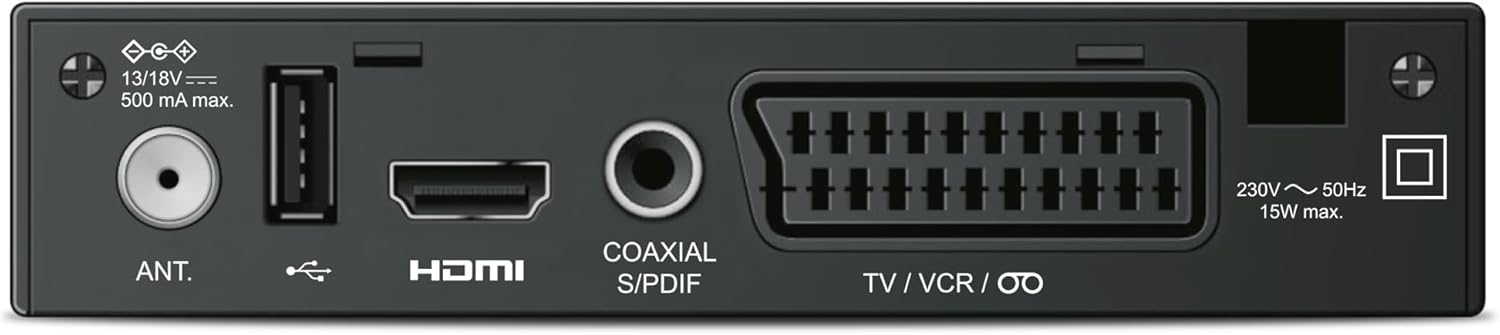
Image 2.1: Rear panel connections including Antenna In, USB, HDMI, Coaxial S/PDIF, and SCART (TV/VCR).
- Connexió de l'antena de satèl·lit: Connect your satellite dish cable to the "ANT." input port on the rear of the decoder.
- Connexió HDMI: Use an HDMI cable to connect the "HDMI" output port on the decoder to an HDMI input on your television.
- Connexió d'alimentació: Connect the power adapter to the decoder's power input and then plug it into a wall outlet.
- USB Device (Optional): For recording or media playback, connect a USB flash drive or external hard drive to the USB port on the front or rear of the decoder.
2.3 First Time Setup and Channel Scan
After connecting all cables, power on your television and select the correct HDMI input. Then, power on the Metronic Touchbox HD4. The device will likely guide you through an initial setup wizard. Follow the on-screen prompts to:
- Seleccioneu el vostre idioma preferit.
- Configure satellite settings (LNB type, frequency, etc. - consult your satellite dish installer if unsure).
- Perform an automatic channel scan to find available free-to-air satellite channels. This process may take several minutes.
Once the scan is complete, the decoder will display the first available channel.
3. Instruccions de funcionament
This section details the primary functions of your Metronic Touchbox HD4 decoder using the remote control.

Image 3.1: Metronic Touchbox HD4 decoder with its dedicated remote control.
3.1 Funcionament bàsic
- Encès/apagat: Premeu el botó PODER botó del comandament a distància o del panell frontal.
- Selecció de canals: Utilitza el CH+ / CH- buttons to navigate channels sequentially, or enter the channel number directly using the numeric keypad.
- Control de volum: Utilitza el VOL + / VOL- botons per ajustar el volum de l'àudio.
- Accés al menú: Premeu el botó MENÚ button to access the main settings and features. Use arrow keys to navigate and OK per confirmar.
- Guia electrònica de programes (EPG): Premeu el botó EPG botó per view horaris del programa.
3.2 Recording (PVR Function)
To record programs, a USB storage device (flash drive or external hard drive, not included) must be connected to the decoder's USB port.

Image 3.2: Connecting a USB storage device to the front USB port for recording and media playback.
- Enregistrament instantani: Mentre mireu un programa, premeu la tecla REC button on the remote control to start recording. Press STOP per finalitzar l'enregistrament.
- Scheduled Recording (Timer): Access the EPG or the Timer menu to schedule recordings for future programs. Set the start time, end time, and channel.
- Gravat files are typically saved in MKV or MP4 format and can be played back on the decoder or on a PC/Mac using compatible software (e.g., VLC).
3.3 Time Shift Function
The Time Shift function allows you to pause live television and resume watching later. A USB storage device must be connected for this feature.
- Mentre mireu la televisió en directe, premeu el botó PAUSA button. The program will pause, and the decoder will begin recording to the USB device.
- Premeu JUGAR to resume watching from where you left off.
- Podeu utilitzar FFW (Avançament ràpid) i REW (Rewind) to navigate within the buffered content.
- Premeu STOP to exit Time Shift mode and return to live TV.
3.4 Reproducció multimèdia
The USB port also supports playback of multimedia files (videos, photos, music) stored on a USB device.
- Connecteu el vostre dispositiu USB.
- Access the "Media" or "USB" menu from the main menu.
- Navega pel teu files i seleccioneu el contingut desitjat per a la reproducció.
3.5 Subtitling (DVB)
If a broadcast offers DVB subtitles, you can enable them through the decoder's menu or a dedicated subtitle button on the remote (if available).
4. Manteniment
4.1 Neteja
To clean the decoder, disconnect it from the power supply. Use a soft, dry cloth to wipe the exterior. Do not use liquid cleaners or abrasive materials.
4.2 Actualitzacions de programari
Reviseu periòdicament el fabricant weblloc (www.metronic.com) for any available software updates. Follow the instructions provided with the update file carefully to avoid damaging the device.
5. Solució De Problemes
If you encounter issues with your Metronic Touchbox HD4, refer to the following common problems and solutions:
| Problema | Causa possible | Solució |
|---|---|---|
| Sense imatge ni so | Incorrect HDMI input selected on TV, loose cable connections, decoder not powered on. | Check TV input, ensure all cables are securely connected, verify decoder power. |
| Missatge "Sense senyal" | Satellite dish misalignment, antenna cable issue, incorrect satellite settings. | Check antenna cable connection, verify satellite settings in the menu, consider professional satellite dish alignment. |
| No es pot gravar a USB | USB device not connected, insufficient storage space, incompatible USB format. | Ensure USB device is connected and recognized, check available space, format USB device to a compatible file system (e.g., FAT32, NTFS). |
| Cannot receive TNTSAT/FRANSAT channels | The decoder is not designed for these encrypted services. | This decoder only receives free-to-air satellite channels and does not support TNTSAT or FRANSAT. No solution for this specific decoder. |
6. Especificacions
Below are the technical specifications for the Metronic Touchbox HD4 decoder:
- Model: Touchbox HD4
- Marca: Metrònic
- Color: Negre
- Resolució: HD 1080p (Supports 576i/p, 720i/p, 1080i/p)
- Sintonitzador: 950-2150 MHz
- Demodulador: Standard DVB-S / DVB-S2
- Ports USB: 1 (configurable front or rear)
- Connectivitat: HDMI, SCART (Péritel), USB, Coaxial S/PDIF
- Mode de sortida d'àudio: estèreo
- Format d'àudio compatible: PCM
- Container Formats (Recording/Playback): MKV / MP4
- Característiques: Time Shift, USB Recording, EPG, DVB Subtitling, Timer Programming
- Dimensions (L x A x A): 14.3 cm x 8 cm x 3.2 cm
- Consum d'energia: Màxim 15W
- Origen: Xina

Image 6.1: Physical dimensions of the Metronic Touchbox HD4 decoder.
7. Garantia i Suport
7.1 Informació de la garantia
This product comes with a standard manufacturer's warranty. Please refer to the warranty card included in your product packaging or visit the official Metronic weblloc web per conèixer els termes i condicions detallats. Conserveu el comprovant de compra per a reclamacions de garantia.
7.2 Atenció al client
For technical assistance, troubleshooting beyond this manual, or service inquiries, please contact Metronic customer support. Contact details can typically be found on the manufacturer's weblloc web o a l'embalatge del producte.
Metronic Official Weblloc: www.metronic.com