
Introducció
The AQIRYS Mira is a compact 65% mechanical keyboard designed for versatility and performance. It offers triple connectivity options: wired USB-C, 2.4GHz wireless, and Bluetooth, making it compatible with PC, Mac, mobile devices, and consoles. Featuring Outemu Red mechanical switches, N-key rollover, full anti-ghosting, and dynamic RGB backlighting, the Mira keyboard provides a responsive and customizable typing and gaming experience. Its hot-swap design allows for easy switch replacement.
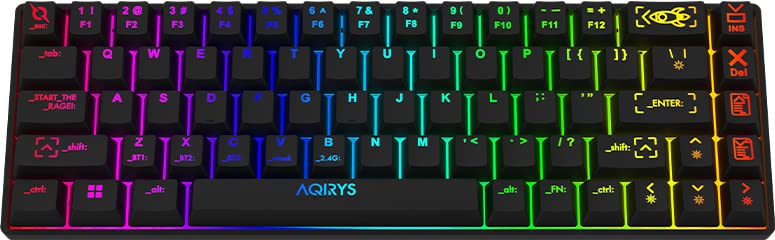
Image: The AQIRYS Mira 65% Mechanical Keyboard, showcasinel seu disseny compacte i la seva vibrant retroiluminació RGB.
Configuració
Contingut del paquet
- AQIRYS Mira 65% Mechanical Keyboard
- Cable USB-C a USB-A
- 2.4GHz Wireless Dongle (typically stored in the keyboard's battery compartment or a dedicated slot)
- Keycap Puller (optional, for maintenance)
- Switch Puller (optional, for maintenance)
Carregant el teclat
Before initial use, ensure the keyboard is fully charged. Connect the provided USB-C cable to the keyboard's USB-C port and the other end to a powered USB port on your computer or a USB wall adapter. The charging indicator will show the charging status.
Modes de connectivitat
The AQIRYS Mira keyboard supports three connection modes: Wired, 2.4GHz Wireless, and Bluetooth. A switch on the keyboard (usually on the back or side) allows you to select the desired mode.
1. Connexió per cable
- Set the mode switch on the keyboard to the 'Wired' or 'USB' position.
- Connecteu el cable USB-C al teclat i l'extrem USB-A a l'ordinador.
- El sistema operatiu reconeixerà automàticament el teclat.
2. Connexió sense fil de 2.4 GHz
- Localitza el dongle USB de 2.4 GHz.
- Plug the USB dongle into an available USB port on your computer or device.
- Set the mode switch on the keyboard to the '2.4G' position.
- El teclat s'hauria de connectar automàticament. Si no, premeu Fn + P durant 3 segons per iniciar l'aparellament.
3. Connexió Bluetooth
The keyboard can pair with up to three different Bluetooth devices.
- Set the mode switch on the keyboard to the 'BT' position.
- To enter pairing mode for a specific slot (BT1, BT2, or BT3), press and hold Fn + Q (per a BT1), Fn + W (per a BT2), o Fn + E (for BT3) for 3-5 seconds. The corresponding key (Q, W, or E) will flash rapidly, indicating pairing mode.
- On your device (PC, Mac, mobile), enable Bluetooth and search for new devices. Select "AQIRYS Mira" from the list.
- Once paired, the flashing light will become solid for a few seconds and then turn off.
- To switch between paired Bluetooth devices, short press Fn + Q, Fn + W, o Fn + E.

Imatge: Lateral view of the AQIRYS Mira keyboard, highlighting the USB-C port for wired connection and charging.
Instruccions de funcionament
Key Functions and Combinations
The AQIRYS Mira keyboard features a 68-key US layout. Many functions are accessed via the Fn clau en combinació amb altres tecles.
- Fn + 1/2/3: Canvia entre dispositius Bluetooth (BT1, BT2, BT3).
- Fn + P: Initiate 2.4GHz pairing (hold for 3 seconds).
- Fn + Retrocés: Tecla Suprimeix.
- Fn + \|: Toggle backlight effects.
- Fn + [{: Reduir la brillantor de la retroiluminació.
- Fn + ]}: Augmenta la brillantor de la retroiluminació.
- Fn + ;:: Disminueix la velocitat de la llum de fons.
- Fn + '"': Augmenta la velocitat de la retroiluminació.
- Fn + ,<: Decrease backlight color (for static modes).
- Fn + .>: Increase backlight color (for static modes).
- Fn + Fletxa esquerra: Pista anterior.
- Fn + Fletxa dreta: Pista següent.
- Fn + Fletxa amunt: Puja el volum.
- Fn + Fletxa avall: Baixar el volum.
- Fn + Intro: Reproduir/pausa.
- Fn + Win: Tecla de bloqueig/desbloqueig de Windows.
Personalització de la llum de fons
The keyboard features full RGB dynamic backlighting. Basic adjustments can be made using Fn key combinations as listed above. For in-depth customization, including per-key lighting and advanced effects, connect the keyboard in wired mode and use the dedicated AQIRYS software (available for download from the official AQIRYS weblloc).
N-Key Rollover i Anti-Ghosting
The Mira keyboard supports N-key rollover and full anti-ghosting, ensuring that every keystroke is registered accurately, even when multiple keys are pressed simultaneously. This is particularly beneficial for fast typing and gaming.
Hot-Swap Switch Design
The keyboard's hot-swap design allows you to change mechanical switches without soldering. It is compatible with Outemu 3-pin switches. This feature enables customization of typing feel and easy replacement of faulty switches.
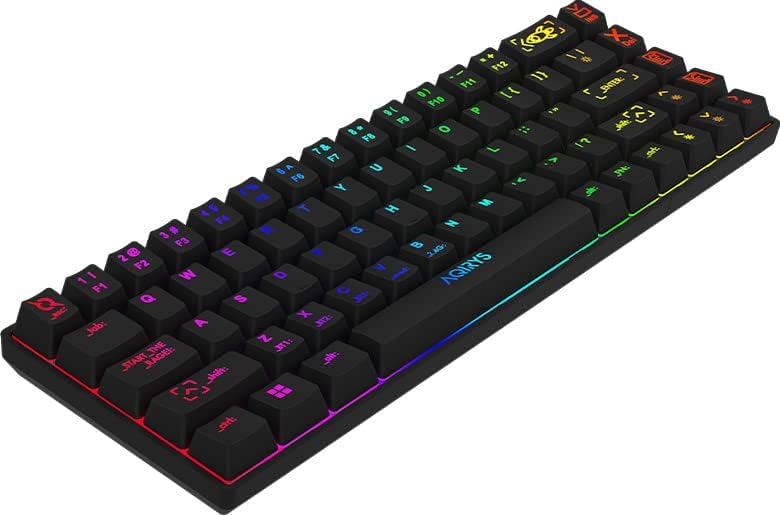
Image: Close-up of the AQIRYS Mira keyboard's keycaps, illustrating the US layout and RGB backlighting.
Manteniment
Neteja del teclat
- Eliminació de pols: Feu servir una llauna d'aire comprimit per treure la pols i les restes que hi ha entre les tecles.
- Neteja de superfícies: Gently wipe the keycaps and chassis with a soft, lint-free cloth dampEsbandiu amb una petita quantitat d'aigua o una solució de neteja suau i no abrasiva. Eviteu la humitat excessiva.
- Neteja profunda: For thorough cleaning, you may use a keycap puller to remove keycaps and clean the switches and plate underneath. Ensure the keyboard is powered off and disconnected before removing keycaps.
Switch Replacement (Hot-Swap)
The AQIRYS Mira keyboard features hot-swappable switches, allowing for easy replacement without soldering.
- Apagar: Ensure the keyboard is disconnected from power and turned off.
- Treure la tapa de les tecles: Use a keycap puller to carefully remove the keycap from the switch you wish to replace.
- Treure l'interruptor: Use a switch puller to grasp the top and bottom clips of the switch. Gently pull the switch straight up and out of the PCB.
- Insereix un nou interruptor: Align the pins of the new Outemu 3-pin compatible switch with the holes on the PCB. Press the switch firmly until it clicks into place. Ensure the pins are not bent.
- Substitueix la tapa de les tecles: Torneu a col·locar la tapa de les tecles al nou interruptor.

Imatge: Una alternativa view of the AQIRYS Mira keyboard, highlighting the keycap profiles and overall design.
Resolució de problemes
- El teclat no respon (amb cable):
- Assegureu-vos que el cable USB-C estigui connectat correctament tant al teclat com a l'ordinador.
- Proveu un port USB diferent a l'ordinador.
- Ensure the keyboard mode switch is set to 'Wired' or 'USB'.
- El teclat no respon (sense fil 2.4 GHz):
- Ensure the 2.4GHz USB dongle is securely plugged into your device.
- Ensure the keyboard mode switch is set to '2.4G'.
- Check if the keyboard battery is charged.
- Try re-pairing by holding Fn + P durant 3 segons.
- Problemes d'emparellament per Bluetooth:
- Ensure the keyboard mode switch is set to 'BT'.
- Assegureu-vos que el Bluetooth del vostre dispositiu estigui activat i es pugui detectar.
- Make sure the keyboard is in pairing mode (e.g., Fn + Q held for 3-5 seconds, with the key flashing).
- Forget the device from your computer's Bluetooth settings and try pairing again.
- Try pairing to a different Bluetooth slot (BT1, BT2, BT3).
- Claus que no es registren o s'escriuen dues vegades:
- Check for any debris under the keycap or around the switch.
- If a specific switch is faulty, consider replacing it using the hot-swap feature.
- La retroiluminació no funciona o és tènue:
- Assegureu-vos que la bateria del teclat estigui carregada.
- Ajusta la brillantor amb Fn + [{ i Fn + ]}.
- Aneu alternant els efectes de retroiluminació amb Fn + \|.
- If using software, ensure settings are correctly applied.
Especificacions
| Marca | AQIRYS |
| Model | Mira |
| Connectivitat | Sense fil de 2.4 GHz, Bluetooth, USB-C amb cable |
| Disseny | US Layout, 68 Keys (65% Form Factor) |
| Interruptors | Outemu Red Mechanical (Linear, 4mm travel, 47gF actuation) |
| Anti-fantasma | N-Key Rollover, Full Anti-Ghosting |
| Llum de fons | Full RGB Dynamic Backlight |
| Bateria | Bateria de liti de 1300 mAh |
| Compatibilitat | PC (Windows 10), Mac, Mobile (Smartphone, Tablet), Console |
| Dimensions del producte | 30.8 x 10.1 x 3.9 cm |
| Pes de l'article | 900 g |
| Material | Plàstic, cautxú |
| Components inclosos | Cable USB |
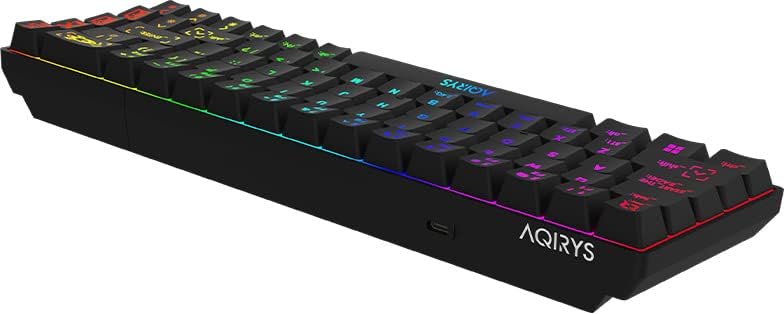
Image: A low-angle view of the AQIRYS Mira keyboard, highlighting the chassis design and rubber coating.
Informació de la garantia
For detailed warranty terms and conditions, please refer to the warranty card included with your product or visit the official AQIRYS weblloc. La cobertura de la garantia normalment inclou defectes de fabricació durant un període especificat a partir de la data de compra. Conserveu el comprovant de compra per a reclamacions de garantia.
Atenció al client
If you encounter any issues not covered in this manual or require further assistance, please visit the AQIRYS official website for support resources, FAQs, and contact information for customer service. You may also reach out to your retailer for product support.