
Introducció
Gràcies per la compraasing the ODK Gaming Desk. This desk is designed to provide a functional and organized workspace with features such as a monitor stand, two spacious drawers, and an adjustable side storage rack. This manual will guide you through the assembly process, explain its features, and provide essential maintenance and troubleshooting tips to ensure long-lasting use.
Informació de seguretat
- Llegiu atentament totes les instruccions abans de muntar i utilitzar.
- Mantingueu totes les peces petites i els materials d'embalatge fora de l'abast dels nens.
- Munta l'escriptori sobre una superfície suau i neta per evitar ratllades.
- Ensure all screws and fasteners are tightened securely before use. Periodically check and re-tighten if necessary.
- Do not overload the desk, drawers, or shelves beyond their weight capacity.
- Eviteu col·locar objectes calents directament sobre la superfície de l'escriptori sense protecció.
- Use the desk on a level surface to prevent wobbling and instability.
Contingut del paquet
Si us plau, verifiqueu que tots els components que s'enumeren a continuació siguin presents abans de començar el muntatge. Si falta alguna peça o hi ha alguna peça danyada, poseu-vos en contacte amb el servei d'atenció al client.
- Panell d'escriptori
- Suport de monitor
- Desk Frame (Legs and Support Bars)
- Calaixos de tela (2 unitats)
- Side Storage Rack Shelves (2 units)
- Maquinari de muntatge (cargols, clau Allen)
- Manual d'instruccions
Muntatge i muntatge
Follow these steps carefully for proper assembly. It is recommended to have two people for certain steps.
Pas 1: Prepareu els components
Unpack all parts and lay them out on a clean, soft surface. Identify each component using the provided parts list in your physical manual.

Imatge: Explosió view of desk components with dimensions.
Pas 2: munta el marc principal
Attach the desk legs to the main desktop support structure using the provided screws. Ensure all connections are firm but do not overtighten initially.
Step 3: Install the Side Storage Rack
The side storage rack can be installed on either the left or right side of the desk to suit your preference. Attach the rack frame to the main desk structure. The two shelves for the rack are height-adjustable; select your desired positions and secure them.
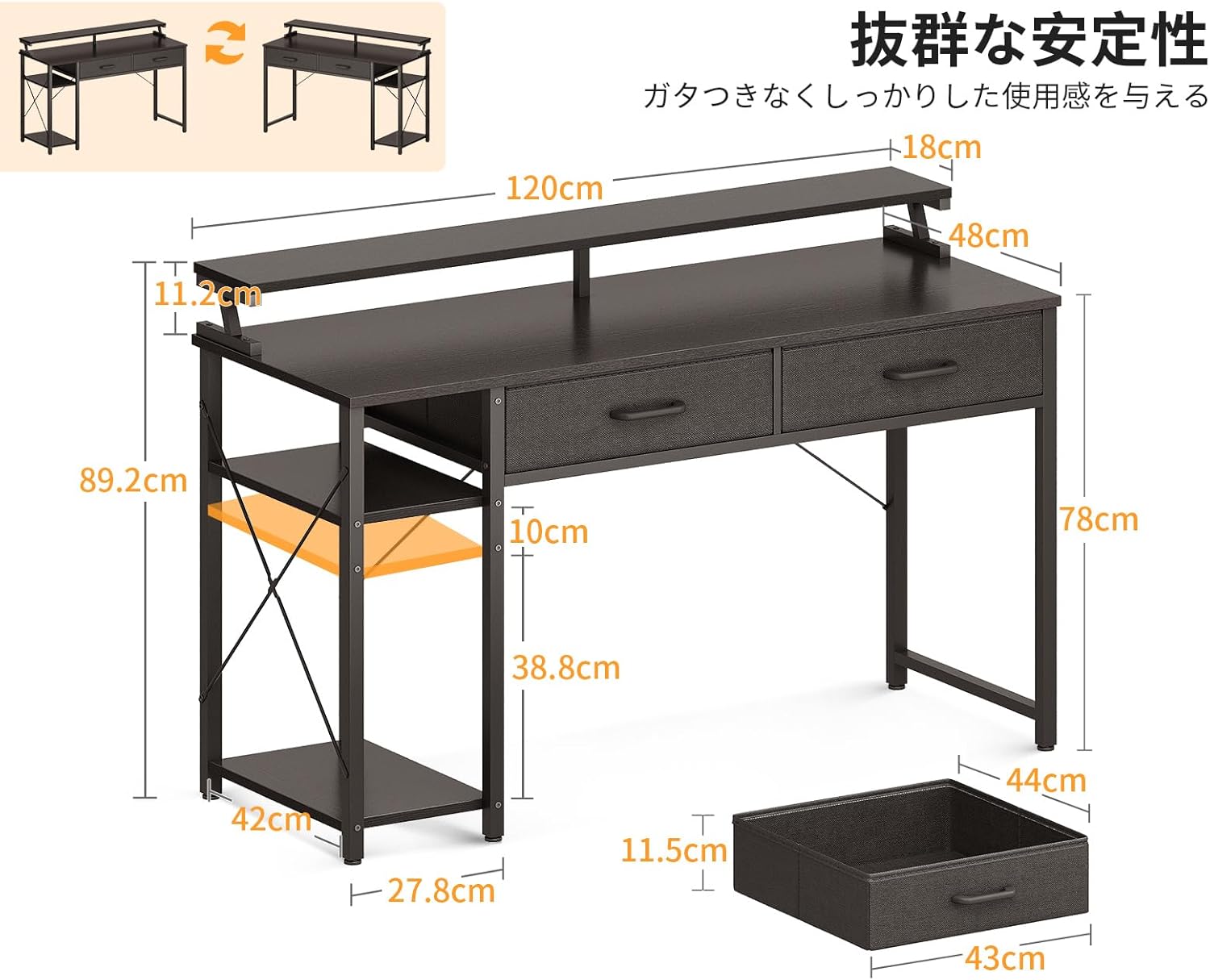
Image: Desk with side rack configurable to left or right.
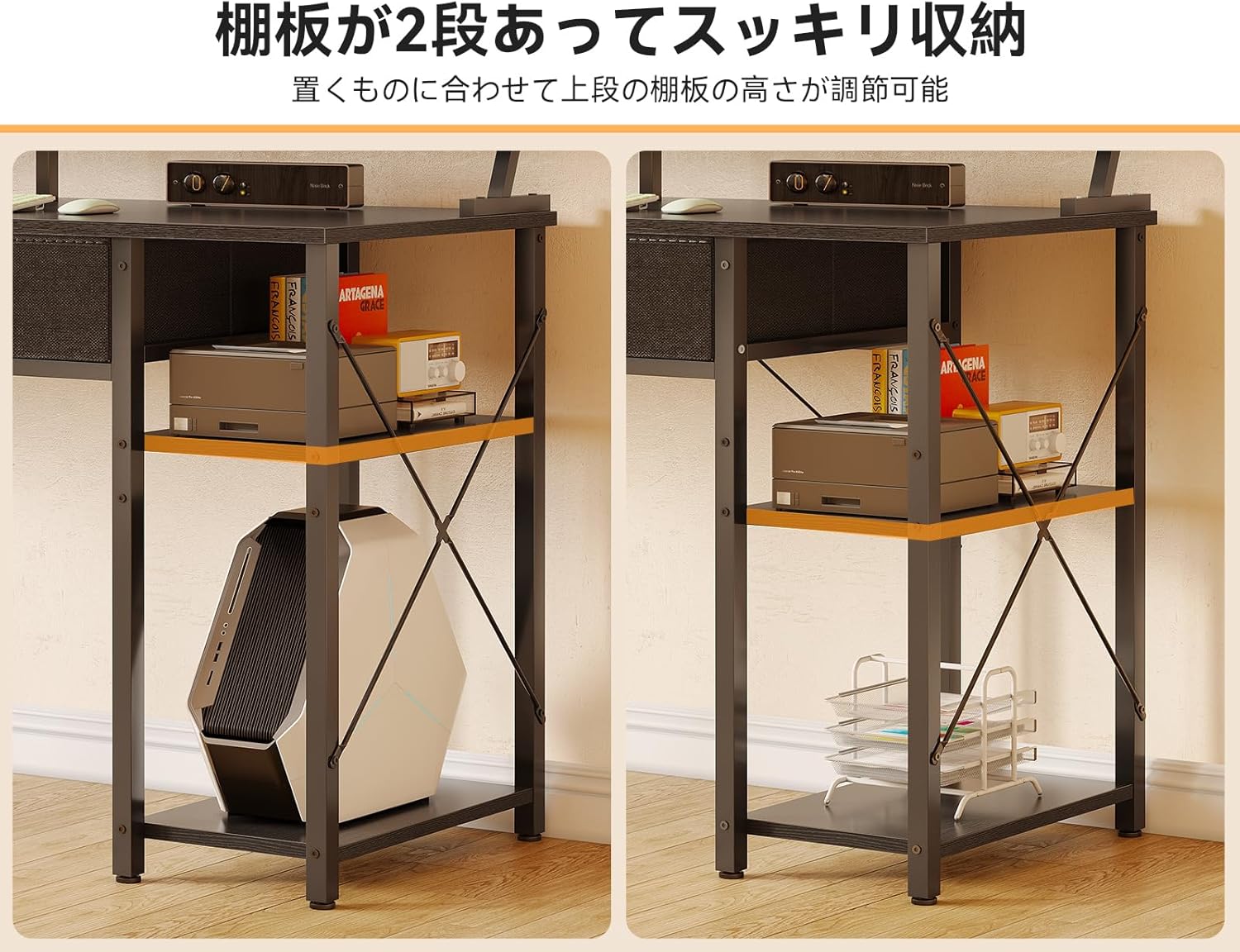
Image: Adjustable shelves on the side storage rack.
Step 4: Attach the Monitor Stand
Secure the monitor stand to the top of the desk using the designated fasteners. This stand elevates your monitor for improved ergonomics.

Image: Desk with monitor stand and dual monitors.
Step 5: Assemble and Insert Drawers
Assemble the two fabric drawers according to the instructions in your physical manual. Once assembled, slide them into their designated slots under the desktop. These drawers are designed for convenient storage of office supplies and documents.

Image: Close-up of the two fabric drawers.

Image: Drawers pulled out, showing storage capacity.
Step 6: Final Tightening and Leveling
Once all components are assembled, carefully tighten all screws. Check the desk for stability and adjust the leveling feet at the bottom of the legs if necessary to eliminate any wobbling.
Instruccions de funcionament
Suport de monitor
The integrated monitor stand elevates your screen by approximately 11.2 cm, promoting a correct sitting posture and reducing strain on your neck and shoulders during long periods of use. The space underneath the monitor stand can be used to store your keyboard, mouse, or other small accessories, freeing up valuable desktop space.

Image: Monitor stand promoting ergonomic posture.
Calaixos d'emmagatzematge
The two A4-compatible fabric drawers provide convenient storage for documents, stationery, and other small items. They help keep your desktop clutter-free and your essentials within easy reach. The sturdy construction of the drawers resists deformation even when holding heavier items.
Side Storage Rack
The two-tier side storage rack offers versatile storage options. The upper shelf is height-adjustable, allowing you to customize it based on the size of the items you wish to store. The lower shelf is designed to accommodate larger items such as a PC tower. This rack can be positioned on either the left or right side of the desk during assembly to best fit your room layout and needs.
Manteniment
- Neteja: Netegeu les superfícies de l'escriptori amb un drap suau iamp drap. Eviteu productes químics agressius o netejadors abrasius que puguin danyar l'acabat.
- Vessaments: Netegeu els vessaments immediatament per evitar taques o danys a la fusta.
- Protecció de calor: Use coasters or protective pads under hot dishes or cups to prevent heat marks.
- Elements de fixació: Periodically check all screws and bolts to ensure they remain tight. Re-tighten if any looseness is detected to maintain stability.
- Cura del calaix: The fabric drawers can be spot cleaned with a mild detergent and damp cloth. Allow to air dry completely.
Resolució de problemes
| Problema | Causa possible | Solució |
|---|---|---|
| L'escriptori està inestable | Sòl irregular; fixacions fluixes | Adjust the leveling feet at the bottom of the desk legs. Ensure all assembly screws are tightened. |
| Els calaixos no llisquen suaument | Improper assembly; obstruction | Check drawer assembly and ensure they are inserted correctly into their slots. Remove any obstructions. |
| Peces faltes o danyades | Packaging error; shipping damage | Contact ODK customer support with your purchase details for assistance. |
Especificacions
| Característica | Detall |
|---|---|
| Dimensions generals | 120 cm (Width) x 48 cm (Depth) x 78 cm (Height to main desktop) / 89.2 cm (Total Height with monitor stand) |
| Alçada del suport del monitor | Approximately 11.2 cm above main desktop |
| Material | Engineered Wood (Desktop), Steel (Frame), Fabric (Drawers) |
| Color | Negre |
| Pes del producte | 15.3 kg |
| Pes del paquet | 17.7 kg |
| Característiques especials | Space-saving design, Reversible side rack, 2 drawers, Monitor stand |
Garantia i Suport
ODK products are manufactured with quality and care. In the unlikely event of a manufacturing defect or if you encounter any issues with your product, please contact ODK customer support. Please retain your proof of purchase for warranty claims. Our support team is available to assist you with any questions or concerns regarding your ODK Gaming Desk.