
1. Introducció
Thank you for choosing the UNITED LED40HS82A11 40-inch Full HD Smart Android TV. This television combines a vibrant Full HD display with the power of Android 11, offering a seamless entertainment experience. With built-in Chromecast and Airplay, Wi-Fi, Ethernet, and support for various digital broadcasting standards (DVB/T2/S2/C, MPEG-4, HEVC Main 10), your new TV is designed for versatile use, from watching movies and playing games to browsing the internet.
This manual provides essential information for setting up, operating, and maintaining your television. Please read it thoroughly before using the product and keep it for future reference.

Imatge 1.1: Frontal view of the UNITED LED40HS82A11 TV with Android TV interface.
2. Informació de seguretat
Before operating your TV, please read all safety instructions carefully. Improper use can result in electric shock, fire, or damage to the appliance.
- Font d'alimentació: Assegureu-vos que el televisor estigui connectat a una font d'alimentació de CA de 100-240 V, 50/60 Hz. No sobrecarregueu les preses de corrent.
- Ventilació: No bloquegeu les obertures de ventilació. Deixeu prou espai al voltant del televisor per a un flux d'aire adequat.
- Aigua i humitat: No exposeu el televisor a la pluja ni a la humitat. No col·loqueu objectes plens de líquids, com ara gerros, a sobre del televisor.
- Fonts de calor: Mantingueu el televisor allunyat de fonts de calor com ara radiadors, reixetes de calor, estufes o altres aparells que produeixin calor.
- Neteja: Desendolleu el televisor de la presa de corrent abans de netejar-lo. Feu servir un drap suau i sec. No utilitzeu netejadors líquids ni aerosols.
- Manteniment: No intenteu atendre aquest producte vosaltres mateixos. Consulteu tots els serveis a personal de servei qualificat.
- Nens: Supervise children to ensure they do not play with the TV.
3. Contingut del paquet
Si us plau, comproveu que els següents elements estiguin inclosos al paquet del televisor:
- UNITED LED40HS82A11 40-inch Full HD Smart Android TV
- Remote Control (with 2x AAA 1.5V batteries)
- Cable d'alimentació
- Suport de TV (2 peces) i cargols
- MiniAV Adapter Cable
- Manual d'usuari (aquest document)
Si falta algun article o està malmès, poseu-vos en contacte amb el vostre distribuïdor.
4. Configuració
4.1 Col·locació del suport
- Col·loqueu amb cura el televisor cap per avall sobre una superfície suau i plana (per exemple, una manta o escuma) per evitar que es facin malbé la pantalla.
- Alineeu les potes del suport amb les ranures corresponents de la part inferior del televisor.
- Secure each stand leg with the provided screws. Ensure they are tightened firmly.
- Aixequeu amb cura el televisor fins a la posició vertical i col·loqueu-lo sobre una superfície estable i anivellada.
4.2 Muntatge a la paret (opcional)
This TV is compatible with VESA standard wall mounts. The VESA mounting pattern for this model is typically 200x200mm. Please consult a professional for wall mounting to ensure proper installation and safety. Wall mount bracket and screws are not included.
4.3 Connexió de dispositius externs
Your TV offers various connectivity options for external devices.
Imatge 4.1: posterior view del televisor amb disseny de ports.
- HDMI: Connect Blu-ray players, game consoles, set-top boxes, or other HDMI-enabled devices. The TV supports multiple HDMI inputs.
- USB: Connect USB storage devices (e.g., flash drives) to play media files. The TV has 1 USB port.
- MiniAV: Use the provided MiniAV adapter cable to connect older devices with composite video and stereo audio outputs.
- Sortida d'auriculars: Connecteu els auriculars per a una escolta privada.
4.4 Antenna/Cable Connection
Connect your terrestrial antenna (DVB-T/T2) or satellite dish (DVB-S/S2) cable to the appropriate input on the back of the TV. For cable TV (DVB-C), connect the cable to the antenna input.
4.5 Network Connection (Wi-Fi & Ethernet)
Your TV can connect to the internet via Wi-Fi or an Ethernet cable.
- Wi-Fi: During the initial setup or via the settings menu, select your Wi-Fi network and enter the password.
- Ethernet: Connect an Ethernet cable from your router to the LAN port on the back of the TV.
5. Configuració inicial
- Encès: After connecting all necessary cables, plug the power cord into an electrical outlet. Press the power button on the remote control or on the TV.
- Configuració inicial: The TV will guide you through the initial setup process.
- Selecció d'idioma: Trieu el vostre idioma preferit.
- Configuració de la xarxa: Connect to your Wi-Fi network or use an Ethernet connection.
- Compte de Google: Sign in with your Google account to access the Google Play Store, personalized recommendations, and other Android TV features.
- Escaneig de canals: The TV will prompt you to scan for available channels based on your antenna/cable connection.
- Configuració de privadesa: Review and adjust privacy settings as desired.
- Configuració completada: Once all steps are finished, your TV is ready for use.
6. Funcionament del televisor
6.1 Funcions de control remot
The remote control allows you to navigate the TV's features. Familiarize yourself with the buttons:
- Potència: Encén/apaga el televisor.
- Entrada: Selecciona la font d'entrada (HDMI, AV, TV).
- Botons de navegació (amunt/avall/esquerra/dreta): Navegar pels menús i les opcions.
- D'acord/Entra: Confirma les seleccions.
- Enrere: Torna a la pantalla anterior.
- Inici: Accedeix a la pantalla d'inici d'Android TV.
- Pujar/baixar el volum: Ajusta el volum.
- Canal amunt/avall: Canvia els canals de televisió.
- Assistent de Google: Activa les ordres de veu.
- Botons de l'aplicació: Direct access to popular streaming applications.
6.2 Navigating Android TV Interface
The Android TV home screen provides access to your installed apps, live TV, and recommended content. Use the navigation buttons on your remote to browse categories like Search, Home, Discover, and Apps.

Image 6.1: Android TV home screen with various applications.
6.3 Selecció de la font d'entrada
Premeu el botó Entrada button on your remote control to switch between connected devices (e.g., HDMI 1, HDMI 2, AV) and the built-in TV tuner.
6.4 Sintonització de canals
If you connected an antenna or cable, you can access live TV channels. Use the Canal amunt/avall buttons to change channels. To perform a new channel scan or adjust channel settings, go to the TV's settings menu.
6.5 Ús de les funcions intel·ligents
- Aplicacions: Baixeu i instal·leu una àmplia gamma d'aplicacions des de Google Play Store.
- Chromecast integrat: Cast content (videos, photos, music) from your compatible smartphone, tablet, or computer directly to your TV. Look for the Chromecast icon in supported apps.
- Airplay: For Apple device users, Airplay allows you to stream content or mirror your screen to the TV.
- Navegació per Internet: Utilitzeu a web browser app to surf the internet.
7. Manteniment
7.1 Neteja del televisor
- Desendolla sempre el televisor abans de netejar-lo.
- Feu servir un drap suau, sec i sense borrissol per netejar la pantalla i la carcassa.
- Per a marques persistents a la pantalla, fregueu lleugeramentampNetegeu el drap amb aigua o un netejador de pantalles especialitzat (no ruixeu directament sobre la pantalla).
- Eviteu utilitzar netejadors abrasius, ceres o dissolvents, ja que poden danyar l'acabat del televisor.
7.2 Actualitzacions de programari
Your Android TV may receive software updates to improve performance and add new features. It is recommended to keep your TV connected to the internet to receive these updates automatically. You can also check for updates manually in the TV's settings menu.
8. Solució De Problemes
Si teniu problemes amb el televisor, consulteu els problemes i solucions més comuns següents:
- Sense energia:
- Comproveu si el cable d'alimentació està ben connectat al televisor i a la presa de corrent.
- Ensure the wall outlet is working by plugging in another device.
- Prova de prémer el botó d'engegada del televisor, no només el comandament a distància.
- No hi ha imatge, però hi ha so:
- Assegureu-vos que s'ha seleccionat la font d'entrada correcta.
- Check the cable connections to external devices.
- Prova de reiniciar el televisor i el dispositiu connectat.
- No hi ha so, però hi ha imatge:
- Comproveu el nivell de volum i assegureu-vos que el televisor no estigui silenciat.
- Verify audio settings in the TV menu and on the external device.
- Try a different HDMI cable or input.
- El control remot no funciona:
- Substituïu les piles del comandament a distància.
- Assegureu-vos que no hi hagi obstacles entre el comandament a distància i el sensor d'infrarojos del televisor.
- Apunta el comandament a distància directament al televisor.
- Problemes de connexió Wi-Fi:
- Reinicieu el router i el mòdem.
- Comproveu si la contrasenya del Wi-Fi introduïda és correcta.
- Move the TV closer to the router or use an Ethernet cable for a stable connection.
Per a problemes més complexos, poseu-vos en contacte amb l'atenció al client.
9. Especificacions
Here are the technical specifications for the UNITED LED40HS82A11 TV:
| Característica | Especificació |
|---|---|
| Marca | UNITS |
| Nom del model | LED40HS82A11 |
| Mida de la pantalla | 40 polzades |
| Resolució de visualització | Full HD (1920 x 1080 píxels) |
| Sistema operatiu | Android 11 |
| Tecnologia de connectivitat | Wi-Fi, Ethernet, Bluetooth, HDMI, USB |
| Característiques especials | Smart TV, Flat Screen, Chromecast Built-in, Airplay, Pre-installed Apps |
| Sintonitzadors | DVB/T2/S2/C |
| Descodificació de vídeo | MPEG-4, HEVC Main 10 |
| Freqüència d'actualització | 60 Hz |
| Relació d'aspecte | 16:9 |
| Ports USB | 1 |
| Dispositius compatibles | Auriculars |
| Color | Negre |
| Fabricant | CHANGHONG EUROPE ELECTRIC SRO |
Image 9.1: EU Energy Label for LED40HS82A11.
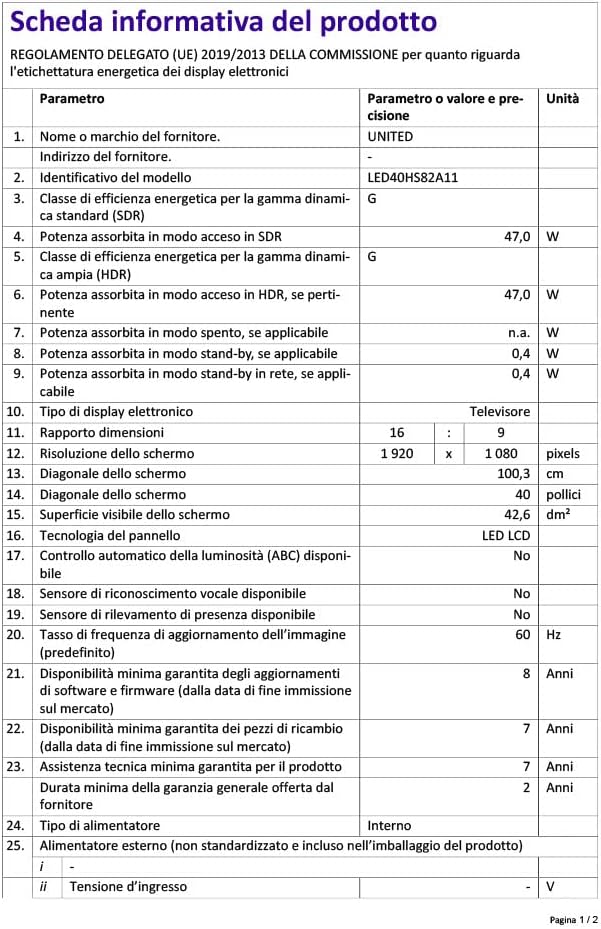
For detailed product information, including energy consumption data, please refer to the official EU EPREL database via the QR code on the energy label or by visiting https://eprel.ec.europa.eu/qr/1068369.
10. Garantia i Suport
For warranty information, please refer to the warranty card included with your product or contact your retailer. The manufacturer, CHANGHONG EUROPE ELECTRIC S.R.O., provides general support for this product.
Please note that information regarding software update guarantees and spare parts availability is not explicitly provided for this model. For any technical assistance or service inquiries, please contact the customer support channels provided by your point of purchase.


