
Introducció
The AODELAN WTR-2 is a versatile wireless remote shutter release system designed for Canon EOS cameras. It functions as both a remote shutter release and a programmable timer, offering advanced control over your camera's exposure settings. This manual provides detailed instructions for setting up, operating, and maintaining your WTR-2 system.
The system operates using 2.4 GHz wireless transmission, providing a range of up to 60 meters (196.8 feet). It features an LCD screen for easy programming and monitoring of settings.
Contingut del paquet
Si us plau, comproveu el contingut del paquet per assegurar-vos que hi hagi tots els elements:
- WTR-2 Transmitter (Remote Control)
- WTR-2 Receiver
- Connecting Cable (C8 type for Canon)
- 2x Lanyards
- Manual d'instruccions

Image: The complete package contents of the AODELAN WTR-2 wireless remote shutter release system.
Producte acabatview
Transmissor (control remot)
The transmitter features an LCD display for setting timer functions and viewing current modes. It includes a two-stage shutter release button (half-press for autofocus, full-press for shutter release), mode buttons, and navigation controls.
Receptor
The receiver connects to your camera's remote port and receives signals from the transmitter. It has a hot shoe mount for easy attachment to your camera or a cold shoe mount on a rig.

Imatge: Més deview of the AODELAN WTR-2 Transmitter and Receiver, highlighting key features like timer, time-lapse, bulb mode, 2.4G wireless, and operating range.
Configuració
1. Instal·lació de la bateria
Both the transmitter and receiver require 2x AAA batteries (not included). Open the battery compartment on the back of each unit and insert the batteries, observing the correct polarity.

Image: Battery installation for the WTR-2 Transmitter and Receiver, showing the location for two AAA batteries in each unit.
2. Connecting the Receiver to your Camera
Attach the receiver to your camera's hot shoe or a cold shoe mount. Connect the C8 connecting cable to the receiver's port and then to your Canon camera's remote control terminal. Ensure the connection is secure.

Image: The C8 connecting cable being inserted into the 3-pin remote connection port of a Canon EOS camera.
3. Encès
Turn on both the transmitter and the receiver using their respective ON/OFF buttons. The receiver's LED will blink red initially, then periodically blink green to indicate it is active and paired.
Modes de funcionament
The WTR-2 offers various shooting modes and timer functions. Use the MODE button on the transmitter to cycle through the main shooting modes (S, C, B, 2S) and the TEMPORIZADOR button to access timer settings.
Shutter Release Modes
- S (Single Shot): Takes a single photo with each full press of the shutter button.
- C (Continuous Shooting): Takes multiple photos as long as the shutter button is held down.
- B (Bulb Mode): Keeps the shutter open for as long as the shutter button is pressed, ideal for long exposures.
- 2S (2-Second Delay): Takes a single photo after a 2-second delay.
Funcions del temporitzador
The WTR-2 provides advanced timer settings for precise control over your photography. Press the TEMPORIZADOR button to access these functions. Use the arrow keys to navigate and the SET botó per confirmar.
- DELAY (Self-Timer): Sets a delay before the first exposure. Adjustable in 0.1-second increments.
- LONG (Long Exposure Timer): Sets the duration of the shutter opening for long exposures, especially useful in Bulb mode. Adjustable in 0.1-second increments.
- INTVL (Interval Timer): Sets the time interval between consecutive shots for time-lapse photography. Adjustable in 0.1-second increments.
- N (Number of Exposures): Sets the total number of photos to be taken in a sequence.
- BKLN (Bracketed Exposure): Automatically triggers a sequence of 3, 5, or 7 bracketed exposures for HDR photography.
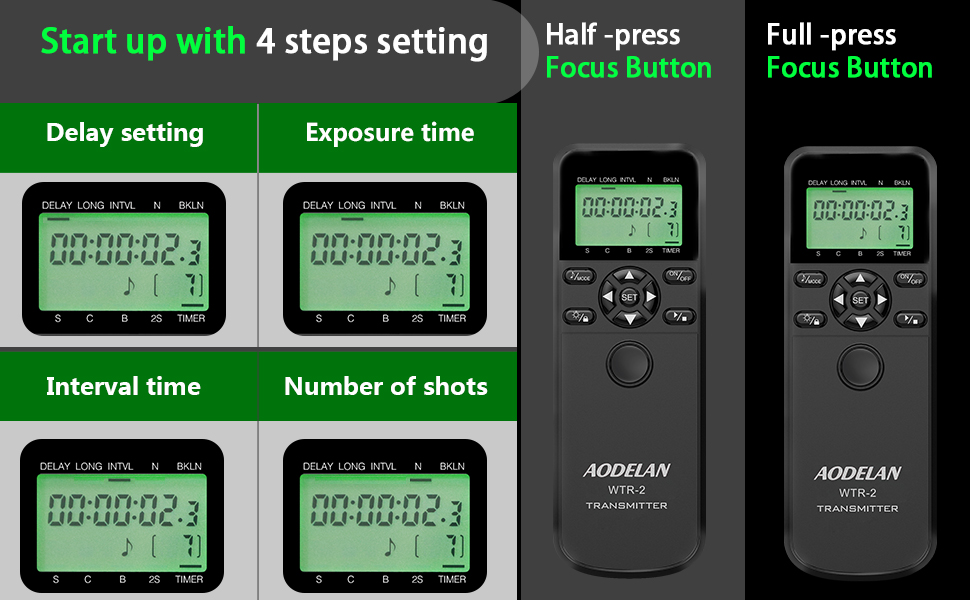
Image: The LCD display of the WTR-2 transmitter showing the settings for Delay, Long Exposure, Interval, and Number of Shots.
Example: Time-Lapse Photography
To set up a time-lapse sequence:
- Estableix el RETARD to your desired initial delay (e.g., 10 seconds).
- Estableix el LLARG exposure time (if applicable, otherwise set to 0).
- Estableix el INTVL (interval) between shots (e.g., 10 seconds).
- Estableix el N (number of exposures) (e.g., 120 shots for a 1-hour time-lapse with 30-second intervals).
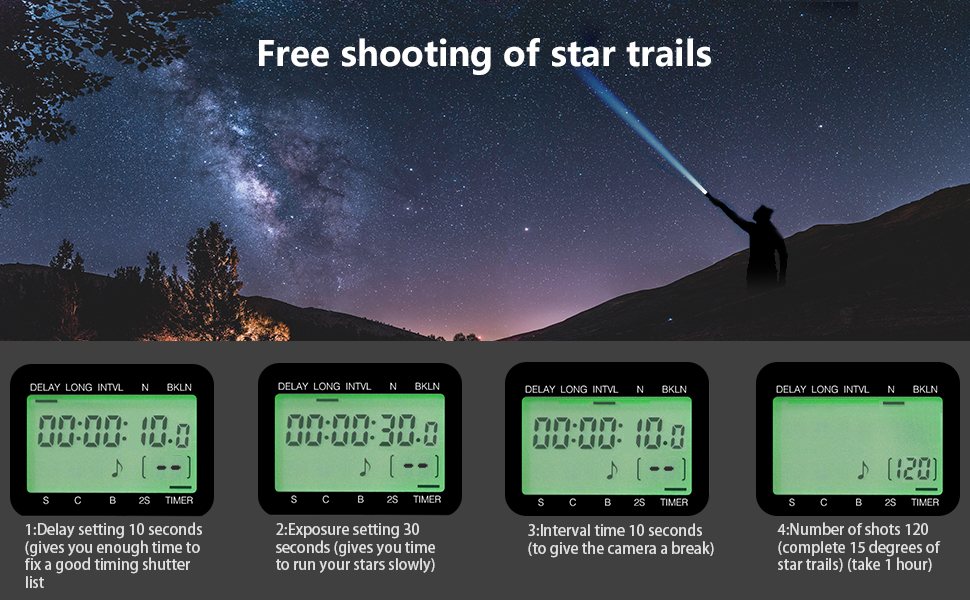
Imatge: Un example of star trail photography, illustrating how the WTR-2's timer functions (Delay, Exposure, Interval, Number of shots) can be configured for complex sequences.
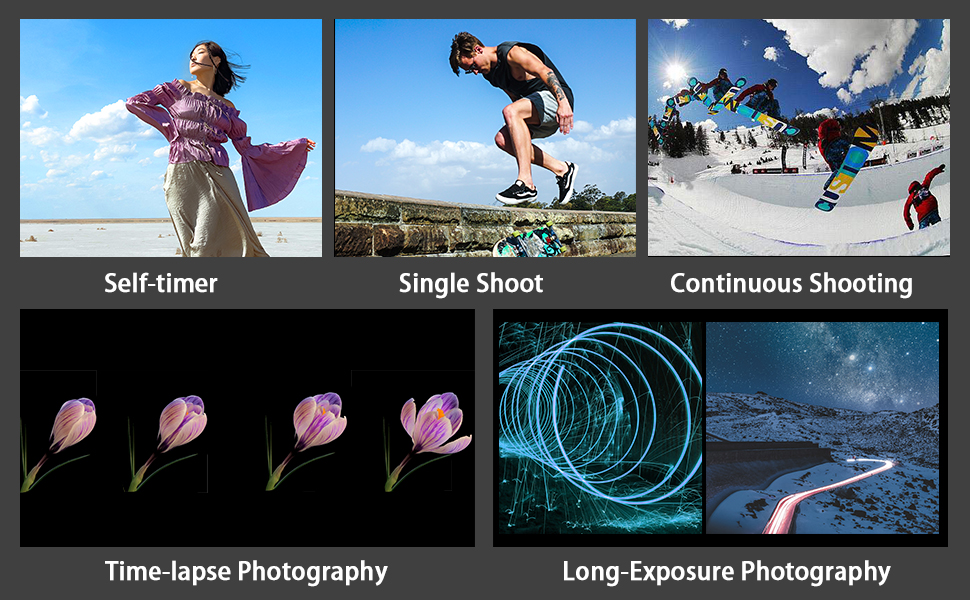
Image: Visual representations of various photography techniques achievable with the WTR-2, including self-timer, single shot, continuous shooting, time-lapse, and long exposure.
Manteniment
- Mantingueu el dispositiu sec. No l'exposeu a la humitat ni a la pluja.
- Clean the unit with a soft, dry cloth. Do not use harsh chemicals or abrasive cleaners.
- Traieu les piles si no heu d'utilitzar el dispositiu durant un període prolongat per evitar fuites.
- Emmagatzemar en un lloc fresc i sec, lluny de la llum solar directa.
Resolució de problemes
| Problema | Possible causa/solució |
|---|---|
| El dispositiu no s'encén. | Comproveu la instal·lació de les piles i assegureu-vos que siguin noves. Substituïu-les si cal. |
| Camera does not respond to shutter release. |
|
| La pantalla LCD està tènue o en blanc. | Substituïu les piles del transmissor. |
| Timer functions are not working as expected. | Review the timer settings on the transmitter's LCD. Ensure all parameters (Delay, Long, Interval, N) are correctly configured and activated. |
Especificacions
| Nom del model: | WTR-2 |
| Marca: | AODELAN |
| Tecnologia de connectivitat: | Sense fil de 2.4 GHz |
| Interval màxim: | 60 metres (196.8 peus) |
| Dispositius compatibles: | Canon EOS R3, R5, R5 C, 10D, 6D Mark II, 1D X Mark III, 1D X Mark II, 1D X, 1D C, 1DS Mark III, 1DS Mark II, 1Ds, 1D Mark IV, 1D Mark III, 1D Mark II N, 1D Mark II, 1D, 5D Mark II, 5D Mark III, 5D Mark IV, 5DS, 5DS R, 6D, 7D, 7D Mark II, 50D, 40D, 30D, 20D, D2000, D60, D30, EOS-1V, EOS-3 (C8 type connection) |
| Font d'alimentació: | 2x AAA batteries for Transmitter, 2x AAA batteries for Receiver (not included) |
| Característica especial: | Digital LCD Display, Timer Functions (Delay, Long Exposure, Interval, Number of Shots, Bracketed Exposure) |
| Nombre de botons: | 3 (main control buttons, plus navigation/set) |
| País d'origen: | Xina |
Garantia i Suport
Specific warranty information is typically provided with your purchase documentation. For product support, technical assistance, or warranty claims, please refer to the contact information provided by your retailer or visit the official AODELAN weblloc.
Per a més ajuda, també podeu consultar la AODELAN brand page on Amazon.


