
Introducció
The BALDR BA-102TY Wireless Weather Station provides accurate indoor and outdoor temperature and humidity readings, along with a 12-24 hour weather forecast. It features a large LCD display, supports up to three external sensors, and includes functions such as alarm, snooze, and backlight. This manual will guide you through the setup, operation, and maintenance of your device.
Contingut del paquet
- 1 x BALDR Weather Station (Main Unit)
- 1 x Sensor exterior sense fil
- 1 x manual d'instruccions
Note: Batteries are not included. The main unit requires 2x AAA batteries, and the outdoor sensor requires 2x AA batteries.
Configuració
1. Instal·lació de la bateria
- Unitat principal: Open the battery compartment cover on the back of the weather station. Insert 2 AAA batteries, observing the correct polarity (+/-). Close the cover.
- Sensor exterior: Open the battery compartment cover on the back of the outdoor sensor. Insert 2 AA batteries, observing the correct polarity (+/-). Close the cover.

Figure 1: Battery installation for the main unit and outdoor sensor. Ensure correct battery polarity.
2. Emparellament de sensors
After inserting batteries, the main unit will automatically search for the outdoor sensor. The outdoor temperature and humidity will appear on the display. If the connection is not established, press the "CH" button on the main unit to cycle through channels or the "RESET" button on both units to re-initiate pairing.
The weather station can synchronize with up to 3 external sensors. To add additional sensors (sold separately), ensure each sensor is set to a different channel (CH1, CH2, CH3) before pairing.

Figure 2: The weather station supports up to three wireless sensors for monitoring different areas.
3. Col·locació
- Unitat principal: Place the main unit indoors on a flat surface using its integrated kickstand, or mount it on a wall. Ensure it is away from direct sunlight or heat sources that could affect indoor temperature readings.
- Sensor exterior: Position the outdoor sensor within 100 meters (328 feet) of the main unit. Choose a shaded, dry location to protect it from direct rain and sunlight, which can impact accuracy. The sensor has an IP54 waterproof rating, but protection from extreme weather is recommended for longevity.

Figura 3: Examples of suitable placement for the main unit and outdoor sensor in various environments.

Figure 4: Proper placement of the outdoor sensor under shelter to avoid direct rain and sun.
Instruccions de funcionament
1. Mostra mésview
The large LCD screen displays indoor and outdoor temperature and humidity, weather forecast icons, time, date, and maximum/minimum records. Data updates every 10 seconds for high responsiveness.
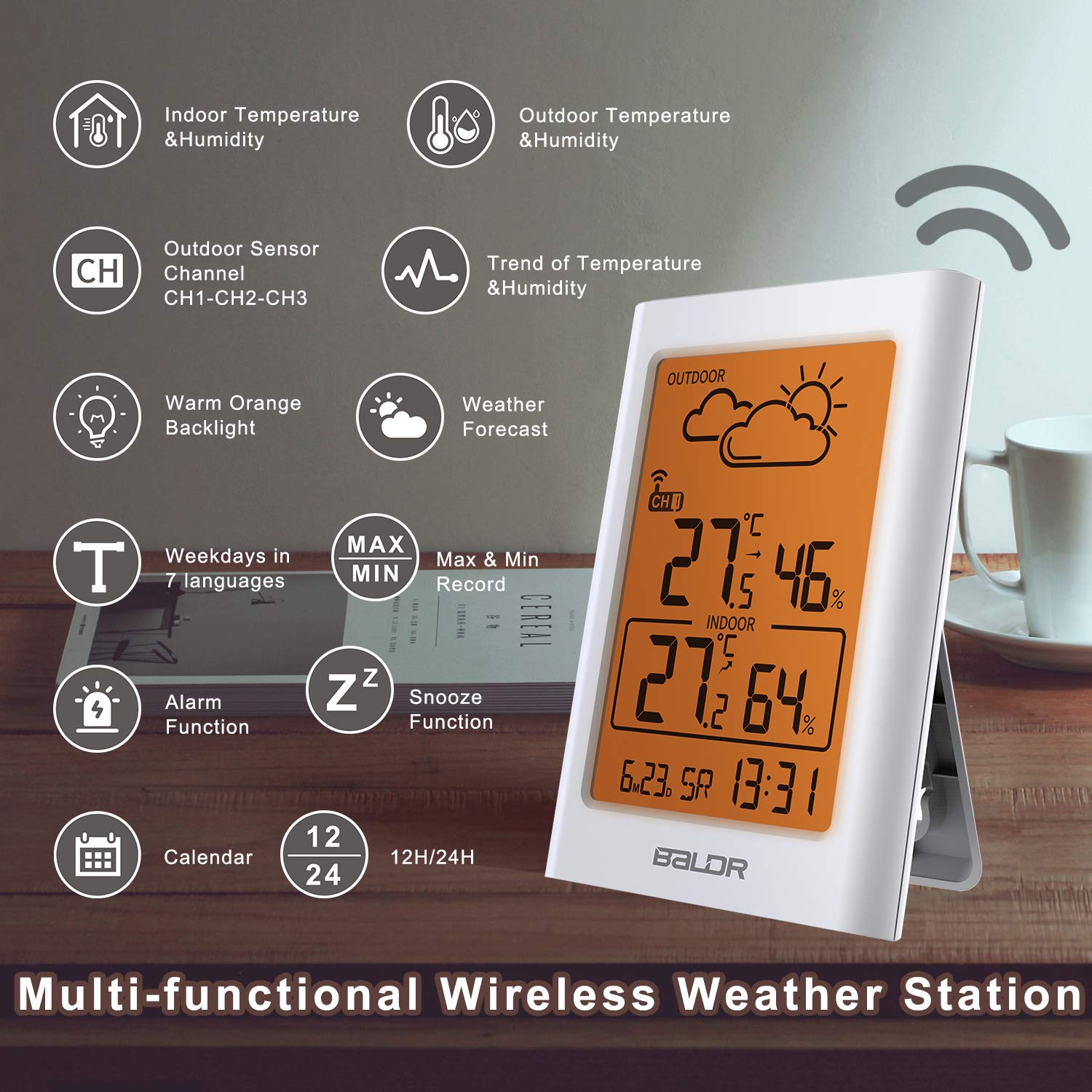
Figura 5: Mésview of the multi-functional display and its indicators.
2. Previsió meteorològica
The station uses Weather Forecast 2.0 technology to provide a graphical prediction for the next 12-24 hours. Icons include Sunny, Partly Cloudy, Cloudy, Rainy, and Snowy. These forecasts are based on atmospheric pressure changes and are estimates, not guarantees.

Figure 6: Weather forecast icons displayed on the screen.
3. Maximum and Minimum Records
The weather station automatically records the maximum and minimum indoor and outdoor temperature and humidity values. Press the "MEM" button to view these records. Pressing it again will cycle through current, maximum, and minimum values. These records reset daily or can be manually cleared.
4. Funció d'alarma i repetició d'alarma
The device includes an alarm clock function. To set the alarm, refer to the detailed instructions in the full manual. When the alarm sounds, press the "SNOOZE/LIGHT" button to activate the snooze function, which will temporarily silence the alarm for a few minutes.
5. Llum de fons
Press the "SNOOZE/LIGHT" button to activate the warm orange backlight for approximately 20 seconds, improving readability in low-light conditions.

Figure 7: The warm orange backlight enhances visibility.
6. Configuració de data i hora
The weather station allows setting the current time in 12/24-hour format and the calendar. Refer to the full instruction manual for specific button sequences to adjust these settings.
Manteniment
- Substitució de la bateria: Replace batteries in both the main unit and outdoor sensor when the low battery indicator appears on the display. Always replace all batteries at the same time with new ones of the same type.
- Neteja: Netegeu el dispositiu i el sensor amb un drap suauamp tela. No utilitzeu netejadors abrasius ni dissolvents.
- Cura del sensor: While the outdoor sensor is IP54 rated for water resistance, prolonged exposure to heavy rain or direct sunlight can reduce its lifespan. Position it in a sheltered area.
Resolució de problemes
| Problema | Causa possible | Solució |
|---|---|---|
| No hi ha visualització de temperatura/humitat exterior. | Sensor not paired, out of range, or low battery. |
|
| Lectures de temperatura/humitat inexactes. | Sensor exposed to direct sunlight/rain, or near heat/cold sources. |
|
| La pantalla està tènue o en blanc. | Piles baixes a la unitat principal. | Replace the AAA batteries in the main unit. |
Especificacions
| Característica | Detall |
|---|---|
| Marca | Baldr |
| Número de model | BA-102TY |
| Font d'alimentació | Battery powered (Main Unit: 2x AAA, Sensor: 2x AA) |
| Tecnologia de connectivitat | 433 MHz or 868 MHz wireless |
| Gamma de sensors exteriors | Fins a 100 metres (328 peus) |
| Precisió de la temperatura | ±1 °C |
| Tipus de visualització | LCD |
| Característiques especials | Weather Forecast 2.0, graphical weather display, IP54 waterproof sensor, 10-second data update, Min/Max temperature and humidity memory, alarm, snooze, backlight, calendar, 12/24-hour time. |
| Material | Plàstic |
| Color | Crema |

Figura 8: posterior view of the main unit, showing control buttons and stand.

Figure 9: The weather station's compact design for easy placement.
Garantia i Suport
For warranty information and technical support, please refer to the documentation included with your product or visit the official BALDR website. Contact details for customer service are typically provided in the full user manual.