
1. Introducció
This manual provides essential information for the safe and efficient operation of your Cuifati 30A MPPT Solar Controller. Please read these instructions carefully before installation and use to ensure optimal performance and longevity of the product.
The Cuifati 30A MPPT Solar Controller is designed to manage the power flow from your solar panels to your battery bank, ensuring efficient charging and protecting your batteries from overcharge and over-discharge. It features an intelligent regulator compatible with 12V, 24V, 36V, and 48V systems, a built-in USB port for device charging, and an LCD digital panel for easy monitoring and parameter configuration.
2. Producte acabatview
2.1 Característiques clau
- Àmplia compatibilitat: Supports 12V, 24V, 36V, and 48V battery systems.
- Integrated USB Output: Two 5V/2A USB ports for charging mobile devices.
- Protecció intel·ligent: Features protection against overcurrent, short-circuit, inverse polarity, low voltage, i sobrecàrrec.
- Pantalla LCD: Provides real-time status and data, allowing for convenient mode switching and parameter configuration.
- Automatic System Management: Manages solar panel and battery operations automatically with a built-in industrial microcontroller.
2.2 Components
The solar controller unit includes the main control module with an LCD screen, USB ports, and terminal connections for solar panels, battery, and load. The device is housed in an engineering plastic casing designed for durability.

Figura 1: Frontal view of the Cuifati 30A MPPT Solar Controller, showing the LCD display, USB ports, and connection terminals.
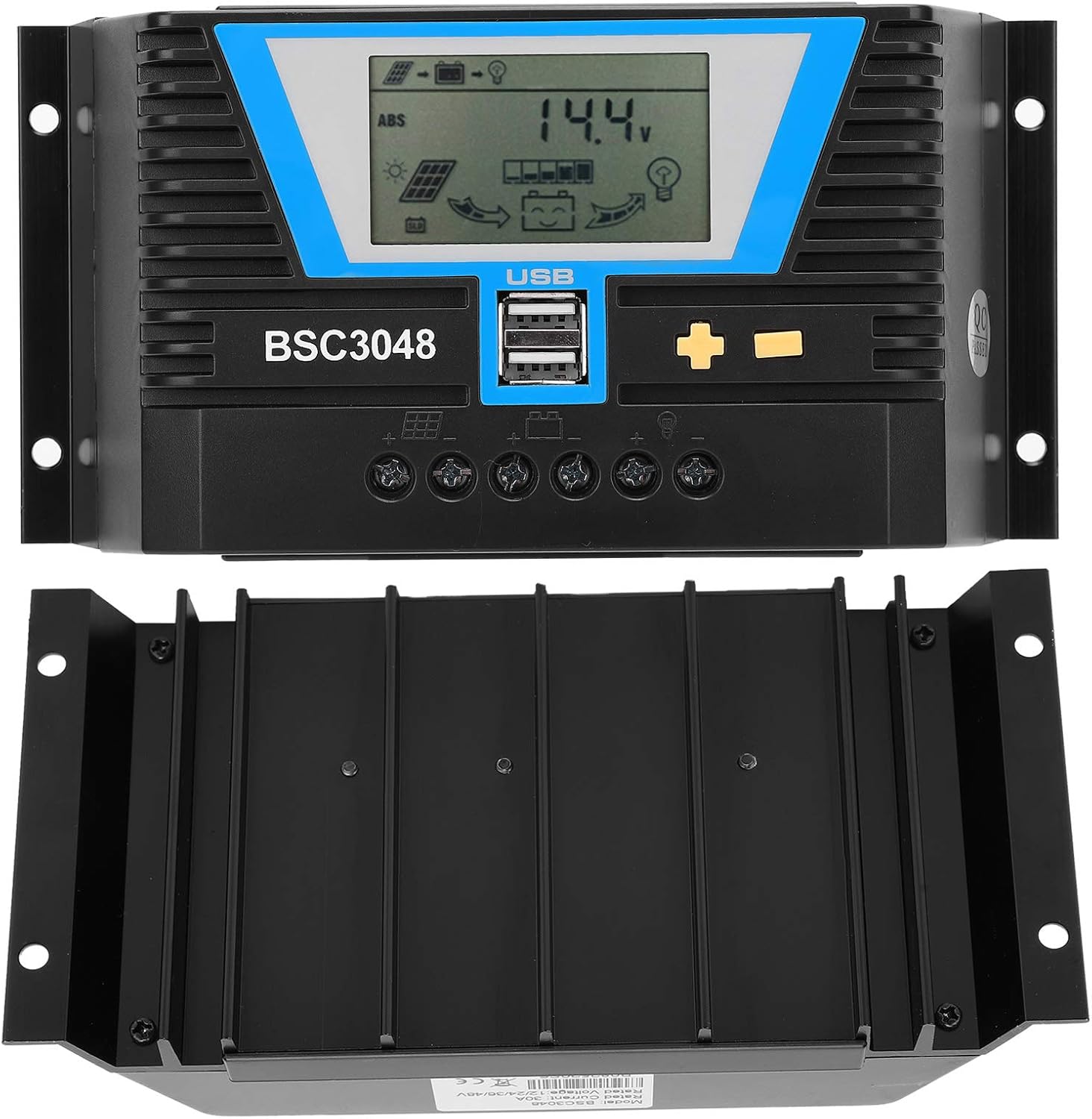
Figura 2: Frontal i inferior view of the solar controller, highlighting the heat sink fins for efficient cooling.
3. Especificacions
| Paràmetre | Valor |
|---|---|
| Tipus d'element | Controlador solar |
| Material | Plàstic d'enginyeria |
| Corrent nominal | 30A |
| Voltage | 12V/24V/36V/48V (detecció automàtica) |
| Vol. d'entrada del panell solartage | ≤100V |
| Pèrdua estàtica | ≤30mA |
| Caiguda de pressió del bucle | ≤0.3V |
| Sortida USB | 5 V/2 A x 2 |
| Temperatura de treball | -20 ~ +55 ℃ |
| Nivell de protecció | IP32 |
| Humitat relativa | ≤95%, sense condensació |
| Mida del terminal | 6AWG/16mm² |
| Dimensions del paquet | 8.66 x 4.57 x 2.24 polzades |
| Pes de l'article | 1.1 lliures (0.5 quilograms) |
4. Configuració i instal·lació
Proper installation is crucial for the safe and efficient operation of your solar charging system. Please follow these steps carefully:
4.1 Precaucions de seguretat
- Ensure all connections are secure and correct to prevent damage to the controller or other components.
- Connecteu sempre primer la bateria, després el panell solar i finalment la càrrega. Desconnecteu-ho en ordre invers.
- Instal·leu el controlador en una zona ben ventilada, allunyada de la llum solar directa, de les altes temperatures i de la humitat.
- Use appropriate wire gauges for all connections to minimize power loss and prevent overheating.
4.2 Passos de connexió
- Connecteu la bateria: Connect the positive and negative terminals of your battery to the corresponding battery terminals on the solar controller. Ensure correct polarity. The LCD display should light up.
- Connecteu el panell solar: Connect the positive and negative terminals of your solar panel(s) to the corresponding solar panel terminals on the controller. Ensure correct polarity.
- Connecteu la càrrega (opcional): If you are connecting a DC load directly to the controller, connect its positive and negative terminals to the load terminals on the controller.

Figura 3: Primer pla view of the controller's connection terminals for solar panels, battery, and load.
5. Instruccions de funcionament
The Cuifati solar controller features an intuitive LCD display and control buttons for easy operation and monitoring.
Pantalla LCD i botons 5.1
The LCD screen displays various system parameters such as battery voltage, charging current, discharge current, and operating modes. The controller typically has three buttons: a 'Mode' button, a '+' button, and a '-' button.

Figure 4: The controller's LCD display and control buttons, along with a guide to basic operations.
5.2 Operacions bàsiques
| Mode | Instrucció de funcionament |
|---|---|
| Mode de navegació | Short press the "+" or "-" button to cycle through display parameters. |
| Interruptor de càrrega | When the load is set to 24-hour mode, short press "+" on the main interface to toggle the load. Do not manually switch the load in other working modes. |
| Estableix el mode | In the settable interface, long press "+" to enter parameter setting. Short press "+" or "-" to adjust the parameter. Long press "+" again to confirm and save the parameter setting. (Long pressing "-" will not save parameters and restore to the last setting). |
| Restableix | Long press "+" in the ambient temperature interface to reset the controller. |
5.3 Càrrega USB
The two 5V/2A USB ports can be used to charge compatible electronic devices such as mobile phones, tablets, and PCs. Simply connect your device using a standard USB cable.
6. Manteniment
Un manteniment regular garanteix la longevitat i el rendiment òptim del vostre controlador solar.
- Neteja: Keep the controller clean and free from dust and debris. Use a dry cloth to wipe the surface.
- Connexions: Periodically check all wire connections to ensure they are tight and free from corrosion. Loose connections can lead to power loss or overheating.
- Ventilació: Ensure the installation area remains well-ventilated to prevent overheating of the controller.
- Control ambiental: Verify that the controller is not exposed to excessive moisture, extreme temperatures, or direct sunlight, which can degrade its performance and lifespan.
7. Solució De Problemes
If you encounter issues with your Cuifati solar controller, refer to the following common problems and solutions:
7.1 No Display on LCD Screen
- Comproveu la connexió de la bateria: Ensure the battery is correctly connected to the controller with the correct polarity. The controller draws power from the battery to operate its display.
- Voltage: Comproveu que la bateria voltage is within the operating range (12V-48V). If the battery is completely discharged, the controller may not power on.
7.2 La bateria no es carrega
- Connexió del panell solar: Check if the solar panels are correctly connected to the controller with the correct polarity.
- Sortida del panell solar: Ensure the solar panels are receiving sufficient sunlight and are producing voltage. Use a multimeter to check the open-circuit voltage de les plaques solars.
- Configuració del controlador: Verify that the battery type and charging parameters are correctly set in the controller's settings.
7.3 Load Not Working
- Connexió de càrrega: Ensure the load is correctly connected to the controller's load terminals.
- Load Switch Setting: Check the load switch setting on the controller. If it's in a timed mode, ensure the current time is within the active period.
- Voltage: Si la bateria voltage is too low, the controller may cut off the load to protect the battery.
- Protecció de sobrecàrrega: The controller has overload protection. Ensure the load current does not exceed the controller's rated load current.
8. Garantia i Suport
The Cuifati 30A MPPT Solar Controller comes with a 12-month warranty. For any issues or support inquiries, please contact Cuifati customer service via email. Please have your product model number (CUIFATImipqrgdwyu) and purchase details ready when contacting support.
Hi ha plans de protecció opcionals disponibles per a una cobertura ampliada:
- Pla de protecció de 3 anys
- Pla de protecció de 4 anys
For details on these plans, please refer to your purchase documentation or contact your retailer.