Konix Mythics Starter Kit for Nintendo Switch Instruction Manual
Model: 78441119954
Producte acabatview
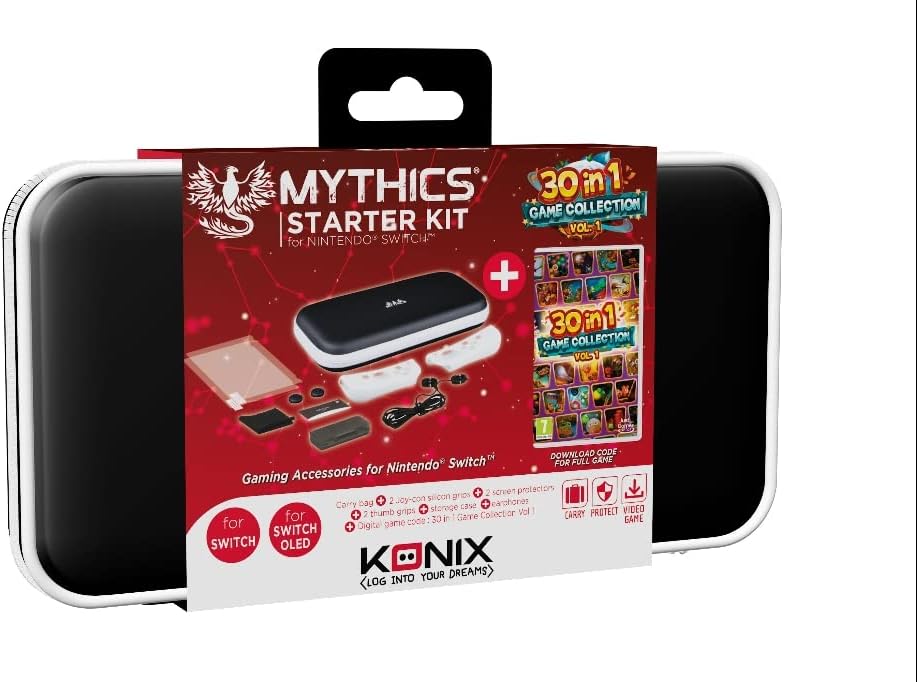
The Konix Mythics Starter Kit for Nintendo Switch provides essential accessories to enhance your gaming experience. This comprehensive bundle includes a protective carrying case, a tempered glass screen protector, in-ear headphones, a cleaning cloth, joystick caps, and a digital download code for the "30 in 1 Game Collection Vol. 1".
Figure 1: Kit Contents - Screen protectors, cleaning cloth, joystick caps, in-ear headphones, and game collection download card.
Instruccions de configuració
Instal·leu el protector de pantalla:
Before applying the screen protector, ensure your Nintendo Switch screen is clean and free of dust. Use the included cleaning cloth to gently wipe the screen. Carefully align the tempered glass screen protector with your console's screen and apply it, pressing gently from the center outwards to remove any air bubbles.
Place Console in Carrying Case:
Open the protective carrying case. Carefully place your Nintendo Switch console into the designated compartment. The case features a double opening and multiple storage options for accessories. Ensure the console fits snugly to prevent movement during transport.
Figure 2: Carrying Case - The protective case designed for the Nintendo Switch.
Connect In-Ear Headphones:
Plug the 3.5mm jack of the in-ear headphones into the headphone port of your Nintendo Switch console. Adjust the earbuds for a comfortable fit.
Apply Joystick Caps:
Gently place the joystick caps over the analog sticks of your Joy-Con controllers. These provide enhanced grip and protection.
Redeem Game Collection:
Locate the digital download code for the "30 in 1 Game Collection Vol. 1". On your Nintendo Switch, navigate to the Nintendo eShop, select "Redeem Code," and enter the provided code to download and install the game collection.
Instruccions de funcionament
Using the Carrying Case:
The case is designed for portability and protection. Use the zipper closure to secure your console and accessories. The internal compartments can store game cartridges, cables, and other small items.
Using the In-Ear Headphones:
Once connected, adjust the volume on your Nintendo Switch console to your preferred level. The headphones provide clear audio for an immersive gaming experience.
Playing the 30-in-1 Game Collection:
After successful download and installation, the "30 in 1 Game Collection Vol. 1" will appear on your Nintendo Switch home screen. Select the game icon to launch and explore the variety of puzzle, action, sports, and strategy games included.
Manteniment
Neteja de la pantalla:
Regularly use the provided cleaning cloth to wipe dust and fingerprints from your screen protector and console screen. For stubborn marks, slightly dampHumitegeu el drap amb aigua (no ruixeu directament sobre la pantalla).
Caring for the Case:
Wipe the exterior of the carrying case with a soft, damp drap segons calgui. Eviteu productes químics agressius o netejadors abrasius.
Cura dels auriculars:
Store headphones neatly to prevent tangling. Clean earbuds gently with a dry cloth.
Resolució de problemes
Screen Protector Bubbles:
If air bubbles appear after installation, gently lift the nearest edge of the protector and re-apply, pushing the bubble towards the edge with a soft card or cloth.
No hi ha àudio dels auriculars:
Ensure the 3.5mm jack is fully inserted into the console's port. Check the volume settings on your Nintendo Switch. Test headphones with another device if possible to rule out a headphone issue.
Game Download Code Not Working:
Verify that you have entered the code correctly, paying attention to similar-looking characters (e.g., '0' and 'O', '1' and 'I'). Ensure your Nintendo Switch has an active internet connection. If issues persist, contact Nintendo support for assistance with eShop codes.
Console Does Not Fit in Case:
Ensure you are placing the correct model of Nintendo Switch (compatible with Switch, Switch Lite, OLED Switch) into the case. Remove any bulky external accessories from the console before placing it in the case.
Especificacions del producte
Número de model
78441119954
Marca
Konix
Dispositius compatibles
Nintendo Switch, Switch Lite, OLED Switch
Material de la caixa
Poliuretà termoplàstic (TPU)
Tipus de tancament
Cremallera
Nombre de compartiments
2
Pes de l'article
9.2 unces (260 grams)
Dimensions del producte (LxWxH)
1.97 x 6.3 x 11.02 polzades
Llengua
Multilingüe
Garantia i Suport
Specific warranty information for the Konix Mythics Starter Kit is not provided in this manual. Please refer to the product packaging or the manufacturer's official website for detailed warranty terms and conditions. For product support, please contact Konix customer service through their official channels.
Ask a question about this manual
Ask about setup, troubleshooting, compatibility, parts, safety, or missing instructions. Manuals+ will review the question and use this page’s manual context to help answer it.