
Max Power MPD1223-ROAR
Maxpower MPD1223 12" Bluetooth-Compatible Speaker User Manual
Model: MPD1223-ROAR
Introducció
The Maxpower MPD1223 is a versatile 12-inch Bluetooth-compatible speaker system designed for various audio applications, including parties, karaoke, and general music playback. It features a built-in microphone, remote control, and a speaker stand for enhanced usability. This manual provides detailed instructions for setup, operation, maintenance, and troubleshooting to ensure optimal performance and longevity of your device.
Què hi ha a la caixa
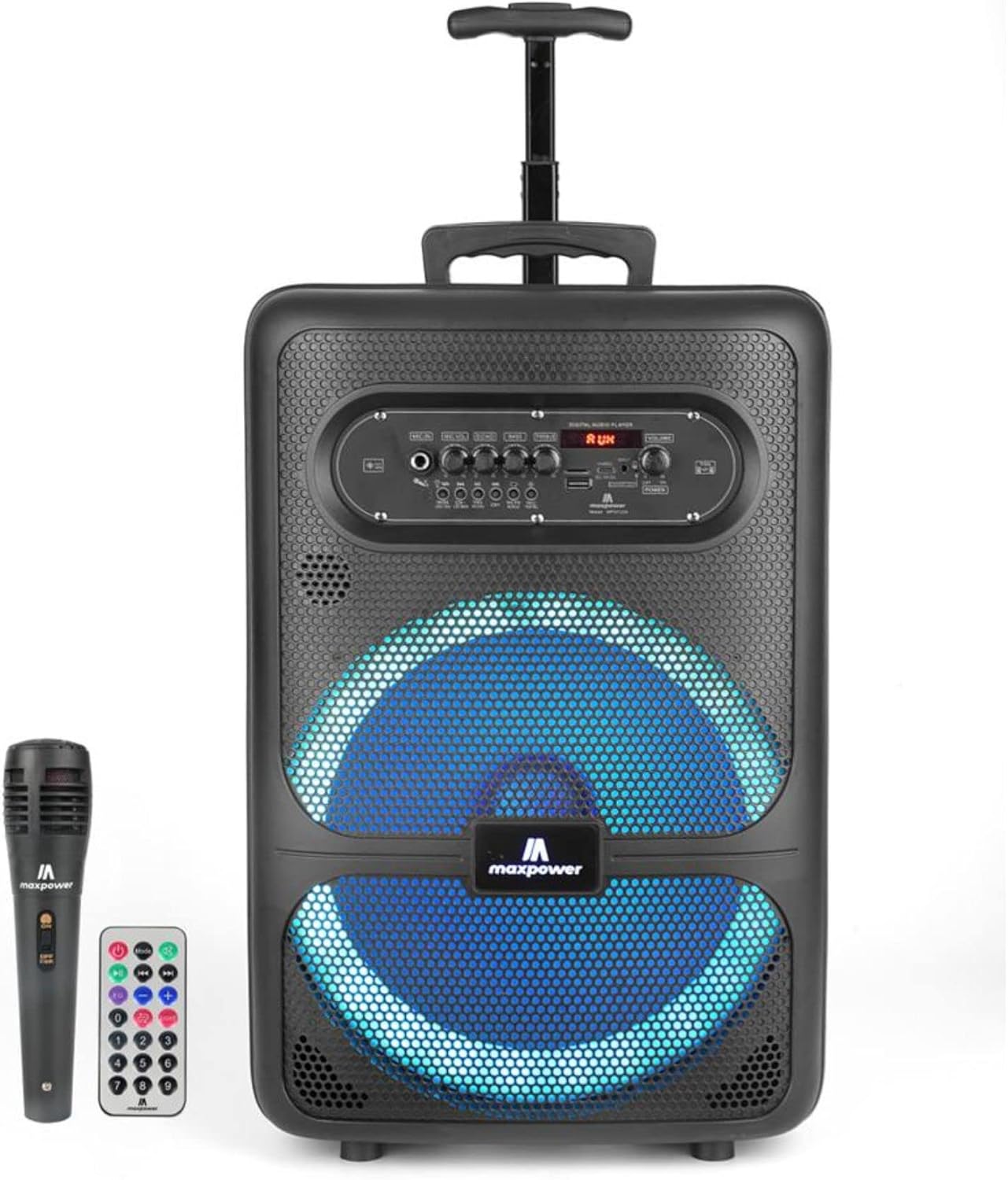
Image: The Maxpower MPD1223 speaker, accompanied by its wireless microphone and remote control.
Upon unboxing your Maxpower MPD1223 speaker system, please verify that all the following components are present:
- Maxpower MPD1223 12" Speaker Unit
- Micròfon sense fil
- Control remot
- Speaker Stand (DJ Stand)
- AC 100-240V Main Power Cable
- Manual d'usuari (aquest document)
Característiques clau

Image: A visual summary of the Maxpower MPD1223's key features, including its portability, battery life, and connectivity options.
- 12-inch Speaker with DJ Stand: Provides full-range stereo sound reproduction and impressive bass response, elevated by the included stand.
- Connectivitat Bluetooth: Seamlessly stream music wirelessly from any Bluetooth-enabled device.
- Bateria recarregable: Built-in battery offers up to 6 hours of playback, ideal for portable use.
- Multi LED Lights Mode: Integrated flashing lights enhance the visual experience, synchronizing with the music.
- Built-in Smartphone Charger: Convenient charging port for mobile devices.
- Múltiples entrades d'àudio: Supports USB, Aux, and Microphone inputs for versatile connectivity.
- Disseny portàtil: Compact with a convenient carry handle, making it easy to transport.
- True Wireless Pairing (TWS): aparellament sense fil veritable Allows connection of two MPD1223 speakers for a stereo sound experience.
Guia de configuració
1. Carregant l’altaveu
Before initial use, fully charge the speaker. Connect the provided AC power cable to the speaker's power input and plug the other end into a standard electrical outlet. The charging indicator light will illuminate. Once fully charged, the light may change color or turn off, depending on the model.
2. Assembling the Speaker Stand
- Desplegueu les potes del trípode del suport d'altaveu fins que estiguin completament esteses i estables.
- Adjust the height of the stand using the locking pin and knob. Ensure the pin is securely inserted into one of the height adjustment holes.
- Carefully place the Maxpower MPD1223 speaker onto the top pole of the stand, ensuring it is seated firmly and securely.
3. Encès
Locate the power switch on the speaker's control panel. Toggle it to the "ON" position. The digital display will light up, indicating the speaker is ready for operation.
Instruccions de funcionament

Imatge: Detallada view of the Maxpower MPD1223 control panel, highlighting various inputs and adjustment knobs.
1. Emparellament Bluetooth

Image: Illustration of the speaker's wireless Bluetooth streaming capability.
- Assegureu-vos que l'altaveu estigui encès.
- Press the "MODE" button on the control panel until "BLUE" or "Bluetooth" appears on the digital display. The speaker will enter pairing mode, indicated by a flashing Bluetooth icon or sound prompt.
- Al dispositiu mòbil (telèfon intel·ligent, tauleta, etc.), activeu el Bluetooth i cerqueu els dispositius disponibles.
- Select "Maxpower MPD1223" from the list of found devices.
- Once paired, the speaker will emit a confirmation sound, and the Bluetooth indicator will stop flashing. You can now stream audio wirelessly.
2. Ús del micròfon
Plug the microphone into the "MIC IN" jack on the control panel. Adjust the "MIC VOL" knob to control the microphone's volume. The "ECHO" knob can be used to add an echo effect to your voice for karaoke or vocal performances.
3. USB and AUX Playback
- Reproducció USB: Inseriu una unitat flash USB que contingui àudio MP3 files into the "USB" port. The speaker will automatically switch to USB mode and begin playing the first compatible track. Use the playback controls (Play/Pause, Next/Previous) on the speaker or remote.
- Reproducció AUX: Connect an external audio device (e.g., MP3 player, laptop) to the "AUX IN" port using a 3.5mm audio cable. Press the "MODE" button until "AUX" appears on the display. Control playback from your connected device.
4. Adjusting Sound and LED Lights
- Volum: Use the large "VOLUME" knob to adjust the overall output volume.
- Gravs i aguts: Use the "BASS" and "TREBLE" knobs to fine-tune the audio's low and high frequencies.
- Llums LED: Press the "LED" button on the control panel to cycle through different light modes or turn the lights off.
Manteniment
- Neteja: Feu servir un drap suau i sec per netejar l'exterior de l'altaveu. No utilitzeu productes de neteja abrasius ni dissolvents.
- Emmagatzematge: Quan no l'utilitzeu durant períodes prolongats, guardeu l'altaveu en un lloc fresc i sec, allunyat de la llum solar directa i de temperatures extremes.
- Cura de la bateria: Per allargar la durada de la bateria, eviteu descarregar-la completament amb freqüència. Carregueu l'altaveu regularment, fins i tot si no l'esteu fent servir, per mantenir la bateria en bon estat.
- Ventilació: Ensure the speaker's ventilation openings are not blocked during operation to prevent overheating.
Resolució de problemes
| Problema | Causa possible | Solució |
|---|---|---|
| Sense poder | Bateria descarregada; cable d'alimentació no connectat; interruptor apagat. | Carregueu l'altaveu; assegureu-vos que el cable d'alimentació estigui ben connectat; gireu l'interruptor d'alimentació a la posició "ON". |
| Sense so | Volume too low; Incorrect input mode; Device not paired (Bluetooth); Microphone not connected. | Increase volume; Press "MODE" to select correct input; Re-pair Bluetooth device; Ensure microphone is plugged in and MIC VOL is up. |
| Bluetooth no connectat | Speaker not in pairing mode; Device too far; Interference; Speaker already connected to another device. | Ensure speaker is in Bluetooth pairing mode; Move device closer; Avoid obstacles; Disconnect from other devices. |
| El micròfon no funciona | Microphone not plugged in; MIC VOL too low; Microphone battery low (if applicable). | Plug in microphone securely; Increase MIC VOL; Replace microphone batteries. |
Especificacions

Image: Dimensions of the Maxpower MPD1223 speaker.
| Característica | Detall |
|---|---|
| Número de model | MPD1223-ROAR |
| Mida de l'altaveu | 12 polzades |
| Font d'alimentació | Funciona amb bateria (recarregable) |
| Durada de la bateria | Up to 6 hours (Bluetooth on) |
| Tecnologia de connectivitat | Bluetooth, USB, Aux |
| Entrada d'àudio | Micròfon |
| Tipus de muntatge | Pole Mount (with included stand) |
| Dimensions del producte (L x A x A) | 12 x 8.4 x 18.2 polzades |
| Pes de l'article | 14.97 lliures |
| Color | Negre |
| UPC | 785571464900 |
Support and Legal Information
Atenció al client
For any questions, technical assistance, or support regarding your Maxpower MPD1223 speaker, please contact Max Power customer service. Refer to the product packaging or the official Max Power weblloc web per obtenir la informació de contacte més actualitzada.
Avís legal
This product contains chemicals known to the State of California to cause cancer and birth defects or other reproductive harm. Please handle with care and refer to all safety guidelines provided with the product.
Ask a question about this manual
Ask about setup, troubleshooting, compatibility, parts, safety, or missing instructions. Manuals+ will review the question and use this page’s manual context to help answer it.