
Introducció
Thank you for choosing the AQQA Aquarium Light Model AQ037. This multi-functional LED light is designed to provide optimal lighting for your freshwater aquarium, featuring 24/7 automatic programming, customizable day and night modes, a DIY sunrise/sunset simulation, and manual control with full spectrum and 7 color options. Its waterproof design and adjustable brightness ensure a healthy and vibrant environment for your aquatic life. Please read this manual thoroughly before installation and operation to ensure proper use and longevity of your product.
Informació de seguretat
- Always disconnect the power supply before performing any maintenance or cleaning on the light or aquarium.
- This product is designed for indoor use only. Do not expose it to direct sunlight or extreme temperatures.
- Ensure your hands are dry when handling the power adapter and plug.
- Do not immerse the power adapter in water. The light fixture itself is waterproof, but the adapter is not.
- Mantenir fora de l'abast dels nens i mascotes.
- Do not attempt to disassemble or modify the light fixture or power adapter. This will void the warranty and may cause damage or injury.
- Ensure the light is securely mounted on the aquarium to prevent accidental falls.
Contingut del paquet
Verifiqueu que tots els elements siguin presents al paquet:
- AQQA Aquarium Light Fixture (with integrated controller)
- Adaptador d'alimentació
- Adjustable Mounting Brackets (2 pieces)

Image: AQQA Aquarium Light fixture and power adapter.
Característiques del producte
- Construcció duradora: Made of thickened aluminum alloy for quick heat dissipation and enhanced durability.
- Perles LED d'alta qualitat: Utilizes 2835 and 5730 LED beads for high brightness and a color rendering index (CRI) up to 89.
- Disseny impermeable: Light bead panel is fully covered with glue, ensuring good waterproof performance.
- Suports ajustables: Retractable brackets accommodate fish tanks with lengths from 12 inches to 54 inches.
- Control integrat: Features an LED high-definition screen and integrated controller for a clean, wire-free setup.
- 24/7 Automatic Program: Allows setting of automatic on/off cycles for Day, Night, and DIY modes.
- Mode de dia: Customizable WRGB color values and brightness (5-100%) for a full spectrum daytime environment.
- Mode nocturn: Offers 7 distinct colors (purple, red, orange, yellow, green, cyan, blue) with adjustable brightness (5-100%) for a calming nighttime ambiance.
- Mode DIY: Simulates natural sunrise and sunset by dividing the day into 8 customizable time periods, each with adjustable start/end times, colors, and brightness.
- Mode manual: Provides instant full spectrum lighting or a cycle through 7 colors. Manual activation overrides automatic programs for the current day.
Producte acabatview
The AQQA Aquarium Light features an intuitive control panel integrated directly into the light fixture. Familiarize yourself with the buttons and their functions:

Image: Control panel with numbered buttons.
- Botó d'engegada (1): Encén o apaga la llum.
- Color/Mode Button (2): In manual mode, cycles through different colors or full spectrum. In programming mode, selects color parameters.
- Mode Button (M) (3): Enters programming mode and cycles through Day, Night, and DIY program settings.
- Set Button (S) (4): Confirms settings during programming.
- Down Arrow Button (5): Decreases values (time, brightness, color intensity) during programming.
- Up Arrow Button (6): Increases values (time, brightness, color intensity) during programming.
Instruccions de configuració
- Desembalar: Traieu amb cura tots els components de l'embalatge.
- Col·loca els suports: Slide the adjustable mounting brackets into the slots on each end of the light fixture.
- Ajust de longitud: Extend the brackets to fit the length of your aquarium (12"-54"). Ensure the light is centered and stable.
- Llum de posició: Place the light fixture securely on the edges of your aquarium.
- Connectar l'alimentació: Plug the power adapter into the light fixture, then plug the adapter into a standard electrical outlet.

Image: Adjustable brackets for tank mounting.
Instruccions de funcionament
Configuració de l’hora actual
- Manteniu premut el botó Conjunt (S) fins que la pantalla de les hores parpellegi.
- Utilitza el Up i Avall arrow buttons to adjust the hour.
- Premeu Conjunt (S) again to move to the minute display.
- Utilitza el Up i Avall arrow buttons to adjust the minutes.
- Premeu Conjunt (S) per confirmar l'hora.
Programming Automatic Modes (24/7 Cycle)
The light offers Day, Night, and DIY modes that can run automatically on a 24/7 cycle. Note that Day and Night modes cannot exist simultaneously with DIY mode. The last set mode will prevail, and conflicting modes will be automatically closed.
Day Mode Programming

Image: Day Mode settings for WRGB color and brightness.
- Premeu el botó Mode (M) button repeatedly until "Day Mode" appears on the screen.
- Premeu Conjunt (S) to enter Day Mode settings. The start time will flash.
- Ús Amunt/Avall arrows to set the desired start time (hour and minute), pressing Conjunt (S) to confirm each part.
- Repeat for the end time.
- Next, set the WRGB color values (White, Red, Green, Blue) from 0-100%. Use Amunt/Avall arrows to adjust each color, pressing Conjunt (S) to move to the next.
- Finally, set the overall brightness from 5-100%. Press Conjunt (S) to save and exit Day Mode programming.
Night Mode Programming
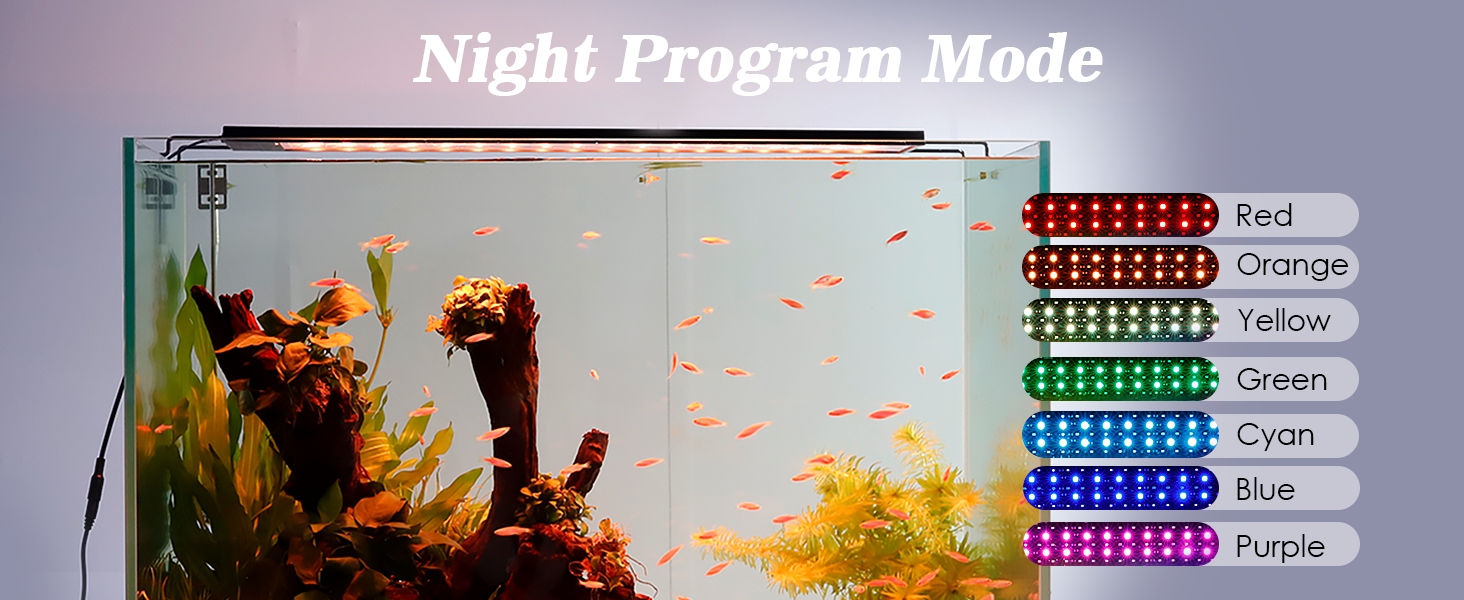
Image: Night Mode with available color options.
- Premeu el botó Mode (M) button repeatedly until "Night Mode" appears on the screen.
- Premeu Conjunt (S) to enter Night Mode settings. The start time will flash.
- Ús Amunt/Avall arrows to set the desired start time (hour and minute), pressing Conjunt (S) to confirm each part.
- Repeat for the end time.
- Choose one of the 7 available colors (purple, red, orange, yellow, green, cyan, blue) using the Color/Mode botó o Amunt/Avall fletxes. Premeu Conjunt (S) per confirmar.
- Set the brightness from 5-100%. Press Conjunt (S) to save and exit Night Mode programming.
DIY Mode Programming (Sunrise/Sunset Simulation)
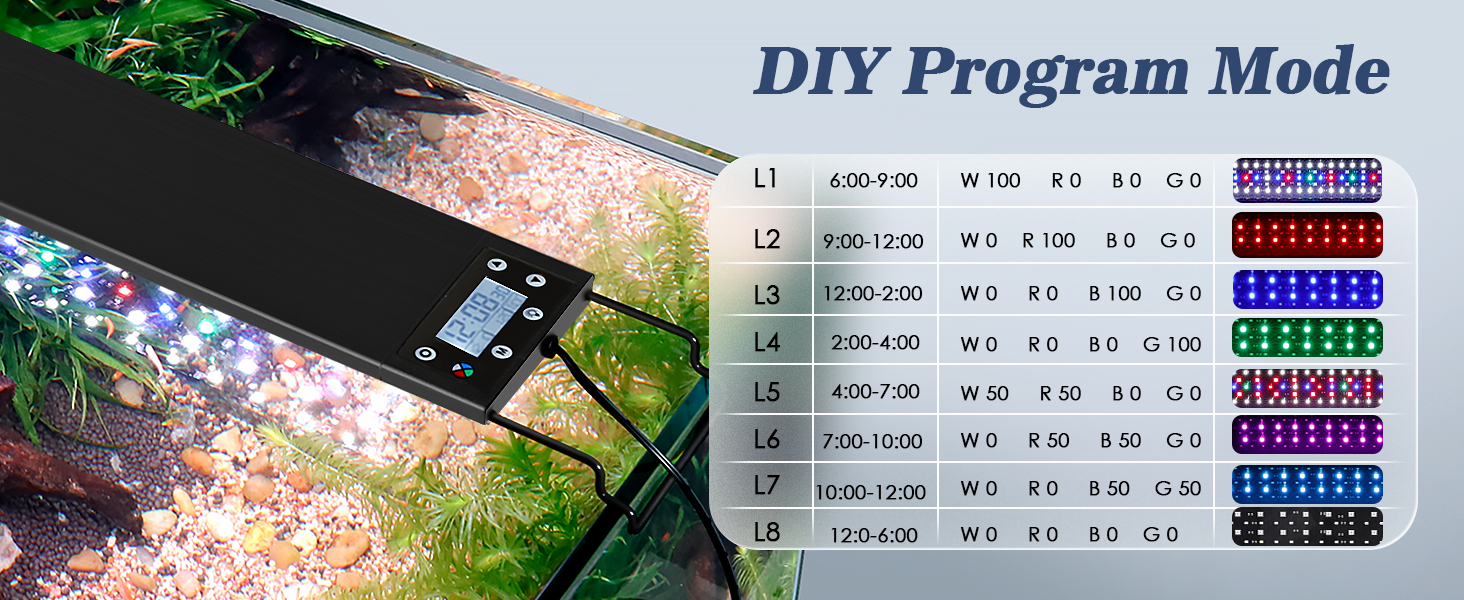
Image: DIY Mode programming interface showing 8 customizable time periods.
- Premeu el botó Mode (M) button repeatedly until "DIY Mode" appears on the screen.
- Premeu Conjunt (S) to enter DIY Mode settings. You will see L1 (Light Period 1) settings.
- For each of the 8 time periods (L1-L8), you can set:
- Hora d'inici: Ús Amunt/Avall arrows to adjust, Conjunt (S) per confirmar.
- Hora de finalització: Ús Amunt/Avall arrows to adjust, Conjunt (S) to confirm. (Note: L2-L8 start times are automatically set as the end time of the previous period).
- WRGB Color Values: Adjust White, Red, Green, Blue intensity (0-100%) using Amunt/Avall arrows, pressing Conjunt (S) after each.
- Brillantor: Set from 5-100%.
- After setting L1, press Mode (M) to move to L2, and repeat the process for all 8 periods.
- After setting L8, press Conjunt (S) to save and exit DIY Mode programming.
- The light will gradually change color within 5 minutes from L1 to L8, and within 15 minutes from L8 to L1, with brightness gradually increasing to minimize fish discomfort.
Funcionament en mode manual

Image: Manual Full Spectrum Mode display.
Manual mode allows for immediate control of the light. Activating manual mode will temporarily override any automatic programs for the current day. Automatic operation will resume the next day.
- Activate Manual Mode: Premeu el botó Poder button to turn the light on. It will typically default to the last used setting or a full spectrum white light.
- Canvia els colors: Premeu el botó Color/Mode button to cycle through 7 individual colors (purple, red, orange, yellow, green, cyan, blue) and a 7-color cycle mode.
- Ajusta la brillantor: Utilitza el Up i Avall arrow buttons to adjust the brightness from 5-100% in any manual color or full spectrum setting.
- Apagar: Premeu el botó Poder button to turn the light off.
Vídeo oficial del producte
Video: This video demonstrates the various functions and programming capabilities of the AQQA Aquarium Light, including setting different modes and adjusting colors and brightness.
Manteniment
- Neteja: Regularly wipe the light fixture with a soft, damp cloth to remove dust, water spots, and algae buildup. Do not use abrasive cleaners or solvents.
- Adaptador d'alimentació: Keep the power adapter and electrical connections dry and clean.
- Inspecció: Periodically inspect the power cord and light fixture for any signs of damage. If damage is found, discontinue use and contact customer support.
Resolució de problemes
| Problema | Causa possible | Solució |
|---|---|---|
| La llum no s’encén. | Sense font d'alimentació; connexió fluixa; adaptador defectuós. | Check if the power adapter is securely plugged into both the light and the wall outlet. Ensure the outlet has power. Try a different outlet. |
| Buttons are unresponsive or difficult to press. | Temporary software glitch; physical obstruction; worn buttons. | Unplug the light for 30 seconds and plug it back in (power cycle). Ensure buttons are clean and free of debris. If issues persist, contact customer support. |
| Automatic program is not running. | Incorrect time setting; manual mode activated; conflicting program. | Verify the current time is set correctly. Ensure you have not activated manual mode for the current day. Check for conflicting Day/Night/DIY modes and re-program if necessary. |
| La sortida de llum és tènue o inconsistent. | Brightness setting too low; dirty light surface; LED failure. | Increase brightness using the Up arrow button. Clean the light surface. If individual LEDs are out, contact customer support. |
Especificacions
| Característica | Detall |
|---|---|
| Número de model | AQ037 |
| Marca | AQQA |
| Wattage | 16 watts |
| Dimensions del producte (P x A x A) | 3.46" x 17.2" x 0.51" |
| Pes de l'article | 0.65 kg |
| Material | Alumini |
| Tipus de font de llum | LED |
| Nombre de fonts de llum | 16 |
| Temperatura de color | 6500K (White LED) |
| Entrada Voltage | AC100-240V |
| Nivell de resistència a l'aigua | Waterproof (light fixture) |
| Mètode de control | Push Button / Integrated Controller |
| Tecnologia de connectivitat | USB (for power adapter connection) |
| Tipus de muntatge | Tabletop (with adjustable brackets) |
Garantia i Suport
The AQQA Aquarium Light Model AQ037 comes with a Garantia del fabricant de 1 anys des de la data de compra. Aquesta garantia cobreix els defectes de materials i de mà d'obra en ús normal.
For warranty claims, technical assistance, or any questions regarding your product, please contact AQQA customer support. Our team is dedicated to providing long-term quality after-sales service.
Si us plau, conserveu el comprovant de compra per motius de garantia.


