
Bewinner Dilwegyrcfmb8sp862
Bewinner Digital Camera User Manual
Model: Dilwegyrcfmb8sp862
Introducció
Gràcies per la compraasing the Bewinner Digital Camera. This compact and versatile camera is designed to capture high-quality photos and videos with ease. Featuring 4K Ultra HD video recording, 48MP image resolution, 8x digital zoom, and a 2.7-inch LCD screen, it's perfect for capturing your precious moments. This manual provides detailed instructions on how to set up, operate, and maintain your camera.
Contingut del paquet
Si us plau, reviseu el paquet per assegurar-vos que hi ha tots els elements:
- 1 x Bewinner Digital Camera
- 1 x cable USB
- 1 x Manual d'usuari (aquest document)
- 1 x bossa d'emmagatzematge
- 1 x Corretja de canell

Image: Contents of the Bewinner Digital Camera package.
Característiques del producte
- Alta resolució: Supports up to 48MP image resolution and 4K video resolution.
- Zoom digital 8x: Allows for clear capture of distant objects.
- Pantalla LCD d'2.7 polzades: Per fàcil viewing de fotos i vídeos.
- Built-in Fill Light: Millora la visibilitat en condicions de poca llum.
- Funcions versàtils: Includes selfie mode, continuous shooting, and anti-shake.
- Bateria recarregable: Built-in 550mAh Li-ion battery, rechargeable via USB.
- Emmagatzematge ampliable: Supports memory cards up to 128GB (not included).

Imatge: Frontal view of the Bewinner Digital Camera highlighting its features.
Configuració
1. Carregant la bateria
The camera comes with a built-in 550mAh lithium battery. Before first use, ensure the battery is fully charged.
- Locate the USB port on the camera.
- Connect the provided USB cable to the camera's USB port.
- Connecteu l'altre extrem del cable USB a un adaptador de corrent USB (no inclòs) o al port USB d'un ordinador.
- The charging indicator light will illuminate. Once charging is complete, the light will change or turn off.
2. Inserció d'una targeta de memòria
The camera supports memory cards up to 128GB (not included). A memory card is required to save photos and videos.
- Localitzeu la ranura de la targeta de memòria al lateral de la càmera.
- Gently insert the memory card into the slot with the metal contacts facing the correct direction (refer to the diagram on the camera).
- Push the card in until it clicks into place. To remove, push the card again until it springs out.
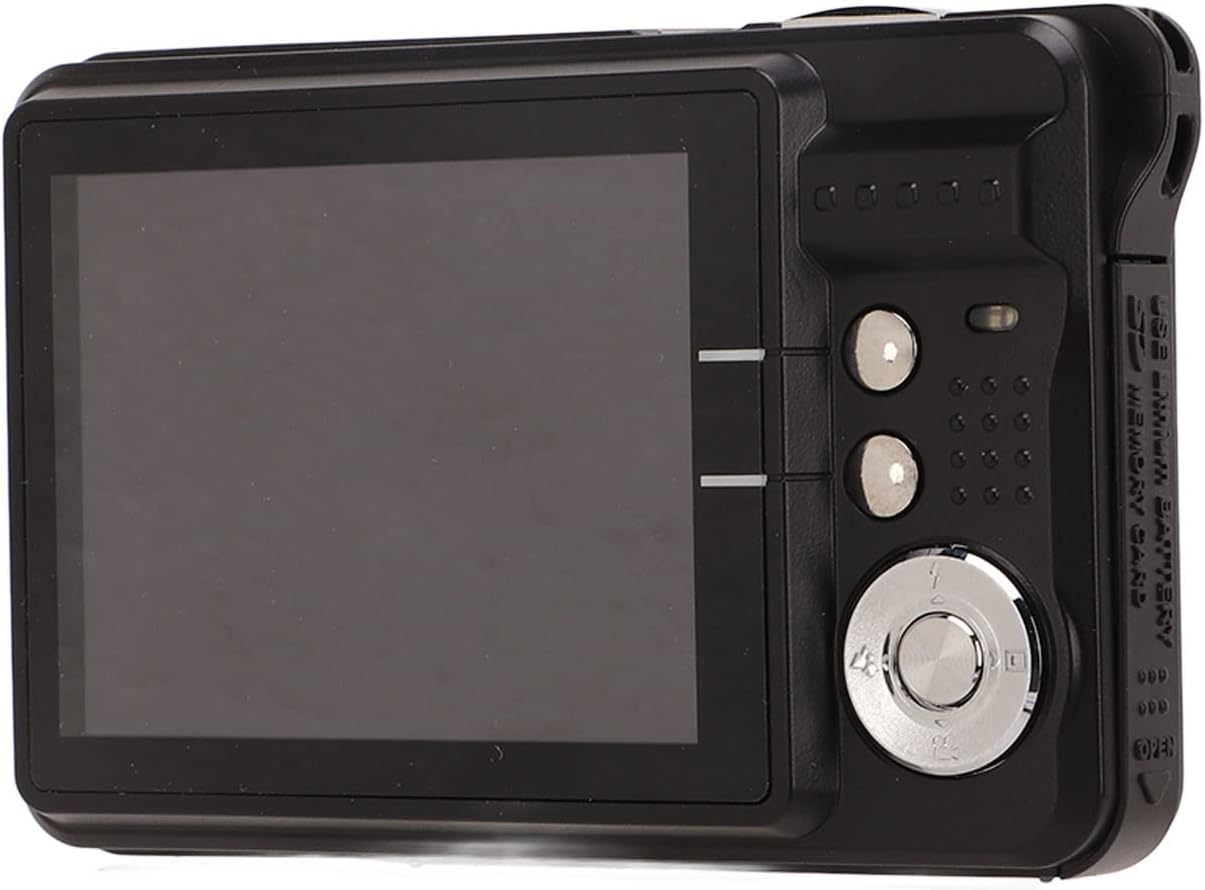
Image: Detail of the USB port and memory card slot for setup.
Instruccions de funcionament
Taking Still Images
- Hold the camera steady and aim it so you can see your subject on the screen.
- Set the shooting menu: Press the A, Flash, o Escena button to adjust flash settings or select a scene mode. Other settings can be accessed and adjusted within the camera's main menu.
- Use the zoom function: Press T to zoom in on a larger subject, or W to widen the field of view.
- Premeu el botó de l'obturador per capturar la imatge.

Imatge: Part posterior view of the camera, illustrating the LCD screen and control layout for operation.
Gravació de vídeos
The camera supports video recording up to 4K resolution.
- Switch the camera to video recording mode (if applicable, refer to on-screen icons).
- Enquadra la teva foto amb la pantalla LCD.
- Press the record button (usually marked with a red dot or video camera icon) to start recording.
- Premeu de nou el botó de gravació per aturar la gravació.
Using the Built-in Fill Light
The built-in fill light can be activated in dark environments to improve image brightness.
- Access the camera's menu or dedicated button for flash/fill light settings.
- Select the appropriate fill light mode (e.g., On, Off, Auto) based on your shooting conditions.
Manteniment
- Neteja: Feu servir un drap suau i sec per netejar el cos de la càmera. Per a l'objectiu, feu servir un drap i una solució especials per a la neteja d'objectius. Eviteu materials abrasius.
- Emmagatzematge: When not in use, store the camera in the provided storage bag in a cool, dry place away from direct sunlight and extreme temperatures.
- Cura de la bateria: Recharge the battery regularly, even if the camera is not used frequently, to maintain battery health. Avoid fully discharging the battery for extended periods.
- Eviteu l'aigua: This camera is not waterproof. Keep it away from water and high humidity.
Resolució de problemes
| Problema | Causa possible | Solució |
|---|---|---|
| La càmera no s'encén. | La bateria està esgotada o no carregada. | Charge the camera battery using the provided USB cable. |
| No es poden fer fotos/vídeos. | La targeta de memòria està plena, no està inserida o està malmesa. | Insert a memory card, free up space, or format the card (this will erase all data). |
| Les imatges són borroses. | Camera shake, dirty lens, or incorrect focus. | Hold the camera steady, clean the lens, or ensure proper lighting. |
| No es pot transferir files a l'ordinador. | USB cable issue or driver problem. | Ensure USB cable is securely connected. Try a different USB port or computer. |
Especificacions
| Característica | Detall |
|---|---|
| Tipus d'element | Càmera digital |
| Material | Plàstic i metall |
| Component fotosensible | CMOS 5MP processor |
| Resolució d'imatge | 48MP (8000x6000), 30MP (6400x4800), 24MP (5600x4200), 20MP (5200x3900), 18MP (4896x3672), 16MP (4608x3456), 12MP (4000x3000), 8MP (3264x2448), 7MP (3072x2304), 5MP (2592x1944), 2MP (1600x1200) |
| Format d'imatge | JPEG |
| Resolució de vídeo | 4K (3840x2160), 2.7K (2688x1520), FHD (1920x1080), HD (1280x720) |
| Format de vídeo | AVI |
| Mida de la pantalla | 2.7 polzades |
| Zoom digital | 8x |
| Obturador | Electrònica |
| Emmagatzematge | Maximum support memory card 128GB (not included) |
| Bateria | Bateria de liti integrada, 550mAh |
| Pes brut | 164 g / 5.8 oz |
| Número de model | Dilwegyrcfmb8sp862 |
Garantia i Suport
Bewinner products are manufactured to high-quality standards. For warranty information and technical support, please refer to the warranty card included in your package or visit the official Bewinner weblloc web. Conserveu el rebut de compra com a comprovant de compra.
For further assistance, please contact Bewinner customer service.
Ask a question about this manual
Ask about setup, troubleshooting, compatibility, parts, safety, or missing instructions. Manuals+ will review the question and use this page’s manual context to help answer it.