
1. Producte acabatview
The LENVII F510 is a versatile wired 2D barcode scanner designed for efficient data capture in various environments such as retail, warehouses, libraries, and pharmacies. It supports both 1D and 2D barcodes, including QR codes, and can read barcodes from mobile phone and PC screens. Its ergonomic design ensures comfortable operation for extended periods.

Figure 1: LENVII F510 Barcode Scanner from various perspectives.
2. Contingut del paquet
En obrir el paquet, comproveu que hi hagi tots els elements següents:
- LENVII F510 Wired 2D Barcode Scanner
- USB Cable (1.8 meters)
- Manual d'usuari

Figure 2: Typical package contents for the LENVII F510 Barcode Scanner.
3. Configuració
3.1 Connexió USB amb cable
The LENVII F510 scanner is designed for plug-and-play operation via its USB connection. No additional drivers are typically required for most operating systems.
- Connect the USB cable to the scanner's port.
- Plug the other end of the USB cable into an available USB port on your computer (PC, laptop).
- The scanner will power on and be ready for use.

Figure 3: Connecting the LENVII F510 scanner to a computer via USB.
3.2 Compatibilitat del sistema
The LENVII F510 barcode scanner is compatible with a wide range of operating systems, ensuring broad usability:
- Windows (7, 8, XP, 10)
- Mac OS
- Linux
Nota: Connection with Square systems is not supported.

Figure 4: The scanner supports various operating systems including Windows, Mac, and Linux.
4. Instruccions de funcionament
4.1 Escaneig bàsic
To scan a barcode, aim the scanner's light beam at the barcode and press the trigger button. The scanner will emit a beep and the data will be transmitted to your connected device.
4.2 Capacitats de descodificació
The LENVII F510 is capable of decoding a wide array of 1D and 2D barcode types:
- Codis de barres 1D: UPC, EAN-13, EAN-8, Codabar, Code 39, MSI, Code 93, Code 128, ISBN, ISSN, Code 39 extended, Interleaved 2 of 5 (ITF), Appendix 2 of 5, IATA Code, MSI/Plessy, Chinese Postcode, Code 32 (Italian Pharmaceutical Code), RSS 14, RSS Limited, RSS Extension.
- Codis de barres 2D: PDF417, MicroPDF417, Data Matrix, Maxicode, QR Code, Aztec.

Figure 5: The scanner supports various 1D and 2D barcode formats, including QR codes.
4.3 Scanning from Screens
The scanner can read barcode information directly from mobile phone screens and computer displays, making it suitable for digital tickets or QR codes.

Figure 6: Demonstrating the scanner's ability to read barcodes from digital screens.
4.4 Modes d'escaneig
The scanner offers different scanning modes to suit various applications. Refer to the full manual for details on configuring specific modes, such as continuous scanning.

Figure 7: The scanner supports multiple scanning modes for flexibility.
5. Manteniment
To ensure optimal performance and longevity of your LENVII F510 scanner, follow these maintenance guidelines:
- Keep the scanner clean by wiping it with a soft, dry cloth. Avoid abrasive cleaners or solvents.
- Protect the scanning window from scratches or damage.
- The scanner is designed with a 1.5-meter anti-shock and anti-fall capability, providing durability against accidental drops.
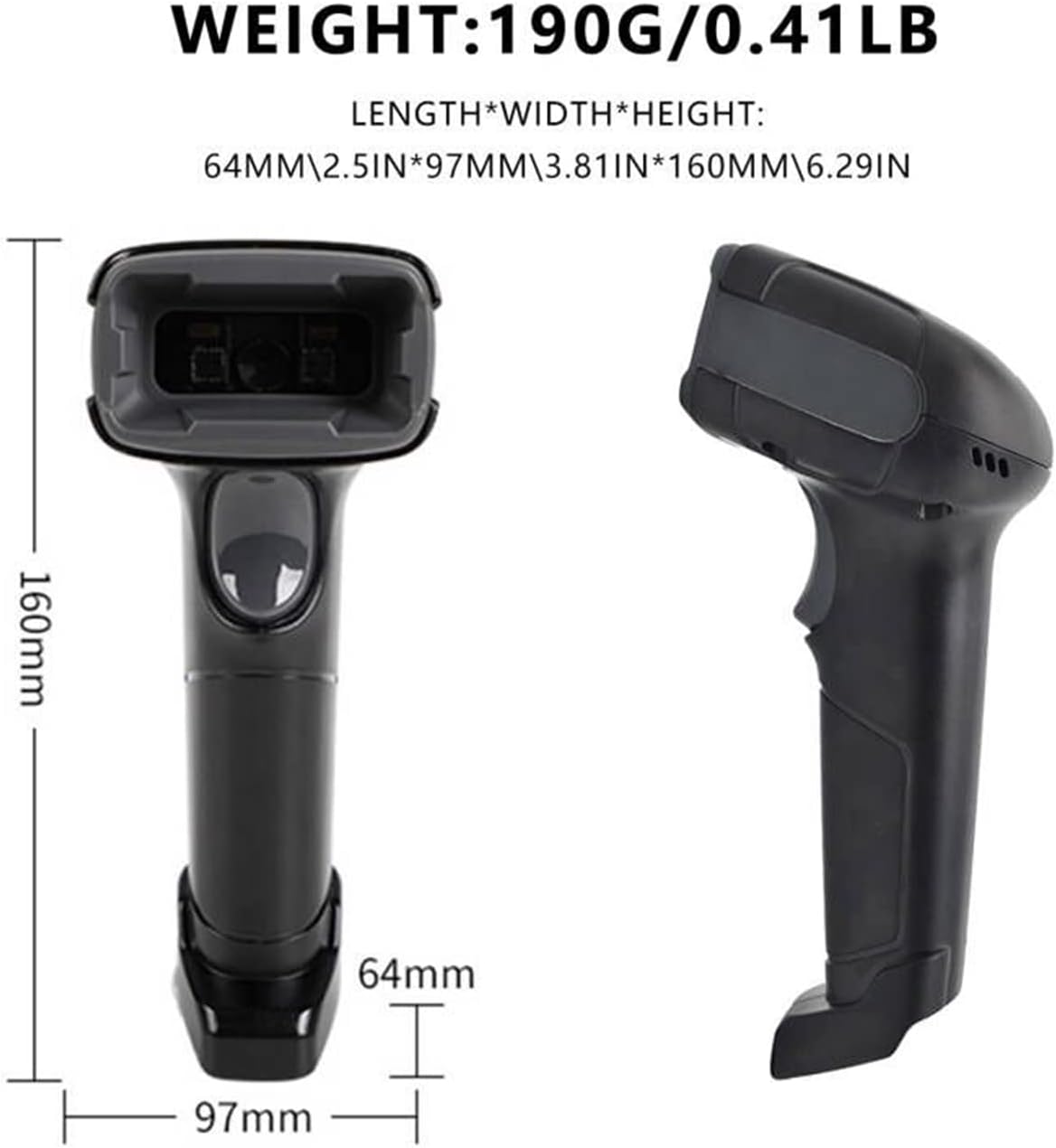
Figure 8: The scanner is built to withstand drops from up to 1.5 meters.
6. Solució De Problemes
If you encounter issues with your LENVII F510 scanner, consider the following common solutions:
- Sense sortida d'escaneig: Ensure the USB cable is securely connected to both the scanner and the computer. Verify that the computer recognizes the device.
- Sortida de dades incorrecta: If the scanner outputs incorrect data, it may require configuration. Refer to the full user manual for specific configuration barcodes to adjust settings like prefix/suffix or data format.
- L'escàner no respon: Disconnect and reconnect the USB cable. If the issue persists, try connecting to a different USB port or computer to rule out port-specific problems.
7. Especificacions
| Característica | Especificació |
|---|---|
| Número de model | F510 |
| Dimensions del producte (L x A x A) | 160 x 64 x 97 mm (6.29 x 2.5 x 3.81 polzades) |
| Pes | 190 grams (0.41 lliures) |
| Longitud del cable | 1.8 metres |
| Font de llum | Aiming: 617 nm LED; Illumination: 6500K LED |
| Image (Pixel) | 640 pixels (H) x 480 pixels (V) |
| Velocitat d'escaneig | 200 escanejos per segon |
| Resolució | Reads minimum 5mil barcode and maximum 13mil barcode |
| Vol. Operatiutage | 5 Volts DC (VDC) |
| Temperatura màxima d'emmagatzematge | 50 graus centígrads |
| Drop Protection Height | 5 meters (Note: Product description states 1.5m anti-shock/anti-fall, but specifications list 5m drop protection. Please refer to product packaging for definitive information.) |
| Tecnologia de connectivitat | USB |
8. Garantia i Suport
For warranty information and technical support, please refer to the official LENVII weblloc web o contacteu amb el vostre distribuïdor. Conserveu el rebut de compra com a comprovant de compra.