
Tuanzi T10
Tuanzi T10 Smart Watch with Earbuds User Manual
Model: T10
Introducció
This manual provides detailed instructions for the setup, operation, and maintenance of your Tuanzi T10 Smart Watch with integrated TWS Earbuds. Please read this manual thoroughly before use to ensure proper functionality and to maximize your product experience.
The Tuanzi T10 combines a 1.28-inch round touch color screen smartwatch with built-in Bluetooth 5.0 TWS HiFi stereo headphones, offering a versatile wearable experience for daily activity tracking, communication, and music enjoyment.
Què hi ha a la caixa
En obrir l'embalatge del producte, hauríeu de trobar els següents elements:
- Tuanzi T10 Smart Watch (with pre-attached straps and integrated TWS earphones)
- Cable de càrrega magnètica USB
- Manual d'usuari


Configuració
Follow these steps to set up your Tuanzi T10 Smart Watch and pair it with your smartphone.
- Charge the Smart Watch: Before initial use, ensure the watch is fully charged using the provided USB magnetic charging cable. The watch comes pre-charged, but a full charge is recommended.
- Descarrega l'aplicació: Open the included user manual and locate the QR code. Scan this QR code with your smartphone to download and install the 'VeryFit' application from your device's app store (available for Android 4.4 and above, and iOS 8.0 and above).

Locate and scan the QR code in the user manual to download the 'VeryFit' app. - Activa el Bluetooth: On your smartphone, navigate to your settings and ensure Bluetooth is enabled.
- Registra't/Iniciar sessió: Open the 'VeryFit' app and follow the on-screen prompts to register a new account or log in if you already have one.
- Vincular el dispositiu: Within the 'VeryFit' app, select the option to 'Add Device' or 'Pair Device'. The app will search for nearby devices. Select 'T10' from the list of found devices to initiate pairing. Confirm the pairing request on both your phone and the watch if prompted.
- Configura la configuració: After successful pairing, the app will guide you through initial settings such as language selection, unit format (e.g., Celsius/Fahrenheit, km/miles), and notification preferences (call alerts, SMS, calendar, emails).
For a visual guide on connecting your Tuanzi T10 Smart Watch, please refer to the video below:
Funcionament del rellotge intel·ligent
The Tuanzi T10 Smart Watch offers a variety of functions accessible through its touch screen and physical buttons.
Navegació bàsica
- Encès/apagat: Long press the side button to turn the watch on or off.
- Activació de la pantalla: Raise your wrist or press the side button to wake the screen.
- Llisca cap amunt/avall: Toggle through menus and view long text details.
- Llisca cap a l'esquerra/dreta: Toggle through different menu screens or features.
- Tap Screen: Enter a menu or select an option.
- Mantén premut: Switch between various watch faces.
Característiques clau
- Vigilància de la salut: The watch tracks heart rate, blood pressure, and SpO2 (blood oxygen) levels. It also includes a sleep monitor to track your sleep quality.
- Seguiment de la forma física: Monitor daily activities such as steps taken, calories burned, and distance covered. The watch supports various workout modes for tracking specific exercises.
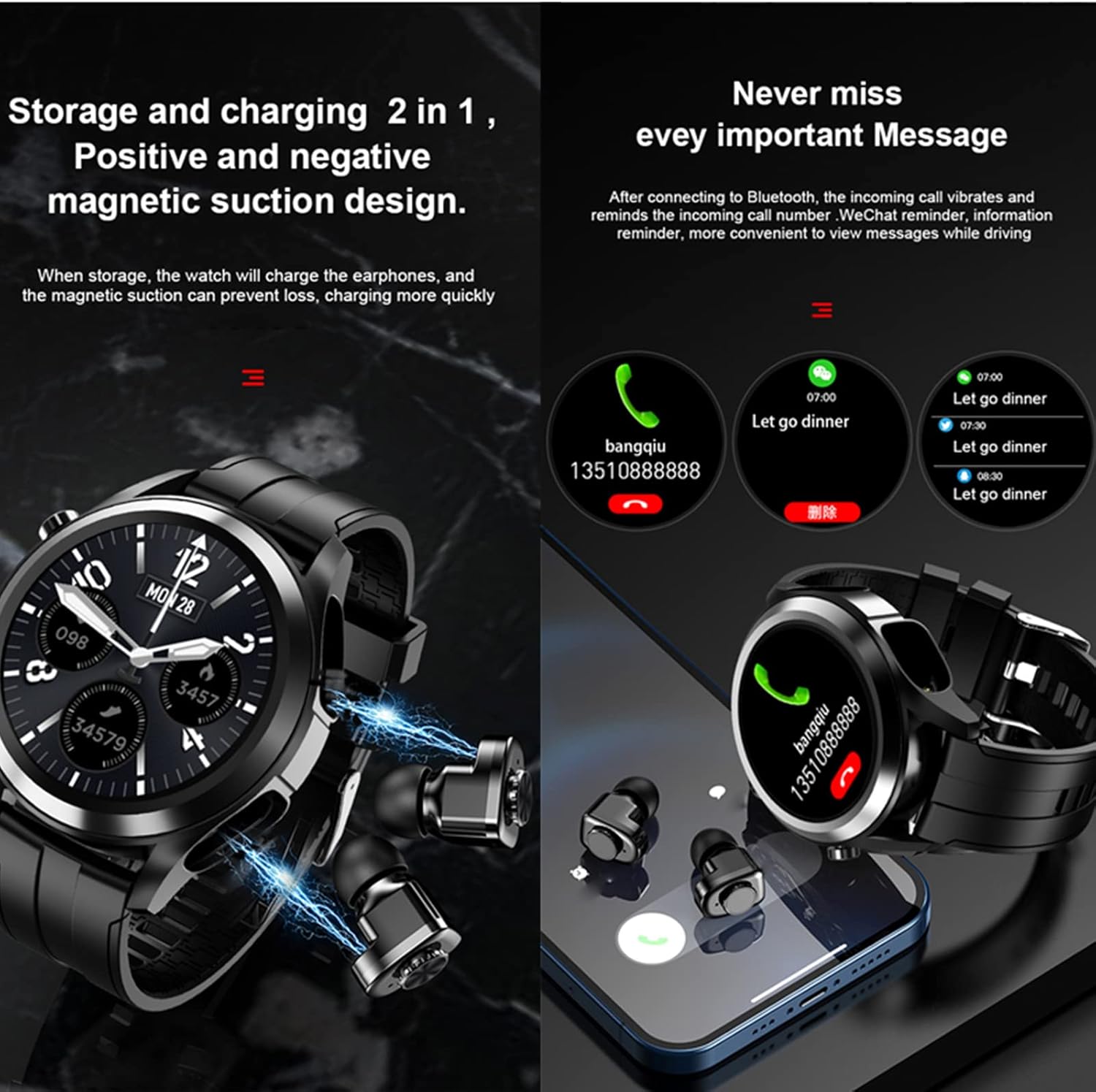
- Notificacions: Receive call alerts, SMS messages, calendar reminders, and email notifications directly on your wrist when connected to your smartphone.
- Control de música: Control music playback on your smartphone (play, pause, skip tracks) directly from the watch.
- Auriculars TWS: The integrated earbuds provide HiFi stereo sound for calls and music. They are stored and charged within the watch itself.
- Altres funcions: Includes features like weather updates, camera remote control, 'Find Phone' and 'Find Watch' functions, stopwatch, clock, non-disturb mode, and sedentary reminders.


Manteniment
Proper care and maintenance will extend the life of your Tuanzi T10 Smart Watch.
Carregant
Use only the provided USB magnetic charging cable. Connect the magnetic end to the charging points on the back of the watch. A full charge typically takes approximately 1 hour and provides 3-10 days of use (without earphones) or about 2.5 hours of continuous earphone playback.
Neteja
Netegeu regularment el rellotge i la corretja amb un drap suau i sec. Eviteu utilitzar productes químics agressius o materials abrasius. Assegureu-vos que els contactes de càrrega estiguin nets i secs abans de carregar-los.
Resistència a l'aigua
The Tuanzi T10 Smart Watch has a waterproof rating. While it can withstand splashes and brief immersion, it is not recommended for swimming or showering, especially with hot water, as this may affect its water resistance over time.
Resolució de problemes
If you encounter issues with your Tuanzi T10 Smart Watch, try the following steps:
- El rellotge no s'encén: Assegureu-vos que el rellotge estigui completament carregat. Connecteu-lo al carregador i espereu uns minuts abans d'intentar tornar-lo a encendre.
- No s'ha pogut emparellar amb el telèfon: Check that Bluetooth is enabled on your phone and that the 'VeryFit' app is open. Ensure the watch is close to your phone. Restart both the watch and your phone, then try pairing again.
- Notificacions no rebudes: Verify that notification permissions are granted to the 'VeryFit' app in your phone's settings. Also, check the notification settings within the 'VeryFit' app itself.
- Dades de salut inexactes: Ensure the watch is worn snugly on your wrist, but not too tight. Keep the sensor clean.
- Earbuds not connecting/charging: Ensure the earbuds are properly seated in their charging slots within the watch. Check for any debris obstructing the charging contacts.
If the issue persists, please refer to the comprehensive troubleshooting section in the full user manual or contact customer support.
Especificacions
| Característica | Especificació |
|---|---|
| Dimensions del producte | 2.25 x 1.95 x 0.64 polzades |
| Pes de l'article | 7 unces |
| Número de model de l'article | T10 |
| Mida de la pantalla de peu | 1.28 polzades |
| Capacitat d'emmagatzematge de memòria | 128 MB |
| Compatibilitat de sistemes operatius | Android 4.4 i iOS 8.0 o superior |
| Característica especial | TWS Bluetooth Earphone and Watch 2 in 1 |
| Capacitat de la bateria | 350 mAh |
| Tecnologia de connectivitat | Bluetooth (APP name: Brandfit) |
| Comunicació sense fils estàndard | Bluetooth |
| Composició de les cèl·lules de la bateria | Polímer |
| GPS | Sense GPS |
| Forma | Ronda |
| Nivell de resistència a l'aigua | Impermeable |
| Fabricant | PADY&Tuanzi |
Garantia i Suport
For warranty information, product support, or to purchase protection plans, please refer to the documentation included with your product or visit the official Tuanzi weblloc web. També podeu contactar directament amb el venedor per obtenir ajuda.
Ask a question about this manual
Ask about setup, troubleshooting, compatibility, parts, safety, or missing instructions. Manuals+ will review the question and use this page’s manual context to help answer it.