
1. Introducció
Thank you for choosing the OCOOPA UT2s MagTwins Rechargeable Hand Warmers. This device is designed to provide warmth and serve as a portable power bank, making it ideal for various outdoor activities and cold environments. Please read this manual thoroughly before use to ensure proper operation and safety.
2. Informació de seguretat
- Do not expose the device to extreme temperatures (above 140℉/60℃) or direct sunlight for extended periods.
- Mantingueu el dispositiu allunyat de l'aigua i altres líquids.
- No intenteu desmuntar, reparar o modificar el dispositiu.
- Mantenir fora de l'abast dels nens.
- Use only the provided charging cables or certified equivalents.
- If the device becomes excessively hot, emits smoke, or shows any signs of damage, discontinue use immediately.
3. Contingut del paquet
- 2 x OCOOPA UT2s MagTwins Hand Warmers
- 2 x cables de càrrega USB-C
- 1 x Malet per portar
- 1 x Manual d'usuari
4. Producte acabatview
The OCOOPA UT2s MagTwins consist of two individual hand warmer units that can be magnetically attached or separated for versatile use. Each unit features a power button, LED indicators for heat level and battery status, and charging ports.

Figure 1: OCOOPA UT2s MagTwins Hand Warmers (Air Force Blue)

Figure 2: Charging and Output Ports
- Botó d'encesa: Used to turn the device on/off and cycle through heat settings.
- Indicadors LED: Display current heat level (red lights) and battery status (blue lights).
- Port d'entrada USB-C: For charging the hand warmer units.
- Port de sortida USB-A: For charging external devices (e.g., smartphones).
- Connexió magnètica: Allows the two units to attach securely.
5. Configuració i càrrega
5.1 Càrrec inicial
Before first use, fully charge both hand warmer units. Connect the provided USB-C charging cables to each unit and plug them into a compatible USB power adapter (not included). The blue LED indicators will show charging progress and turn solid when fully charged.
5.2 Comprovació de l'estat de la bateria
Double-press the power button quickly to display the battery level via the blue LED indicators. Each blue light represents approximately 25% charge.
6. Instruccions de funcionament
6.1 Encesa/apagada
- To turn on: Press and hold the power button for 3 seconds. The red LED indicators will light up, and the device will begin heating.
- To turn off: Press and hold the power button for 3 seconds. The red LED indicators will turn off.
6.2 Ajust dels nivells de calor
Once the device is on, short-press the power button to cycle through the four heat settings. The number of red LED lights indicates the current heat level:
- 1 Red Light: Level 1 (approx. 100-108°F / 38-42°C)
- 2 Red Lights: Level 2 (approx. 108-118°F / 42-48°C)
- 3 Red Lights: Level 3 (approx. 118-127°F / 48-53°C)
- 4 Red Lights: Level 4 (approx. 127-137°F / 53-58°C)

Figure 3: Heat Level Indicators
6.3 Ús com a bateria externa
Each OCOOPA UT2s unit can function as a 5000mAh power bank. To charge an external device, connect your device's charging cable to the USB-A output port on the hand warmer. The hand warmer will automatically begin charging your device. Note that using the power bank function will reduce the available battery life for heating.

Figura 4: Funcionalitat del banc d'energia externa
7. Característiques
- Magnetic Separation: The two units can be used together as a single palm-sized warmer or separated to hold one in each hand or share.
- Escalfament ràpid: Experience warmth within seconds of activation due to a 20% increase in power density.
- Extended Warmth: Each 5000mAh unit provides up to 8 hours of heat on the lowest setting, offering a combined 16 hours of warmth when used sequentially or shared.
- Construcció duradora: Features a smooth, unibody high-grade brushed aluminum housing for efficient heat retention and distribution.
- Protecció del port: Rubber covers shield charging ports from dust and debris.
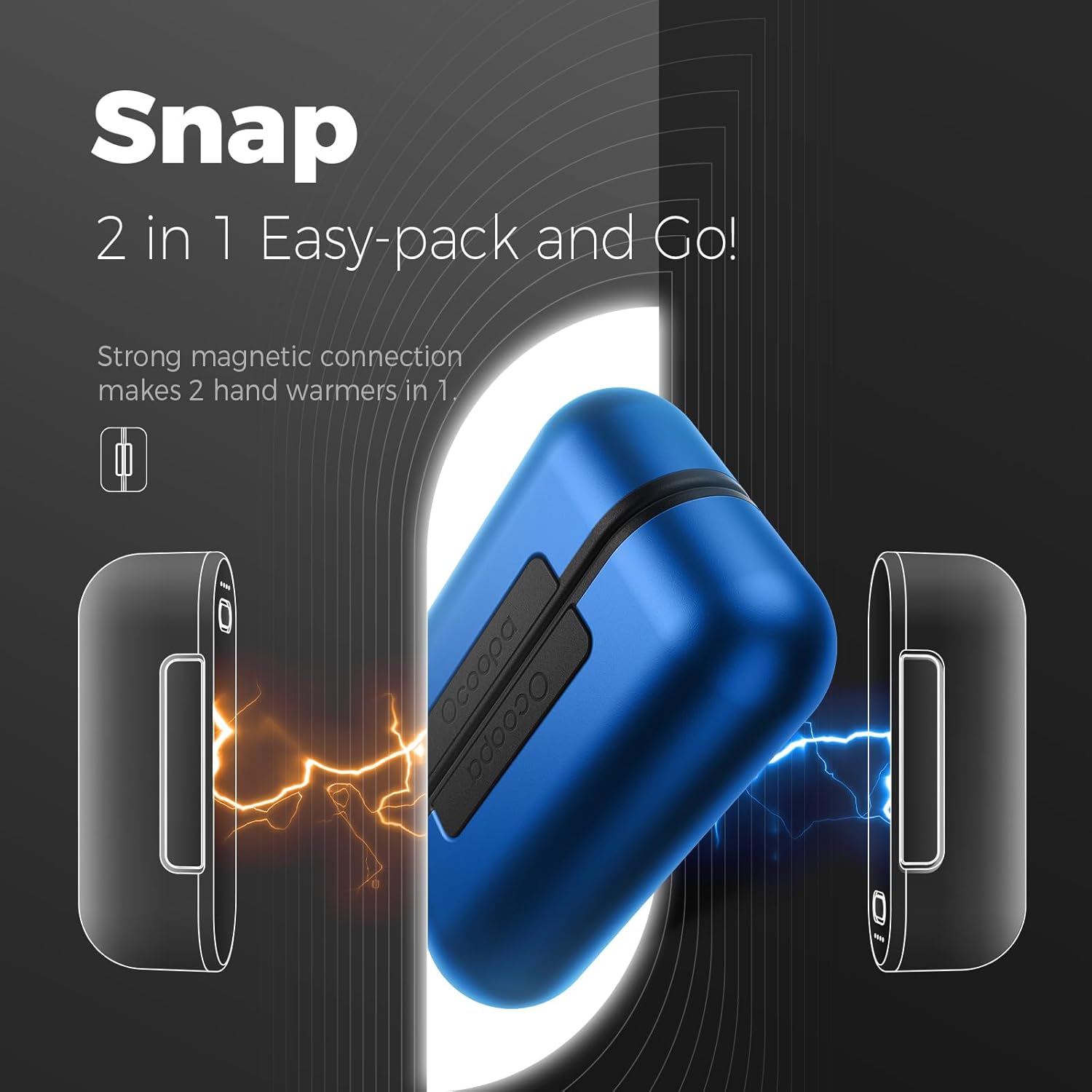
Figure 5: Magnetic Separation Feature
8. Especificacions
| Característica | Especificació |
|---|---|
| Nom del model | UT2s (MagTwins) |
| Marca | OCOOPA |
| Capacitat de la bateria | 10000 mAh (2 x 5000 mAh units) |
| Nivells de calor | 4 Levels (100-137°F / 38-58°C) |
| Potència de calor màxima | 137 °C (58 °F) |
| Max Heat Duration | 8+ hours per unit (on low setting) |
| Port de càrrega | Entrada USB-C |
| Port de sortida | USB-A Output (5V/2A Max) |
| Material | Alumini |
| Dimensions (each unit) | 1.26 x 3.7 x 2.36 polzades |
| Weight (each unit) | 0.25 quilos |
| UPC | 649615184875 |
9. Manteniment
- Neteja: Netegeu el dispositiu amb un drap suau i sec. No utilitzeu productes de neteja abrasius ni el submergiu en aigua.
- Emmagatzematge: Store the hand warmers in a cool, dry place when not in use. Ensure they are fully charged before long-term storage to preserve battery health.
10. Solució De Problemes
- El dispositiu no s'encén: Ensure the device is charged. Press and hold the power button for 3 seconds.
- El dispositiu no escalfa: Check battery level. Ensure the device is turned on and a heat level is selected.
- External device not charging: Ensure the hand warmer has sufficient charge. Check the connection cable and the external device's charging port.
- Càrrega lenta: Ensure you are using a compatible power adapter and cable. Fast charging is indicated by a green light on some chargers.
11. Garantia i Suport
The OCOOPA UT2s MagTwins Hand Warmers come with a 1-year warranty from the date of purchase. For warranty claims or technical support, please contact OCOOPA customer service through the retailer where the product was purchased or visit the official OCOOPA weblloc.