
RHYTHM 8RZ234SR04
RHYTHM D234 8RZ234SR04 Radio Alarm Clock User Manual
Model: 8RZ234SR04
1. Introducció
Gràcies per la compraasing the RHYTHM D234 8RZ234SR04 Radio Alarm Clock. This digital alarm clock features a radio-controlled timekeeping function, an electronic sound alarm with snooze, a thermometer, a hygrometer, and a calendar display. Its compact design and clear LCD make it suitable for various indoor environments. Please read this manual thoroughly before use to ensure proper operation and to maximize the clock's features.
2. Informació de seguretat
- No exposeu la unitat a temperatures extremes, llum solar directa o humitat elevada.
- Eviteu deixar caure la unitat o sotmetre-la a impactes forts.
- No intenteu desmuntar ni modificar la unitat. Això anul·larà la garantia.
- Mantingueu les piles fora de l'abast dels nens. En cas d'ingestió, busqueu atenció mèdica immediata.
- Eliminar les bateries usades d'acord amb la normativa local.
- Use only the specified battery type (AA batteries).
3. Contingut del paquet
Assegureu-vos que tots els elements siguin presents al paquet:
- RHYTHM D234 8RZ234SR04 Radio Alarm Clock
- Manual d'usuari (aquest document)
4. Producte acabatview
The RHYTHM D234 8RZ234SR04 features a clear LCD display and easily accessible front-facing control buttons for intuitive operation.
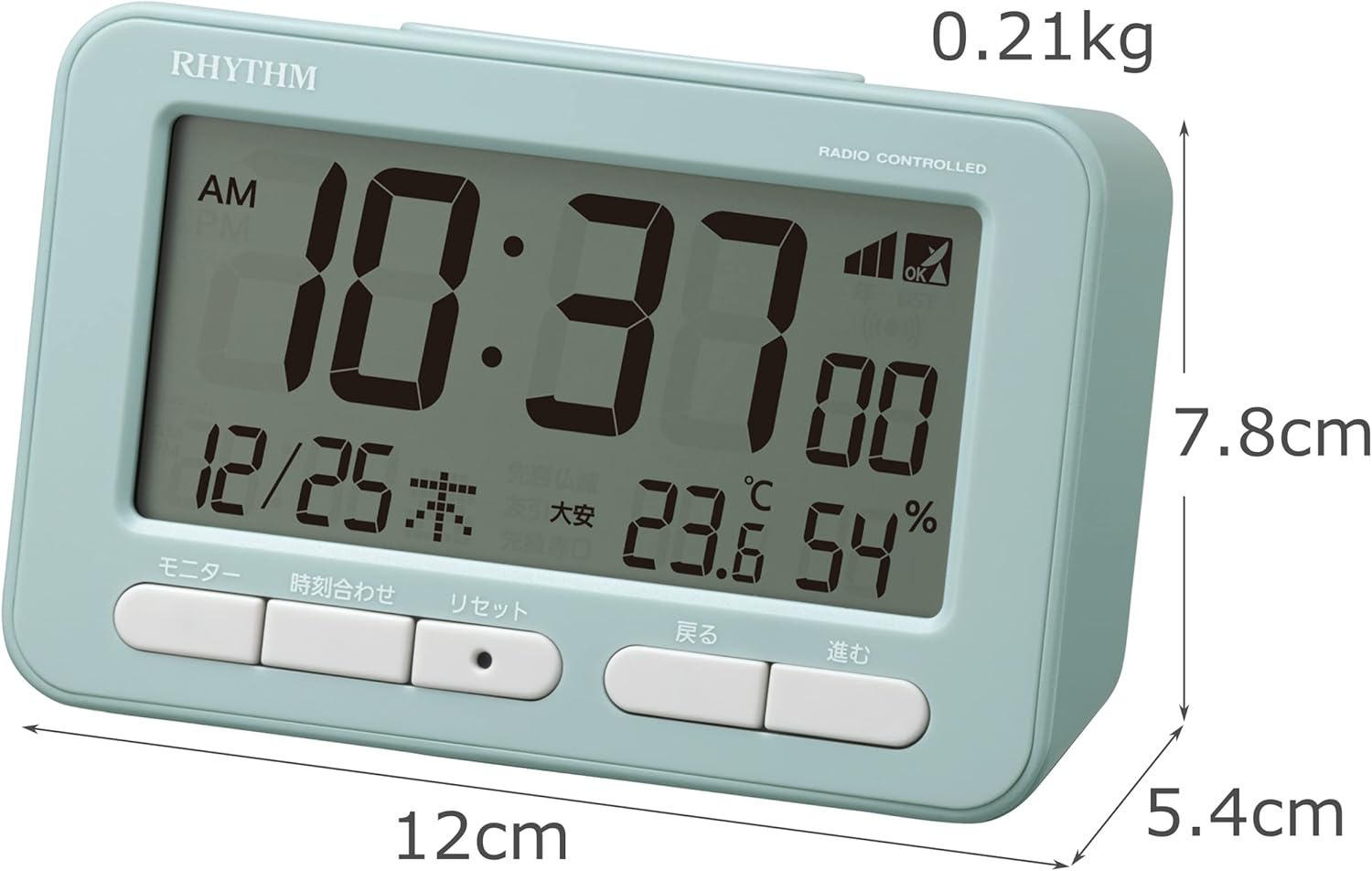
Figura 4.1: Davant view of the RHYTHM D234 8RZ234SR04 Radio Alarm Clock, showing its dimensions (7.8cm H x 12cm W x 5.4cm D) and weight (0.21kg).

Figura 4.2: Detallada view of the clock's large LCD display and the front control buttons, including 'Monitor', 'Time Set', 'Reset', 'Back', and 'Forward'.
Mostra informació:
- Hora: Displays current time in AM/PM or 24-hour format.
- Data: Shows month, day, and day of the week.
- Temperatura: Displays current ambient temperature in Celsius.
- Humitat: Mostra el percentatge d'humitat ambiental actualtage.
- Radio Wave Reception Indicator: Indica la força del senyal.
- Alarm ON/OFF Indicator: Shows if the alarm is active.
Botons de control:
- MONITOR: Activates backlight or cycles display modes.
- HORA ESTABLECIDA: Enters time/date setting mode.
- RESET: Restableix el rellotge als valors predeterminats de fàbrica.
- BACK (<): Adjusts settings backward.
- FORWARD (>): Adjusts settings forward.
- SNOOZE/LLUM: Activates snooze during alarm or backlight when pressed.
5. Configuració
5.1 Instal·lació de la bateria
- Obriu la tapa del compartiment de la bateria situada a la part posterior del rellotge.
- Insert two (2) AA batteries (not included) according to the polarity indicators (+ and -) inside the compartment.
- Tanqueu bé la tapa del compartiment de la bateria.
5.2 Initial Power On and Radio Wave Reception
Upon battery installation, the clock will automatically attempt to receive radio time signals to set the correct time and date. This process may take several minutes.

Figura 5.1: Illustration of radio wave time signal reception from two transmission stations, ensuring accurate timekeeping.
- Col·loca el rellotge a prop d'una finestra per a una recepció òptima del senyal.
- Avoid placing it near electronic devices that may cause interference (e.g., TVs, computers, mobile phones).
- A signal strength indicator will appear on the display during reception. Once synchronized, the indicator will show a stable signal.
6. Instruccions de funcionament
6.1 Manual Time and Date Setting
If radio signal reception is poor or unavailable, you can set the time and date manually:
- Manteniu premut el botó HORA CONFIGURADA fins que la pantalla de l'hora comenci a parpellejar.
- Utilitza el BACK (<) i FORWARD (>) botons per ajustar l'hora. Premeu HORA CONFIGURADA to confirm and move to minutes.
- Repetiu el procés per a minuts, any, mes i dia.
- Premeu HORA CONFIGURADA una última vegada per sortir del mode de configuració.
6.2 Configuració de l'alarma
- Premeu el botó CONJUNT D'ALARMES button (usually located on the side or back, if not on front, refer to product diagram). The alarm time will flash.
- Utilitza el BACK (<) i FORWARD (>) buttons to set the desired alarm hour. Press CONJUNT D'ALARMES per confirmar.
- Ajusteu els minuts amb la tecla BACK (<) i FORWARD (>) botons. Premeu CONJUNT D'ALARMES per confirmar i sortir.
- Per activar/desactivar l'alarma, premeu el botó ALARMA ON / OFF switch or button. An alarm icon will appear/disappear on the display.
6.3 Ús de la funció Snooze
Quan soni l'alarma, premeu el botó gran SNOOZE / LIGHT button on the top of the clock. The alarm will pause for approximately 5 minutes and then sound again. This can be repeated multiple times.
6.4 Display Modes and Backlight
The clock continuously displays time, date, temperature, and humidity. To temporarily illuminate the display, press the SNOOZE / LIGHT button. The backlight will activate for a few seconds.

Figura 6.1: The clock's display illuminated by its backlight, showing time, date, temperature, and humidity clearly in low light conditions.
Format 6.5 12/24 hores
To switch between 12-hour (AM/PM) and 24-hour formats, locate the 12/24H button (often on the back or side) and press it. The display will change accordingly.
7. Manteniment
7.1 Neteja
Wipe the clock with a soft, dry cloth. Do not use abrasive cleaners, solvents, or spray directly onto the unit, as this may damage the finish or internal components.
7.2 Substitució de la bateria
When the display becomes dim or the clock functions irregularly, it is time to replace the batteries. Follow the battery installation steps in Section 5.1. Replace both batteries simultaneously with new ones of the same type.
8. Solució De Problemes
| Problema | Causa possible | Solució |
|---|---|---|
| Sense pantalla o pantalla tènue | Piles gastades o incorrectament inserides. | Substituïu les piles per piles AA noves, assegurant-vos de la polaritat correcta. |
| Hora/data incorrecta | Poor radio signal reception or manual setting error. | Move the clock to a location with better signal. Perform manual time setting if necessary. |
| L'alarma no sona | L'alarma no està activada o està configurada incorrectament. | Ensure the alarm is turned ON and the alarm time is set correctly. |
| Les lectures de temperatura/humitat semblen inexactes | Unit placed near heat/cold sources or in extreme conditions. | Relocate the clock to a stable indoor environment away from direct heat, cold, or moisture. Allow time for readings to stabilize. |
9. Especificacions
- Número de model: 8RZ234SR04
- Dimensions: 7.8 cm (Al) x 12 cm (A) x 5.4 cm (F)
- Pes: Approximately 0.21 kg (7.5 oz)
- Font d'alimentació: 2 x AA batteries (sold separately)
- Moviment: Radio-controlled (Automatic time synchronization)
- Tipus de visualització: LCD
- Alarma: Electronic sound, 4-level volume change, with Snooze function
- Thermometer Range: -9.9 °C a 50 °C
- Hygrometer Range: del 20% al 95%
- Calendari: Programs until December 31, 2099
- Material: Plàstic
- Tipus de muntatge: Taula
- Característiques especials: Backlight, 12/24-hour display option
10. Garantia i Suport
For warranty information and customer support, please refer to the documentation provided at the time of purchase or contact your local RHYTHM distributor. Keep your purchase receipt as proof of purchase for any warranty claims.
Ask a question about this manual
Ask about setup, troubleshooting, compatibility, parts, safety, or missing instructions. Manuals+ will review the question and use this page’s manual context to help answer it.