
1. Introducció
Welcome to the ATEZR P20 Plus Laser Engraver user manual. This guide provides essential information for the safe and effective operation, maintenance, and troubleshooting of your laser engraving and cutting machine. Please read this manual thoroughly before operating the device.
2. Informació de seguretat
WARNING: Laser engravers operate with high-power lasers and can be dangerous if not used properly. Always adhere to the following safety guidelines:
- Wear appropriate laser safety glasses at all times when the machine is operating.
- Ensure proper ventilation to remove fumes and smoke generated during engraving and cutting.
- No deixeu mai la màquina sense vigilància durant el funcionament.
- Mantenir un extintor a prop.
- Do not engrave or cut unknown materials, as some may produce toxic fumes or catch fire.
- Mantingueu els nens i les mascotes lluny de la zona d'operacions.
- Desconnecteu l'alimentació abans de realitzar qualsevol manteniment o ajust.

Image: The ATEZR P20 Plus machine, highlighting the emergency stop button and safety labels.
3. Muntatge i muntatge
The ATEZR P20 Plus is designed for straightforward assembly. Follow these steps carefully.
3.1 Contingut del paquet
Verify all components are present before beginning assembly. Refer to the packing list provided with your machine.
3.2 Passos de muntatge
- Unpack all components and place them on a stable, flat surface.
- Assemble the main frame according to the included quick start guide. Ensure all screws are securely tightened.
- Instal·leu el mòdul làser al pòrtic.
- Connect all cables, including power, USB, and air assist (if applicable).
- Position the machine in a well-ventilated area, away from flammable materials.

Imatge: Més deview of the assembled ATEZR P20 Plus laser engraver.

Image: Components of the aluminum alloy frame, highlighting stability and ease of installation.
4. Instruccions de funcionament
The ATEZR P20 Plus offers versatile control options for your engraving and cutting projects.
4.1 Compatibilitat de programari
The machine is compatible with popular laser control software:
- LightBurn (recommended for advanced users)
- LaserGRBL (free, open-source)
- ATEZR App (for mobile control)

Image: The ATEZR P20 Plus is compatible with multiple software platforms and operating systems.
4.2 Connecting to the Machine
You can connect to your ATEZR P20 Plus via:
- USB Connection: Direct connection to your computer.
- WiFi Connection: For wireless control via the ATEZR App.
- Offline Work: Utilize the offline controller for pre-loaded projects.
4.3 Passos bàsics d'operació
- Power on the machine using the main power switch.
- Place your material on the working area.
- Connect to the machine using your preferred software or the ATEZR App.
- Importa o crea el teu disseny.
- Adjust laser parameters (power, speed, passes) based on the material.
- Use the frame preview funció per garantir el posicionament correcte del disseny sobre el material.
- Initiate the engraving or cutting process.
- Monitor the process closely and ensure proper ventilation.

Image: The laser module's internal structure and its ability to cut thick materials like 15mm wood and 10mm black acrylic.

Image: The built-in air duct design for effective air assist, resulting in cleaner engraving and cutting.
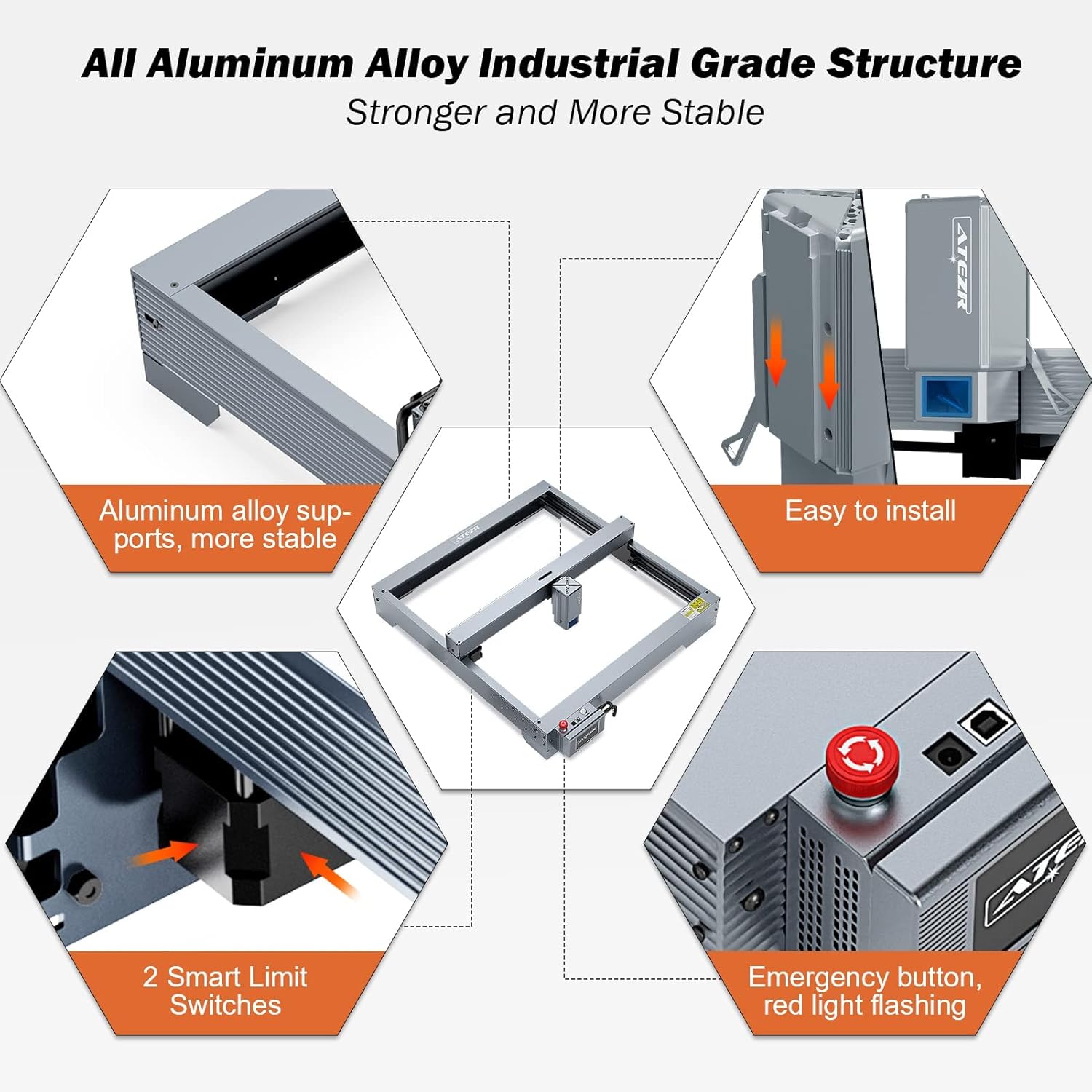
Image: The generous 430mm x 430mm (17" x 17") working area, allowing for large-scale projects.

Image: The precision of the 0.08 x 0.06mm ultra-fine compression laser for detailed engraving.

Image: The machine's high operating speed of 24800 mm/min, significantly reducing processing time.

Image: The ATEZR Laser App interface, demonstrating G-code and frame preview capabilities for precise project setup.
5. Manteniment
Regular maintenance ensures optimal performance and extends the lifespan of your ATEZR P20 Plus.
- Neteja de lents làser: Regularly inspect and clean the laser lens with a specialized lens cleaning solution and lint-free cloth to prevent debris buildup and maintain laser power.
- Rail and Belt Cleaning: Keep the guide rails and belts free from dust and debris. Lubricate the rails periodically with a suitable lubricant.
- Broquet d'assistència d'aire: If using air assist, ensure the nozzle is clear of obstructions.
- Neteja general: Wipe down the machine exterior with a soft, dry cloth.
6. Solució De Problemes
This section addresses common issues you might encounter during the operation of your ATEZR P20 Plus.
| Problema | Causa possible | Solució |
|---|---|---|
| El làser no dispara | Loose connection, laser module fault, software settings | Check all cable connections. Verify laser power settings in software. Contact support if issue persists. |
| Engraving/Cutting is weak or inconsistent | Dirty lens, incorrect focus, material issues, low laser power | Clean the laser lens. Ensure proper focus. Adjust laser power and speed settings. |
| Machine not homing correctly | Limit switch obstruction, motor issue, firmware settings | Check for obstructions near limit switches. Ensure belts are properly tensioned. Refer to software documentation for firmware settings. |
7. Especificacions tècniques
Key specifications for the ATEZR P20 Plus Laser Engraver:
- Potència làser: 20000MW (20W)
- Àrea de treball: 17" x 17" (430 mm x 430 mm)
- Dimensions del paquet: 29.1 x 22 x 5.7 polzades
- Pes de l'article: 24.7 lliures
- Connectivitat: USB, WiFi (App Control), Offline
- Programari compatible: LightBurn, LaserGRBL, ATEZR App
- Admet File Formats: SVG, PNG, DXF, TIF, BMP, PDF, NG
- Sistema operatiu: Mac OS / Windows
- Fabricant: ATEZR
- Data de primera disponibilitat: 14 de setembre de 2023
8. Garantia i Suport
For warranty information and technical support, please refer to the official ATEZR weblloc web o contacteu directament amb el seu servei d'atenció al client.
Recursos addicionals:
- Guia de l'usuari (PDF): Descarrega la Guia d'usuari
- Manual d'usuari (PDF): Descarrega el manual d'usuari