
1. Introducció
This manual provides detailed instructions for the setup, operation, and maintenance of your Graflsoa PG-9078 Bluetooth Wireless Gamepad. Please read this manual thoroughly before using the product to ensure proper functionality and to maximize your gaming experience. This gamepad is compatible with iOS, Android, Tablet, Phone, PC, Smart TV, and Set Top Box devices.
2. Informació de seguretat
- Do not expose the gamepad to extreme temperatures, humidity, or direct sunlight.
- Eviteu deixar caure el gamepad ni sotmetre'l a impactes forts.
- No intenteu desmuntar ni modificar el comandament de joc. Això anul·larà la garantia.
- Keep the gamepad away from water and other liquids.
- Feu servir només el cable de càrrega proporcionat o un equivalent certificat.
- Store the gamepad in a clean, dry place when not in use.
3. Contingut del paquet
Si us plau, comproveu el contingut del paquet en desempaquetar-lo:
- Graflsoa PG-9078 Wireless Gamepad
- Cable de càrrega USB
- Manual d'usuari (aquest document)
4. Producte acabatview
Familiarize yourself with the components and features of your PG-9078 gamepad.
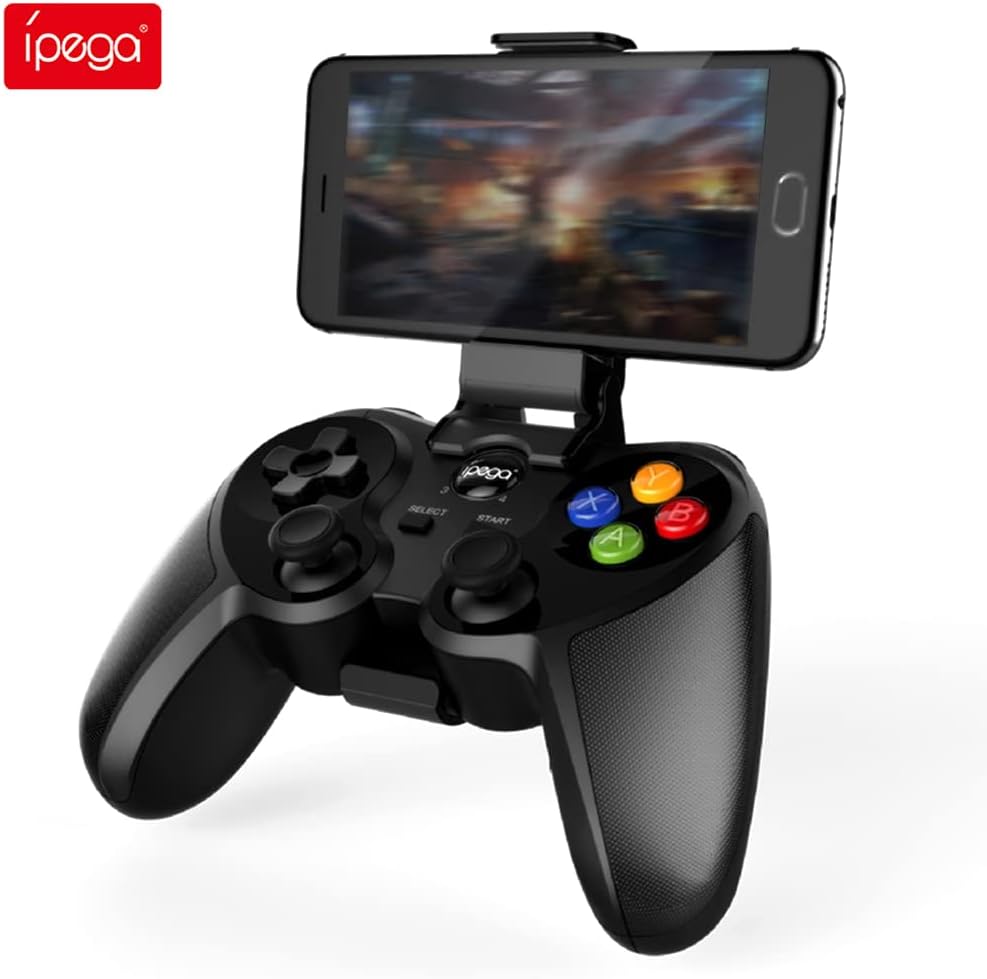
Figure 4.1: Graflsoa PG-9078 Wireless Gamepad with a smartphone mounted in the integrated holder.
The Graflsoa PG-9078 is a versatile Bluetooth gamepad designed for various gaming platforms. It features a comfortable ergonomic design, precise controls, and an integrated phone holder.
4.1 Característiques clau
- Suport de telèfon integrat: Supports smartphones from 4 to 5.5 inches, with an adjustable angle for optimal viewing.
- Hall Effect Sensor Switches: Provides durable and responsive trigger input.
- High Accuracy Joysticks: 360-degree precision joysticks with anti-slip texture to prevent operational errors.
- Botons de resposta: Fast response time for all face buttons and shoulder buttons.
- Analog L2/R2 Triggers: Offers precise control for racing and other games requiring nuanced input.
- Connectivitat Bluetooth: Stable wireless connection with a transmission distance of up to 8 meters.

Figure 4.2: The adjustable phone holder, designed to securely hold smartphones between 4 and 5.5 inches. The angle can be freely adjusted for user comfort.

Figure 4.3: The high-accuracy joystick, featuring 360-degree movement and an anti-slip texture for enhanced control.

Figure 4.4: The highly sensitive and responsive face buttons and shoulder buttons, designed for quick input.
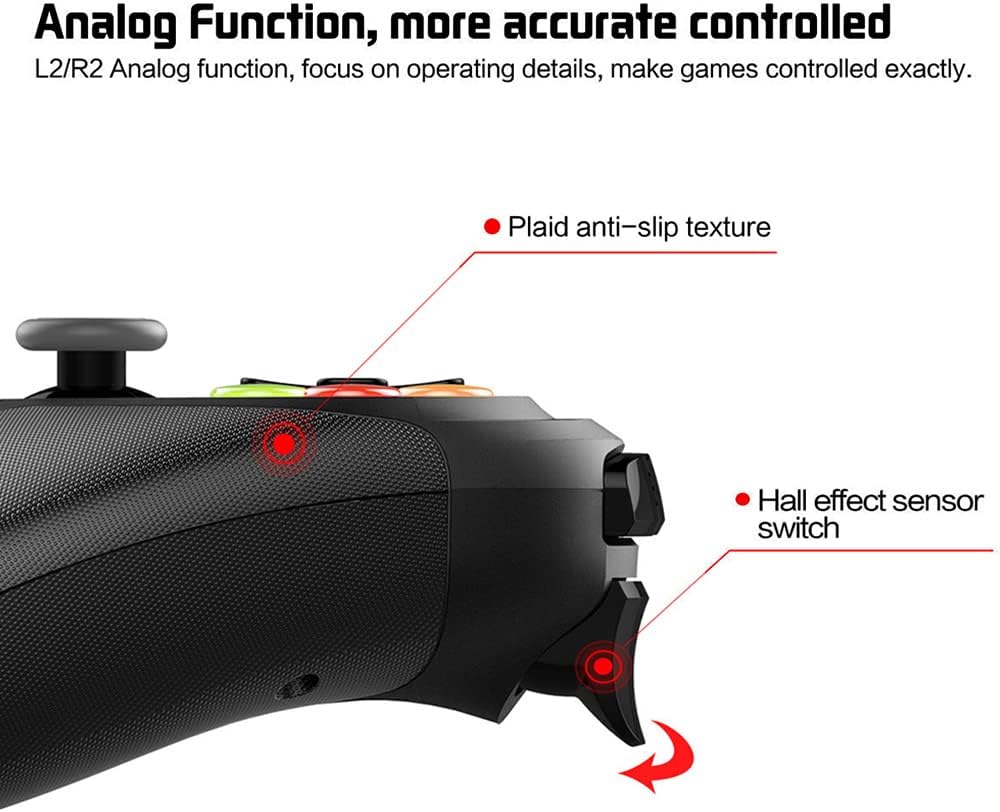
Figure 4.5: The L2/R2 analog triggers, providing accurate and detailed control for various in-game actions.

Figure 4.6: The gamepad utilizes Bluetooth technology for wireless connectivity, offering a stable connection up to 8 meters.
5. Instruccions de configuració
5.1 Càrrega del GamePad
- Connecteu l'extrem petit del cable de càrrega USB al port de càrrega del gamepad.
- Connecteu l'extrem més gran del cable de càrrega USB a una font d'alimentació USB (per exemple, un port USB de l'ordinador, un adaptador de paret USB).
- The charging indicator light on the gamepad will illuminate during charging and turn off or change color when fully charged.
- Una càrrega completa sol trigar aproximadament 2-3 hores.
5.2 Fixació del suport per al telèfon
- Locate the phone holder attachment point on the top of the gamepad.
- Carefully slide the phone holder into the designated slot until it clicks securely into place.
- Ajusteu l'angle del suport al vostre gust viewposició d'ingrés.
- Gently place your smartphone (4-5.5 inches) into the holder, ensuring it is securely gripped.
5.3 Vinculació Bluetooth
The PG-9078 supports multiple connection modes. Select the appropriate mode for your device.
5.3.1 Android Standard Mode
- Assegureu-vos que el gamepad estigui apagat.
- Manteniu premut el botó "X" button + HOME button simultaneously until the indicator light flashes rapidly.
- On your Android device, enable Bluetooth and search for available devices.
- Select "PG-9078" from the list to pair. The indicator light will become solid once connected.
5.3.2 iOS Standard Mode
- Assegureu-vos que el gamepad estigui apagat.
- Manteniu premut el botó "Y" button + HOME button simultaneously until the indicator light flashes rapidly.
- On your iOS device, enable Bluetooth and search for available devices.
- Select "PG-9078" from the list to pair. The indicator light will become solid once connected.
5.3.3 PC/Smart TV Mode (Direct Play)
- Assegureu-vos que el gamepad estigui apagat.
- Manteniu premut el botó "A" button + HOME button simultaneously until the indicator light flashes rapidly.
- On your PC or Smart TV, enable Bluetooth and search for available devices.
- Select "PG-9078" from the list to pair. The indicator light will become solid once connected.
Note: After successful pairing, the gamepad will automatically connect to the last paired device when powered on in the same mode.
6. Instruccions de funcionament
6.1 Encès/Apagat
- Encès: Premeu el botó Botó HOME for 1 second. The indicator light will flash, then connect to the last paired device.
- Apagar: Manteniu premut el botó Botó HOME for 5 seconds until the indicator light turns off. The gamepad will also automatically power off after 5 minutes of inactivity.
6.2 Gamepad Modes
The PG-9078 supports different modes for optimal compatibility:
- Android Standard Mode (X + HOME): For most Android games and emulators.
- iOS Standard Mode (Y + HOME): For iOS games that support MFi controllers or specific gamepad protocols.
- PC/Smart TV Mode (A + HOME): For direct play on Windows PCs (requires Bluetooth adapter) and compatible Smart TVs.
Note: Game compatibility varies by platform and game title. Some games may require specific mapping or may not support external controllers.
6.3 Ús dels controls
The gamepad features standard controls:
- Coixinet direccional (D-Pad): Per a una entrada direccional precisa.
- Manets analògics esquerre/dret: Per a moviment de 360 graus i control de la càmera.
- Botons frontals (A, B, X, Y): Per a accions dins del joc.
- Botons d'espatlla (L1, R1): For quick actions.
- Analog Triggers (L2, R2): For pressure-sensitive input, ideal for acceleration/braking in racing games.
- Botons SELECCIONAR/INICIAR: For menu navigation and game functions.
- Botó HOME: For power on/off and mode switching.

Figure 6.1: Proper grip and button access on the Graflsoa PG-9078 gamepad, highlighting its ergonomic design and Hall effect sensor switches.
7. Manteniment
- Neteja: Use a soft, dry cloth to wipe the surface of the gamepad. Do not use harsh chemicals or abrasive cleaners.
- Emmagatzematge: Guardeu el gamepad en un lloc fresc i sec, allunyat de la llum solar directa i de temperatures extremes.
- Cura de la bateria: To prolong battery life, avoid fully discharging the gamepad frequently. Charge it regularly, even if not in constant use. If storing for an extended period, charge it to about 50% every few months.
8. Solució De Problemes
8.1 Gamepad Does Not Power On
- Ensure the gamepad is charged. Connect it to a power source using the USB cable and allow it to charge for at least 30 minutes before attempting to power on again.
- Manteniu premut el botó HOME durant 1 segon per encendre.
8.2 No es pot emparellar per Bluetooth
- Ensure the gamepad is in the correct pairing mode for your device (Android: X+HOME, iOS: Y+HOME, PC/Smart TV: A+HOME).
- Assegureu-vos que el Bluetooth estigui habilitat al dispositiu i que es pugui detectar.
- Acosta el gamepad al dispositiu (a menys de 8 metres).
- Forget/remove "PG-9078" from your device's Bluetooth list and attempt to pair again.
- Restart both your device and the gamepad.
8.3 Els botons/joysticks no responen
- Verify that the gamepad is successfully connected to your device.
- Check game settings to ensure controller support is enabled and controls are mapped correctly.
- Some games may not fully support external gamepads.
- Try restarting the gamepad and your device.
9. Especificacions
| Model | PG-9078 |
| Connectivitat | Bluetooth sense fil |
| Interval Bluetooth | Fins a 8 metres |
| Compatibilitat | iOS, Android, Tablet, Phone, PC, Smart TV, Set Top Box |
| Phone Holder Support | 4 - 5.5 inch smartphones |
| Característiques especials | Hall Effect Sensor Switches, 360-degree High Accuracy Joysticks, Analog L2/R2 Triggers |
| Font d'alimentació | Rechargeable Battery (Internal) |
10. Garantia i Suport
Per obtenir informació sobre la garantia i assistència tècnica, consulteu la documentació que s'inclou amb la compra o poseu-vos en contacte amb el vostre distribuïdor. Conserveu el comprovant de compra per a qualsevol reclamació de garantia.