
Mitzu CSA-5715
Mitzu Professional 15" Speaker with Tripod User Manual
Model: CSA-5715 | Brand: Mitzu
1. Informació de seguretat
Si us plau, llegiu atentament totes les instruccions de seguretat abans d'utilitzar aquest producte. Conserveu aquest manual per a futures consultes.
- No exposeu l'altaveu a la pluja ni a la humitat per evitar incendis o descàrregues elèctriques.
- Do not open the speaker enclosure. Refer all servicing to qualified personnel.
- Assegureu-vos que hi hagi una ventilació adequada. No bloquegeu cap obertura de ventilació.
- Utilitzeu només accessoris/accessoris especificats pel fabricant.
- Eviteu que el cable d'alimentació sigui trepitjat o pessigat.
- Desendolleu l'altaveu durant tempestes amb llamps o quan no l'utilitzeu durant períodes prolongats.
- Eviteu col·locar l'altaveu sobre superfícies inestables.
- No feu servir l'altaveu a prop de fonts de calor com ara radiadors, registres de calor, estufes o altres aparells (inclosos amplificadors) que produeixen calor.
2. Producte acabatview
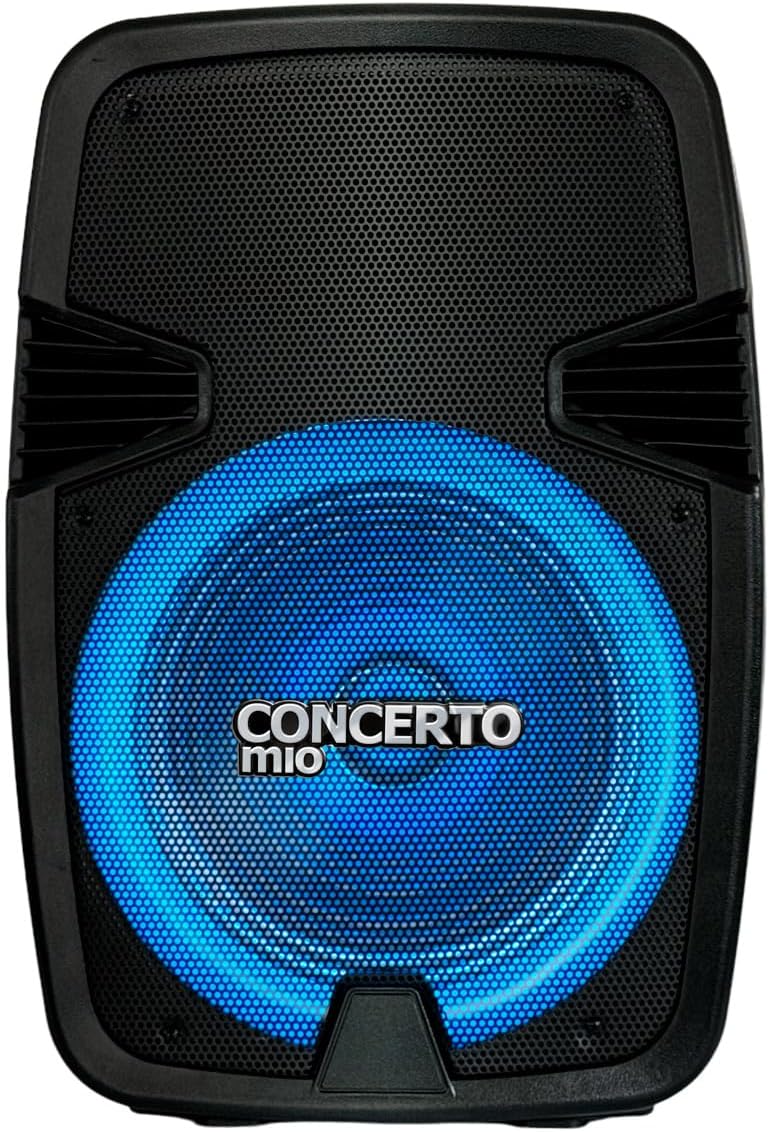
The Mitzu CSA-5715 is a professional 15-inch speaker designed for high-quality audio output, featuring Bluetooth connectivity, USB and auxiliary inputs, and integrated LED lighting. It comes with a tripod for optimal sound projection.


3. Configuració
- Desembalatge: Carefully remove the speaker and all accessories from the packaging. Verify all components are present: speaker unit, tripod, power cable, and user manual.
- Muntatge del trípode:
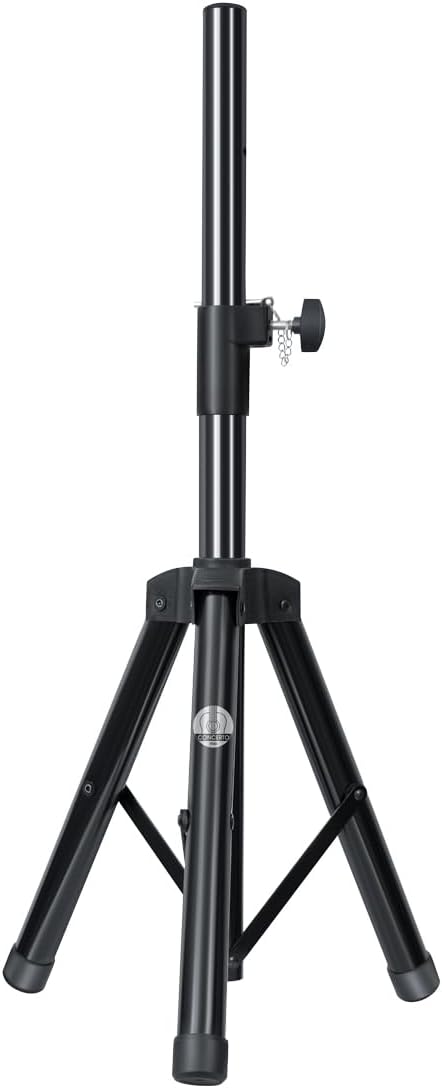
- Extend the tripod legs fully and ensure they are locked securely.
- Adjust the height of the tripod to your desired level, ensuring the locking pin is engaged and the knob is tightened.
- Carefully place the speaker onto the tripod pole, ensuring it is stable and centered.
- Connexió d'alimentació: Connect the power cable to the speaker's power input on the rear panel, then plug the other end into a suitable electrical outlet (AC 120V/60Hz).
- Initial Charge (if applicable): For first use, it is recommended to fully charge the internal battery. The charging time is approximately 3 hours.
4. Instruccions de funcionament
4.1 Encès/Apagat
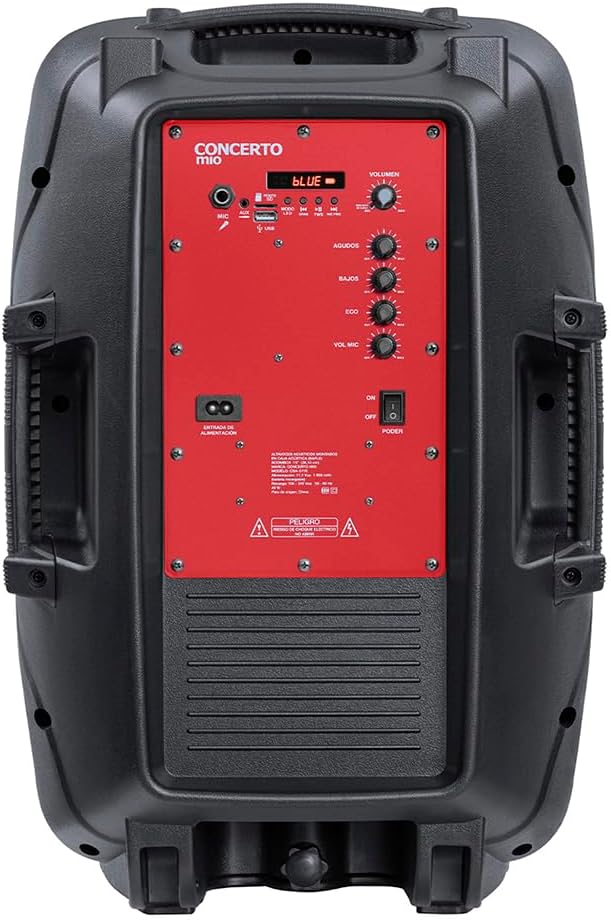
Locate the POWER switch on the rear control panel. Flip it to the "ON" position to power on the speaker. Flip to "OFF" to power off.
4.2 Selecció del mode
Press the "MODE" button on the control panel to cycle through available input modes: Bluetooth, USB, AUX, FM Radio (if applicable).
4.3 Connexió Bluetooth
- Ensure the speaker is in Bluetooth mode (indicated by a "BLUE" light or display).
- Al dispositiu mòbil, activeu el Bluetooth i cerqueu els dispositius disponibles.
- Select "Mitzu CSA-5715" (or similar name) from the list.
- Once paired, a confirmation sound will be heard, and you can now stream audio wirelessly.
4.4 USB/AUX Playback
- USB: Insert a USB flash drive with compatible audio files al port USB. L'altaveu canviarà automàticament al mode USB i començarà la reproducció.
- AUX: Connect an external audio device (e.g., MP3 player, smartphone) to the AUX input using a 3.5mm audio cable. Select AUX mode on the speaker.
4.5 Ús del micròfon
Connect a microphone to the MIC input on the rear panel. Adjust the "MIC VOL" and "ECHO" knobs to control microphone volume and echo effect, respectively.
4.6 Controls d'àudio
- VOLUM: Rotate the main VOLUME knob to adjust the overall sound output.
- AGUDOS (Treble): Adjust for higher frequency sounds.
- BAJOS (Bass): Adjust for lower frequency sounds.
4.7 modes de llum LED
The speaker features integrated LED lights. Use the dedicated light button (if available) or cycle through modes via the control panel to change light patterns or turn them off.
5. Manteniment
- Neteja: Use a soft, dry cloth to clean the exterior of the speaker. Do not use liquid cleaners or abrasive chemicals.
- Emmagatzematge: Quan no l'utilitzeu durant períodes prolongats, guardeu l'altaveu en un lloc fresc i sec, allunyat de la llum solar directa i de temperatures extremes.
- Cura de la bateria: If the speaker has an internal rechargeable battery, avoid fully discharging it frequently. For long-term storage, charge the battery to approximately 50-70% every few months to maintain its lifespan.
6. Solució De Problemes
| Problema | Causa possible | Solució |
|---|---|---|
| Sense poder | Power cable not connected; Power switch off; Battery depleted. | Ensure power cable is securely connected and outlet is active. Turn power switch to ON. Charge the battery. |
| Sense so | Volume too low; Incorrect input mode; Device not connected properly. | Increase volume. Select correct input mode (Bluetooth, USB, AUX). Reconnect audio source. |
| Bluetooth no emparellat | Altaveu no en mode d'emparellament; Dispositiu massa lluny; Interferències. | Ensure speaker is in Bluetooth mode. Move device closer to speaker. Turn off other Bluetooth devices. |
| So distorsionat | Volume too high; Audio source issue; EQ settings. | Lower volume on speaker and/or source device. Check audio source. Adjust BASS/TREBLE knobs. |
7. Especificacions
| Característica | Detall |
|---|---|
| Model | CSA-5715 |
| Tipus d'altaveu | Woofer |
| Tipus de muntatge | Floor (with included tripod) |
| Material | Plàstic |
| Tecnologia de connectivitat | Auxiliar, Bluetooth, USB |
| Característiques especials | High-resolution audio, LED Light, USB Port |
| Potència màxima de sortida de l'altaveu | 40 watts |
| Resposta de freqüència | 20 kHz |
| Durada de la bateria | 6 hores |
| Temps de càrrega | 3 hores |
| Dimensions del producte | 20 cm (profunditat) x 32 cm (amplada) x 60.5 cm (alçada) |
| Pes | 10.96 quilos |
8. Garantia i Suport
This Mitzu product comes with a limited warranty. Please refer to the warranty card included in your packaging for specific terms and conditions. For technical support, service, or warranty claims, please contact Mitzu customer service.
You can find more information and support on the official Mitzu store page: Mitzu Official Store
Ask a question about this manual
Ask about setup, troubleshooting, compatibility, parts, safety, or missing instructions. Manuals+ will review the question and use this page’s manual context to help answer it.