
1. Introducció
This manual provides detailed instructions for the setup, operation, and maintenance of your MageGee Star98 Mechanical Keyboard. Designed for gaming and daily use, this 98-key wired keyboard features blue mechanical switches, customizable backlighting, and a hot-swappable design for personalized key switch replacement.
2. Contingut del paquet
- MageGee Star98 Mechanical Keyboard
- Cable USB
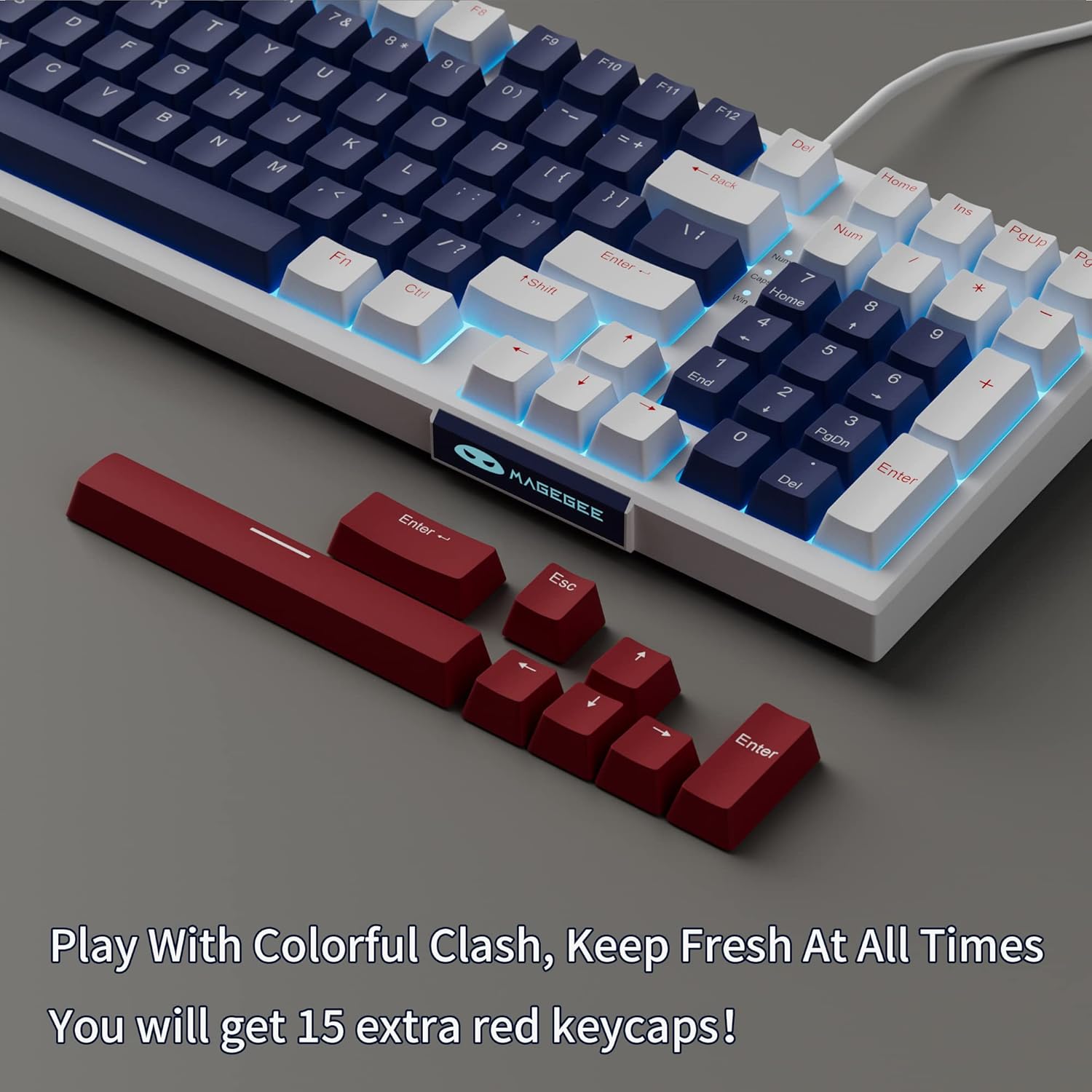
- Additional Red Keycaps (15 pieces)

Image: The MageGee Star98 keyboard displayed with a set of 15 additional red keycaps, highlighting the customization option.
3. Característiques del producte
- Experiència de mecanografia còmoda: Equipped with blue mechanical switches for tactile feedback and a stepped layout for ergonomic typing.
- Anti-ghosting de 98 tecles: All 98 keys can be pressed simultaneously without conflict, ensuring fast and accurate input.
- Mixed Keycaps & Adjustable Tilt Legs: Features 3-color mixed double injection keycaps for clear backlighting and foldable brackets for adjustable typing angles.
- Disseny intercanviable en calent: Compatible with most 3-pin and 5-pin mechanical switches, allowing for easy customization and replacement.
- Solid Sea Blue Backlight: Multiple backlight modes with a solid sea blue color, which can also be turned off.
- Àmplia compatibilitat: Supports Win2000, Win XP, Win ME, Vista, Win7, Win8, Win10, Android, Linux, Mac operating systems. Plug and play functionality via USB.

Image: A diagram illustrating the compact 98-key layout of the MageGee Star98 keyboard, highlighting its space-saving design while retaining full functionality.
4. Instruccions de configuració
- Connecteu el teclat: Locate the USB cable provided in the package. Plug one end into the USB port on the back of the keyboard and the other end into an available USB port on your computer.
- Reconeixement del sistema: Your operating system should automatically detect and install the necessary drivers for the keyboard. This is a plug-and-play device, so no additional software installation is typically required.
- Ajustar les potes inclinades: For ergonomic comfort, unfold the adjustable tilt legs located on the underside of the keyboard to achieve your preferred typing angle.

Image: The MageGee Star98 keyboard connected to a laptop, demonstrating the USB connection point and overall setup.
5. Instruccions de funcionament
Control de retroiluminació 5.1
The keyboard features a solid sea blue backlight with multiple operating modes. Use the following key combinations to control the backlighting:
- Fn + [Tecla]: Specific key combinations for changing backlight modes are typically indicated on the keycaps themselves (e.g., Fn + Ins, Fn + Home, Fn + PgUp, Fn + Del, Fn + End, Fn + PgDn). Refer to the keycap legends for exact functions.
- Fn + Fletxa amunt/avall: Ajusteu la brillantor de la llum de fons.
- Fn + Fletxa esquerra/dreta: Ajusta la velocitat de la retroiluminació (per als modes dinàmics).
- Fn + Win: Locks the Windows key to prevent accidental presses during gaming.
5.2 Commutadors intercanviables en calent
The MageGee Star98 keyboard supports hot-swappable mechanical switches, allowing you to change switches without soldering. This feature is compatible with most 3-pin and 5-pin mechanical switches on the market.
- Treure la tapa de les tecles: Use a keycap puller (not included) to gently remove the desired keycap.
- Treure l'interruptor: Use a switch puller (not included) to carefully grip the switch and pull it straight up.
- Insereix un nou interruptor: Alineeu els pins del nou interruptor amb els forats de la placa de circuit imprès. Premeu fermament fins que l'interruptor encaixi al seu lloc. Assegureu-vos que els pins no estiguin doblegats.
- Substitueix la tapa de les tecles: Place the keycap onto the new switch stem and press down.
Imatge: Un primer pla view of the keyboard demonstrating the hot-swappable switch feature, with several keycaps and switches removed to show the underlying mechanism.
Video: An official video demonstrating the features of the MageGee Sky98 Mechanical Gaming Keyboard, including its hot-swappable switches and design.
6. Manteniment
- Neteja de les tecles: Utilitzeu un suau, damp cloth to wipe down keycaps. For deeper cleaning, keycaps can be removed using a keycap puller (not included) and washed with mild soap and water. Ensure they are completely dry before reattaching.
- Neteja d'interruptors: Use compressed air to remove dust and debris from between the switches. Avoid spraying liquids directly into the switches.
- Cura del cable: Eviteu doblegar o doblegar bruscament el cable USB per evitar danys.
- Emmagatzematge: Store the keyboard in a clean, dry environment away from extreme temperatures and direct sunlight.
7. Solució De Problemes
- El teclat no respon:
Ensure the USB cable is securely connected to both the keyboard and the computer. Try plugging the keyboard into a different USB port or a different computer to rule out port issues.
- Les claus no funcionen:
If individual keys are not responding, check if any debris is lodged under the keycap or switch. For hot-swappable switches, try removing and re-inserting the switch, or replacing it with a known working switch.
- Backlight Not Working/Flickering:
Ensure the backlight is not turned off (check Fn key combinations). Try adjusting brightness. If flickering persists, ensure the keyboard is connected to a stable USB port providing sufficient power.
- Windows Key Locked:
Premeu Fn + Win to toggle the Windows key lock function.
8. Especificacions
| Característica | Detall |
|---|---|
| Marca | MageGee |
| Número de model | Estrella 98 |
| Descripció del teclat | Mecànica |
| Nombre de claus | 98 |
| Tipus de canvi | Tactile (Blue Switches) |
| Tecnologia de connectivitat | Amb cable (USB) |
| Il·luminació de fons | Single Color (Sea Blue), Multiple Modes |
| Intercanviable en calent | Yes (3-pin and 5-pin switches) |
| Dispositius compatibles | PC, ordinador portàtil |
| Sistema operatiu compatible | Win2000, Win XP, Win ME, Vista, Win7, Win8, Win10, Android, Linux, Mac |
| Material | Acrilonitril butadiè estirè (ABS) |
| Característica especial | Ergonomic, Anti-Ghosting |
9. Garantia i Suport
The MageGee Star98 Mechanical Keyboard comes with a 1 any de garantia des de la data de compra. Aquesta garantia cobreix els defectes de fabricació i els problemes derivats de l'ús normal.
For technical support, warranty claims, or any questions regarding your product, please contact MageGee customer service through the retailer's platform or the official MageGee website. Please have your purchase receipt and product model number (Star98) ready when contacting support.