
1. Introducció
The Teenage Engineering OP-1 Field is a portable synthesizer, sampler, and drum machine designed for music production and performance. It features a built-in speaker, microphone, various effects, and a vocoder, offering a comprehensive all-in-one solution for musicians and sound designers. This manual provides essential information for setting up, operating, maintaining, and troubleshooting your OP-1 Field.

The OP-1 Field portable synthesizer, showcasing its compact design, keyboard, and control knobs.
2. Configuració
2.1 Desembalatge i inspecció inicial
Carefully remove your OP-1 Field from its packaging. Inspect the device for any signs of damage. Ensure all included components are present:
- OP-1 Field unit with built-in speaker and microphone
- Teclat
- Variety of tapes (digital tape modes)
- Bluetooth MIDI capability
- Port USB-C
- Vocoder functionality
- Effects processing
- Antena FM
- Custom USB cable
2.2 Engegada i càrrega
The OP-1 Field is equipped with a rechargeable battery. Connect the custom USB cable to the USB-C port on the device and to a compatible USB power source (e.g., computer, USB wall adapter). The device will begin charging. To power on, locate the power switch on the side of the unit and slide it to the 'on' position.

posterior view of the OP-1 Field, showing the power switch, USB-C, audio in, and audio out ports.

lateral view of the OP-1 Field, highlighting the built-in speaker grille.
3. Instruccions de funcionament
The OP-1 Field offers a versatile workflow for music creation. Familiarize yourself with the main modes and controls.
Oficial acabatview video demonstrating the core functionalities of the Teenage Engineering OP-1 Field, including synth, drum, tape, and mixer modes.
3.1 Synthesizer Engines
The OP-1 Field features 12 distinct synth engines, each with unique parameters adjustable via the colored knobs. Explore various presets or create your own sounds.
The distinctive colored rotary knobs on the OP-1 Field, used for parameter adjustments.
3.2 Sampler and Drum Machine
Utilize the built-in sampler with a 20-second sample time to capture audio. The drum machine allows for rhythmic pattern creation. Each engine offers presets and adjustable parameters for sound shaping.

Un detallat view of the OP-1 Field's screen, showing a visual representation of a sound waveform.
3.3 Tape Recorder
Record up to 160 minutes of audio across 4 digital tapes. Choose from 4 distinct tape styles: Studio 4-track, Vintage 4-track, Porta 4-track, and Disc Mini, each imparting unique characteristics to your recordings.

Davant view of the OP-1 Field, highlighting the display screen and various controls.
3.4 Built-in Effects and Vocoder
Experiment with 8 different effect styles, including delays, reverbs, filters, and modulation. The integrated vocoder allows for vocal synthesis and manipulation.
3.5 Connectivitat
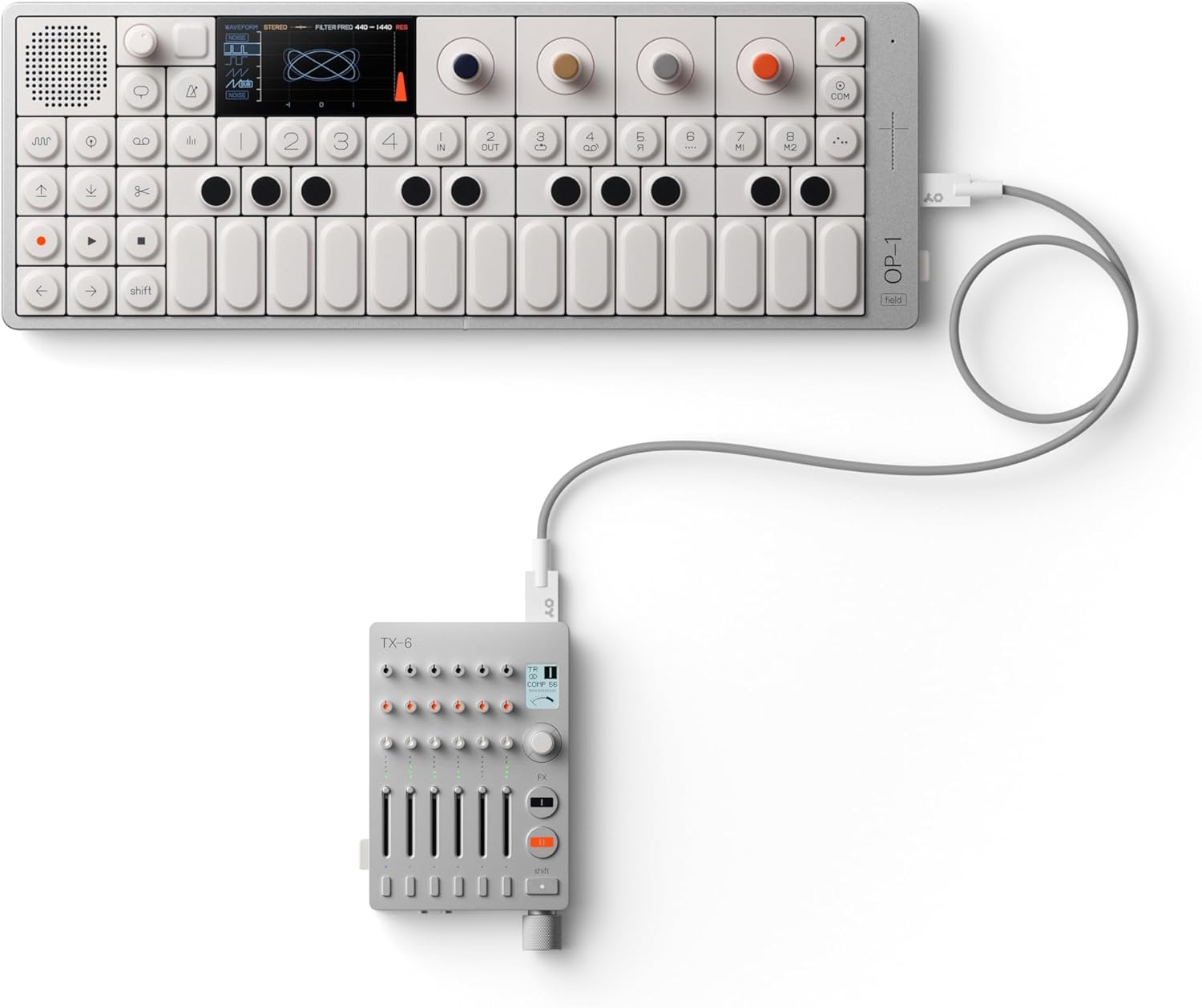
The OP-1 Field supports Bluetooth MIDI and USB-C for full interconnectivity with other devices, including iOS, macOS, and Windows systems. It also features an FM antenna for radio transmission.

The OP-1 Field connected to a Teenage Engineering TX-6 mixer, demonstrating system interconnectivity.
Una projecció de vídeo introductòriaasing the design and key features of the Teenage Engineering OP-1 Field portable synthesizer.
A short video demonstrating the Teenage Engineering OP-1 Field's integration with other Field System devices, such as the Choir speaker.
4. Manteniment
To ensure the longevity and optimal performance of your OP-1 Field, follow these maintenance guidelines:
- Neteja: Use a soft, dry cloth to clean the surface of the device. Avoid abrasive cleaners or solvents.
- Emmagatzematge: Store the OP-1 Field in a cool, dry place away from direct sunlight, extreme temperatures, and humidity.
- Manipulació: Handle the device with care to prevent drops or impacts, which can damage internal components.
5. Solució De Problemes
If you encounter issues with your OP-1 Field, try the following basic troubleshooting steps:
- Sense energia: Assegureu-vos que el dispositiu estigui completament carregat. Connecteu-lo a una font d'alimentació amb el cable USB-C.
- Sense so: Check the volume levels on the device and any connected audio equipment. Ensure headphones or speakers are properly connected.
- Problemes de connectivitat: For Bluetooth MIDI, ensure the device is in pairing mode and within range. For USB-C, check the cable connection and ensure your computer recognizes the device.
- Controls que no responen: Try restarting the device. If the issue persists, consult the Teenage Engineering support resources.
6. Especificacions
| Característica | Detall |
|---|---|
| Color | silver, white |
| Marca | Teenage Engineering |
| Material | aluminum, polycarbonate and acrylonitrile butadiene styrene |
| Nom del model | OP–1 field |
| Mides de l'article L x W x H | 11.81 x 4.72 x 0.79 polzades |
| Número de model | TE002AS002 |
| Components inclosos | built-in speaker, built-in microphone, keyboard, variety of tapes, Bluetooth MIDI, USB-C, vocoder, effects, FM antenna, custom USB cable |
| Fabricant | enginyeria adolescent |
| Número d'identificació comercial global | 07350073036905 |
| Nom del tipus d'element | sampler |
| Descripció de la garantia | 1 anys de garantia. |
| Pes de l'article | 589 grams |
| Tipus de connector | Usb Type C |
7. Garantia i Suport
7.1 Informació de la garantia
The Teenage Engineering OP-1 Field comes with a 1-year warranty. Please retain your proof of purchase for warranty claims.
7.2 Atenció al client
For further assistance, technical support, or warranty inquiries, please visit the official Teenage Engineering website or contact their customer service department. You can find more information and resources on their official Amazon store page: Teenage Engineering Store.