
1. Introducció
This manual provides essential instructions for the setup, operation, maintenance, and troubleshooting of your White Shark GK-2102 LEGIONNAIRE-X RGB USB Keyboard. Please read this manual thoroughly before using the product to ensure proper functionality and longevity.

Imatge 1.1: Part superior view of the White Shark GK-2102 LEGIONNAIRE-X RGB USB Keyboard, showcasing el seu disseny complet i la il·luminació RGB.
2. Configuració
Follow these steps to connect your White Shark GK-2102 LEGIONNAIRE-X RGB USB Keyboard to your computer.
- Descomprimir el teclat: Carefully remove the keyboard and its USB cable from the packaging.
- Connecteu el cable USB: Insert the USB connector of the keyboard into an available USB port on your computer.

Image 2.1: Close-up of the USB connector, which is used to connect the keyboard to a computer.
- Instal·lació del controlador: El teclat és plug-and-play. El sistema operatiu hauria de detectar i instal·lar automàticament els controladors necessaris. Normalment no cal instal·lar cap programari addicional.
- Ajustar els peus del teclat: For ergonomic comfort, you may extend the adjustable feet located on the underside of the keyboard.

Imatge 2.2: View of the adjustable feet on the keyboard's underside, allowing users to modify the typing angle.
3. Instruccions de funcionament
The White Shark GK-2102 LEGIONNAIRE-X is a standard USB keyboard with RGB lighting features. Below are general operating guidelines.
3.1 Funcions bàsiques del teclat
The keyboard functions as a standard QWERTY layout device. All keys perform their indicated character or function when pressed. Special function keys (F1-F12) may require the 'Fn' key to be held down simultaneously for their secondary functions, depending on your operating system and specific keyboard model configuration.
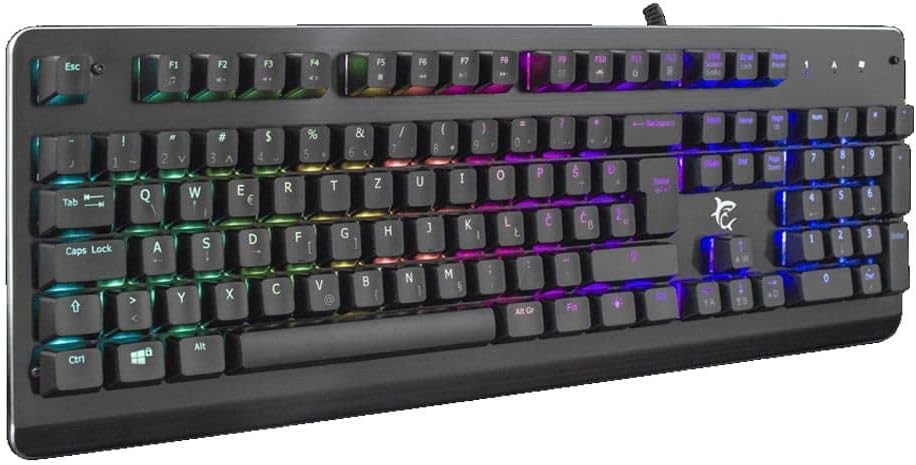
Imatge 3.1: Anglesa view of the keyboard, highlighting the key layout and illuminated RGB backlighting.
3.2 Control d'il·luminació RGB
This keyboard features RGB lighting. Specific key combinations, often involving the 'Fn' key and other designated keys (e.g., arrow keys, Ins, Home, PgUp, Del, End, PgDn), are typically used to cycle through lighting modes, adjust brightness, or change colors. Refer to the quick start guide or manufacturer's website for detailed RGB control commands specific to this model.
4. Manteniment
Un manteniment adequat garanteix la longevitat i el rendiment del teclat.
- Neteja: Disconnect the keyboard from your computer before cleaning. Use a soft, dry cloth to wipe the surface. For stubborn dirt, a slightly damp cloth with mild soap can be used, ensuring no liquid enters the keyboard. Compressed air can be used to remove dust and debris from between the keys.
- Eviteu líquids: Do not spill liquids on the keyboard. Liquid damage can cause permanent malfunction.
- Emmagatzematge: Guardeu el teclat en un lloc fresc i sec, allunyat de la llum solar directa i de temperatures extremes quan no l'utilitzeu durant períodes prolongats.
5. Solució De Problemes
If you encounter issues with your keyboard, try the following solutions:
- El teclat no respon:
- Assegureu-vos que el cable USB estigui connectat correctament tant al teclat com a l'ordinador.
- Prova de connectar el teclat a un port USB diferent de l'ordinador.
- Prova el teclat en un altre ordinador per determinar si el problema és amb el teclat o amb el port/controladors de l'ordinador.
- Reinicieu l'ordinador.
- Les claus no funcionen:
- Check for any physical obstructions under the keycaps.
- Netegeu el teclat tal com es descriu a la secció Manteniment.
- Il·luminació RGB no funciona/incorrecta:
- Assegureu-vos que el teclat estigui connectat correctament i que rebi alimentació.
- Refer to the manufacturer's specific instructions for RGB control key combinations.
6. Especificacions
Below are the technical specifications for the White Shark GK-2102 LEGIONNAIRE-X RGB USB Keyboard:

Imatge 6.1: Pro lateralfile of the keyboard, illustrating its physical dimensions and keycap height.
| Característica | Detall |
|---|---|
| Marca | Tauró blanc |
| Model | GK-2102 LEGIONNAIRE-X |
| Connectivitat | USB |
| Dimensions del producte | 50 x 50 x 28 cm |
| Pes | 1.06 kg |
| Material | Plàstic |
| Característiques especials | Il·luminació RGB |
| Piles necessàries | No |
7. Informació de la garantia
For detailed warranty information regarding your White Shark GK-2102 LEGIONNAIRE-X RGB USB Keyboard, please refer to the warranty card included with your product or visit the official White Shark weblloc web. Els termes i condicions de la garantia poden variar segons la regió i el distribuïdor.
8. Suport
If you require further assistance or have questions not covered in this manual, please contact White Shark customer support through their official website or the contact information provided with your purchase. Please have your product model (GK-2102 LEGIONNAIRE-X) and purchase details ready when contacting support.