
1. Introducció
The Amazon Echo Show 8 (3rd Generation, 2023 Model) is a smart display designed to enhance your daily life with its 8-inch HD touchscreen, spatial audio, and integrated smart home hub. Powered by Alexa, it offers a wide range of functionalities including voice assistance, entertainment, communication, and smart home control.
2. Què hi ha a la caixa
- Echo Show 8 Device
- Ice White Power Adapter (30 W)
- Power Cable (1.5 m, white)
- Guia d'inici ràpid
3. Dispositiu acabatview
Familiarize yourself with the key components of your Echo Show 8.

The Echo Show 8 features an 8-inch HD display, a front-facing camera, and integrated speakers. The image highlights its capabilities for video calls, smart home management, and entertainment.
3.1. Característiques clau
- Pantalla tàctil HD d'8 polzades: For visual interactions, video calls, and content display.
- 13 MP Camera: Located at the top, used for video calls and monitoring.
- Camera Cover: A physical slider for privacy, located above the camera.
- Micròfons: Integrat per a ordres de veu i trucades.
- Ponents: Two 52mm full-range drivers with passive bass radiator for spatial audio.
- Port d'alimentació: Situat a la part posterior per connectar l'adaptador de corrent.
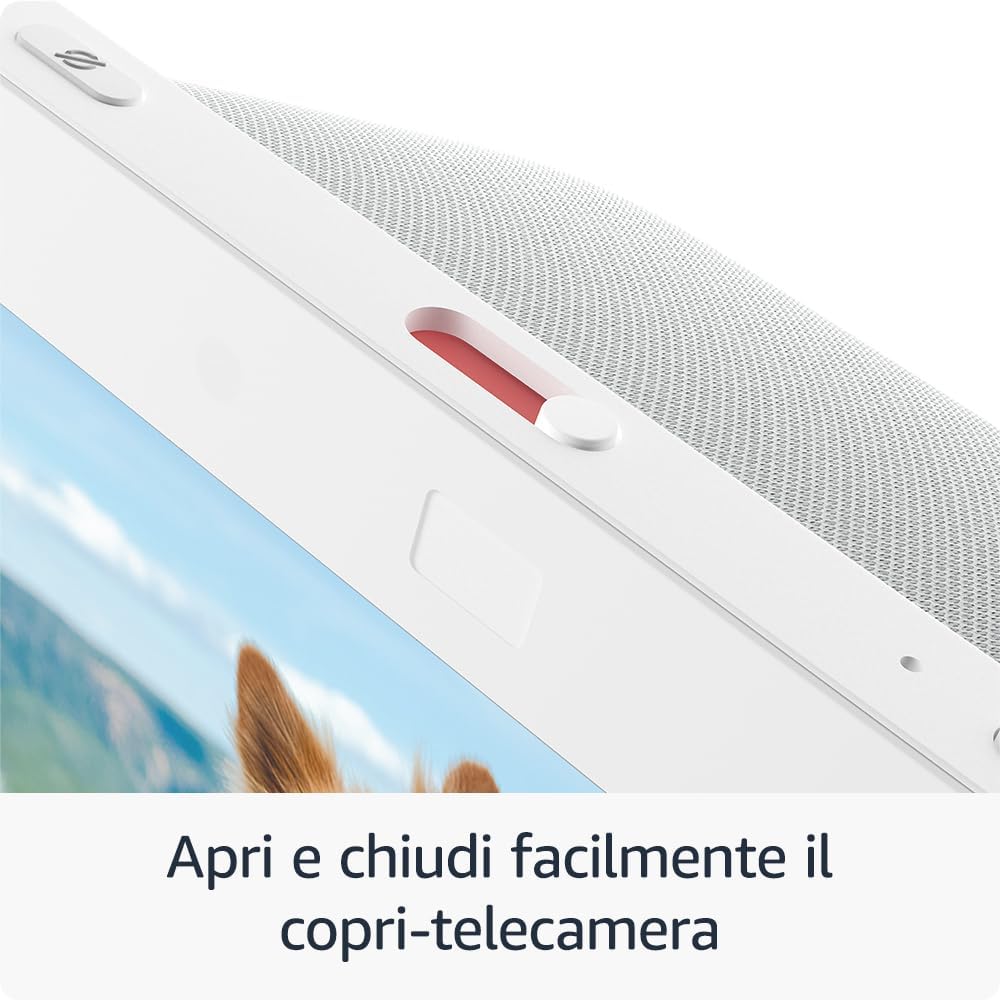
Un primer pla view of the physical camera cover, which can be easily opened or closed to ensure privacy.
4. Configuració
Segueix aquests passos per configurar el teu Echo Show 8:
- Encès: Connecta l'adaptador de corrent al teu Echo Show 8 i endolla'l a una presa de corrent. El dispositiu s'encén automàticament.
- On-Screen Instructions: Follow the on-screen prompts to select your language, connect to your Wi-Fi network, and log in with your Amazon account.
- Aplicació Alexa: Download the Alexa app on your Android or iOS device. The app is essential for managing settings, skills, and smart home devices.
- Configuració senzilla: The Echo Show 8 supports Amazon's simple setup technology, allowing for easy connection of compatible smart home devices to your Wi-Fi network.
5. Instruccions de funcionament
Your Echo Show 8 offers various ways to interact and utilize its features.
5.1. Control per veu amb Alexa
Simply say "Alexa" followed by your command. Examples inclouen:
- "Alexa, configura una alarma per a les 7 del matí."
- "Alexa, afegeix llet a la meva llista de la compra."
- "Alexa, what's on my calendar today?"
- "Alexa, show me the weather."
5.2. Entreteniment
Enjoy music, videos, and more on your Echo Show 8.

The Echo Show 8 allows you to access popular streaming services such as Netflix and Prime Video directly on its HD screen.
- Transmissió de vídeo: Stream content from Prime Video, Netflix, and other platforms. Say, "Alexa, open Prime Video" or "Alexa, play [show name] on Netflix."
- Reproducció de música: Listen to music from Amazon Music, Apple Music, Spotify, and more. Say, "Alexa, play music" or "Alexa, play [artist/song] on Spotify."

The device's screen displays album art and song information when playing music from services like Amazon Music.

Enjoy video content from Prime Video. A compatible stand (sold separately) can optimize viewangles d'ajust.
5.3. Control intel·ligent de la llar
The integrated smart home hub simplifies managing compatible devices.

The Echo Show 8 serves as a central control panel for compatible smart home devices, allowing you to manage thermostats, lights, and smart plugs.
- Vinculació de dispositius: Associate and control devices compatible with Zigbee, Matter, and Thread protocols without needing a separate hub.
- Mètodes de control: Manage smart cameras, lights, and other devices using the touchscreen, voice commands, or by setting up routines activated by motion.
5.4. Comunicació
Stay connected with friends and family.
- Videotrucades: Initiate video calls using your voice. The 13 MP central camera features auto-framing and noise reduction for clearer conversations.
- Contacts Widget: Use the new Contacts widget for one-touch calls to contacts who have the Alexa App or an Echo device with a screen.
5.5. Fotos
Transform your Echo Show 8 into a digital photo frame.

The Echo Show 8 can display your Amazon Photos, turning the device into a personalized digital photo frame that adapts to ambient light conditions.
- Fotos d'Amazon: Link your Amazon Photos account to display your favorite memories on the home screen. Automatic color adjustment ensures photos look vibrant in any lighting condition.
6. Privacy Features
The Echo Show 8 is designed with multiple privacy controls:
- Activation Word: Alexa only starts listening after detecting the activation word.
- Transmission Indicators: Visual and audible indicators confirm when Alexa is recording your request.
- Botó de desactivació del micròfon/càmera: A dedicated button physically disconnects the microphones and camera.
- Coberta de la càmera integrada: A physical slider allows you to block the camera lens.
- Gestió de gravacions de veu: You have the ability to review i suprimir les gravacions de veu.
For more details on how Alexa and Echo devices protect your privacy, refer to the Alexa Privacy Portal.
7. Manteniment
Per garantir la longevitat i el rendiment òptim del vostre Echo Show 8, seguiu aquestes pautes de manteniment:
- Neteja: Use a soft, dry, lint-free cloth to clean the screen and exterior surfaces. Avoid using abrasive cleaners, solvents, or harsh chemicals. Do not spray cleaners directly onto the screen.
- Col·locació: Place the device on a stable, flat surface away from direct sunlight, heat sources, and moisture. Ensure adequate ventilation around the device.
- Potència: Use only the provided power adapter. Unplug the device during electrical storms or when unused for extended periods.
8. Solució De Problemes
If you encounter issues with your Echo Show 8, try the following steps:
- El dispositiu no respon: If the device is not responding, unplug the power adapter from the wall outlet, wait for 10 seconds, and then plug it back in.
- Problemes de connectivitat Wi-Fi: Ensure your Wi-Fi router is working correctly and the Echo Show 8 is within range. Try restarting your router. You can also check Wi-Fi settings in the Alexa app.
- Comandes de veu no reconegudes: Speak clearly and ensure you are within hearing range of the device. Check that the microphone is not muted (the light ring will be red).
- Problemes de pantalla: If the screen is frozen or unresponsive, try restarting the device.
- Actualitzacions de programari: Ensure your device has the latest software updates. Updates are usually automatic when connected to Wi-Fi.
For persistent issues, consult the Alexa app's help section or contact Amazon Customer Support.
9. Especificacions
| Característica | Detall |
|---|---|
| Dimensions | 200 x 139 x 106 mm |
| Pes | 1034 grams (Actual size and weight may vary by manufacturing process) |
| Pantalla | Pantalla tàctil HD de 8 polzades |
| Càmera | 13 MP central camera with integrated camera cover (Photo quality and size may vary) |
| Connectivitat Wi-Fi | Dual-band Wi-Fi compatible with 802.11 a/b/g/n/ac networks. Not compatible with ad-hoc (or peer-to-peer) Wi-Fi networks. |
| Smart Home Hub | Zigbee, Matter, and Thread border router |
| Connectivitat Bluetooth | A2DP support for audio streaming to/from Echo Show 8. AVRCP for voice control of connected mobile devices. Not compatible with Mac OS X hands-free voice control or Bluetooth speakers requiring a PIN. |
| Àudio | 2 x 52 mm (2”) full-range drivers with passive bass radiator |
| Processador | Octa-core SoC system with Amazon AZ2 neural network engine |
| Generació | Echo Show 8 (3rd Gen), 2023 Model |
| Llengua | Alexa speaks English, French, German, Italian, Spanish, and Dutch. |
10. Accessibilitat
The Echo Show 8 includes several accessibility features:
- Toca per a Alexa: Allows interaction with Alexa by touching the device, using on-screen icons or keyboard, instead of voice. You can also save preferred actions.
- Preferred Speaking Speed: Control the speed at which Alexa speaks.
- veuView Lector de pantalla: Enables visually impaired users to access functionalities.
- Lupa: Magnify and reduce image sizes and explore the screen.
- Kindle Reading Assistant: Alexa can read your Kindle books aloud.
To activate these features, go to Configuració → Accessibilitat al teu dispositiu.
11. Garantia i Suport
Your Amazon Echo Show 8 is covered by the following:
- Legal Warranty of Conformity: This covers defects of conformity that appear within 24 months from the delivery date of the product, as per EU Directive 1999/44/CE. You must report the defect within 2 months of its discovery.
- One-Year Limited Manufacturer's Warranty: This warranty is provided by the manufacturer, with terms and conditions detailed in the product's packaging and available in the Limited Warranty section.
For warranty claims or technical assistance, please contact Amazon Customer Support. The use of Amazon Echo Show 8 is also subject to the terms found on the Amazon weblloc.