
Introducció
Thank you for choosing the Havit Gaming Mouse MS955. This optical gaming mouse features a USB interface, adjustable DPI settings, and RGB backlighting, designed to enhance your gaming experience. This manual provides essential information for setting up, operating, and maintaining your mouse.
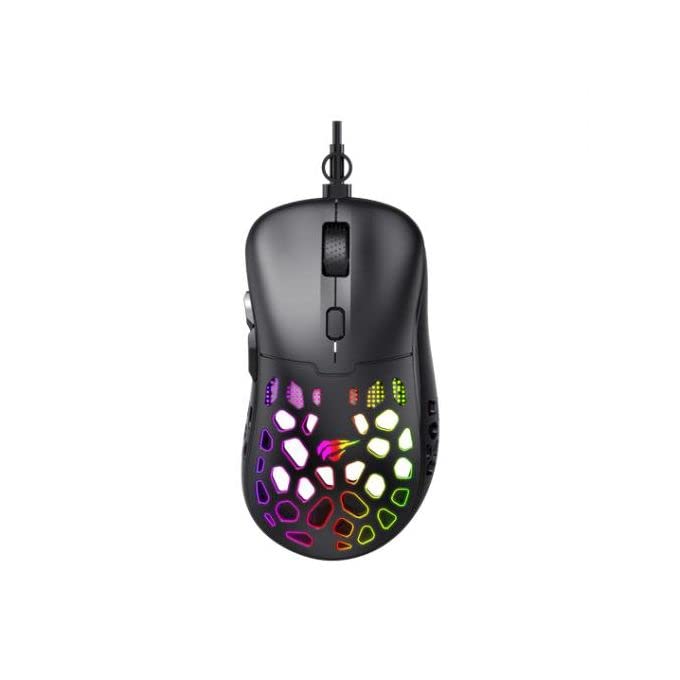
Imatge: De dalt a baix view of the Havit Gaming Mouse MS955, showcasing its ergonomic design and vibrant RGB lighting through the honeycomb shell.
Configuració
- Desempaqueta el ratolí: Carefully remove the Havit Gaming Mouse MS955 from its packaging.
- Connexió a l'ordinador: Locate an available USB port on your computer. Insert the USB connector of the mouse into the USB port.
- Instal·lació del controlador: The mouse is plug-and-play. Your operating system (Windows XP, Windows 7, Linux, etc.) will automatically detect and install the necessary drivers. No additional software installation is typically required for basic functionality.
- Funcionalitat de prova: Un cop connectat, moveu el ratolí i feu clic als botons per assegurar-vos que funciona correctament.
Instruccions de funcionament
The Havit Gaming Mouse MS955 features 6 programmable buttons and adjustable DPI settings for precise control.

Imatge: Lateral view of the Havit Gaming Mouse MS955, highlighting the left-side buttons and scroll wheel.
- Botó esquerre de clic: Primary button for selection and interaction.
- Botó dret: Secondary button for context menus and alternative actions.
- Roda de desplaçament: S'utilitza per desplaçar-se pels documents i web pàgines. També funciona com un botó central que es pot fer clic.
- Botó d'ajust de DPI: Located behind the scroll wheel. Press this button to cycle through different DPI sensitivity levels (800-1200-2400-3200 DPI). Each press changes the sensitivity, allowing you to adapt to various gaming or work scenarios.
- Botons laterals: Two buttons are located on the left side of the mouse. These are typically used for 'forward' and 'backward' navigation in web browsers or can be programmed for in-game actions.
Il·luminació RGB
The Havit Gaming Mouse MS955 features an integrated RGB backlight system. The lighting effects are typically automatic and may change with DPI settings or cycle through various colors. There are no dedicated buttons for controlling the RGB lighting directly on the mouse.
Manteniment
- Neteja: To clean the mouse, disconnect it from your computer. Use a soft, dry cloth to wipe the surface. For stubborn dirt, a slightly damp cloth can be used, ensuring no liquid enters the mouse. Do not use harsh chemicals or abrasive cleaners.
- Emmagatzematge: Guardeu el ratolí en un entorn net i sec, allunyat de temperatures extremes i de la llum solar directa.
- Cura del cable: Eviteu doblegar o girar excessivament el cable USB per evitar danys.
Resolució de problemes
- El ratolí no respon:
- Assegureu-vos que el cable USB estigui ben connectat a un port USB que funcioni de l'ordinador.
- Prova de connectar el ratolí a un port USB diferent.
- Reinicieu l'ordinador.
- Els DPI no canvien:
- Press the DPI button firmly. Ensure you are pressing the correct button.
- The mouse cycles through fixed DPI settings; there is no visual indicator other than cursor speed change.
- Les llums RGB no funcionen:
- Verifiqueu que el ratolí estigui connectat correctament a l'ordinador.
- The RGB lighting is automatic; if the mouse is functioning otherwise, the lighting should also be active.
Especificacions
| Característica | Detall |
|---|---|
| Marca | Havit |
| Model | MS955 |
| Tipus d'interfície | USB |
| Dimensions | 115.2 x 63 x 37.6 mm |
| Nombre de claus | 6 |
| Chipset | NST5311 |
| Resolució DPI | 800-1200-2400-3200 DPI |
| Vol. Operatiutage | 5V |
| Vida útil de la clau | 3,000,000 clics |
| Longitud del cable | 1.5 m |
| Detecció de moviment | Òptic |
| Orientació de la mà | D'acord |
| Ús recomanat | Jocs |
| Sistemes operatius | Linux, Windows 7, Windows XP |
| Color | Negre |
Garantia i Suport
For warranty information or technical support, please refer to the documentation included with your purchase or visit the official Havit weblloc web. Conserveu el comprovant de compra per a reclamacions de garantia.