
1. Introducció
This manual provides essential information for the safe and effective operation of your PENTAX KF APS-C DSLR Camera. The PENTAX KF is a compact digital single-lens reflex camera designed for advanced photographic practice, featuring a dust and weather-resistant construction and an vari-angle LCD monitor. Please read this manual thoroughly before using the camera and keep it in a safe place for future reference.
2. Informació de seguretat
- Do not disassemble or modify the camera. This may cause electric shock or malfunction.
- Keep the camera away from water and moisture to prevent electric shock or fire.
- Use only the specified battery and charger. Incorrect usage may lead to overheating, fire, or explosion.
- Avoid exposing the camera to extreme temperatures, direct sunlight, or high humidity.
- Do not look at the sun or strong light sources through the viewfinder or lens, as this can cause permanent eye damage.
- Mantenir fora de l'abast dels nens.
3. Contingut del paquet
Verifiqueu que tots els elements que s'enumeren a continuació s'inclouen al paquet de la càmera:
- PENTAX KF Camera Body
- Cable USB
- Bateria d'ions de liti
- Carregador de bateria
- Corretja
- Software (CD-ROM)
- Adaptador de CA
- Adaptador USB
- Ocular
- Coberta de sabates calentes
- Body Mount Cap
4. Càmera acabadaview
Familiarize yourself with the various parts of your PENTAX KF camera.

Figura 4.1: Frontal View of PENTAX KF Camera Body. This image displays the front of the PENTAX KF camera body, highlighting the lens mount, grip, and the PENTAX logo. The SR (Shake Reduction) indicator is also visible.

Figura 4.2: posterior View of PENTAX KF Camera with LCD Display Active. This image shows the back of the camera with the vari-angle LCD screen displaying shooting information such as shutter speed, aperture, ISO, and white balance settings. The viewfinder and control buttons are also visible.

Figura 4.3: superior View of PENTAX KF Camera. This image illustrates the top panel of the camera, featuring the mode dial, power switch, shutter button, hot shoe, and Wi-Fi/Fx2 button.
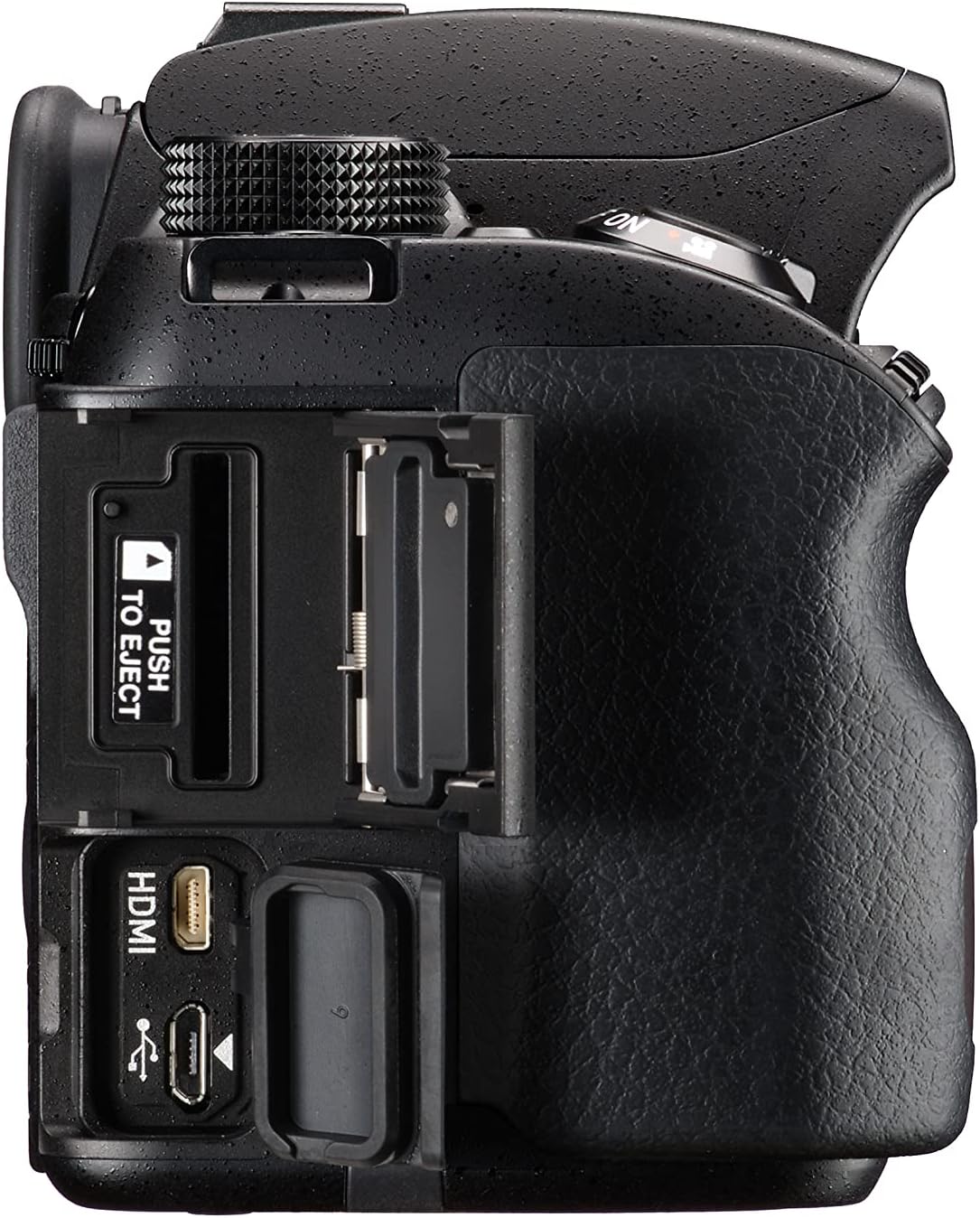
Figura 4.4: Costat dret View of PENTAX KF Camera. This image shows the right side of the camera, revealing the HDMI and USB ports, along with the memory card slot.
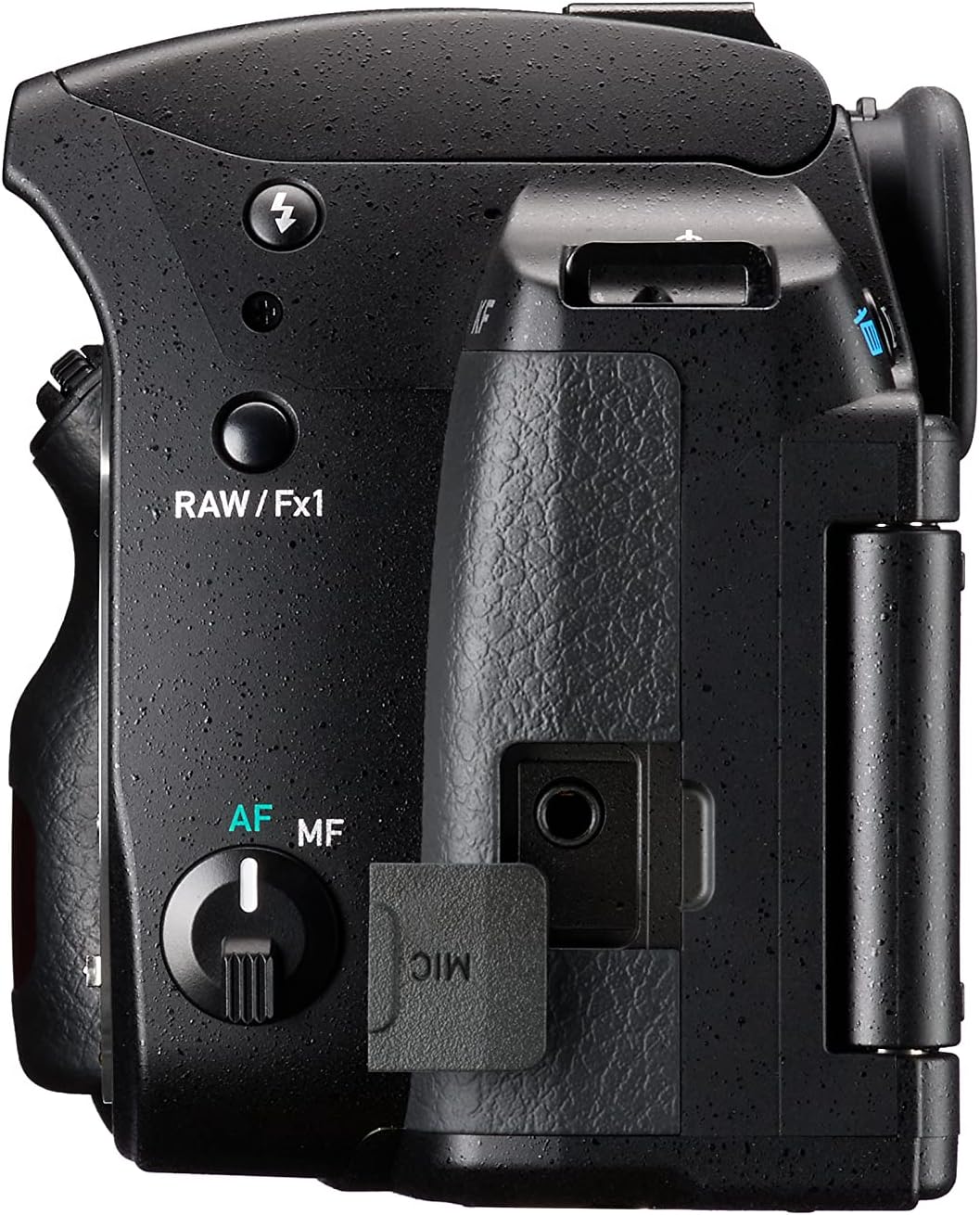
Figura 4.5: Costat esquerre View of PENTAX KF Camera. This image displays the left side of the camera, featuring the microphone input port and the RAW/Fx1 button.

Figure 4.6: Optical Viewfinder Diagram. This diagram illustrates the internal structure of the optical viewfinder, providing a clear view del subjecte.

Figure 4.7: Vari-Angle LCD Screen. This image demonstrates the flexibility of the vari-angle LCD monitor, allowing for diverse shooting angles.
5. Configuració
5.1. Charging and Inserting the Battery
- Insert the battery into the charger and connect the charger to a power outlet. The charging indicator will illuminate.
- Once charging is complete, the indicator will change. Disconnect the charger.
- Obriu la tapa del compartiment de la bateria a la part inferior de la càmera.
- Introduïu la bateria carregada al compartiment, assegurant-vos que estigui correctament orientada. Tanqueu bé la tapa.
5.2. Inserció d'una targeta de memòria
- Obriu la tapa de la ranura de la targeta de memòria que hi ha al lateral de la càmera.
- Insert an SD card into the slot with the label facing the front of the camera until it clicks into place.
- Tanqueu la tapa de la ranura de la targeta de memòria.
5.3. Col·locació d'una lent
- Remove the body mount cap from the camera and the rear cap from the lens.
- Alineeu la marca d'índex vermella de l'objectiu amb la marca d'índex vermella de la muntura de l'objectiu de la càmera.
- Gireu la lent en sentit horari fins que encaixi al seu lloc.
5.4. Configuració inicial (data/hora)
Upon first power-on or after battery replacement, you may need to set the date, time, and language. Follow the on-screen prompts to configure these settings.
6. Funcionament de la càmera
6.1. Encendre/apagar
Per encendre la càmera, gireu l'interruptor d'alimentació situat al voltant del botó de l'obturador a la posició "ON". Per apagar-la, gireu-lo a "OFF".
6.2. Modes bàsics de tret
El selector de mode a la part superior de la càmera permet seleccionar diversos modes de fotografia:
- AUTOMÀTIC: Mode totalment automàtic per a un funcionament senzill d'apuntar i disparar.
- P (Programa AE): La càmera ajusta l'obertura i la velocitat d'obturació per a una exposició òptima.
- Av (Aperture-Priority AE): Tu ajustes l'obertura del diafragma, la càmera ajusta la velocitat d'obturació.
- Tv (Shutter-Priority AE): Tu ajustes la velocitat d'obturació, la càmera ajusta l'obertura.
- M (Manual): Ajusteu tant l'obertura com la velocitat d'obturació.
- SCN (Scene Modes): Modes preestablerts per a escenes específiques (per exemple, Retrat, Paisatge).
6.3. Enfocament
The PENTAX KF features SAFOX X autofocus system with 11 points, including 9 cross-type sensors.
- Enfocament automàtic (AF): Set the AF/MF switch on the lens or camera body to AF. Press the shutter button halfway to focus.
- Enfocament manual (MF): Set the AF/MF switch to MF. Rotate the focusing ring on the lens to adjust focus manually.
6.4. Fer una foto
- Seleccioneu el mode de disparo desitjat amb el selector de mode.
- Enquadra la teva presa a través del viewfinder or on the LCD screen.
- Premeu el botó de l'obturador fins a la meitat per enfocar.
- Premeu completament el botó de l'obturador per capturar la imatge.
7. Funcions avançades
7.1. Pixel Shift Resolution System
The Pixel Shift Resolution System captures four images of the same scene by shifting the image sensor by a single pixel for each image, then synthesizes them into a single composite image. This results in super-high-resolution images with finer details and more accurate colors. The system also includes a motion correction function to compensate for slight movement during capture.

Figure 7.1: Pixel Shift Resolution. This image demonstrates the enhanced detail captured using the Pixel Shift Resolution system.
7.2. Astrotracer Function
When paired with the optional O-GPS1 GPS unit, the PENTAX KF's Astrotracer function simplifies astronomical photography. It tracks celestial bodies by synchronizing the image sensor's movement with the Earth's rotation, allowing for sharp, streak-free images of stars and other astronomical objects even during long exposures, without the need for an equatorial mount.

Figure 7.2: Astrotracer Function. This image illustrates the Astrotracer feature, showing the camera with an optional GPS unit for astronomical tracking.
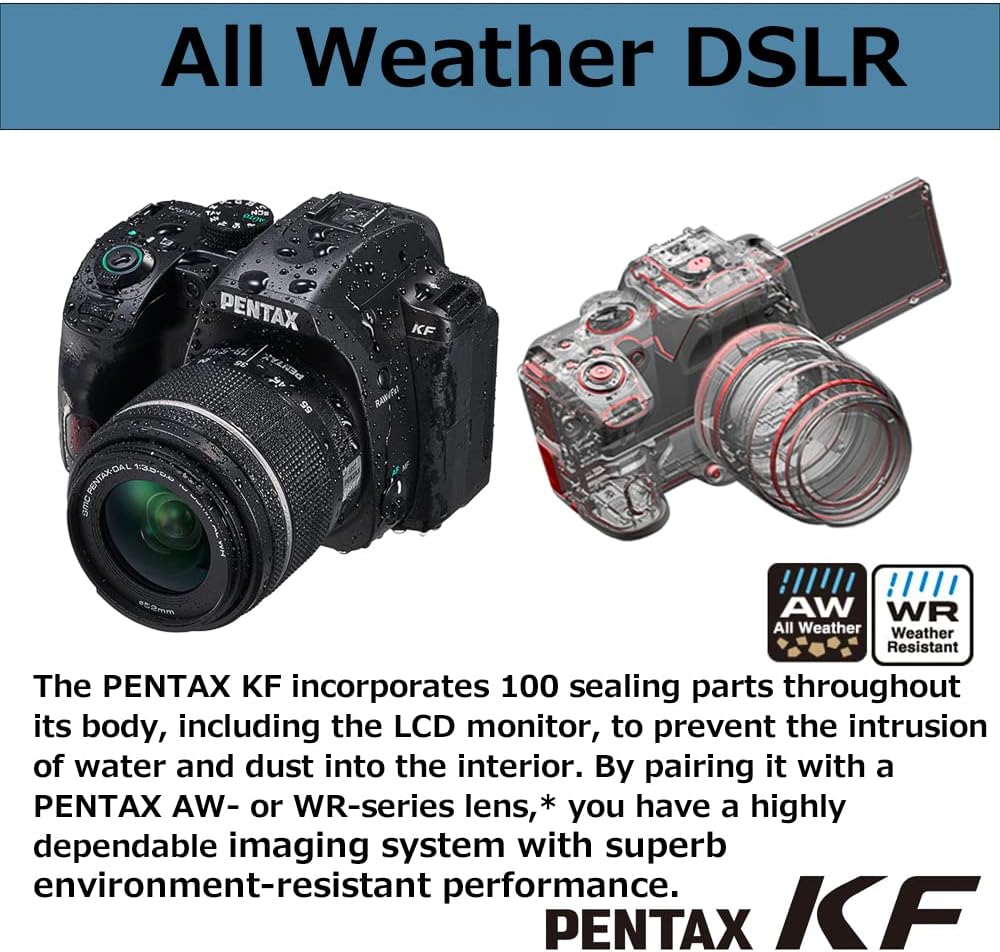
Figure 7.3: Astrophotography Example. Un example of a Milky Way photograph captured using the camera's capabilities.
7.3. Dust and Weather-Resistant Construction
The PENTAX KF features a robust construction with 100 sealing parts throughout its body, including the LCD monitor. This design prevents the intrusion of water and dust, making it suitable for outdoor photography in challenging conditions. When paired with a PENTAX AW- or WR-series lens, the camera forms a highly dependable, environment-resistant imaging system.

Figura 7.4: Disseny resistent a la intempèrie. This image highlights the camera's weather-sealed construction, showing water droplets on the body.
7.4. Connectivitat Wi-Fi
The integrated Wi-Fi module allows for wireless connection to a smartphone or tablet using the dedicated Image Sync application. This enables remote control of the camera, live view display, and transfer of images to your smart device.

Figure 7.5: Image Sync Application. A screenshot of the Image Sync app interface, demonstrating remote camera control and image transfer.
7.5. AA Filter Simulator
The PENTAX KF features an APS-C CMOS sensor without an anti-aliasing (AA) filter, prioritizing image sharpness. To mitigate moiré patterns and false colors that can occur without an AA filter, the camera incorporates an AA filter simulator. This function applies microscopic vibrations to the image sensor during exposure, effectively providing the same level of moiré reduction as an optical AA filter.
8. Manteniment
8.1. Neteja de la càmera
- Cos de la càmera: Netegeu amb un drap suau i sec. Per a la brutícia persistent, utilitzeu un drap lleugerament humit.ampesbandit amb aigua i després eixugueu-ho.
- Lent: Use a lens brush to remove dust, then gently wipe with a lens cleaning cloth and lens cleaning solution.
- Sensor d'imatge: If dust appears on images, use the camera's sensor cleaning function or consult a service center.
- Monitor LCD: Gently wipe with a soft, dry cloth. Avoid pressing hard.
8.2. Emmagatzematge
- Store the camera in a cool, dry, and well-ventilated place, away from direct sunlight and high humidity.
- Traieu la bateria si la càmera no s'utilitzarà durant un període prolongat.
- Use desiccant to prevent mold growth, especially in humid environments.
9. Solució De Problemes
| Problema | Causa possible | Solució |
|---|---|---|
| La càmera no s'encén. | La bateria està esgotada o inserida incorrectament. | Carregueu la bateria completament i assegureu-vos que estigui inserida correctament. |
| No es poden fer fotos. | Memory card is full, locked, or not inserted. Lens cap is on. | Insert a new/unlocked card, remove lens cap. Check card status. |
| Les imatges són borroses. | Enfocament incorrecte, tremolor de la càmera o lent bruta. | Assegureu-vos d'enfocar correctament, utilitzeu una velocitat d'obturació més ràpida o un trípode i netegeu l'objectiu. |
| La pantalla LCD està en blanc. | Camera is off, battery depleted, or display mode is off. | Power on camera, charge battery, press INFO/DISPLAY button. |
| La connexió Wi-Fi falla. | Incorrect settings, distance too far, or interference. | Check Wi-Fi settings, move closer to the device, avoid interference. |
10. Especificacions
| Característica | Detall |
|---|---|
| Marca | Pentax |
| Nom del model | Pentax KF |
| Resolució efectiva | 24.24 megapíxels |
| Tipus de sensor | APS-C CMOS (without AA filter) |
| Sensibilitat ISO | 100 a 102400 |
| Estabilització d'imatge | Sensor-shift type (SR mechanism) |
| Pantalla LCD | 3-inch Vari-angle LCD |
| Sistema d'enfocament automàtic | SAFOX X (11 points, 9 cross-type) |
| Velocitat de tir continu | Fins a 5 fotogrames per segon |
| Resolució de vídeo | 1080p |
| Connectivitat | Wi-Fi |
| Resistència a la intempèrie | Construcció resistent a la pols i a la intempèrie |
| Tipus de bateria | Ió de liti |
| Dimensions (L x A x A) | 21.1 x 16.5 x 13.1 cm (dimensions aproximades del paquet) |
| Pes | 1.23 Kilograms (approximate package weight) |
11. Garantia i Suport
11.1. Garantia del fabricant
The PENTAX KF camera comes with a Garantia del fabricant de 1 anys. Please retain your proof of purchase for warranty claims. The warranty covers defects in materials and workmanship under normal use. It does not cover damage caused by misuse, accidents, unauthorized repairs, or normal wear and tear.
11.2. Atenció al client
For technical assistance, service, or further inquiries, please visit the official Pentax support weblloc o poseu-vos en contacte amb el seu servei d'atenció al client.