
1. Introducció
This manual provides essential instructions for setting up, operating, maintaining, and troubleshooting your Kinstone 10.1-inch 4G LTE Android Tablet. Please read this guide thoroughly to ensure optimal performance and longevity of your device.
The Kinstone tablet features a 10.1-inch Full HD IPS display, an octa-core processor, 8GB RAM, 128GB internal storage (expandable up to 1TB), an 8000mAh battery, and dual SIM card slots for 4G LTE connectivity. It operates on the Android operating system.

Imatge 1.1: Davant i darrere view of the Kinstone 10.1-inch Android Tablet. The front displays a screen with '5G WiFi', 'Widevine L1 Netflix', '128GB+1TB', 'Octa-core CPU', and '8000mAh Face ID'. The back shows the camera module and 'Kinstone' branding.
2. Configuració
2.1 Què hi ha a la caixa
- Tablet x 1
- Cable de càrrega x 1
- Carregador x 1
- SD card removal tool x 1
- Manual d'usuari x 1
- Tablet protective film x 1
- Leather case x 1

Image 2.1: A diagram illustrating the tablet's physical features such as the earphone jack, TF expand slot, Type-C port, power/reset button, volume buttons, speaker, and 13MP camera. It also lists the contents of the package.
2.2 Càrrega inicial
Before first use, fully charge the tablet using the provided Type-C charging cable and adapter. The 8000mAh battery ensures extended usage. A full charge typically takes several hours.
2.3 Encès/Apagat
- Per encendre: Press and hold the Power button until the Kinstone logo appears.
- Per apagar: Mantingueu premut el botó d'engegada i, a continuació, seleccioneu "Apagar" de les opcions que apareixen a la pantalla.
- Per reiniciar: Mantingueu premut el botó d'engegada i, a continuació, seleccioneu "Reiniciar" de les opcions.
2.4 Instal·lació de la targeta SIM i la targeta MicroSD
The tablet supports dual SIM cards or one SIM card and one MicroSD card for expandable storage up to 1TB. Use the provided SD card removal tool to open the tray.
- Localitza la safata de la targeta SIM/MicroSD al lateral de la tauleta.
- Insert the SD card removal tool into the small hole next to the tray and gently push until the tray ejects.
- Place your Nano-SIM card(s) and/or MicroSD card into the designated slots on the tray. Ensure correct orientation.
- Torneu a inserir la safata a la tauleta amb cura.

Image 2.2: A close-up of the tablet's side, highlighting the dual card slot for SIM and MicroSD cards. It also shows the 13MP rear camera and 5MP front camera, along with a graphic indicating 4G VoLTE support.

Image 2.3: The tablet screen showing '8GB RAM', '128GB ROM', and '1TB Expandable' storage. A small inset image demonstrates how to insert a MicroSD card into the tablet's slot.
2.5 Connexió de xarxa
- Wi-Fi: Go to Settings > Network & internet > Wi-Fi. Turn on Wi-Fi and select your desired network. Enter the password if prompted. The tablet supports 2.4GHz and 5GHz dual-band Wi-Fi.
- Dades mòbils (4G LTE): If a SIM card is installed, go to Settings > Network & internet > Mobile network to configure mobile data settings. The tablet supports 4G VoLTE for simultaneous calls and data.
3. Instruccions de funcionament
3.1 Característiques de visualització
The 10.1-inch Full HD IPS display offers a resolution of 1920x1200 pixels with a 178° wide viewing angle. It includes low blue light screen technology for eye comfort.

Image 3.1: The tablet screen displaying vibrant content, with icons indicating 'FHD 1920*1200 In-cell Full HD', '2.4GHz+5.0GHz WiFi', 'Low Blue Light Screen', and 'Thin Metal Design'.
3.2 Performance and Operating System
Powered by an octa-core processor (hexa-core @2.0 GHz Cortex-A55 and dual-core @1.8 GHz Cortex-A75) and 8GB RAM, the tablet ensures smooth multitasking and app performance. It runs on the Android operating system, offering an intuitive user experience.

Image 3.2: Graphics illustrating the tablet's internal components, including an '8-Core 2.0GHz' processor, '8GB+128GB RAM+ROM', 'A75' architecture, and a '12nm 2025 New AI Chip'.

Image 3.3: The tablet screen displaying the Google Play Store and various app icons, with text indicating 'The latest Android 12 OS' and features like 'Efficiency Upgrade', 'Safety Upgrade', 'Entertainment Upgrade', and 'Display Upgrade'.
Funcionalitat de càmera 3.3
The tablet is equipped with a 13MP rear camera and a 5MP front camera, suitable for capturing photos, recording videos, and video calls.
3.4 Connectivitat
The tablet supports Bluetooth 5.0 for connecting wireless accessories and 4G LTE for mobile data and voice calls (VoLTE).
4. Manteniment
4.1 Cura de la bateria
To maximize the lifespan of your 8000mAh battery:
- Eviteu temperatures extremes.
- Feu servir només el carregador i el cable proporcionats.
- No deixeu que la bateria es descarregui completament amb freqüència.
- For long-term storage, charge the tablet to about 50% and power it off.

Image 4.1: A graphic illustrating the long-lasting battery life of the tablet, showing '720 Standby Hours', '14H Gaming', '24H Reading', and '16H Movies', powered by an 8000mAh battery.
4.2 Neteja
Feu servir un drap suau i sense borrissol per netejar la pantalla i el cos de la tauleta. Eviteu utilitzar productes químics agressius o materials abrasius.
4.3 Actualitzacions de programari
Comprova i instal·la regularment si hi ha actualitzacions del sistema per assegurar-te que la tauleta tingui les funcions, els pegats de seguretat i les millores de rendiment més recents. Ves a Configuració > Sistema > Actualització del sistema.
5. Solució De Problemes
If you encounter issues with your Kinstone tablet, refer to the following common solutions:
- La tauleta no s'encén: Assegureu-vos que la bateria estigui carregada. Connecteu el carregador i espereu uns minuts abans d'intentar tornar-lo a engegar.
- Tablet freezing or unresponsive: Premeu i manteniu premut el botó d'engegada durant aproximadament 10-15 segons per forçar un reinici.
- Problemes de connectivitat Wi-Fi: Try restarting your Wi-Fi router. On the tablet, forget the network and reconnect. Ensure you are within range of the Wi-Fi signal.
- Problemes de càrrega: Ensure the charging cable and adapter are securely connected and undamaged. Try a different compatible Type-C charger if available.
- Rendiment lent: Close unnecessary background applications. Clear cache for frequently used apps. Consider performing a factory reset if performance issues persist (back up your data first).
For persistent issues not resolved by these steps, please contact Kinstone customer support.
6. Especificacions
| Característica | Especificació |
|---|---|
| Número de model | KST102SA_ROW |
| Sistema operatiu | Android |
| Mida de la pantalla | 10.1 polzades |
| Resolució de pantalla | 1920x1200 Pixels (Full HD IPS) |
| Processador | Octa-Core (2 GHz) |
| RAM | 8 GB |
| Emmagatzematge intern | 128 GB |
| Emmagatzematge ampliable | Fins a 1 TB (MicroSD) |
| Capacitat de la bateria | 8000 mAh |
| Durada mitjana de la bateria | 8 hores (segons l'ús) |
| Càmera posterior | 13 MP |
| Càmera frontal | 5 MP |
| Connectivitat sense fil | 802.11a/ac (2.4/5G Dual-band Wi-Fi), 4G LTE |
| Bluetooth | 5.0 |
| Ports | Type-C, 3.5mm Audio Jack |
| Dimensions (LxWxH) | 15.8 x 24.1 x 0.8 polzades |
| Pes de l'article | 2 lliures |

Image 6.1: The back of the Kinstone tablet, displaying the 'Kinstone' logo and regulatory information including the model number 'KST102SA_ROW' and FCC ID.
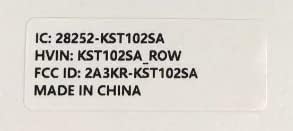
Image 6.2: A label detailing the tablet's identification: 'IC: 28252-KST102SA', 'HVIN: KST102SA_ROW', and 'FCC ID: 2A3KR-KST102SA', indicating it is 'MADE IN CHINA'.
7. Informació de la garantia
Kinstone products are covered by a limited warranty. Please refer to the warranty card included in your product packaging or visit the official Kinstone weblloc web per obtenir informació detallada sobre els termes i condicions de la garantia. Conserveu el comprovant de compra per a reclamacions de garantia.
8. Suport
For further assistance, technical support, or service inquiries, please contact Kinstone customer support through their official weblloc web o la informació de contacte que es proporciona a la documentació del producte.