
ODK B15090
ODK L-Shaped Desk with Shelf and Monitor Stand User Manual
Model: B15090 | Brand: ODK
1. Producte acabatview
The ODK L-Shaped Desk is designed to optimize your workspace, offering a versatile and robust solution for home offices, studies, or gaming setups. Its reversible design allows for flexible placement, adapting to various room layouts. The desk integrates a spacious work surface with a multi-tier bookshelf and an adjustable monitor stand, promoting an organized and ergonomic environment.

Figura 1.1: Mésview of the ODK L-Shaped Desk, showcasing its monitor stand and integrated bookshelf.
Característiques principals:
- L-Shaped Design with Bookshelf: Optimizes corner space, providing an efficient and organized work area. The robust frame ensures stability and durability.
- Spacious Reversible Workspace: Ofertes ample surface area for multiple monitors, writing, or other activities. The bookshelf can be installed on either the right or left side to suit your preference.
- Suport de monitor ajustable: Elevates your screen to an ergonomic height, improving posture and reducing strain. Provides additional storage space underneath.
- Emmagatzematge multifuncional: Includes a 5-tier side bookshelf and a 2-level shelf under the main desk for CPU towers or storage boxes, enhancing organization.

Figure 1.2: The ODK L-Shaped Desk in a typical office setup, highlighting its functional design.
2. Muntatge i muntatge
Before beginning assembly, ensure all components are present and undamaged. It is recommended to assemble the desk with two people for ease and safety. Refer to the included assembly manual for detailed step-by-step instructions and diagrams.
2.1 Desembalatge i comprovació de components
Carefully unpack all parts from the packaging. Lay them out on a clean, soft surface to prevent scratches. Verify that all hardware (screws, bolts, tools) and wooden/metal components are accounted for against the parts list in the assembly manual.
2.2 Passos de muntatge anteriorsview
- Assemble the main desk frames using the provided screws and Allen wrench.
- Attach the desktop panels to the assembled frames.
- Assemble the 5-tier bookshelf frame.
- Attach the bookshelf panels to its frame.
- Connect the bookshelf to the main desk, choosing either the left or right configuration as desired.
- Install the adjustable monitor stand onto the main desk.
- Install the 2-level under-desk shelves.
- Adjust the leveling feet at the bottom of the desk and bookshelf to ensure stability on uneven floors.

Figure 2.1: The reversible design allows the bookshelf to be positioned on either the left or right side of the L-shaped desk.

Figure 2.2: Adjustable leveling feet ensure stability on various floor surfaces.
3. Instruccions de funcionament
The ODK L-Shaped Desk is designed for intuitive use, focusing on ergonomics and organization.
3.1 Utilizing the Monitor Stand
The monitor stand can be adjusted to three different heights to suit your ergonomic needs. This helps in elevating your monitor to eye level, reducing neck and eye strain.
- Alçada A: 6.3 polzades (aprox. 16 cm)
- Height B: 5.1 polzades (aprox. 13 cm)
- Alçada C: 3.9 polzades (aprox. 10 cm)
To adjust the height, carefully detach the monitor stand from its current position and re-attach it to the desired height setting using the designated holes and hardware. Ensure it is securely fastened before placing any equipment on it.

Figure 3.1: The monitor stand offers three adjustable height options for optimal ergonomic positioning.

Figure 3.2: Proper monitor height, achieved with the adjustable stand, helps maintain an ergonomic posture.
3.2 Utilizing Storage Shelves
The desk features a 5-tier bookshelf and two under-desk shelves. Use these to organize books, documents, office supplies, or to house your computer tower.

Figure 3.3: The 5-tier bookshelf provides ample storage for various items, helping to keep your workspace tidy.

Figure 3.4: The two-level shelves under the main desk are ideal for storing a CPU tower or other office essentials.
4. Manteniment i cura
Proper maintenance will extend the life and appearance of your ODK L-Shaped Desk.
- Neteja: Netegeu les superfícies amb un suau, damp cloth. Avoid abrasive cleaners or harsh chemicals that may damage the finish. For stubborn marks, a mild soap solution can be used, followed by drying with a clean cloth.
- Vessaments: Immediately wipe up any spills to prevent liquid absorption and potential damage to the wood material.
- Calor i humitat: Avoid placing hot items directly on the desk surface. Use coasters for drinks to prevent water rings.
- Subjecció de subjecció: Periodically check and tighten all screws and bolts to ensure the desk remains stable and secure. This is especially important after initial assembly and a few weeks of use.
- Distribució de pes: Distribute weight evenly across the desk surface and shelves. Avoid placing excessively heavy items on one spot.
5. Solució De Problemes
This section addresses common issues you might encounter with your ODK L-Shaped Desk.
| Problema | Causa possible | Solució |
|---|---|---|
| L'escriptori està inestable o trontolla. | Uneven floor; loose fasteners; incorrect assembly. | Adjust the leveling feet at the bottom of the desk and bookshelf. Check and tighten all screws and bolts. Review instruccions de muntatge per assegurar-se que totes les peces estiguin instal·lades correctament. |
| Monitor stand feels loose. | Elements de fixació no prou apretats. | Ensure the screws securing the monitor stand to the desk are fully tightened. |
| Difficulty assembling a specific part. | Misinterpretation of instructions; missing part. | Refer to the detailed assembly manual. Double-check part numbers and orientation. If a part is missing or damaged, contact customer support. |
| Esgarrapades o marques a la superfície. | Objectes punxeguts; neteja abrasiva. | Use desk mats or coasters to protect the surface. Clean with soft cloths and non-abrasive cleaners. Minor scratches may be repairable with furniture repair kits. |
If you encounter an issue not listed here, or if the suggested solutions do not resolve the problem, please contact ODK customer support for further assistance.
6. Especificacions
| Atribut | Detall |
|---|---|
| Marca | ODK |
| Número de model | B15090 |
| Color | Blanc |
| Dimensions del producte (L x A x A) | 100 x 48 x 75.7 cm (aprox. 39.4 x 18.9 x 29.8 polzades) |
| Material | Wood (Top Material), Metal (Base Material) |
| Pes de l'article | 28.6 quilograms (aprox. 63.0 lliures) |
| Característica especial | Adjustable Monitor Stand, Reversible L-Shape, Integrated Bookshelf |
| Disseny d'escriptori | Escriptori d'ordinador |
| Tipus d'acabat | Lacat |
| País d'origen | Xina |
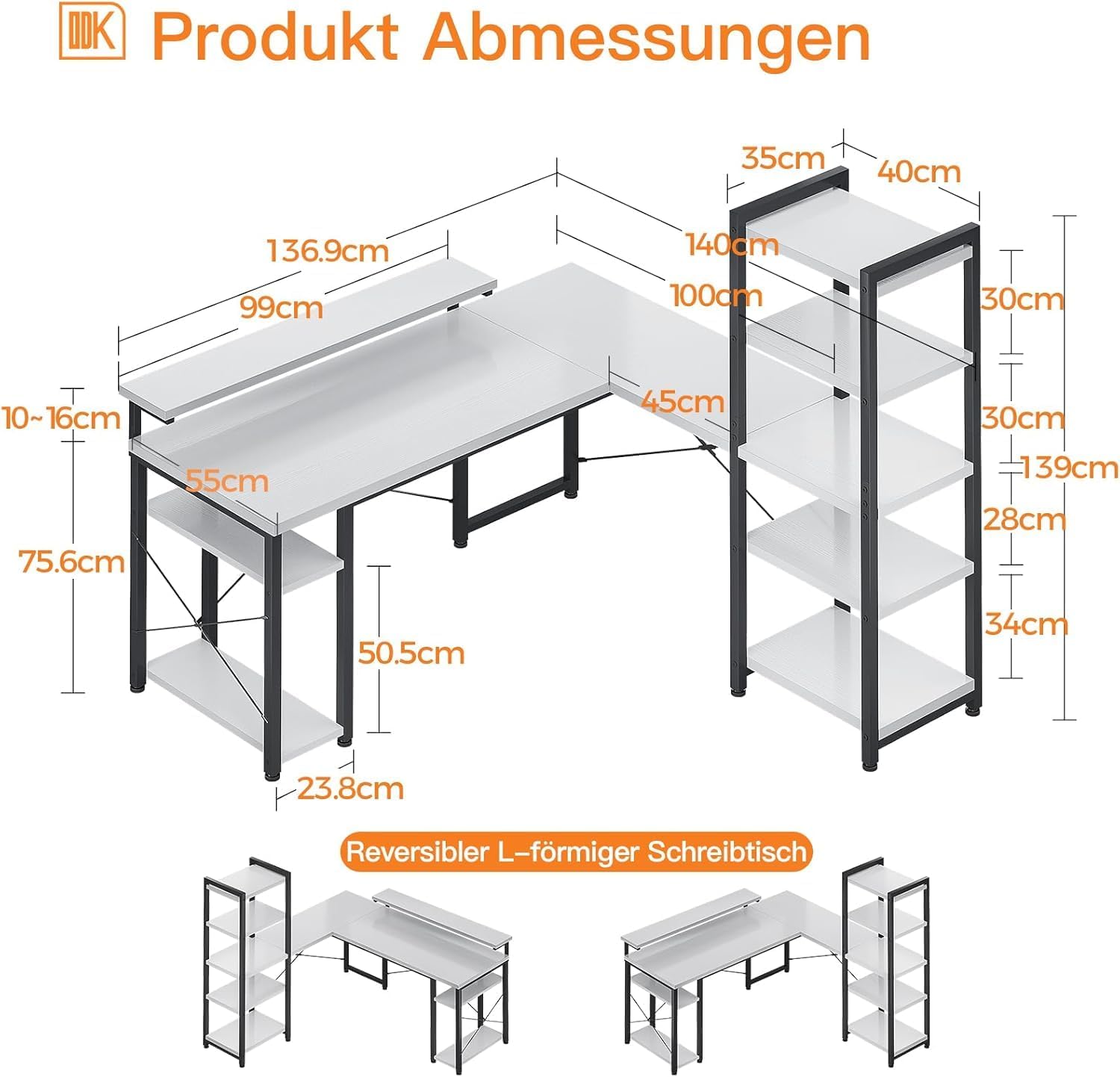
Figure 6.1: Detailed dimensions of the ODK L-Shaped Desk.
7. Garantia i Suport
ODK is committed to providing high-quality products and customer satisfaction. For specific warranty information regarding your ODK L-Shaped Desk (Model B15090), please refer to the warranty card included with your product or visit the official ODK weblloc.
If you require technical assistance, have questions about assembly, or need to report a missing/damaged part, please contact ODK customer support through the following channels:
- Assistència en línia: Visit the ODK official website for FAQs and support contact forms.
- Suport per correu electrònic: Consulteu l'embalatge del producte o la fitxa oficial weblloc web per a l'adreça de correu electrònic del servei d'atenció al client.
- Suport telefònic: Check the official ODK weblloc web per conèixer els números de telèfon d'assistència disponibles i l'horari d'atenció.
Please have your model number (B15090) and purchase information ready when contacting support to ensure a swift resolution.
Ask a question about this manual
Ask about setup, troubleshooting, compatibility, parts, safety, or missing instructions. Manuals+ will review the question and use this page’s manual context to help answer it.