
1. Introducció
Thank you for choosing the ANRAN Q3 Max 5MP Solar Security Camera. This manual provides essential information for the proper installation, operation, and maintenance of your device. Please read it thoroughly before use and retain it for future reference.
Informació de seguretat
- Ensure the camera is installed in a stable location to prevent falls.
- Do not expose the camera to extreme temperatures or corrosive environments.
- Use only the provided charging cable or a compatible 5V/2A adapter for charging.
- Mantingueu la càmera i els seus components fora de l'abast dels nens.
- The solar panel requires direct sunlight for optimal charging. Insufficient sunlight may require manual charging.
2. Contingut del paquet
Verifiqueu que tots els articles siguin presents al vostre paquet. Si falta algun article o hi ha algun malmès, poseu-vos en contacte amb l'atenció al client.

Imatge 2.1: Contents of the ANRAN Q3 Max Solar Security Camera package. Includes the camera unit, solar panel, USB charging cable, mounting bracket, screws, and user manual.
- ANRAN Q3 Max 5MP Solar Security Camera
- Solar Panel with mounting bracket
- Cable de càrrega USB
- Cargols i ancoratges de muntatge
- Manual d'usuari
3. Producte acabatview
The ANRAN Q3 Max is a 5-megapixel wireless security camera designed for outdoor use, featuring solar power capabilities and IP65 weather resistance.

Imatge 3.1: ANRAN Q3 Max Solar Security Camera with its solar panel and a smartphone showing the live camera feed.
Característiques clau
- Resolució de 5MP: Proporciona un vídeo clar i detallattage.
- Energia solar: Integrated solar panel for continuous charging, reducing the need for manual recharging.
- 100% Wireless: Operates on 2.4GHz Wi-Fi, offering flexible placement.
- Funcionalitat PTZ: Pan (355°) and Tilt (90°) for wide area coverage.
- Detecció de moviment: Triggers recording and alerts upon detecting movement.
- Àudio bidireccional: Micròfon i altaveu integrats per a la comunicació.
- Visió nocturna: Infrared and color night vision capabilities.
- Resistent a la intempèrie IP65: Dissenyat per suportar diferents condicions meteorològiques.
- Alexa Compatible: View camera feed on Alexa-enabled devices.

Imatge 3.2: Visual comparison demonstrating the clarity difference between 5-megapixel and 3-megapixel video resolution.

Imatge 3.3: The ANRAN Q3 Max camera with its solar panel, highlighting its IP65 waterproof and dustproof design for outdoor durability.
4. Configuració
4.1 Càrrega de la càmera
Before initial use, fully charge the camera using the provided USB cable and a 5V/2A power adapter (not included). The LED indicator will show charging status.
4.2 Instal·lació de l'aplicació i creació del compte
- Download the "ANRAN" or "CloudEdge" app from your smartphone's app store (iOS or Android).
- Register for a new account and log in.
4.3 Connecting the Camera to Wi-Fi
- Obre l'aplicació i toca la icona "+" per afegir un dispositiu nou.
- Seguiu les instruccions que apareixen a la pantalla per encendre la càmera i reiniciar-la si cal.
- Seleccioneu la vostra xarxa Wi-Fi de 2.4 GHz i introduïu la contrasenya. Note: The camera does not support 5GHz Wi-Fi.
- Scan the QR code displayed on your phone with the camera lens.
- Un cop connectada, posa un nom a la càmera i completa la configuració.
4.4 Muntatge de la càmera i del panell solar
- Trieu una ubicació de muntatge que proporcioni una vista clara view and strong Wi-Fi signal.
- Mount the solar panel in a location that receives direct sunlight for several hours daily to ensure optimal charging.
- Securely attach the camera and solar panel using the provided screws and anchors.
- Connecteu el cable del panell solar al port de càrrega de la càmera.
5. Instruccions de funcionament
5.1 Viu View i la reproducció
Open the ANRAN/CloudEdge app to access the live feed from your camera. You can view esdeveniments enregistrats des de la secció de reproducció.
5.2 Control de panoràmica, inclinació i zoom (PTZ)
Use the directional controls within the app to remotely adjust the camera's viewing angle. The camera supports 355° horizontal pan and 90° vertical tilt.

Imatge 5.1: The ANRAN Q3 Max camera's PTZ functionality, allowing 355° horizontal and 90° vertical rotation controlled via the smartphone app.
5.3 Detecció de moviment i alertes
The camera is equipped with motion detection. When motion is detected, the camera will record an event and send an alert notification to your smartphone. You can adjust the sensitivity levels (10 levels available) in the app settings to reduce false alarms.

Imatge 5.2: Illustration of the camera's motion detection feature, showing an intruder triggering an alarm and a smartphone receiving an alert.
5.4 Àudio bidireccional
Use the microphone and speaker icons in the app to communicate with visitors or deter intruders.
5.5 Visió nocturna i dissuasió
The camera automatically switches to night vision in low-light conditions. It also features bright spotlights that can be activated upon motion detection to deter unwanted activity.
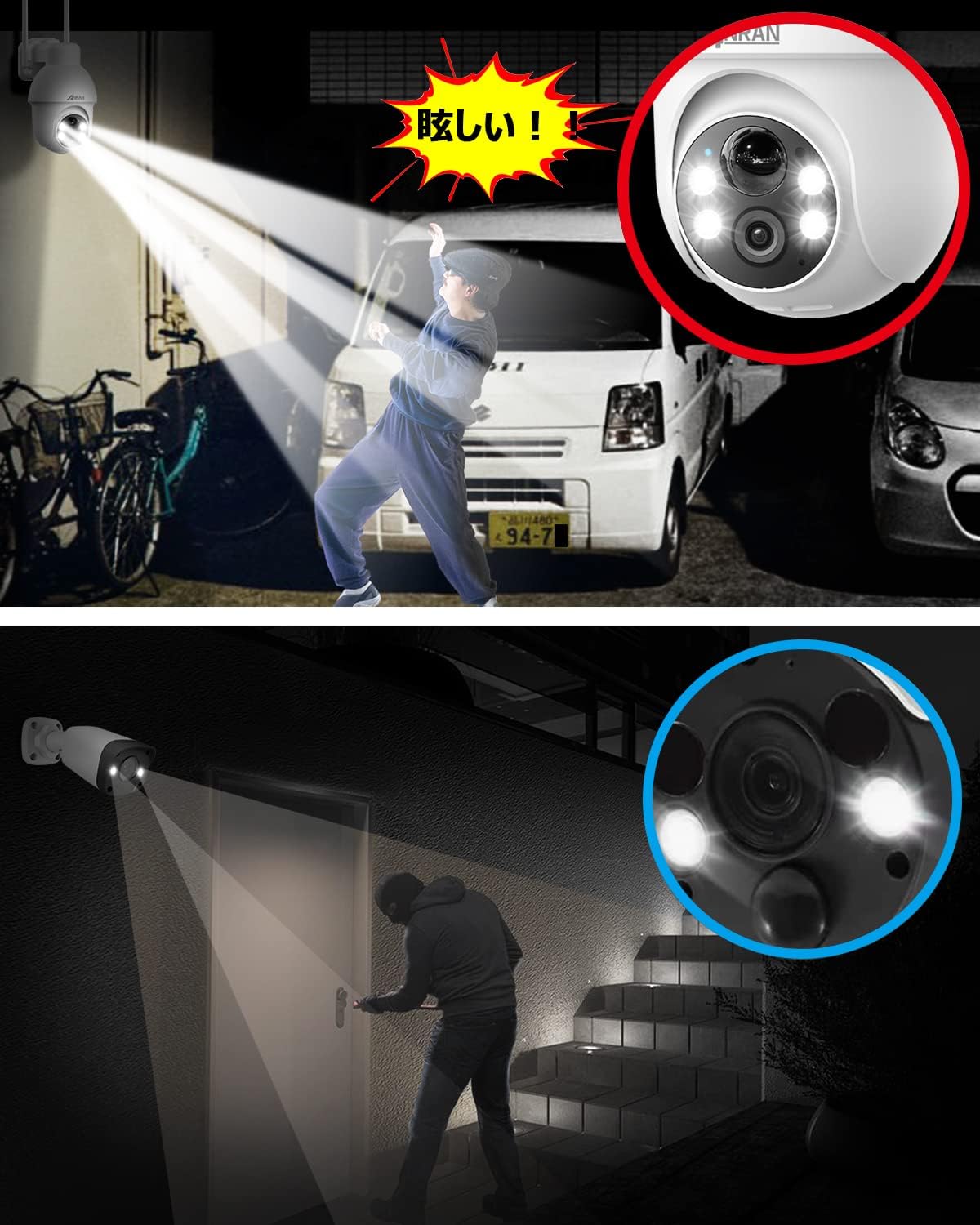
Imatge 5.3: The camera's integrated spotlights illuminating an area to deter potential intruders during nighttime.
5.6 Integració d'Alexa
The ANRAN Q3 Max camera is compatible with Amazon Alexa. You can link your camera to your Alexa account to view the live feed on compatible Alexa-enabled devices by voice command (e.g., "Alexa, show me the front door camera").

Imatge 5.4: An Amazon Echo Show device displaying the live video feed from the ANRAN Q3 Max camera, illustrating its compatibility with Alexa.
6. Manteniment
6.1 Neteja
Netegeu regularment la lent de la càmera i el panell solar amb un drap suau i sec.amp cloth to ensure optimal performance. Avoid using harsh chemicals or abrasive materials.
6.2 Càrrega de la bateria
While the solar panel provides continuous charging, prolonged periods of low sunlight or heavy usage may deplete the battery. If the battery level is low, manually charge the camera using the USB cable and a 5V/2A power adapter.
6.3 actualitzacions de microprogramari
Check the app regularly for firmware updates. Keeping your camera's firmware updated ensures optimal performance and security.
7. Solució De Problemes
Problemes comuns i solucions
- La càmera no es connecta a la Wi-Fi:
- Ensure you are using a 2.4GHz Wi-Fi network. 5GHz networks are not supported.
- Check Wi-Fi signal strength at the camera's location.
- Verifiqueu que la contrasenya del Wi-Fi sigui correcta.
- Try resetting the camera and repeating the setup process. - Poca qualitat de vídeo:
- Netegeu la lent de la càmera.
- Ensure adequate lighting for optimal image capture.
- Check your internet connection speed. - La bateria no es carrega:
- Ensure the solar panel is receiving direct sunlight.
- Check the connection between the solar panel and the camera.
- Manually charge the camera via USB to confirm battery functionality. - Sense alertes de detecció de moviment:
- Revisa la configuració de notificacions de l'aplicació al teu telèfon intel·ligent.
- Adjust motion detection sensitivity in the app.
- Ensure the camera is positioned to capture the desired detection area.
Limitacions importants
- Does not support 24/7 continuous recording; only motion-activated recording.
- Cannot be integrated with computers, NVR systems, Blue Iris, or other third-party software.
- Does not feature motion tracking.
- An SD card is not included. Cloud storage requires a paid subscription after a 7-day free trial.
8. Especificacions
| Número de model | AR-W683 |
| Resolució del sensor fotogràfic | 5 megapíxels |
| Camp de View | 355 degrees (Pan), 90 degrees (Tilt) |
| Connectivitat sense fil | Wi-Fi de 2.4 GHz (IEEE 802.11b/g/n) |
| Classificació de protecció internacional | IP65 (resistent a l'aigua i a la pols) |
| Font d'alimentació | Rechargeable Battery, Solar Panel, 5V/2A USB (for manual charging) |
| Temperatura de funcionament | Refer to product packaging for specific range |
| Dimensions (L x A x A) | 5.91 x 3.54 x 4.72 polzades |
9. Informació de la garantia
ANRAN products are covered by a limited warranty from the date of purchase. Please refer to the warranty card included in your package or visit the official ANRAN website for detailed warranty terms and conditions. This warranty typically covers manufacturing defects but does not cover damage caused by misuse, accidents, unauthorized modifications, or natural disasters.
10. Suport
For technical assistance, troubleshooting, or any product-related inquiries, please contact ANRAN customer support through the following channels:
- Correu electrònic: Refer to your product packaging or the ANRAN official weblloc.
- Assistència en línia: Visit the ANRAN official weblloc web per a preguntes freqüents i recursos de suport.
- App Feedback: Use the feedback feature within the ANRAN or CloudEdge app.
When contacting support, please have your product model number (AR-W683) and purchase information ready.