
1. Configuració
1.1 Desembalatge i inspecció
Carefully unpack the U.S. Solid USS-HMA02 Moisture Analyzer and all its components. Inspect for any signs of damage during transit. Verify that all accessories listed in the packing list are present. If any items are missing or damaged, contact customer support immediately.
1.2 Col·locació
Place the moisture analyzer on a stable, level surface free from vibrations, direct sunlight, drafts, and significant temperature fluctuations. Ensure adequate space around the unit for ventilation and safe operation.
1.3 Connexió d'alimentació
Connect the power cord to the analyzer and then to a grounded electrical outlet with the appropriate voltage (110V/60Hz). Ensure the power switch is in the 'Off' position before connecting.
1.4 Muntatge de components
- Lift the heater cover straight up to access the weighing chamber.
- Install the draft shield into its designated slot within the chamber.
- Col·loca el sample pan holder onto the weighing platform.
- Posicionar el sample pan handle.
- Posa una s buidaample pan onto the sample pan holder, ensuring it lies flat and centered.

1.5 Calibració
Regular calibration ensures accurate measurements. Perform calibration before first use and periodically thereafter, or if the analyzer is moved.
- Assegureu-vos que el sample pan is empty and the heater cover is closed.
- Press and hold the "RESET" button until "-CAL-" is displayed on the screen.
- When "100.000" flashes, carefully place the 100g calibration weight onto the center of the sample pa.
- Wait for the display to stabilize and show "100.000" again, then remove the calibration weight.
- The display will show "= = = = = =" and then return to "0.000" when calibration is complete.
2. Instruccions de funcionament
2.1 Encès/Apagat
Premeu el botó PODER button to turn the analyzer on or off. Allow a brief warm-up period after powering on.
2.2 S'ha acabat la interfícieview

The analyzer features a backlit LCD display and an intuitive keypad for operation. Key buttons include:
- MENÚ: Accesses and navigates through settings.
- CONVERSIÓ: Switches between different result display modes (%, g, %m).
- RESET: Used for calibration and resetting parameters.
- INICI / PARADA: Initiates or terminates a drying cycle.
- REPELL: Zeros the weight on the pan.
- CONFIRMAR: Confirma les seleccions o els paràmetres.
- AMUNT AVALL: Navigates through options or adjusts values.
2.3 Setting Measurement Method
The analyzer allows storage of up to 15 method presets. To set or select a method:
- Premeu el botó MENÚ button. The serial number "0" will be displayed.
- Utilitza el UP or ABAIX buttons to select a method number (1-15) or a factory preset (A-F). Press CONFIRMAR.
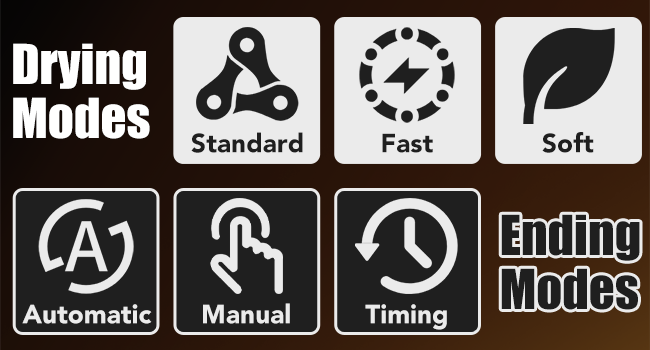
- Ús UP or ABAIX to select the desired drying mode (Standard, Fast, Soft), ending mode (Automatic, Manual, Timing), and drying temperature. Confirm each selection by pressing CONFIRMAR.
- After confirming all parameters, the analyzer will return to the weighing page.

2.4 Realització d'una mesura
- Lift the heater cover straight up. Place an empty sample pa al sample pan holder, ensuring it is laid flat.
- Close the heater cover and press TARA to zero the display.
- Open the heater cover and evenly place your sample cap al sample pa.
- Close the heater cover and press INICI/PARA to begin the drying process.
- During drying, the current temperature, time, and temporary results will be continuously updated and displayed.
- An audible signal will sound, and the final result will be displayed when the drying is completed according to the selected ending mode.

2.5 Resultats de lectura
After the drying cycle is complete, the final moisture content will be displayed. You can switch between different result displays (moisture percentage, dry weight, or dry-weight percentage) by pressing the CONVERSIÓ botó.

3. Manteniment
3.1 Neteja
- Exterior: Netegeu l'exterior amb un suau, damp tela. No utilitzeu netejadors abrasius ni dissolvents.
- Sample Pan & Holder: Remove and clean the sample pan and holder after each use to prevent contamination. They can be washed with mild detergent and water, then thoroughly dried.
- Heating Chamber: Ensure the chamber is cool before cleaning. Use a soft brush or cloth to remove any residue. Avoid touching the halogen lamp directament.
3.2 Emmagatzematge
When not in use, store the moisture analyzer in a clean, dry, and stable environment. Keep the heater cover closed to protect the weighing chamber from dust and debris.
3.3 Recalibració
It is recommended to re-calibrate the analyzer regularly, especially if precise measurements are critical, or if the unit has been moved or subjected to significant environmental changes. Refer to section 1.5 for calibration instructions.
4. Solució De Problemes
This section addresses common issues you might encounter with your moisture analyzer.
| Problema | Causa possible | Solució |
|---|---|---|
| Lectures inexactes | Unit not level, vibrations, drafts, incorrect calibration, dirty sample pa. | Ensure unit is level and stable. Re-calibrate the analyzer. Clean the sample pan. Avoid drafts. |
| Missatge d'"error" a la pantalla | Overload, internal fault, sensor issue. | Remove any excess weight. Power cycle the unit. If the error persists, contact customer support. |
| Sense calefacció | Halògen lamp failure, power issue. | Check power connection. If the lamp is visibly broken or not glowing, it may need replacement by a qualified technician. Contact customer support. |
| La unitat no s'encén | Power cord disconnected, faulty outlet, internal fuse. | Check power cord connection. Test the outlet with another device. If still no power, contact customer support. |
5. Especificacions
The following table outlines the technical specifications for the U.S. Solid USS-HMA02 Moisture Analyzer:
| Característica | Especificació |
|---|---|
| Número de model | USS-HMA02 |
| Capacitat | 110 g |
| Weight Readability | 1 mg |
| Llegibilitat de la humitat | 0.01% |
| Drying Temperature Range | 40-199 ℃ |
| Element calefactor | 400 W halògen Lamp |
| Sample Pan Diameter | 90 mm |
| Interfície | RS232 |
| Tipus de visualització | LCD retroil·luminat |
| Material | Alumini (carcassa) |
| Dimensions del producte | 11.02 x 9.84 x 9.84 polzades |
| Pes de l'article | 15.67 lliures |
6. Garantia i Suport
6.1 Garantia del producte
U.S. Solid products typically come with a standard manufacturer's warranty covering defects in materials and workmanship. For specific warranty terms and duration for your USS-HMA02 Moisture Analyzer, please refer to the warranty card included with your product or visit the official U.S. Solid weblloc.
6.2 Atenció al client
If you encounter any issues not covered in the troubleshooting section, require technical assistance, or have questions regarding your product, please contact U.S. Solid customer support. Have your model number (USS-HMA02) and purchase information ready when contacting support to ensure efficient service.
You can find contact information on the official U.S. Solid weblloc web o a través del punt de compra original.