
1. Introducció
The UGREEN USB C 4-in-1 SD Card Reader (Model 50443) is a versatile external memory card adapter designed for high-speed data transfer. It supports various memory card formats and is compatible with a wide range of USB-C enabled devices, including smartphones, tablets, and computers. This manual provides essential information for the proper setup, operation, and maintenance of your card reader.
2. Característiques clau
- 4-in-1 Card Slots: Supports SD, Micro SD (TF), CF (Compact Flash), and MS (Memory Stick) card formats.
- Compatibilitat universal amb USB-C: Designed for use with iPhone 15 series, MacBook, iPad, Android phones (e.g., Samsung Galaxy S23/S20/S10, Note 20/Note 10, Google Pixel 4 XL, Moto G8/G7), trail cameras, and other USB-C devices.
- Transferència de dades d'alta velocitat: Achieves data transfer speeds of up to 5Gbps, allowing quick transfer of large files.
- Simultaneous Card Access: Supports reading and writing to all connected cards concurrently.
- Plug and Play: Driver-free operation across multiple operating systems including Windows, Mac OS, Linux, and Chrome OS.
- Extended Cable Design: Features a 19.5-inch cable to prevent port blocking and provide flexibility for desktop usage.
- Compacte i portàtil: Mini size for easy transport.
3. Guia de configuració
Setting up your UGREEN USB C 4-in-1 SD Card Reader is straightforward. No additional drivers are required for most operating systems.
3.1 Connexió del lector de targetes
- Locate an available USB-C port on your device (laptop, tablet, smartphone).
- Insert the USB-C connector of the UGREEN card reader firmly into the USB-C port.
- The device should automatically recognize the card reader. A small LED indicator on the reader may illuminate to show it is powered.

Image: The UGREEN USB C 4-in-1 SD Card Reader connected to a MacBook Pro, illustrating its compact design and multiple card slots.
3.2 Supported Card Types
The card reader supports the following memory card types:
- TF (Micro SD): Micro SD, Micro SDHC, Micro SDXC
- SD: SD, SDHC, SDXC, RS-MMC, MMC Micro
- MS: MS Duo, MS Pro, MS Pro Duo
- CF: Compact Flash

Image: A visual representation of the four card types (TF, SD, MS, CF) supported by the UGREEN 4-in-1 USB C Card Reader.
4. Funcionament
4.1 Inserció de targetes de memòria
- Identify the correct slot for your memory card (SD, Micro SD, CF, or MS).
- Gently insert the memory card into its corresponding slot until it clicks into place or is fully seated. Do not force the card.
- Your device's operating system should detect the card and display its contents.
Video: An official UGREEN video demonstrating the plug-and-play functionality and simultaneous card reading/writing of the 4-in-1 USB C SD Card Reader.
4.2 Transferència de dades
Once a memory card is inserted and recognized, you can transfer files to and from it just like any other external storage device.
- Obre el teu dispositiu file explorer (e.g., File Explorador a Windows, Finder a Mac).
- Locate the drive letter or name assigned to your memory card.
- Arrossegueu i deixeu anar files, or use copy/paste functions to move data.
- The card reader supports up to 5Gbps transfer speeds, ensuring fast data movement.

Image: A visual representation highlighting the 5Gbps high-speed data transfer capability of the UGREEN USB C card reader.
4.3 Simultaneous Read & Write
The UGREEN 4-in-1 card reader allows simultaneous access to all inserted cards. This means you can transfer data between different card types or between a card and your device at the same time.
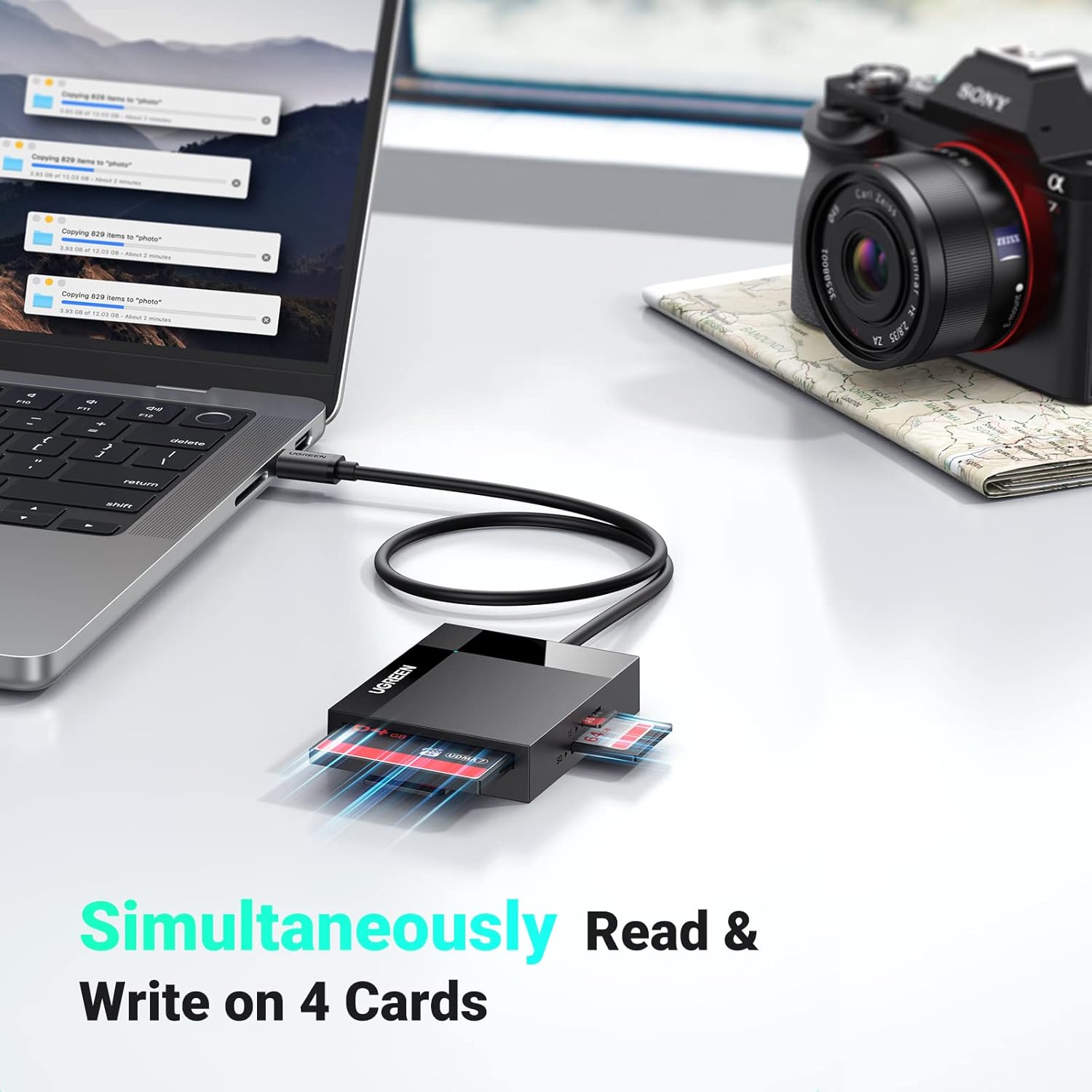
Image: The UGREEN card reader connected to a laptop, demonstrating its ability to read and write to four different memory cards simultaneously.
5. Manteniment
To ensure the longevity and optimal performance of your UGREEN USB C 4-in-1 SD Card Reader, follow these maintenance guidelines:
- Mantenir net: Regularly wipe the exterior of the card reader with a soft, dry cloth. Avoid using liquid cleaners or solvents.
- Protegir els ports: Keep the card slots and USB-C connector free from dust and debris. Use compressed air if necessary, but avoid inserting sharp objects.
- Manejar amb cura: Eviteu deixar caure el dispositiu o sotmetre-lo a forts impactes.
- Emmagatzematge adequat: When not in use, store the card reader in a cool, dry place away from direct sunlight and extreme temperatures.
- Cura del cable: Do not bend the cable excessively or sharply. The cable is designed for durability but improper handling can cause damage.

Imatge: Un primer pla view of the UGREEN USB-C cable, illustrating its robust design and flexibility, capable of withstanding over 10,000 bends.
6. Solució De Problemes
If you encounter issues with your UGREEN USB C 4-in-1 SD Card Reader, refer to the following common problems and solutions:
| Problema | Possible solució |
|---|---|
| Card reader not detected by device. |
|
| Targeta de memòria no reconeguda. |
|
| Velocitats de transferència de dades lentes. |
|
| Cannot access multiple cards simultaneously. |
|
7. Especificacions
| Característica | Detall |
|---|---|
| Marca | UGREEN |
| Número de model | 50443 |
| Tecnologia de connectivitat | USB tipus C |
| Tipus de suports compatibles | CompactFlash, Memory Stick, Targeta SD, MicroSD |
| Velocitat de transferència de dades | Up to 5 Gigabits Per Second (5Gbps) |
| Slot Count | 4 (SD, Micro SD, CF, MS) |
| Dispositius compatibles | USB C Laptops, PCs, Phones (e.g., iPhone 15), iPads, Trail Cameras, Game Cameras |
| Compatibilitat de sistemes operatius | Windows, Mac OS, Linux, Android, Chrome OS |
| Color | Negre |
| Longitud del cable | Approximately 19.5 inches (Extended Cable Design) |
| Capacitat màxima de la targeta | Supports up to 2TB memory cards |
8. Informació de la garantia
This UGREEN USB C 4-in-1 SD Card Reader is covered by a 24 Months Warranty Service provided by UGREEN. Please retain your proof of purchase for warranty claims. For detailed warranty terms and conditions, refer to the official UGREEN weblloc o contacteu amb el servei d'atenció al client.
9. Atenció al client
For further assistance, technical support, or inquiries regarding your UGREEN USB C 4-in-1 SD Card Reader, please visit the official UGREEN website or contact their customer service department. Contact information can typically be found on the product packaging or the UGREEN official weblloc.