
Elitech ECS-974neo
Elitech ECS-974neo Digital Temperature Controller User Manual
Model: ECS-974neo
1. Producte acabatview
The Elitech ECS-974neo is a compact, high-precision, and user-friendly digital temperature controller. It is specifically designed for temperature management in refrigeration systems, offering control over cooling, defrosting, and fan operations.

Figura 1: Frontal view of the Elitech ECS-974neo Digital Temperature Controller, showing the digital display and control buttons.
This controller integrates temperature measurement, display, and control functions. It also includes features such as temperature correction, sensor fault alarms, and over-temperature alarms to ensure reliable operation and system protection.
2. Característiques clau
- High Precision Control: Ensures accurate temperature regulation for optimal performance.
- Multi-functional Outputs: Features three independent control outputs for refrigeration equipment, defrosting equipment, and fan equipment.
- Entrades de sensor dual: Equipped with two-way sensor inputs, including a temperature probe sensor for the storage area and a defrost probe sensor.
- Sistema d'alarma integral: Includes sensor fault alarm and over-temperature alarm for enhanced safety and system monitoring.
- Correcció de temperatura: Allows for calibration of temperature readings to maintain accuracy.
- Interfície fàcil d'utilitzar: Simple operation with clear digital display and intuitive buttons.
3. Especificacions
| Paràmetre | Valor |
|---|---|
| Model | ECS-974neo |
| Vol. Operatiutage | 110 V AC / 220 V AC ± 10% 50/60 Hz |
| Tipus de visualització | LCD |
| Entrades del sensor | 2 (Storage Temperature Probe, Defrost Probe) |
| Sortides de control | 3 (Refrigeration, Defrost, Fan) |
| Fabricant | Elitech |
| Dimensions del paquet | 10 x 8 x 6 cm |
| Pes del paquet | 500 g |
4. Configuració i instal·lació
The ECS-974neo is designed for panel mounting. Ensure the power supply is disconnected before proceeding with any wiring or installation steps to prevent electrical shock.
4.1 Muntatge
Cut an appropriate opening in the control panel according to the controller's dimensions. Insert the controller into the opening and secure it using the provided mounting clips or screws.
4.2 Connexions de cablejat
Refer to the wiring diagram below for correct electrical connections. All wiring should be performed by a qualified electrician in accordance with local electrical codes and regulations.

Figure 2: Detailed wiring diagram for the Elitech ECS-974neo, showing connections for power, sensors, and control outputs.
- Font d'alimentació: Connect the main power supply (110V AC or 220V AC, 50/60Hz) to the designated terminals.
- Sensors de temperatura: Connect the storage temperature probe and the defrost probe to their respective sensor input terminals. Ensure correct polarity if applicable.
- Sortides de control: Connect the refrigeration equipment, defrosting equipment, and fan equipment to their corresponding output terminals. Verify the load capacity of each output before connecting.
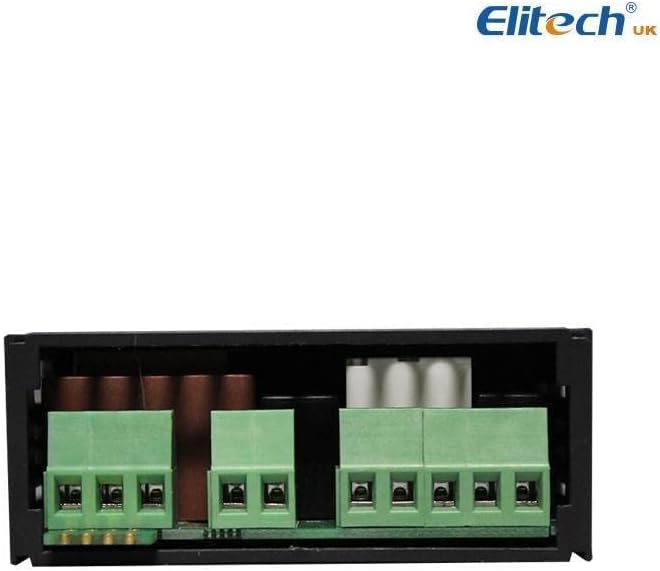
Figura 3: posterior view of the Elitech ECS-974neo, illustrating the terminal blocks for electrical connections.
5. Instruccions de funcionament
The ECS-974neo features a clear LCD display and four intuitive buttons for operation.
5.1 Funcions dels botons
- Botó SET: S'utilitza per entrar al mode de configuració de paràmetres i confirmar les seleccions.
- UP (↑) Button: Used to increase values or navigate through menu options.
- DOWN (↓) Button: Used to decrease values or navigate through menu options.
- Defrost Button (Snowflake icon): Used to manually initiate or terminate a defrost cycle.
5.2 Setting Temperature Parameters
- Premeu el botó SET botó una vegada per view la temperatura de consigna actual.
- Manteniu premut el botó SET button for 3 seconds to enter the parameter setting mode. The display will show a parameter code.
- Utilitza el UP or ABAIX buttons to navigate through different parameters (e.g., temperature setpoint, differential, defrost cycle time).
- Once the desired parameter is displayed, press SET de nou a view its current value.
- Utilitza el UP or ABAIX botons per ajustar el valor.
- Premeu SET to confirm the new value and save it.
- To exit the setting mode, press the Descongelació button or wait for 10 seconds without any button press.
5.3 Descongelació manual
To manually initiate a defrost cycle, press and hold the Descongelació button (snowflake icon) for 3 seconds. The defrost indicator will illuminate, and the defrost cycle will begin according to the programmed parameters.
6. Manteniment
Regular maintenance ensures the longevity and optimal performance of your Elitech ECS-974neo controller.
- Neteja: Netegeu periòdicament la pantalla i casing with a soft, dry cloth. Do not use abrasive cleaners or solvents. Ensure no liquid enters the device.
- Comprovació de la connexió: Annually inspect all electrical connections to ensure they are secure and free from corrosion. Loose connections can lead to erratic behavior or damage.
- Inspecció del sensor: Check the temperature probes for any physical damage or signs of wear. Ensure they are properly positioned and clean for accurate readings.
Desconnecteu sempre l'alimentació de la unitat abans de realitzar qualsevol manteniment.
7. Solució De Problemes
This section provides solutions to common issues you might encounter with your ECS-974neo controller.
| Problema | Causa possible | Solució |
|---|---|---|
| La pantalla està en blanc | No hi ha alimentació o cablejat incorrecte. | Comproveu les connexions d'alimentació i assegureu-vos que el volumtage matches the controller's specifications. Verify wiring according to the diagram. |
| Error "EE" o "HH" a la pantalla | Sensor fault (open circuit, short circuit) or over-temperature alarm. | Check sensor connections. Replace the sensor if it is damaged. Ensure the temperature is within the operating range. |
| Controller not responding to button presses | Buttons stuck or internal malfunction. | Gently press buttons to ensure they are not stuck. If the issue persists, contact support. |
| La lectura de la temperatura no és precisa | Sensor dirty, improperly placed, or needs calibration. | Clean the sensor. Reposition the sensor for better accuracy. Use the temperature correction function if necessary. |
If the problem persists after attempting these solutions, please contact Elitech customer support for further assistance.
8. Garantia i Suport
Elitech provides quality products and customer support. For specific warranty terms and conditions, please refer to the warranty card included with your product or visit the official Elitech weblloc.
For technical support, troubleshooting assistance, or inquiries regarding your Elitech ECS-974neo Digital Temperature Controller, please contact Elitech customer service through their official channels. You can find more information and contact details on the Botiga de la marca Elitech a Amazon o la seva empresa oficial weblloc.
Documents relacionatsECS-974neo


Ask a question about this manual
Ask about setup, troubleshooting, compatibility, parts, safety, or missing instructions. Manuals+ will review the question and use this page’s manual context to help answer it.