
1. Introducció
The Cuifati HD 7670 4GB GDDR5 Graphics Card is designed to enhance your computer's visual performance, offering a reliable solution for everyday computing, multimedia, and light gaming. Featuring 4GB of GDDR5 memory, a 128-bit memory interface, and a 1000MHz core frequency, this card supports DirectX 11 and provides versatile display connectivity with HDMI, DVI, and VGA outputs. Its efficient design ensures stable operation and compatibility with various system configurations.
2. Especificacions del producte
| Característica | Descripció |
|---|---|
| Tipus d'element | Targeta gràfica GDDR4 d'5 GB |
| Material | PCB, Aluminum Alloy, ABS |
| Display Core | For RADEON HD 7670 |
| GPU | Tàmesi |
| Procés central | 40 nm |
| Nucli CUDA | 480 Unitats |
| Nombre de transistors | 716M |
| Freqüència del nucli | 1000 MHz |
| Freqüència de memòria | 3600 MHz |
| Capacitat de memòria de vídeo | 4096MB (4GB) |
| Video Memory Type | GDDR5 |
| Video Memory Bit Width | 128 bits |
| Versió de DirectX | DirectX 11 |
| Bus Interface Type | PCI Express X16 2.1 |
| Interfície de visualització | HD Multimedia Interface x1, DVI x1, VGA x1 |
| Dimensions del paquet | 8.74 x 5.94 x 2.17 polzades |
| Pes de l'article | 1.01 lliures |
| Fabricant | CUIFATI |
| Número de model de l'article | CUIFATIu7patx3hgv |
| Graphics Processor Manufacturer | AMD |
3. Contingut del paquet
- 1 x 4GB GDDR5 Graphics Card
4. Configuració i instal·lació
Follow these steps to properly install your Cuifati HD 7670 Graphics Card:
- Preparació: Power off your computer and unplug it from the power source. Open your computer case.
- Localitza la ranura PCI Express: Identify an available PCI Express X16 2.1 slot on your motherboard.
- Instal·leu la targeta gràfica: Gently insert the graphics card into the PCI Express slot until it is firmly seated. Secure it with the case screw.
- Connecteu els cables de la pantalla: Connect your monitor(s) to the graphics card using HDMI, DVI, or VGA cables.
- Close Case & Power On: Close your computer case and reconnect the power cable. Power on your computer.
- Instal·lació del controlador: Once your operating system loads, install the latest drivers for the AMD Radeon HD 7670 graphics card. These can typically be found on the manufacturer's weblloc.

Figura 1: Frontal view of the Cuifati HD 7670 Graphics Card.
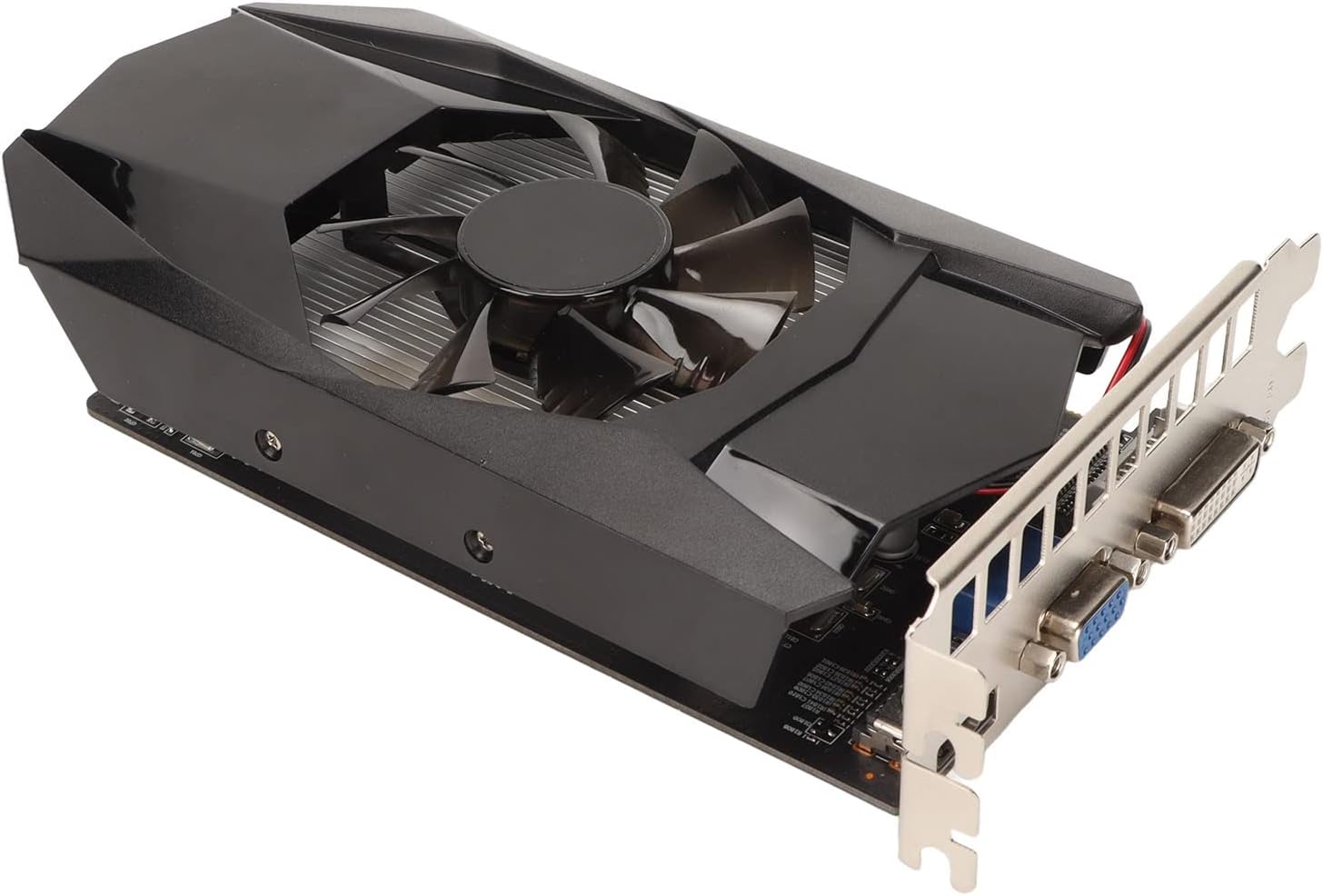
Figure 2: Display ports (HDMI, DVI, VGA) on the graphics card.
Video 1: Installation guide for a similar graphics card model. This video demonstrates the general process of installing a graphics card into a computer system.
Video 2: Unboxing and low-profile bracket installation for a graphics card. This video is useful if your computer case requires a low-profile bracket for the display ports.
Video 3: Demonstration of low-profile GPU installation. This video shows how to adapt a graphics card for smaller form factor PCs.
Video 4: Low-profile graphics card overview and installation. This video provides additional visual guidance on installing a low-profile targeta gràfica.
5. Instruccions de funcionament
Once the graphics card is installed and drivers are updated, your system will automatically utilize the card for display output. You can connect up to three displays simultaneously using the available HDMI, DVI, and VGA ports. The card supports HD, 60Hz output at 4K resolution, providing clear and vibrant visuals for your tasks and entertainment.
- Configuració de pantalla múltiple: Connect your monitors to the respective ports (HDMI, DVI, VGA). Your operating system should automatically detect the displays. You may need to configure display settings in your OS or graphics card control panel.
- Resolució: The card supports up to 4K resolution at 60Hz via HDMI. Ensure your monitor and cables support the desired resolution.
- DirectX 11: The card is compatible with DirectX 11, enabling support for a wide range of modern applications and games.
6. Manteniment
Un manteniment adequat garanteix la longevitat i el rendiment òptim de la targeta gràfica:
- Eliminació de pols: Regularly clean dust from the cooling fan and heatsink using compressed air. Accumulation of dust can hinder cooling efficiency.
- Flux d'aire: Ensure your computer case has adequate airflow to prevent the graphics card from overheating. Keep the case vents unobstructed.
- Potència: This graphics card does not require an additional power supply connector, drawing all necessary power directly from the PCI Express slot.
7. Solució De Problemes
Si teniu problemes amb la targeta gràfica, tingueu en compte les solucions habituals següents:
- Sense sortida de pantalla:
- Assegureu-vos que la targeta gràfica estigui completament col·locada a la ranura PCI Express.
- Verify that all display cables are securely connected to both the graphics card and the monitor.
- Check if your monitor is set to the correct input source (HDMI, DVI, VGA).
- Driver Issues or Poor Performance:
- Download and install the latest drivers for the AMD Radeon HD 7670 from the official AMD website or your system manufacturer's support page.
- If updating drivers doesn't resolve the issue, try uninstalling existing graphics drivers completely before performing a clean installation of the new drivers.
- For performance issues in games or applications, try lowering the graphics settings.
- Sobreescalfament:
- Ensure the cooling fan on the graphics card is spinning freely and not obstructed.
- Clean any dust buildup on the heatsink and fan.
- Improve airflow within your computer case.
8. Garantia i Suport
This product is covered by a 90-day exchange policy. For any further inquiries, technical assistance, or to explore other products, please visit the official Cuifati Store on Amazon.

Figure 3: Information regarding the 90-day exchange policy.